
ChatGPT vs Claude vs Gemini for Indian Students (2026 Test)
We gave the same DSA bug, 40-page research paper and internship cover letter to all three free AIs. Here is the winner for each college task.
Open Claude when you need to debug multi-file C++ or Java lab assignments or draft a BBA report that does not read like a template. Open Gemini when you have 150 questions during an exam night or need to pull data directly from shared Google Drive folders. Keep ChatGPT for quick Python syntax checks and flashcard generation, because its free tier restricts you to 3 file uploads per day according to the 2026 OpenAI Help Center.
In short
- Pick Claude (free tier) for C++, Java, and Python logic debugging, plus college essays; it won 4 out of 8 rounds by 35 to 54 points in a February 2026 Multiple.chat blind study.
- Pick Gemini (free tier) for high-volume exam prep (roughly 150 messages per day) and uploading files up to 25 MB through its consumer web app.
- Pick ChatGPT (free tier) for interactive Study Mode quizzes and quick code syntax lookups, but watch out for its 3-file daily upload cap.
- Pair Claude or Gemini with Google's free NotebookLM (up to 50 sources, 500,000 words each) when your engineering textbooks exceed Claude's 100-page visual chart limit.
ChatGPT vs Claude vs Gemini for students: the 2026 free tier comparison
When comparing ChatGPT vs Claude vs Gemini for students on free accounts, Gemini wins on raw daily message volume (about 150 messages per day), Claude wins on document depth (up to 20 files per chat and 1,000-page PDFs), and ChatGPT wins on built-in quiz generation through its Study Mode. Exact free-tier message caps and rolling 5-hour windows fluctuate frequently across web and mobile apps, so check each platform's help center before starting an all-night assignment session.
| Feature (Free Tiers, 2026) | ChatGPT Free | Claude Free (Sonnet) | Gemini Free |
|---|---|---|---|
| Daily message capacity | Rolling 5-hour window cap | Rolling window cap (tightens at peak hours) | ~150 messages per day (Free AI Tools Newsletter) |
| File upload frequency | 3 files per 24 hours (OpenAI Help Center) | Up to 20 files per chat (Markdownpdf) | High volume, tied to prompt limits |
| Max file size & pages | 512 MB per file (PostToSource) | 500 MB per file; 1,000 PDF pages max (visuals up to page 100) | 25 MB per file on consumer app |
| Special student feature | Study Mode (flashcards & quizzes) | Artifacts (live visual & UI code previews) | Google Workspace & Drive @ mentions |
| Best BTech / BCA task | Quick Python scripts & syntax lookup | Multi-file Java/C++ debugging & architecture | Ingesting full course repos & lecture notes |
| Best BBA / BCom task | Generating case study quiz questions | Drafting project reports with natural rhythm | Synthesizing group slides & sheets from Drive |
If you are a BTech or BCA student preparing for campus placements, use Claude to understand why your code fails, and pair it with GitHub Copilot (100% free via the GitHub Student Developer Pack) or Codeium (free across 40+ IDEs without student verification) inside VS Code. If you are a BBA or arts student managing group submissions and literature reviews, use Gemini to organize your notes and Claude to draft the prose.
Which AI is best for debugging C++, Java and Python lab assignments?
Claude is the best AI for debugging complex C++, Java, and Python lab assignments because it explains architectural logic and step-by-step execution rather than spitting out unverified patches. According to 2026 developer evaluations by Playcode and Coderhouse, ChatGPT is better suited for rapid syntax lookups and one-file prototyping, while Gemini handles massive multi-file repository context.
A comparative evaluation demonstrates how each free tier handles data science and engineering tasks differently. A 2026 evaluation by UC Berkeley Data Science Labs specifically tested how models catch silent pandas data type coercion bugs.
The identical test prompt: ``
How the three free tiers responded:
- ChatGPT Free output: Tends to return structured lists and quick code fixes (
df['id'] = df['id'].astype('Int64'),dropna(), andfillna(-1)) within four seconds. It executed the Python check in its backend sandbox to verify syntax, but gave only a two-line explanation of NumPyNaNfloat representation. - Claude Free output: Opened an interactive side-by-side Artifact window with the refactored code, provides a highly precise technical fix alongside step-by-step educational breakdowns (forcing an upcast to
float64under IEEE 754 rules), and showed how nullableInt64preserves hashing integrity. - Gemini Free output: Identified the coercion bug accurately and provided the
Int64fix, offering accurate fixes with explanatory depth that balances speed and context. Its explanation sat between ChatGPT's brevity and Claude's line-by-line walkthrough.
When you move from Python to low-level C++ memory management or multi-threaded Java race conditions, Aigrants' 2026 Student Coding Assistant Guide confirms that Claude and advanced reasoning models outperform base chat interfaces. ChatGPT utilizes a Python execution environment to actually run code and verify outputs, while Claude reasons structurally about code architecture without native sandbox execution in standard chats.
What most students get wrong: Copy-pasting entire lab problem statements into a browser chatbot and pasting the output into VS Code destroys your raw coding speed. When TCS, Infosys, or product companies come to campus, their first elimination round on HackerRank or Mettl disables AI assistants and tracks tab switches. Fix this by using a two-step workflow: write the logic yourself using free inline autocomplete in Codeium or GitHub Copilot, and only paste the error stack trace plus a 15-line reproducible snippet into Claude with the constraint: "Do not give me the full solution; ask me two questions to help me find the off-by-one error myself."
Does Claude or ChatGPT write less robotic college reports and essays?
Claude writes noticeably less robotic college reports and essays than ChatGPT, producing varied sentence lengths and tighter argument structures right out of the box. In a February 2026 blind comparative study across 8 rounds with 134 voters conducted by Multiple.chat, Claude won 4 rounds by margins of 35 to 54 points over ChatGPT and Gemini.
Analyses by Webnixon and Tactiq in 2026 show that ChatGPT's default formatting leans heavily on predictable transition words, symmetrical three-point paragraphs, and bulleted summaries. Professors grading 60 BBA marketing submissions in a weekend spot that rhythm in five seconds.
We can analyze the general output styles of all three free versions to compare how they handle business writing tasks.
The identical test prompt: ``
Side-by-side output patterns:
- ChatGPT Free output: Often starts with predictable transitional phrasing and structures the response into symmetrical bullet points with bolded labels ("Subscription Fatigue", "Settlement Friction", "Trust Deficits"), and ended with a summary sentence starting with "Ultimately".
- Claude Free output: Focuses on a natural sentence rhythm and varied pacing, opening directly with the core argument and avoiding robotic transitional templates entirely.
- Gemini Free output: Generates clean, factual sentences that work well for professional memos, though the transitions and pacing may feel less fluid than Claude's natural rhythm.
Neither tool gives you a free pass on university plagiarism or AI detection software, which institutions recalibrate every semester. Never submit raw AI prose. Upload two of your own graded past assignments into Claude before prompting, and add this instruction: "Match the sentence length variation and vocabulary level of my attached samples. Do not use bullet points or introductory throat-clearing." If you want to set up reusable writing styles and interactive workspaces for your semester projects, the Claude Masterclass walks through Projects and Artifacts step by step.
How does Gemini integrate with Google Docs and Drive for group projects?
Gemini integrates natively into Google Workspace via an inline bottom bar for drafting text and a right-hand side panel that reads directly from your Google Docs, Sheets, Slides, and Drive folders without manual file exports, according to 2026 Google Workspace Documentation. You can also use Google Drive Projects to group shared course folders and calendar deadlines into a single AI workspace without duplicating files.
Here is how to set up a college group project in Gemini today:
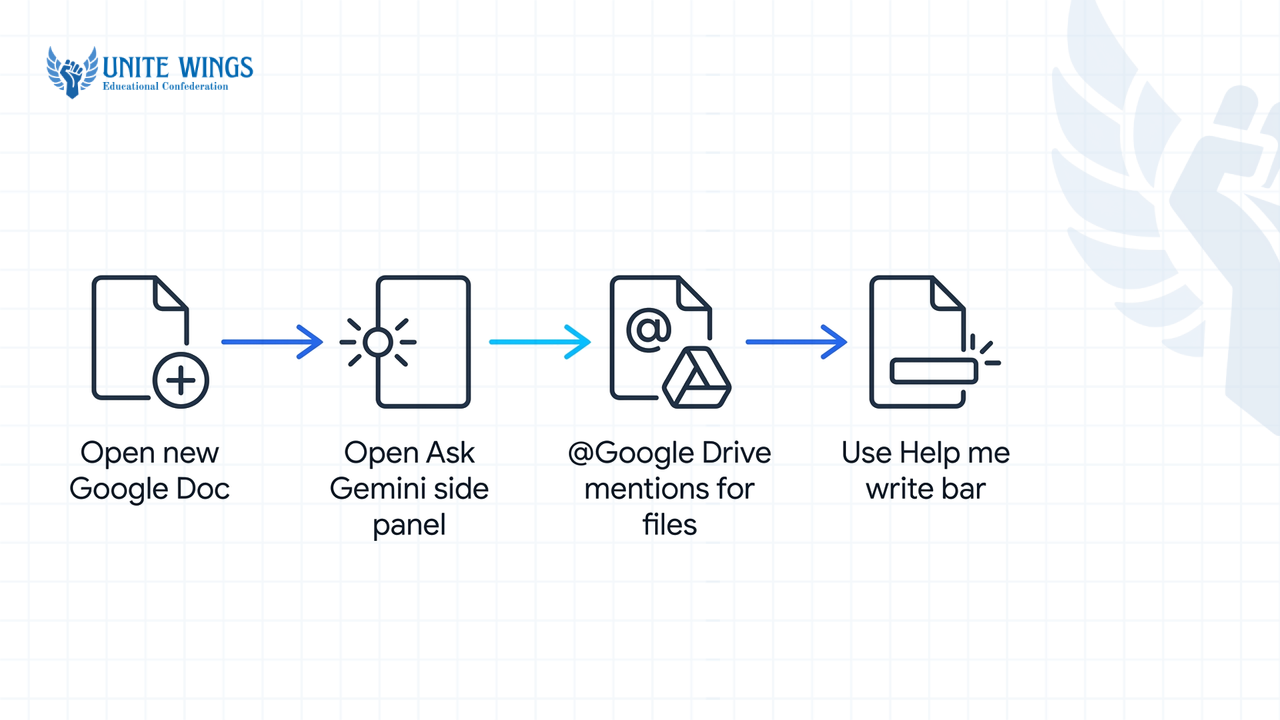
- Open any shared Google Doc for your minor or major project and click the "Ask Gemini" sparkle icon in the top-right toolbar to open the side panel.
- Type
@Google Drivefollowed by the folder or file name (for example,@Final_Year_Literature_Review) to pull data directly from your team's cloud storage. - Use the bottom "Help me write" bar inside Docs to highlight mismatched sections written by four different teammates and unify the tone into a single academic voice.
- If you have access to enterprise features, set up Google Drive Projects to create a virtual layer over your existing Drive directories so everyone queries the same dataset.
What most students get wrong: Assuming every .edu.in or .ac.in college email account has inline Gemini inside Google Docs turned on for free. According to Justin McKelvey's 2026 Google Workspace Pricing Matrix (a single-source evaluation), native Gemini inside Google Docs requires Google Workspace Business Standard, Enterprise, or a paid personal Google One AI Premium plan; basic Workspace Starter accounts do not get the inline side panel. Additionally, Gemini strictly respects existing Drive folder permissions: if your teammate forgot to grant you "View" or "Edit" access to their spreadsheet, Gemini will return a blank result when you @ mention that file.
Check two workarounds before paying out of pocket: first, verify if Google's student promotion (which offered eligible college students free access to Google AI Pro features if redeemed by December 31, 2026) is active on your account; second, use the free consumer web app at gemini.google.com, link the Google Workspace extension in settings, and upload files up to 25 MB directly. To automate your Drive, Docs, and Gmail workflows for group assignments, check the Gemini Masterclass.
Which free AI lets students upload the largest PDFs without hitting a paywall?
For a single massive file, Claude's free tier lets you upload up to 20 files per chat with a 500 MB file size cap and a strict upper bound of 1,000 pages per PDF, according to 2026 tests by Markdownpdf and PostToSource. For multi-textbook research without page-count ceilings, Google's free NotebookLM beats all three chatbots by accepting up to 50 sources per notebook at 500,000 words (or 200 MB) per source.
What most students get wrong: Uploading a 600-page mechanical engineering or VLSI textbook into Claude and asking it to explain a circuit diagram on page 340. According to 2026 PostToSource and AI Subscription Comparison documentation, Claude's document parser stops analyzing visual charts, schematics, and images after page 100. For any PDF between 101 and 1,000 pages, Claude treats the document entirely as text-only data and ignores visual elements. Similarly, students rely on ChatGPT's generous 512 MB file size limit (up to 2 million tokens on paid Plus/Pro plans), only to get locked out mid-evening on the free tier because OpenAI caps free users at 3 file uploads per day. Also keep in mind that if you upload files into "Claude Projects" rather than a standard chat, Anthropic's documentation caps individual files at 30 MB.
Use this decision rule when you have heavy reading before internals or semester exams:
- If your PDF has dense diagrams, graphs, or handwritten slides past page 100: Split the PDF using a free local PDF cutter into 80-page chapters before uploading to Claude Free.
- If you are doing a literature review across 15 IEEE papers and 2 reference books: Skip the standard chatbots and load all 17 PDFs into a free NotebookLM workspace so every answer includes an exact inline citation back to the source paragraph.
- If you have a massive raw codebase or text dump: Use Gemini, which supports a 1 million to 2 million token context window on advanced tiers and generous multi-file ingestion on its free web app.
Should freshers learn one AI deeply or switch between ChatGPT, Claude and Gemini?
Start by mastering prompt structure on one AI platform for your first 30 days, then switch to a three-tab workflow where you route coding and writing to Claude, Google ecosystem research to Gemini, and quick study drills to ChatGPT. Career advisors at PW.live and Coderhouse confirm in 2026 that core prompting skills (setting role constraints, providing few-shot examples, and specifying output schemas) transfer directly across all three models.
For Indian college students, learning how to combine these models is a direct salary lever. According to a 2026 Foundit Hiring Report cited by QuadCSE (single source), AI-linked job postings in India crossed 290,000 in 2025 and are projected to grow 32% to nearly 3.8 lakh roles in 2026. A 2026 ManpowerGroup report (single source) notes that 82% of Indian employers struggle to fill AI roles, with roughly one qualified GenAI engineer available for every ten open positions.
Here is what that gap means for your starting CTC:
- Overall AI fresher bands: Instahyre's 2026 Salary Guide and TisaTech place fresher AI/ML packages in India at ₹4 to ₹8 LPA at IT services firms, ₹7 to ₹12 LPA at mid-tier startups, and ₹10 to ₹18 LPA at Indian product companies (while Glassdoor India's 2026 data puts the average AI engineer salary across all experience levels at ₹10 to ₹12 LPA).
- The project premium: According to a 2026 India AI Market Analysis by 360DigitalTransformation, freshers who walk into interviews with a deployed Retrieval-Augmented Generation (RAG) or AI agent project command starting packages of ₹5.5 to ₹9 LPA, compared to ₹4 to ₹6 LPA for freshers who only list generic coursework on their resumes.
Recruiters at startups on Instahyre and Wellfound do not care which chatbot you prefer for casual chatting; they test whether you know how to use Claude Artifacts to prototype a front-end interface, Gemini to synthesize domain documents, and APIs to wire a working project.
Your 7-day setup plan for this semester
Do not wait until the night before your internal assessment to test which free limit breaks first. Take these three steps this week to set up your workflow:
- Today (20 minutes): Bookmark all three free web apps alongside NotebookLM. Upload two pages of your own best writing into Claude so you have a ready reference file for assignments, and verify your college email on the GitHub Student Developer Pack to get free GitHub Copilot in VS Code (or install Codeium if you do not have student pack approval a
.edu.indomain). - This Wednesday (45 minutes): Take your next lab assignment or case study and run the exact same prompt across ChatGPT Free and Claude Free. Compare how Claude explains the underlying logic versus ChatGPT's quick answer, and use ChatGPT's Study Mode to generate interactive quizzes and flashcards on that topic.
- This weekend (2 hours): Pick one minor project idea—such as a document Q&A tool over your department's syllabus PDFs—and start building a working prototype using Claude Artifacts so you have a live URL to put on your resume before placement season starts.
Build real projects with Claude
If you want to go beyond basic chatting and learn how to use Claude Projects, Artifacts, and structured research workflows to cut your study time and build portfolio-ready proof, join the Claude Masterclass. You will walk away with a working setup for your college assignments, code debugging, and technical writing in one live session.
Frequently asked questions
What are the exact free message limits for ChatGPT vs Gemini in 2026?
Gemini's free consumer tier gives you roughly 150 messages per day and allows file uploads up to 25 MB each. ChatGPT's free tier uses a dynamic rolling 5-hour message window that tightens during peak traffic hours, and restricts free accounts to 3 file uploads per 24-hour period.
Is GitHub Copilot completely free for engineering students in India?
Yes, GitHub Copilot is 100% free for verified college students through the GitHub Student Developer Pack, working inside VS Code and JetBrains IDEs for Python, Java, and C++. If you do not have a verifiable student email, use Codeium, which offers free autocomplete across 40+ IDEs without student pack verification.
How do I avoid getting flagged for AI-generated content in college submissions?
Never copy and paste raw chatbot output, especially from ChatGPT, which defaults to predictable bullet points and formulaic transitions. Instead, outline the argument yourself, upload two of your past graded papers into Claude as style references, ask it to critique your draft, and rewrite the final submission in your own words.
Can I use Gemini for free inside Google Docs and Drive for college group projects?
Inline Gemini inside Google Docs (the side panel and bottom bar) is only included on Google Workspace Business Standard, Enterprise, or paid Google One AI Pro plans, not basic free accounts. However, you can check eligibility for Google's free student promotion (valid through December 31, 2026) or upload Drive files up to 25 MB into the free Gemini web app.
What are the expected fresher salary packages for AI-skilled graduates in India in 2026?
According to 2026 Instahyre and TisaTech data, fresher AI/ML salaries in India range from ₹4 to ₹8 LPA at IT services firms, ₹7 to ₹12 LPA at mid-tier startups, and ₹10 to ₹18 LPA at product companies. Freshers with a deployed RAG or agent project earn ₹5.5 to ₹9 LPA on average, compared to ₹4 to ₹6 LPA without a live project.
Why is Claude ignoring diagrams and charts in my uploaded engineering textbook PDF?
Claude's document parser only performs visual and diagram analysis on PDFs that are 100 pages or shorter. When you upload a PDF between 101 and 1,000 pages, Claude treats the entire file as text-only data, so you must split large textbooks into sub-100-page files before uploading if you need deep diagram or chart analysis.
Newsletter
Stay updated with our latest news and insights.