
How to Set Up Claude Projects as Your 24/7 Placement Coach?
Upload your resume, GitHub readmes, and target company JDs once into a Claude Project so every new chat already knows your background and career goals.
To figure out how to use Claude Projects for placement preparation, create a dedicated workspace at claude.ai/projects, upload five specific career files (your master resume, academic transcript, target job descriptions, technical cheat sheets, and a STAR story bank), and lock in a sub-150-word custom instruction set. Once configured, every new chat thread inside that project automatically reads your CGPA, tech stack, and project metrics without you re-uploading a single PDF. If you hit the free-tier limit of 5 active projects, you can replicate the exact setup by pasting a single Markdown file (MASTER_PLACEMENT_CONTEXT.md) at the top of any regular chat.
In short
- File size trap: Normal Claude chats accept files up to 500 MB, but Claude Project knowledge bases enforce a strict 30 MB limit per file. Convert heavy PDF portfolios into plain text or Markdown before uploading.
- Keep instructions under 150 words: Long system prompts dilute model attention. Use a tight five-part structure (Role, Voice, Format, Always, Never) to make Claude grade your resume like a strict hiring manager.
- Threads do not talk to each other: Chats inside the same Claude Project share your uploaded documents and instructions, but they cannot read each other's chat history.
- Free-tier cap: Free accounts get up to 5 classic Claude Projects. Save a one-page
MASTER_PLACEMENT_CONTEXT.mdfile to paste into regular chats when your slots or daily message quotas run out.
What is the difference between a normal Claude chat and a Claude Project?
A normal Claude chat starts completely blank and forgets your uploaded resume the moment you open a new tab. A Claude Project is a persistent workspace that bundles a 200,000-token knowledge base and custom instructions, feeding both into every separate chat thread you open inside that project (claude-for.com).
When you prepare for campus drives or off-campus roles on LinkedIn and Naukri in a normal chat, you spend the first ten minutes pasting your resume, explaining that you are a final-year B.Tech student, and telling the AI not to use corporate buzzwords. Eventually, the chat slows down or hits length limits. Starting a new chat wipes that setup clean (alexanderharte.com).
A Claude Project separates your static career data from your daily tasks. You upload your background documents once into the right-hand Project Knowledge panel. After that, you can open one thread for TCS Ninja interview prep, a second thread for cold-emailing a Bengaluru startup CTO, and a third thread for rewriting resume bullets. All three threads read the same uploaded files automatically.
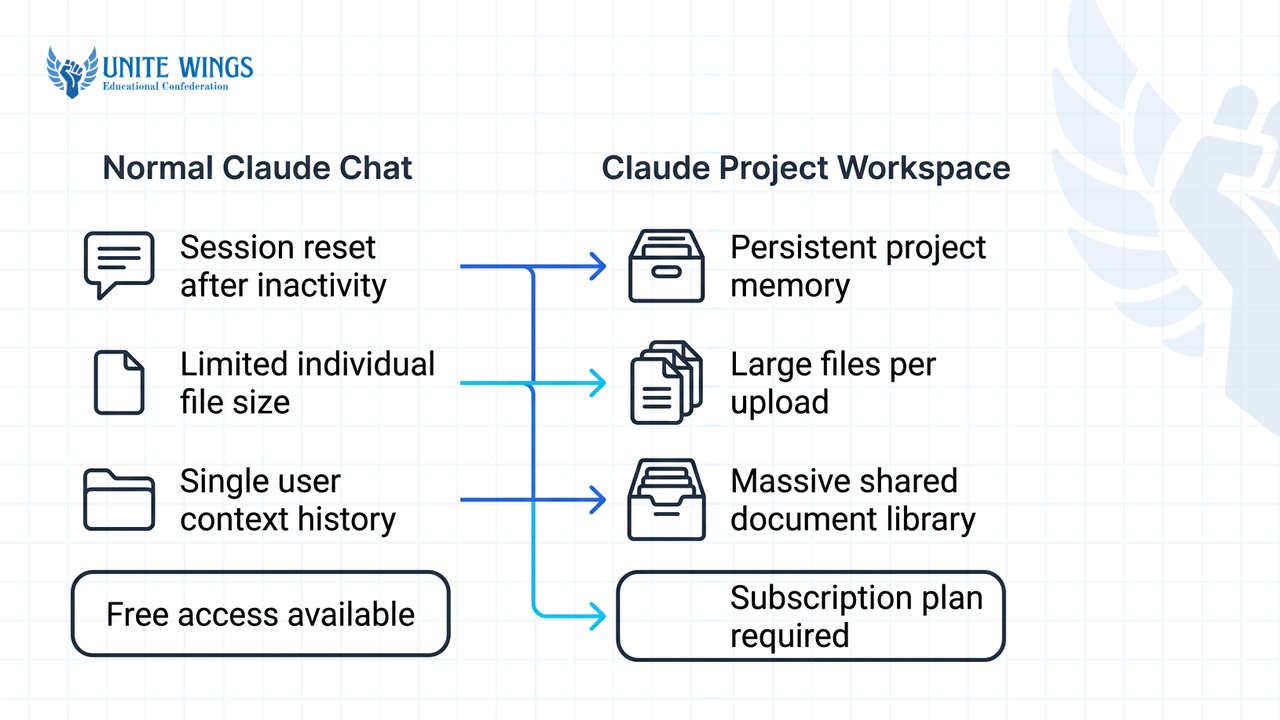
| Feature | Normal Claude Chat | Claude Project Workspace |
|---|---|---|
| Context persistence | Blank slate on every new chat (alexanderharte.com) | Shared knowledge base and custom instructions across all project chats (claude-for.com) |
| Per-file upload limit | Up to 500 MB per file (max 20 files per chat) | Strictly 30 MB per file |
| Total file capacity | Capped per individual conversation | Unlimited file count within the 200,000-token window; up to 10x capacity via automatic RAG on paid plans |
| Free-tier availability | Unlimited chats within daily message quotas | Capped at a maximum of 5 active projects (aitoolanalysis.com) |
| Workspace sharing | Not supported | Private on Free, Pro ($20/mo), and Max; shared ("Can view" / "Can edit") on Team and Enterprise plans (alexanderharte.com) |
What most students get wrong: Beginners assume that different chat threads inside the same Project can read each other's conversation history. They cannot (claude-for.com). If you finalize a new project bullet in your "Resume Tailoring" thread, your "Mock Interview" thread will not know about it unless you update the master resume file inside the Project Knowledge base. Whenever you improve a bullet or add an internship metric, paste the updated text back into your knowledge base document.
What 5 documents should every fresher upload into their Placement Project knowledge base?
Every fresher setting up a placement project should upload five plain-text or Markdown files: a master career document, an academic and eligibility record, a target job description rubric, core technical cheat sheets, and a STAR behavioral story bank. Each file must stay under the 30 MB per-file project limit.
Do not upload five slightly different PDF versions of your one-page resume. Multiple similar PDFs waste your 200,000-token context window and confuse the retrieval system about which version is current. Instead, go to claude.ai, click Projects in the left sidebar, click + New Project, name it Placement Coach 2026 - [Your Name], and upload these five distinct files into the knowledge base:
01_Master_Career_Doc.md(The Uncut Resume): A standard resume forces you to cut details to fit one page. Your master document should be 2 to 4 pages of raw facts: every academic project, the exact tech stack (such as Node.js, PostgreSQL, Docker), GitHub repository links, database schema sizes, latency numbers, and hackathon rank metrics.02_Academic_Eligibility_Record.txt(Hard Cutoffs): Mass recruiters like TCS, Infosys, and Wipro filter candidates on strict academic criteria before a human ever reads a resume. List your 10th percentage, 12th percentage, semester-wise SGPA, cumulative CGPA, active or cleared backlogs, branch, graduation year, and willingness to sign a service bond or relocate to Pune, Hyderabad, or Bengaluru.03_Target_JDs_and_Rubric.md(The Market Reality): The 2026 Indian graduate market is sharply split. Standard IT services roles pay 3.5 to 4.5 LPA, specialized digital tracks at mass recruiters offer 7 to 12 LPA (devhives.in), Global Capability Centers (GCCs) pay 15 to 25 LPA, and top product or AI/ML roles pay 12 to 30+ LPA (hyring.com). Paste 3 to 5 real job descriptions from Naukri, Unstop, or LinkedIn for the exact tier you are targeting so Claude knows the exact keywords required.04_[Core_Tech_Cheat_Sheets.md](/blogs/how-to-use-claude-for-exam-preparation-and-semester-notes)(Your Study Notes): Upload your personal revision notes on Data Structures and Algorithms (DSA), Operating Systems, DBMS, Computer Networks, and OOPs. When you run mock interviews, you will instruct Claude to test you specifically on the concepts inside this file and your uploaded project code.05_STAR_Story_Bank.md(HR & Managerial Proof): Write out 6 to 8 real incidents from your college labs, internships, or club work using the Situation, Task, Action, Result format. Include one time a project broke before a deadline, one conflict with a teammate, and one time you learned a tool in 48 hours. This stops Claude from inventing fake corporate anecdotes when drafting cover letters or HR answers.
If you need help turning weak college projects into hard proof before building your master file, our Resume Masterclass walks through rebuilding your project bullets so a recruiter understands your work in ten seconds.
What custom instructions should I set so Claude acts like a strict placement coordinator?
Set your project custom instructions to a sub-150-word prompt divided into five blocks: Role, Voice, Format, Always, and Never (betterwithclaude.com). Keeping the instructions under 150 words prevents signal dilution and stops Claude from slipping back into polite, overly encouraging chatbot habits.
Most students paste two-page system prompts they found on Reddit, or write something vague like "Be a helpful career coach." Both fail. Long prompts cause the model to ignore rules buried in the middle, while vague prompts make Claude praise mediocre resumes. In a real Indian campus placement cell, a coordinator or technical interviewer will reject a bullet like "Worked on a machine learning model using Python" in five seconds because it has no dataset size, no accuracy metric, and no deployment proof.
Click Set project instructions in your Claude Project and paste this exact 138-word block:
Role: Act as a strict, no-nonsense senior Indian placement coordinator and technical hiring manager at a top product company. Voice: Direct, blunt, analytical. Zero flattery or motivational filler. Format: Start every resume or JD evaluation with a Fit Score out of 10, followed by a bulleted Gap Analysis, and then the rewritten text. Always: Demand measurable numbers (latency reduced by X ms, dataset of Y rows, accuracy of Z%) on every resume bullet. Cross-check my
01_Master_Career_Doc.mdand05_STAR_Story_Bank.mdbefore writing anything. Ask me for missing numbers using[INSERT METRIC]placeholders instead of guessing. Never: Invent skills, metrics, or internships I do not have. Never use AI clichés or passive phrases like "hardworking team player," "passionate fresher," "dynamic environment," or "spearheaded." During mock interviews, never give me the answer until I reply.
Look at the difference this instruction set makes on a real fresher bullet:
- Without instructions: "Developed a full-stack e-commerce web application using React and Node.js to provide a user-friendly shopping experience."
- With strict coordinator instructions: "Fit Score: 3/10. Gap Analysis: Zero scale metrics, no database mentioned, vague outcome. Rewrite: Built a MERN-stack e-commerce platform handling [INSERT CONCURRENT USERS] test requests with JWT authentication and Razorpay test-mode integration, reducing cart query latency from [X] ms to [Y] ms via MongoDB indexing."
How do I use a single Claude Project to generate cold emails, cover letters, and interview prep?
Once your five documents and custom instructions are saved, open four separate chat threads inside the project, designating one each for ATS resume tailoring, cold outreach emails, cover letters, and live mock interviews (claudecowork.im). Naming each thread clearly keeps your placement tasks organized without mixing contexts.
Here is the step-by-step workflow and the exact prompts to run in each thread:
- Thread 1:
ATS Resume Tailoring(For Naukri, Unstop, and Campus Portals) Paste the new job description you are applying for and run this prompt: "Compare this JD against01_Master_Career_Doc.mdand02_Academic_Eligibility_Record.txt. First, confirm if I meet all CGPA and branch cutoffs. Second, give me my Fit Score out of 10 and list the missing technical keywords. Third, rewrite my top 3 project descriptions into 1-line Google XYZ format bullets (Accomplished [X] as measured by [Y], by doing [Z]) that match this JD without inventing skills." - Thread 2:
Cold Emails & LinkedIn DMs(For Startups and Off-Campus GCCs) Recruiters and engineering managers on LinkedIn ignore 300-word essays. Use this prompt: "Write a 90-word cold email to an Engineering Manager at [Company Name] for their [Role Name] opening. Pull the most relevant project from01_Master_Career_Doc.md, connect its architecture directly to their tech stack in03_Target_JDs_and_Rubric.md, and end with a direct link to my GitHub repo. No pleasantries like 'I hope this email finds you well.'" - Thread 3:
Metric-Driven Cover Letters(For Internshala and Company Career Pages) When an application portal requires a cover letter, run this prompt: "Draft a custom cover letter for [Company Name]. Paragraph 1: State the exact role and my graduation timeline from my academic record. Paragraph 2: Connect two quantified metrics from my master career doc and one real incident from05_STAR_Story_Bank.mdto the top two priorities in their JD. Paragraph 3: Call to action. Zero generic adjectives." - Thread 4:
Live Technical & HR Mock InterviewerDo not ask Claude for a list of 20 questions with answers; reading answers builds false confidence. Instead, force an interactive grilling session (claudecowork.im): "Run an interactive technical and managerial mock interview for a target role. Ask me Question 1 based on the projects in01_Master_Career_Doc.mdor concepts in04_Core_Tech_Cheat_Sheets.md, then stop and wait for my answer. After I reply, grade my answer out of 10, point out technical inaccuracies or missing edge cases, show me what a 9/10 answer sounds like, and ask Question 2."
To go deeper on structuring your spoken answers under pressure, pair this fourth thread with the live practice structure in our Interview Masterclass.
How can free-tier students mimic Claude Projects using a Master Context document?
Free-tier users are capped at 5 active Claude Projects (aitoolanalysis.com) and do not get the paid tier's automatic RAG 10x capacity expansion when files approach the 200,000-token limit. You can bypass the 5-project cap and make your setup portable to ChatGPT or Gemini by combining your instructions and career facts into a single one-page Markdown file named MASTER_PLACEMENT_CONTEXT.md and pasting it as your first message in any standard chat (aimagicx.com).
Copy the template below, save it in Notepad, VS Code, or Obsidian as MASTER_PLACEMENT_CONTEXT.md, fill in the bracketed fields with your real data, and keep it on your desktop:
=== SYSTEM INSTRUCTIONS === Role: Strict Indian placement coordinator and technical hiring manager. Voice: Blunt, direct, zero flattery. Always: Demand quantified metrics (
[X]%,[Y] ms,[Z] rows). Use[INSERT METRIC]if a number is missing. Output a Fit Score (/10) and Gap Analysis before rewriting anything. Never: Invent skills/metrics or use clichés ("passionate fresher", "hardworking team player", "spearheaded"). In mock interviews, ask one question at a time and wait for my reply.=== CANDIDATE SNAPSHOT ===
- Degree & Branch: B.Tech in [Branch], Graduation: [Month, 2026/2027], Tier-[2/3] College
- Scores: CGPA: [X.XX/10] | 12th: [XX%] | 10th: [XX%] | Active Backlogs: [0]
- Target Roles: [e.g., Backend SDE / Data Analyst] | Target Band: [e.g., 4.5 LPA Services / 12-18 LPA Product & GCC]
- Location & Bond: Open to Bengaluru, Hyderabad, Pune. Service bond: [Yes/No].
=== VERIFIED TECH STACK ===
- Languages: [e.g., Java, Python, SQL, JavaScript]
- Frameworks/Tools: [e.g., Spring Boot, React, Docker, Git, PostgreSQL, AWS EC2]
- Core Subjects: DSA ([X] problems solved on LeetCode/GFG), DBMS, OS, CN.
=== RAW PROJECT BANK (SOURCE OF TRUTH) ===
- [Project 1 Name] | Stack: [Tech] | Link: [GitHub URL]
- Architecture & Problem: [What it does in 1 line]
- Hard Metrics: [e.g., Processed 50,000 rows, cut API response time from 420ms to 110ms, 92% F1-score]
- [Project 2 Name] | Stack: [Tech] | Link: [GitHub URL]
- Architecture & Problem: [What it does in 1 line]
- Hard Metrics: [e.g., Used by 120 students during college fest, zero downtime, automated 4 hours of manual CSV entry]
=== INTERNSHIPS & STAR STORIES ===
- Internship: [Role at Company, Duration] - Built [feature], resulting in [metric].
- Failure/Fix Story: [1 sentence on a bug or deadline crash and the exact technical fix].
- Team Conflict/Leadership Story: [1 sentence on resolving a blocker in a 4-person team].
=== CURRENT TASK === Read the context above. Reply only with "Context locked. Paste your JD or task."
Whenever your daily Claude Project quota runs out or you want to test the same prompt in another AI tool, open a normal chat, paste MASTER_PLACEMENT_CONTEXT.md (or attach it as a .md file well under the 500 MB chat limit), and start working immediately.
How to set up your placement workspace this week
Do not wait until a placement notice lands in your college WhatsApp group at 9 PM with an 8 AM application deadline. Build your workspace in three steps over the next seven days:
- Today (30 minutes): Copy the
MASTER_PLACEMENT_CONTEXT.mdtemplate above into a text editor and fill in your exact CGPA, 10th/12th scores, and tech stack. Put[INSERT METRIC]next to any college project where you do not yet know the latency, dataset size, or user count. - Within 3 days (1 hour): Open your GitHub repos, run a quick benchmark or check your database row counts to replace every
[INSERT METRIC]placeholder with a real number, and split your data into the 5 knowledge base files atclaude.ai/projects. - This weekend (45 minutes): Paste one 3.5–4.5 LPA IT services JD and one 12+ LPA product or GCC JD into Thread 1 to see your gap analysis, then run a 5-question live technical grilling session in Thread 4.
Build your full workflow in the Claude Masterclass
If you want hands-on guidance setting up persistent Projects, interactive Artifacts, and deep research workflows for your semester exams and job hunt, join the Claude Masterclass. You will walk away with a configured Claude Project workspace, tested custom instructions, and reusable prompt templates built live during the session.
Frequently asked questions
What is the exact file size limit for Claude Projects?
Individual files uploaded to a Claude Project knowledge base are capped at a maximum of 30 MB each. While standard standalone Claude chats allow files up to 500 MB (up to 20 files per chat), Project knowledge bases enforce the stricter 30 MB ceiling across all file types.
How many documents can I upload into a Claude Project knowledge base?
There is no fixed limit on the number of files you can upload to a Claude Project, provided their combined text fits inside Claude's 200,000-token context window. On paid plans, Claude automatically activates Retrieval-Augmented Generation (RAG) when your files approach that limit, expanding capacity by up to 10x.
Can free-tier users share Claude Projects with college study groups?
No, free-tier users cannot share their Claude Projects with classmates. Project sharing with "Can view" or "Can edit" permissions is restricted exclusively to Claude Team and Enterprise plans (alexanderharte.com). On Free, Pro, and Max plans, convert your notes into a MASTER_PLACEMENT_CONTEXT.md file and share that file on WhatsApp or Google Drive instead.
Do separate chats inside the same Claude Project remember each other?
No, separate chat threads inside a Claude Project are isolated from one another and cannot read each other's conversation transcripts (claude-for.com). Every thread reads the shared Project Knowledge files and custom instructions, so if you rewrite a resume bullet in one chat, you must update your knowledge base file for other chats to see it.
How many Claude Projects can a student create on the free plan?
Students on the free tier of claude.ai can create a maximum of 5 active classic Claude Projects (aitoolanalysis.com). Rather than making a new project for every company that visits your campus, keep one unified "Placement Coach" project and open separate chat threads inside it for each company drive.
What is the average fresher salary in India in 2026 to target in my project setup?
In 2026, standard IT services roles at mass recruiters like TCS, Infosys, and Wipro pay 3.5 to 4.5 LPA, while their digital specialist tracks pay 7 to 12 LPA (devhives.in). Global Capability Centers (GCCs) offer 15 to 25 LPA, and product or AI/ML fresher roles range from 12 to 30+ LPA (hyring.com). Upload JDs from both tiers into your project to prepare for both.
Newsletter
Stay updated with our latest news and insights.