
How to Turn 2-Hour YouTube Lectures Into Exam Notes With Gemini
Use Gemini's @YouTube extension and PDF uploader to pull exact timestamps from 2-hour lectures, read handwritten class notes, and solve past papers.
You cannot paste a 2-hour NPTEL lecture link directly into a standard Google Gemini chat and expect usable semester exam notes, because the native @YouTube extension typically cuts off or compresses content past the 40-to-50-minute mark. If you want to learn how to study from YouTube lectures and PDFs using Gemini without losing half the syllabus, you have to pull the raw video transcript or .srt subtitle file and pair it with your university syllabus and previous year question papers (PYQs) inside a Gemini Study Notebook.
In short
- For videos over 30 to 40 minutes, extract the raw transcript or
.srtsubtitle file instead of pasting the YouTube URL, so Gemini does not drop the second half of your lecture. - Upload up to 10 files (up to 100 MB each) per prompt, or drop your syllabus PDF and 5 years of PYQs into a Gemini Study Notebook to rank the most repeated exam questions.
- Gemini reads clean handwritten topper notes with 84% to 85% accuracy, but you must ask for math and engineering formulas in LaTeX so cursive symbols do not get misread.
- Prompt Gemini with the Role, Task, Context, and Format framework to structure outputs into exact 5-mark (definition, 3 to 4 bullets, example) and 10-mark (introduction, derivation, architecture, conclusion) university answers.
How do I use the @YouTube extension in Gemini to summarize long NPTEL lectures?
To summarize long NPTEL lectures, turn on the YouTube extension under Settings > Extensions in Gemini, but only use direct URLs for videos under 30 minutes. For 1-to-2-hour engineering or science lectures, copy the full video transcript or use a Chrome extension like TubeNote to pass the complete text into Gemini without truncation.
Before you run your first prompt, verify that the extension is active on your account. According to Lifehacker, you need to open gemini.google.com, click Settings on the left panel, select Extensions, and make sure the YouTube toggle is switched on (blue). On the mobile app, tap your profile icon in the top corner, open Extensions, and toggle YouTube on.
Here is what most students get wrong during exam week: they paste a 2-hour NPTEL link, type @YouTube summarize this, and study from the output. Benchmarks from Artem Demo show that native URL processing in Gemini relies on auto-generated captions (officially supported in English, Japanese, and Korean) and frequently stops processing or compresses heavily after 40 to 50 minutes. You end up walking into your exam hall with zero notes from the second hour of the lecture, which is usually where the professor works through numerical problems and derivations.
Use this 3-step workflow to get the entire lecture into your notes:
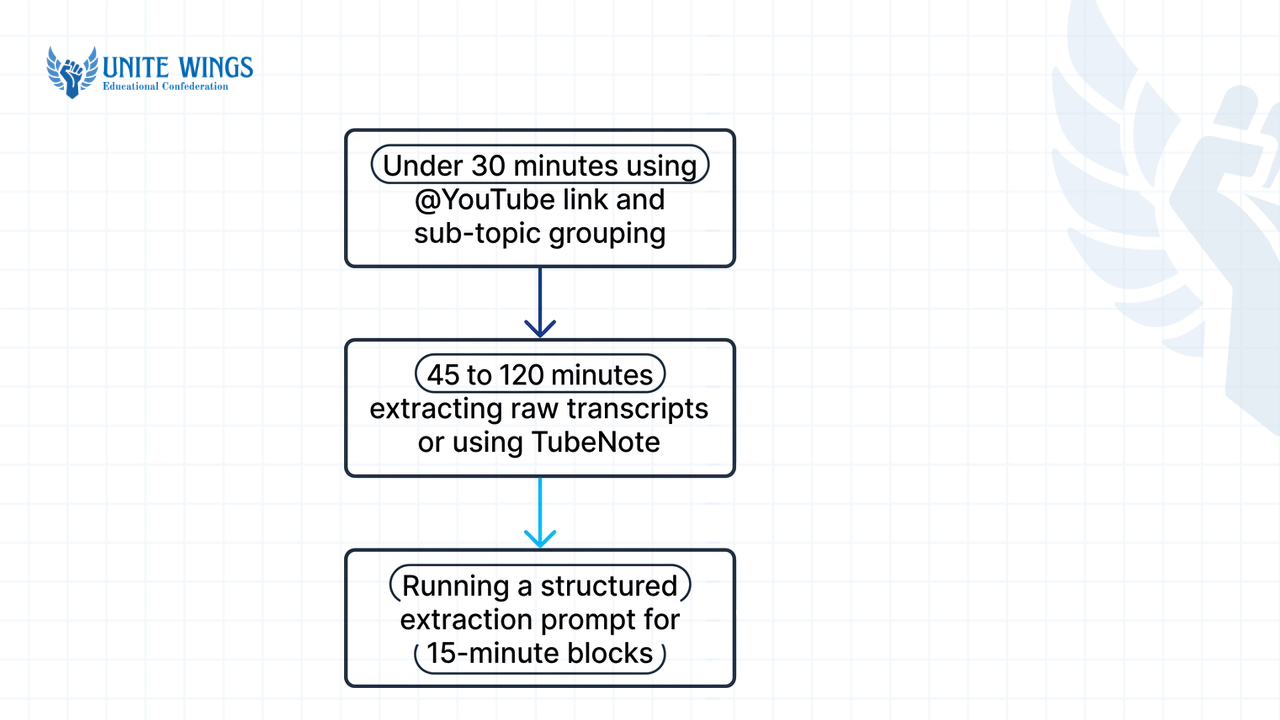
- For videos under 30 minutes: Type
@YouTube, paste the video link, and ask Gemini to group the concepts by sub-topic. - For 45-to-120-minute NPTEL or university lectures: Open the YouTube video description, click Show transcript, toggle timestamps on, and copy the entire text. Alternatively, install a side-panel extension from the Chrome Web Store like TubeNote or Video Notes to Gemini, which passes the full transcript directly into your active Gemini session without needing an API key.
- Run a structured extraction prompt: Paste the copied transcript into Gemini and use this exact prompt: "Act as an engineering teaching assistant. Read this full lecture transcript and break it down chronologically into 15-minute blocks. For each block, list the core definitions, every theorem named by the professor, and any numerical problem solved."
If you are also clearing weekly Swayam assignments alongside your semester prep, community tools like the NPTEL AI Solver let you connect a free Gemini API key from Google AI Studio to parse MOOC assignment questions directly in your browser.
Can Gemini find the exact timestamp where a professor explains a specific formula?
Gemini can pinpoint exact timestamps for formulas only if timestamps are present in the text it reads. Pasting a direct YouTube link often returns blank or guessed timestamps for 2-hour videos, whereas uploading the raw .srt subtitle file or a timestamped transcript lets Gemini return exact minute-and-second markers.
When you ask Gemini to find a formula via a direct URL, the model relies solely on auto-generated captions or video descriptions, often missing precise timestamps. Without explicit YouTube description timestamps or proper transcript track metadata, this native link-based parsing frequently leads to generalized or blank timestamp lists.
To fix this, feed Gemini the raw time-coded data. As documented by Artem Demo, feeding raw .srt subtitle files or timestamped transcripts directly into Gemini produces accurate chronological summaries and exact topic timestamps across multi-hour lectures.
Follow these steps when hunting for a specific derivation the night before an exam:
- Copy the YouTube transcript with timestamps visible, or download the
.srtfile using any free subtitle downloader. - Upload the
.txtor.srtfile into Gemini (the standard interface accepts up to 10 files per prompt, up to 100 MB per file, according to Vertex AI Search / LoreAI). - Copy and paste this prompt: "Analyze this 2-hour NPTEL lecture transcript. Find the exact timestamps and explanations where the professor introduces and derives the formula for [Insert Topic, e.g., Thevenin's Equivalent Impedance / Navier-Stokes Equation]. Output every step of the derivation in LaTeX format and list the exact [MM:SS] timestamp for each step."
Asking for LaTeX formatting is a non-negotiable step for engineering, physics, and economics students. According to a 2026 study guide by Masai School, explicitly instructing Gemini to output mathematical formulas in LaTeX prevents the model from mangling subscripts, integrals, and Greek letters during transcription.
How well does Gemini read scanned photos of handwritten topper notes?
Gemini's multimodal vision models (Gemini Flash and Pro) read clean, block-letter handwritten notes at roughly 84% to 85% accuracy. However, on dense cursive or dimly lit smartphone scans, Gemini guesses missing words from context and can quietly alter mathematical symbols, so you must verify equations against the original page.
Every Indian college WhatsApp group circulates a 60-page CamScanner PDF of the class topper's notebook two days before internals. Traditional optical character recognition (OCR) tools fail on these PDFs because they read character by character. According to 2026 testing by TryLeo.ai and Reddit computer vision benchmarks, Gemini uses multimodal generative decoding to read handwriting in context, hitting 84% to 85% accuracy on clean, modern handwriting.
That contextual reading is a double-edged sword for technical subjects. Because Gemini predicts what a word or equation should be based on surrounding sentences, it occasionally modernizes spelling or fills in illegible cursive with a plausible, though wrong, calculus symbol or circuit variable.
| Source material type | Best Gemini input method | Accuracy & failure point | Fix to apply in your prompt |
|---|---|---|---|
| Short YouTube video (under 30 mins) | Direct URL via @YouTube extension | High accuracy on English captions; fails if captions are disabled | Verify the YouTube extension is toggled blue in Settings |
| Long NPTEL lecture (45 to 120 mins) | Raw .srt file or copied transcript text | Native URL cuts off past 40 to 50 mins; raw text covers 100% | Paste full transcript and demand [MM:SS] timestamp citations |
| Clean, block-letter handwritten PDF | Direct image or PDF upload (up to 100 MB) | ~84% to 85% accuracy; reads headings and tables reliably | Ask for structured markdown tables and bulleted summaries |
| Messy cursive or math-heavy notebook scan | Cropped, high-contrast image upload | Silently guesses illegible symbols in physics or linear algebra | Instruct Gemini to flag unreadable words as [UNCLEAR] instead of guessing |
To stop Gemini from hallucinating formulas when digitizing your classmate's handwritten notes, follow the Google Help Community's OCR guidelines: shoot pages flat under bright lighting with high contrast, and avoid angled shadows. Then upload the PDF or photos with this guardrail prompt:
"Transcribe the attached handwritten notes on [Subject Name] into clean markdown. Convert all equations into LaTeX. Rule: Do not guess or auto-correct messy handwriting. If a symbol, subscript, or cursive word is unclear, write [UNCLEAR - CHECK PAGE X] in bold and describe what the symbol looks like."
Once the transcription is clean, you can export the notes directly to Google Keep or Google Docs, or use third-party tools like NoteLM to push the markdown into Notion or Obsidian.
How do I upload my syllabus PDF and last 5 years' question papers to find repeated topics?
Open Gemini Study Notebooks (formerly NotebookLM, renamed and integrated into the Gemini app in 2026), upload your official university syllabus PDF alongside the last 5 years of question papers, and prompt Gemini to cross-reference them. The workspace grounds its answers strictly in your files, ranking high-weightage modules with clickable inline citations.
Standard chat windows lose track of details when you juggle ten different PDFs across a week of studying. Carnegie Mellon University's 2025 Google for Education Guide notes that Gemini supports a context window of up to 1 million tokens in advanced modes, which is enough to process 1,500 pages of text or 30,000 lines of code at once, and provides inline citations so you can verify claims against the exact page of your PDF.
In 2026, Google brought this directly into the main interface. According to the Google Official Blog, Study Notebooks in the Gemini app let you build a dedicated workspace for a specific exam. When you upload your syllabus and past papers, Study Notebooks can automatically break your subject down into over 100 specific learning objectives, generate diagnostic quizzes to test your baseline knowledge, and track your status across "Strengths," "Focus areas," and "Not started."
If you are worried about hitting daily upload limits while feeding five years of PDFs and lecture transcripts into your workspace, check your college email eligibility. The Google Gemini Student Portal offers 1-year student plans for eligible college students aged 18 and above, giving you expanded storage, higher usage limits, and unlimited uploads for Study Notebooks.
Here is the step-by-step workflow to build a high-weightage revision tracker, adapted from AI Axom and Medium study guides:
- Open Gemini and create a new Study Notebook named after your paper (for example,
CS501 - Operating Systems). - Upload your university's official syllabus PDF, your cleaned lecture transcripts, and PDF scans of the last 5 years' semester question papers (such as VTU, Anna University, Mumbai University, AKTU, or state board question banks).
- Run this exact cross-referencing prompt:
*"Cross-reference the uploaded university syllabus with the attached 5 years of question papers.
- List the top 10 most frequently repeated topics across all 5 years.
- Create a markdown table with columns: Topic Name, Syllabus Unit, Years Asked, Total Marks Weightage, and Exact Question Variations.
- Flag any syllabus unit that accounts for more than 25% of the paper's total marks.
- Build a 5-day priority revision schedule starting with the highest-weightage topics."*
Because Study Notebooks anchor responses strictly to your uploaded files, Gemini will not pull random topics from foreign university curricula that are outside your syllabus. If you want to set up custom Gems and automated Drive workflows for your entire semester, our Gemini Masterclass walks through configuring Gemini across Docs, Drive, and Study Notebooks in one sitting.
How can I ask Gemini to format answers for 5-mark and 10-mark university questions?
Use the Role-Task-Context-Format prompt structure to tell Gemini to act as an Indian university examiner and write strictly from your uploaded notes. For 5-mark questions, require a 2-line definition, 3 to 4 bulleted points, and an example; for 10-mark questions, require an introduction, theoretical derivation, architecture description, pros/cons, and conclusion.
Indian university evaluation rubrics reward structure and sub-headings just as much as technical accuracy. If you write a single 300-word paragraph for a 10-mark question, evaluators skimming 60 answer booklets an hour will dock you 4 marks even if your core concept is right. Generic prompts like "explain deadlock avoidance" give you textbook paragraphs that are useless for writing speed in an exam hall.
According to 2026 prompt documentation from Orink Insights and Edumate AI, academic prompts work best when you lock down four parameters: Role (university examiner), Task (write a model answer), Context (using only the uploaded Study Notebook files), and Format (exact mark-based sub-headings).
Copy and paste these two templates inside your Study Notebook:
Prompt template for 5-mark short notes
*"Role: Act as an Indian university board examiner. Context: Use only the uploaded lecture transcripts and handwritten notes. Task: Write a model 5-mark exam answer for [Insert Question/Topic]. Format strictly into:
- Definition & Core Principle: 2 crisp sentences defining the term.
- Key Characteristics / Working Steps: 4 bullet points, maximum 25 words per bullet, bolding the technical keyword at the start of each bullet.
- Diagram Description & Example: Describe a simple block diagram I can draw with pen and paper in 60 seconds, followed by 1 real-world or code example."*
Prompt template for 10-mark long essay or derivation questions
*"Role: Act as an Indian university board examiner evaluating a 10-mark long-answer question. Context: Base every formula and term strictly on my uploaded syllabus and topper notes. Task: Write a comprehensive 10-mark answer for [Insert Question/Topic]. Format strictly into these 5 numbered sections:
- Introduction & Definition (1.5 marks): Define the concept and state the engineering problem it solves.
- Theoretical Framework / Step-by-Step Derivation (3.5 marks): Provide the full mathematical derivation in LaTeX, explaining what each variable stands for at every step.
- System Architecture / Working Mechanism (2.5 marks): Break the process into sequential steps and describe a labeled block diagram or flowchart I must draw on the answer sheet.
- Merits, Demerits & Applications (1.5 marks): A 2-column comparison of advantages vs limitations, plus 2 practical applications.
- Conclusion (1 mark): A 2-line summary tying back to the introduction."*
Once Gemini generates your 10-mark answer, do not just memorize the text blindly. Switch on Gemini's Guided Learning mode, an interactive tutoring feature documented in the 2026 Gemini Certified Educator Exam Study Guide that asks you open-ended questions step by step instead of handing you the solution. Tell Gemini: "Switch to Guided Learning mode and quiz me step by step on the derivation in Section 2 until I can reproduce every step without looking at the notes."
Your exam week action plan
Do not wait until the night before your first paper to test whether your PDFs are readable or if your NPTEL playlist links get cut off. Set up your pipeline in three short blocks:
- Today (15 minutes): Open
gemini.google.com, go to Settings > Extensions to verify the YouTube toggle is on, and check your college email on the Google Gemini Student Portal to activate unlimited Study Notebook uploads if you are 18 or older. - This week (45 minutes): Create one Study Notebook for your hardest subject. Upload the syllabus PDF and the last 5 years of PYQs, then run the cross-referencing table prompt to identify the top 10 repeated topics.
- Before your next internal or semester exam: Export the transcripts for your top 3 unanswered NPTEL lectures using TubeNote or YouTube's transcript button, drop them into your Study Notebook, and generate 5-mark and 10-mark answers for the highest-weightage questions.
Set up your complete Gemini workflow in one evening
If you want to go beyond basic exam prompts and connect Gemini directly to your Google Docs, Drive, and Gmail for projects, internships, and placement prep, join the Gemini Masterclass. You will walk away with custom-built Gems, a working Deep Research workflow, and reusable Canvas templates configured on your own Google account.
Frequently asked questions
Why does Gemini stop summarizing my 2-hour NPTEL lecture halfway through?
Gemini's native @YouTube extension relies on auto-generated captions and routinely truncates or compresses videos past the 40-to-50-minute mark. To summarize a full 2-hour NPTEL lecture without losing the second half, open the YouTube transcript, copy the full text (or download the .srt file), and upload it directly into a Gemini Study Notebook.
Can Gemini read messy cursive handwriting from smartphone PDF scans?
Gemini reads clean, block-letter handwritten notes at 84% to 85% accuracy using contextual vision decoding. However, on messy cursive or poorly lit scans, it may guess unreadable symbols and alter physics or calculus equations. Always ask Gemini to output formulas in LaTeX and flag illegible words as [UNCLEAR] instead of guessing.
Do I need a paid Gemini plan to upload my syllabus and past question papers?
No, the standard Gemini interface lets you upload up to 10 files per prompt at up to 100 MB per file for free. Furthermore, college students aged 18 and above can apply on the Google Gemini Student Portal for a 1-year student plan that includes unlimited uploads in Study Notebooks.
How do I stop Gemini from giving outside-the-syllabus answers for university exams?
Instead of using a standard chat tab, upload your university syllabus PDF, topper notes, and lecture transcripts into a Gemini Study Notebook. Study Notebooks ground responses strictly in your uploaded source materials and include clickable inline citations so you can verify every definition and derivation against your exact syllabus.
Can I export my Gemini exam notes directly into Notion or Google Docs?
Yes, Gemini integrates directly with Google Workspace, allowing you to export generated study guides to Google Docs or save breakdowns to Google Keep in two clicks. If you use Notion or Obsidian, browser extensions like NoteLM and Video Notes to Gemini transfer formatted markdown notes and video transcripts straight into your workspace.
Newsletter
Stay updated with our latest news and insights.