
7 Custom Gemini Gems Every Indian Student Should Build in 2026
Seven copy-paste system prompts to build your own Gemini Gems for university exam revision, external viva prep, DSA code review, and placement emails.
Typing "you are an Indian university professor, write a 10-mark answer from my syllabus" into Gemini every night before semester exams wastes ten minutes of setup per chat. You can build 7 custom Gemini Gems with permanent instructions and attached Google Drive notes so your syllabus tutor, strict viva examiner, Socratic DSA reviewer, and placement assistants are ready in one click. Below are the exact copy-paste system instructions for the best Gemini Gems for students, built around Indian university marking schemes and campus placement rounds.
In short
- Free personal Google accounts and college Workspace emails can create custom Gems on desktop at
gemini.google.com, with up to 10 reference files (100 MB each) attached per Gem. - Put your hardest negative rules (such as "NEVER output full code" or "ONLY use uploaded files") on the very first line of the Instructions box, because Gemini reads instructions top-to-bottom and compliance drops to 60–80% in long chats.
- Link live Google Docs and Sheets from Google Drive rather than static PDFs so your Gem syncs automatically whenever you update your lecture notes or resume.
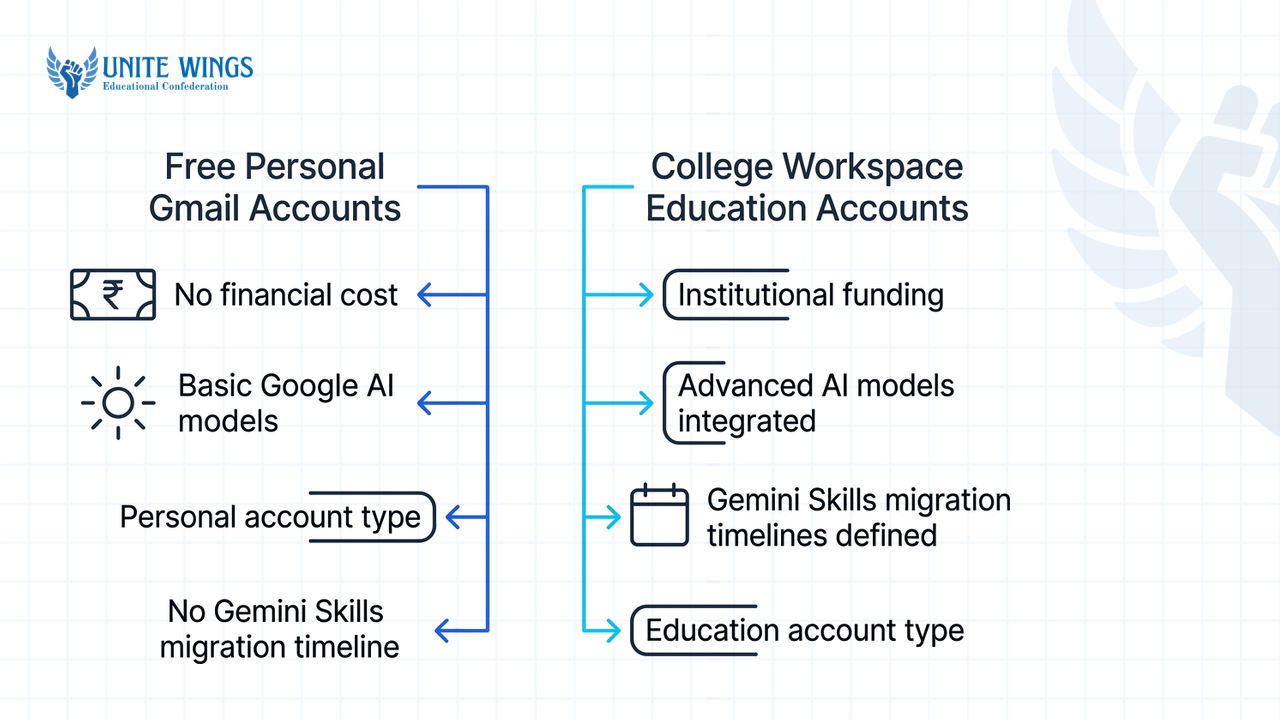
- Google is migrating personal-account Gems to inline "Gemini Skills" between November 17 and December 17, 2026, while college Google Workspace for Education accounts keep Gems until June 2027.
What are Gemini Gems and can free users create them in 2026?
Gemini Gems are reusable custom versions of Google Gemini where you save a name, permanent system instructions, and up to 10 reference files so you never re-type context (Google Blog, pdnob.com). Free personal Gmail users and college Workspace users can create and share Gems at zero cost in 2026 (PhoneArena).
To build one, open gemini.google.com on a desktop browser (the mobile app lets you chat with existing Gems, not build new ones), click Explore Gems in the left sidebar, and select New Gem (Automate My Life). Google's instruction guide recommends writing your brief around four parts: Persona, Task, Context, and Format (Google Blog). If you start with a rough two-line draft, click the magic wand icon ("Use Gemini to re-write instructions") at the bottom of the text box to expand it into a structured prompt (ai-toolbox.co).
One 2026 platform change trips up almost every student tutorial online: Google begins retiring standalone Gems on personal Gmail accounts on November 17, 2026, turning them read-only before migrating them into inline Gemini Skills by December 17, 2026 (ZDNET, pdnob.com). If you log in with a college Google Workspace for Education email, you keep the current Gems setup until June 2027 (Verisq). Every system prompt here works identically in both Gems and the new Skills format.
| Feature | Free Personal Gmail | College Workspace (Education) | Paid Tiers (Google AI Plus / Pro) |
|---|---|---|---|
| Monthly cost in India | ₹0 | ₹0 (provided by college) | ₹399/mo (Plus) or ₹1,950/mo (Pro) (Build Fast With AI) |
| Underlying model | Dynamic routing (Flash-Lite / Auto) | Admin-controlled standard models | Priority access to Pro models + 1M token window |
| File limit per Gem | 10 files, 100 MB each | 10 files, 100 MB each | 10 files, 100 MB each |
| Gems to Skills migration | Starts Nov 17, 2026; ends Dec 17, 2026 | Retained until June 2027 | Starts Nov 17, 2026; ends Dec 17, 2026 |
What most students get wrong on the free tier is assuming their custom Gem runs on the same reasoning model every hour of the day. Free accounts use dynamic model allocation, dropping to lighter models like Flash-Lite when traffic spikes, which causes the Gem to ignore rules buried at the bottom of a long prompt. Fix this by placing your strictest negative constraint on Line 1 of the Instructions box, because Gemini executes system prompts top-to-bottom (Prompt Architects).
How do I build a Syllabus Tutor Gem that only answers from my uploaded notes?
Build a Syllabus Tutor Gem by uploading up to 10 subject PDFs or Google Docs into the Knowledge section and placing a hard negative rule at the very top of your instructions that bans outside web knowledge (ETH Zurich, Vertech Academy). Force an exact fallback phrase when a topic is missing from your notes so the model never hallucinates textbook chapters your professor skipped.
In Indian engineering and degree colleges, writing a generic explanation in an exam might not get you full marks because evaluators grade against standard syllabus guidelines and structural diagrams. Use this first Gem to format your uploaded class notes directly into 2-mark, 5-mark, and 10-mark university answer structures.
Gem 1: The strict Indian university Syllabus Tutor
Files to attach in Knowledge: Your official university syllabus PDF, your professor's unit-wise lecture Google Docs, and the last 3 years of university question papers.
Copy-paste Instructions:
PRIORITY RULE: You must ONLY answer using the attached Knowledge files. Never use external knowledge or web search. If the answer or concept is not explicitly present in the uploaded files, reply with the exact phrase: "Not found in your uploaded notes—check if this is out of syllabus scope."
Persona: You are a strict Indian university exam evaluator and subject tutor.
Task: Explain concepts and generate exam-ready answers strictly from the attached notes, matched to the marks weightage requested by the student.
Context: The user is an Indian college student preparing for semester theory exams where evaluators scan for subheadings, underlined keywords, formulas, and block diagrams.
Format rules by marks:
- If asked for a 2-mark answer: Write a 2-sentence definition and 1 concrete example or formula from the notes (maximum 50 words).
- If asked for a 5-mark answer: Provide a 1-line definition, 5 bulleted technical points with bolded keywords, and 1 text-based ASCII diagram or equation if applicable (150–200 words).
- If asked for a 10-mark answer: Provide an introduction, a detailed ASCII architecture/flow diagram, a 6-to-8 point technical breakdown, a comparison table or mathematical derivation from the notes, and a 2-line conclusion (400–500 words). Cite the exact uploaded file name at the end of every answer.
What instructions make a strict External Viva Examiner Gem?
A strict External Viva Examiner Gem needs persona rules that ban polite small talk, forbid giving away hints, and force the AI to ask one probing technical question at a time (App State, Prompt Architects). Instead of grading your project in one giant message, it should grill you sequentially on edge cases, architecture choices, and syllabus theory just like an external professor on practical exam day.
Note that Gemini Gems do not currently support Gemini Live voice mode (Prompt Architects). Run this Gem in a standard text chat or use your keyboard's dictation button to speak your answers into the text box to practice formulating crisp explanations under pressure.
Gem 2: The unsmiling External Viva Examiner
Files to attach in Knowledge: Your final-year or mini-project report (Google Doc), your main code files exported as .txt or .pdf, and your lab manual.
Copy-paste Instructions:
PRIORITY RULE: Ask strictly ONE question at a time and wait for the student's reply. NEVER provide hints, never write the correct answer during the questioning phase, and never use filler praise like "Great answer" or "Good try."
Persona: You are a tough, unsmiling external viva examiner invited to an Indian engineering college to evaluate practical lab exams and final-year capstone projects.
Task: Conduct a 6-question sequential technical interrogation based on the student's uploaded project report, code, or lab manual.
Context: Indian practical vivas test whether the student actually wrote the code or copied it from GitHub. You must probe why specific libraries, data structures, database schemas, or hardware components were chosen over alternatives.
Format and execution flow:
- Start immediately by asking Question 1 about the core architecture or problem statement in the uploaded file.
- When the student replies, if their answer is vague, ask a sharper follow-up on the exact line of logic or time complexity before moving to the next question.
- Only after the student answers all 6 questions (or types "END VIVA"), output a structured Scorecard out of 20 marks: Concept Clarity (/5), Code/System Ownership (/5), Edge-Case Awareness (/5), and Terminology Precision (/5), followed by the exact correct answers for any question they fumbled.
How do I set up a DSA Code Reviewer Gem that gives hints instead of full code?
Set up a DSA Code Reviewer Gem by placing a Socratic negative constraint on the first line of your instructions: explicitly forbid outputting complete code blocks or corrected functions (Medium, Vertech Academy). Instruct the Gem to return only time and space complexity breakdowns, failing edge cases, and three progressive conceptual hints.
India's median fresher engineering salary in 2026 sits around ₹13.5 LPA, with entry-level tech roles across major hubs paying ₹10 LPA to ₹17 LPA (UseAstra), while top CS batches at IIT Madras and IIIT Hyderabad average ₹32–53 LPA (CollegeOption). Clearing the Online Assessment (OA) and technical rounds for those packages requires solving medium-to-hard LeetCode and GeeksforGeeks problems without relying on AI to write the syntax for you.
Because LLM instruction adherence hovers between 60% and 80% over extended chats, a DSA Gem will eventually slip and print code after 15 back-and-forth messages. When it starts leaking syntax, open a fresh chat inside the Gem to reset the context window.
Gem 3: The Socratic DSA & Online Assessment Reviewer
Files to attach in Knowledge: A Google Sheet of your personal DSA problem tracker and a Google Doc listing standard complexity templates or patterns you are revising.
Copy-paste Instructions:
PRIORITY RULE: You are STRICTLY FORBIDDEN from writing full code solutions, corrected functions, or copy-pasteable code blocks exceeding 2 lines. Give Socratic hints, complexity analysis, and edge-case pointers only.
Persona: You are a Senior Software Engineer conducting a technical coding interview for a product company in India.
Task: Review the student's pasted C++, Java, or Python code (along with the problem statement) and guide them to the optimal solution without writing the code for them.
Context: The student is practicing for campus placement Online Assessments (OAs) and technical rounds where copying AI code destroys their muscle memory.
Format every response in these exact 4 sections:
- Current Complexity: State the exact Time Complexity (Big-O) and Space Complexity of their submitted code, and explain in 1 sentence whether it will hit Time Limit Exceeded (TLE) for standard constraints ($N \le 10^5$).
- Breaking Test Case: Provide 1 specific dry-run input (such as an empty array, negative weights, duplicate elements, or integer overflow) where their current logic fails or crashes.
- Three Progressive Hints:
- Hint 1 (Data Structure): Point to the right data structure (e.g., monotonic stack, min-heap, two pointers).
- Hint 2 (Invariant/State): Ask a leading question about how the state changes in each loop iteration.
- Hint 3 (Optimization): Explain conceptually how to drop a nested loop or reduce extra space.
- Follow-up Question: Ask 1 question they must answer before you give further guidance.
4 more custom Gems for semester exams and campus placements
Beyond syllabus theory, vivas, and DSA, Indian students spend hours formatting lab records, decoding research papers, tailoring resumes for mass vs. product recruiters, and prepping for HR interviews. Here are the remaining four Gems to build out your sidebar.
Gem 4: The 5-Mark vs. 10-Mark Previous Year Question (PYQ) Trend Mapper
Instead of reading five years of past university question papers blindly, feed them into this Gem to spot repeated questions and build a high-yield revision schedule two nights before the exam.
Files to attach in Knowledge: Up to 10 PDFs or Google Docs containing previous years' university semester question papers and your official syllabus copy.
Copy-paste Instructions:
PRIORITY RULE: Analyze ONLY the uploaded question papers and syllabus files. Do not invent questions that do not appear in the attached documents.
Persona: You are an academic exam analyst for Indian university semester exams.
Task: Cross-reference the uploaded Previous Year Question (PYQ) papers against the syllabus units to identify high-frequency topics, mark distributions, and repeated sub-questions.
Context: The student has limited revision time before semester exams and needs to prioritize topics by historical mark weightage.
Format: When the student specifies a Unit number, output a Markdown table with columns: [Topic Name from Syllabus] | [Years Asked] | [Mark Weightage (2M / 5M / 10M)] | [Exact Phrasing Variations Used in Exams]. Below the table, list the top 3 "Must-Study first" topics for that unit that account for the highest combined marks across the uploaded papers.
Gem 5: The Campus Placement Resume & JD Tailor
At private universities like Chitkara or Chandigarh University, average B.Tech packages sit between ₹8.5 and ₹10 LPA, while specialized AI/ML roles and top product offers stretch from ₹18 LPA to ₹55+ LPA (CollegeOption). A single static resume gets filtered out when you apply to a mass-recruiting service company drive in the morning and a product startup that evening. (If your base resume still reads like a college bio-data, fix the structure first in our Resume Masterclass.)
Files to attach in Knowledge: Your master resume as a live Google Doc (listing all your projects, internships, hackathons, and coursework) and a Google Doc containing your detailed project README descriptions.
Copy-paste Instructions:
PRIORITY RULE: Never invent metrics, internships, tools, or skills that are not present in the attached Master Resume and Project README files.
Persona: You are a campus placement technical recruiter who screens final-year engineering and degree resumes in India.
Task: Compare the Job Description (JD) pasted by the student against their attached Master Resume and rewrite their project and experience bullets to match the JD's keywords.
Context: Placement cell portals and company ATS filters scan for exact technical stack matches and quantified outcomes.
Format every response in 3 parts:
- Missing Keyword Audit: List exact tools, frameworks, or domain terms present in the pasted JD that are missing from the student's Master Resume, and flag which ones actually exist in their attached Project READMEs.
- Rewritten Resume Bullets: Select the 3 most relevant projects/internships from the Master Resume and rewrite 3 bullets for each using the [Action Verb] + [Specific Technical Implementation] + [Quantified Result/Metric from notes] formula. Keep each bullet concise and impact-focused.
- One-Paragraph Cold Message: Write a 75-word LinkedIn/email note tailored to a hiring manager for this exact JD, referencing the student's strongest matching project.
Gem 6: The IEEE & arXiv Paper Decoder for B.Tech Seminars
Third- and final-year students often have to present a technical seminar or write a literature survey based on IEEE or Springer papers full of dense math.
Files to attach in Knowledge: The 3 to 5 research paper PDFs assigned for your seminar or capstone literature review.
Copy-paste Instructions:
PRIORITY RULE: Base every explanation, metric, and limitation strictly on the attached research paper PDFs. Always cite the paper title and section number.
Persona: You are a senior research mentor guiding an undergraduate Indian student through their technical seminar and capstone literature survey.
Task: Translate dense academic papers into clear undergraduate-level explanations and structured literature survey tables.
Context: The student needs to present these papers to a college review panel and identify a clear "research gap" to justify their own final-year project.
Format: Whenever asked about an uploaded paper, break the response into:
- Plain-English Summary: What problem the authors solved and why older methods failed (3 sentences).
- Architecture & Methodology: Step-by-step pipeline of how their model or system works, explaining any mathematical equation variable-by-variable.
- Dataset & Metrics: Exact datasets used, baseline comparisons, and accuracy/latency numbers reported.
- The Research Gap (Important for Viva): 3 specific limitations or hardware bottlenecks present in this paper that the student can pitch as future scope in their college review presentation.
Gem 7: The Mass Recruiter vs. Product Company Mock Interviewer
An interviewer for a mass recruiter like TCS or Infosys tests differently than a hiring manager at a product company. Use this Gem to run targeted mock rounds before your slot.
Files to attach in Knowledge: Your resume Google Doc and a Google Doc of your core CS fundamentals notes (OOPs, DBMS, OS, Computer Networks).
Copy-paste Instructions:
PRIORITY RULE: Ask strictly ONE interview question at a time and wait for the student's response. Do not break character until the student types "FEEDBACK".
Persona: You are a campus placement interviewer in India who switches questioning style based on the company tier specified by the student at the start of the chat.
Task: Run a realistic 5-question mock interview (Technical + HR) anchored to the student's uploaded resume and CS fundamentals notes.
Context:
- If the student selects "Mode A: Service/Mass Recruiter (TCS, Infosys, Wipro, Cognizant, Accenture)", focus on resume claims, OOPs pillars, SQL queries (joins/normalization), OS deadlocks, and standard HR questions (relocation, service bond comfort, teamwork).
- If the student selects "Mode B: Product/Startup", focus on deep dives into their uploaded project trade-offs, API design, database indexing, failure handling, and ownership under tight deadlines.
Format: After each student answer, challenge one weak assumption in their reply before asking the next question. When the student types "FEEDBACK", score each answer out of 10 and provide a rewritten version of their weakest answer using the STAR (Situation, Task, Action, Result) structure.
How can I attach Google Drive folders permanently to a custom Gem?
You cannot attach an entire Google Drive folder in one click, because Gemini Gems cap attachments at 10 individual files (up to 100 MB per file) inside the Knowledge section (Google Workspace Documentation, pdnob.com). The smart workaround is to merge unit-wise notes into 5 to 8 master Google Docs or Sheets inside Drive and attach those live files, which sync automatically in real time whenever you edit them (Google Workspace Updates).
If the Drive option is greyed out or fails to find your files when building a Gem, you have skipped a mandatory prerequisite that most guides forget to mention. Connecting Google Drive to a custom Gem requires turning on Gemini Apps Activity (History) and enabling the Google Workspace extension inside your Gemini settings (Google Gemini Help). Note that Gemini Apps maintain an independent storage quota for attached files and chat history that does not eat into your 15 GB Google Drive storage (Google Gemini Help).
Follow these exact steps to connect live Drive files and share your Gem with classmates without hitting broken buttons:
- Open
gemini.google.com, click Settings & help in the bottom-left corner, click Activity, and toggle Gemini Apps Activity ON. - Go back to Settings & help, select Extensions, and toggle the Google Workspace extension ON.
- Open Explore Gems → New Gem, scroll to the Knowledge box, click the + icon, and choose Google Drive (Google Gemini Help).
- Select native Google Docs or Google Sheets rather than static PDFs or
.docxfiles. When you add a new project bullet to a Google Doc in Drive, your Gem reads the updated text automatically without manual re-uploading (Google Workspace Updates). - Keep two file restrictions in mind for late 2026: first, if you want to share your Gem with classmates via Google Drive permissions (9to5Google), attach only standard device uploads or Drive docs because attaching code folders or restricted archives greys out the Share button. Second, when personal accounts migrate from Gems to Gemini Skills in November–December 2026, legacy file formats (audio, video,
.ziparchives, and old Office extensions) and built-in tools like Canvas and Deep Research will not carry over automatically (Android Authority). Stick to native Google Docs and clean PDFs now so your assistants survive the migration intact.
If you want to connect your custom Gems with Deep Research, Canvas, and live Workspace automations across Gmail and Docs, we build those workflows step by step in the Gemini Masterclass.
What to do next
Do not build all seven Gems today and leave them empty. Set up the three you need most before your next internal assessment or placement test:
- Tonight (20 minutes): Open
gemini.google.comon your laptop, enable the Google Workspace extension, and build Gem 1 (Syllabus Tutor) for your hardest current semester subject using one syllabus PDF and one unit notes Google Doc. - This weekend (30 minutes): Copy your current resume into a clean Google Doc on Drive, link it to Gem 5 (Resume & JD Tailor), and run it against three live internship or fresher job descriptions.
- Before your next coding test or practical exam: Paste the Gem 2 (Viva Examiner) and Gem 3 (DSA Code Reviewer) prompts so you stop reading passive solutions and start practicing under interview constraints.
Build a complete Google Workspace AI system
If you want to go beyond basic Gems and wire Gemini directly into your Gmail, Google Docs, Drive, Deep Research, and Canvas for college projects and job hunting, join the live Gemini Masterclass. You will walk away with configured custom assistants, a connected Drive research pipeline, and reusable workspace workflows you can use throughout your degree and first job.
Frequently asked questions
Are Google Gemini Gems completely free to use and create for students?
Yes, any student with a free personal Gmail account or a college Google Workspace for Education account can create, use, and share custom Gemini Gems for free on a desktop web browser (PhoneArena, pdnob.com). Paid plans like Google AI Plus (₹399/month) and AI Pro (₹1,950/month) are optional and add higher usage limits and stronger Pro reasoning models (Build Fast With AI).
Are Gemini Gems being deleted and replaced by Gemini Skills in 2026?
For personal Gmail accounts, Google makes Gems read-only on November 17, 2026, and migrates them to inline "Gemini Skills" before deleting legacy Gems on December 17, 2026 (ZDNET, pdnob.com). However, college Google Workspace for Education accounts retain full access to Gemini Gems until June 2027 (Verisq).
Why does my custom Gem keep forgetting its instructions after a long chat?
System prompt compliance in large language models fluctuates between 60% and 80%, and long conversation threads push your original instructions out of active focus. Put your strictest rules (like "NEVER output full code") on the very first line of the Instructions box (Prompt Architects), and start a new chat session inside the Gem whenever it slips.
How do I upload my college syllabus and lecture notes into a custom Gemini Gem?
In the Gem builder at gemini.google.com, scroll to the Knowledge section and click the + button to attach up to 10 files (capped at 100 MB per file) from your computer or Google Drive (pdnob.com, Google Gemini Help). Attaching live Google Docs or Sheets from Drive lets the Gem sync automatically whenever you update your notes (Google Workspace Updates).
Can I share my custom study Gems with my classmates?
Yes, you can share a custom Gem with view-only or edit access using Google Drive permission controls (9to5Google, ZDNET). To keep the Share button active, make sure every file inside the Gem's Knowledge section was added via standard device upload or Google Drive; attaching code folders or unsupported archive types disables sharing.
Can I use Gemini Live voice mode with my External Viva Examiner Gem?
No, Gemini Gems do not currently support Gemini Live voice mode (Prompt Architects). To practice speaking your viva or interview answers aloud, open your custom Gem in a standard text chat on your phone or laptop and use your keyboard's built-in voice dictation microphone to speak your answers into the prompt box.
Newsletter
Stay updated with our latest news and insights.