
Perplexity vs ChatGPT for Students: 2026 Test on 5 Tasks
Side-by-side results from testing both free and Pro plans on five college tasks: literature reviews, DSA debugging, case studies, citations, and viva prep.
When deciding between Perplexity vs ChatGPT for students in 2026, use Perplexity for finding real academic citations and live company data, and use ChatGPT for debugging DSA lab code and summarizing heavy 100-page textbook PDFs. Both tools charge ₹1,999/month for their flagship paid tiers in India, though verified university students can cut Perplexity's cost in half to $10/month (roughly ₹940 to ₹970) through SheerID verification. If you are staying on the free tiers, you do not need to pick one: keep both tabs open and switch based on the task in front of you.
In short
- Literature reviews & live web facts: Pick Perplexity. It searches the live web by default and hits an 85% valid citation support rate, compared to 30–40% fabricated references when ChatGPT answers from memory.
- DSA labs & coding assignments: Pick ChatGPT. It acts like an interactive tutor for step-by-step C++, Java, and Python debugging, while Perplexity works better as a search engine for recent documentation patches.
- 100-page engineering textbook PDFs: Pick ChatGPT Plus (supports up to 512 MB and 2 million tokens per file). Perplexity Pro caps standard prompt uploads at 40 MB per file.
- Budget paid tier under ₹500: ChatGPT Go costs ₹399/month in India with native UPI support, expanding message limits for free users without charging the full ₹1,999 Plus fee.
- Best ₹2,000/month all-rounder: Perplexity Pro gives you multi-model switching (letting you toggle between OpenAI, Anthropic Claude, and Google models inside one account), and drops to $10/month with a valid college ID card via SheerID.
The 5-task student scorecard: free and paid tiers tested side-by-side
We tested both platforms across five real Indian college tasks: writing an IEEE-style literature review, fixing a failing dynamic programming solution, reading a scanned 150-page semester textbook, researching placement salaries before a campus interview, and stretching the free tier through an exam week.
| College Task | Prompt / Scenario Tested | Perplexity (Free & Pro) | ChatGPT (Free, Go & Plus) | Winner & Decision Rule |
|---|---|---|---|---|
| 1. Academic citations | "Find 5 post-2023 peer-reviewed papers on transformer efficiency in edge devices with DOI links." | Free/Pro: Returns live links and numbered inline citations. Academic Filter restricts results to journal databases. | Free/Plus: Invokes web search selectively. Default answers from model weights risk fabricating authors and DOIs. | Perplexity (Use Academic Filter for any graded bibliography). |
| 2. DSA & lab debugging | "Fix the TLE in my C++ segment tree code and trace the dry run on this sample array." | Free: Gives surface-level fixes from forum threads. Pro: Better only if you manually switch the backend model to Claude or GPT. | Free/Plus: Traces variable states line-by-line, spots off-by-one boundary bugs, and explains time complexity like a lab TA. | ChatGPT (Best for multi-step logic and interactive code dry runs). |
| 3. Heavy textbook PDFs | Uploading a 65 MB, 220-page scanned engineering reference PDF with circuit diagrams. | Free: Strict upload caps. Pro: Rejects standard prompt uploads over 40 MB (Projects tool allows up to 100 MB). | Free: Strict daily file caps. Plus: Accepts files up to 512 MB and 2 million tokens; reads embedded charts and tables natively. | ChatGPT Plus (Use for any single PDF over 40 MB or heavy diagrams). |
| 4. Placement company prep | "What did TCS Ninja and Digital candidates report in October 2025 interviews, and what is the current CTC breakdown?" | Free/Pro: Pulls recent interview experiences, latest discussion threads, and exact links to verify claims. | Free/Plus: Summarizes general interview patterns well, but skips inline thread links unless forced to browse. | Perplexity (Best for recent off-campus drives and verifiable news). |
| 5. Surviving on the free tier | Running 25+ study queries in one night before an end-semester exam. | Free: Unlimited basic web searches, 3 Pro Searches/day, and 1 Deep Research query/month. | Free: Unlimited basic text chats (using models like GPT-6 Luna), with strict caps on file uploads and Deep Research. | Tie (Combine Perplexity Free for search with ChatGPT Free for explanations). |
Which tool gives more accurate citations without making up fake papers?
Perplexity is much safer for academic writing because it runs a live web search on every prompt by default and attaches numbered inline citations to every claim, according to Proofademic and Fabric. A 2026 empirical citation audit by Talkory.ai found that Perplexity achieved an 85% valid support rate, whereas ChatGPT hit roughly 76% with browsing enabled and fabricated 30% to 40% of references when answering from ungrounded model weights.
ChatGPT responds from its pre-trained model weights first and triggers web search selectively, as documented by Sigma Browser. When a final-year B.Tech student asks ChatGPT for "five IEEE papers on solar microgrid fault detection," an ungrounded response often stitches together real author names, plausible-sounding journal titles, and fake publication years. If your project guide checks those titles on Google Scholar, your synopsis gets rejected.
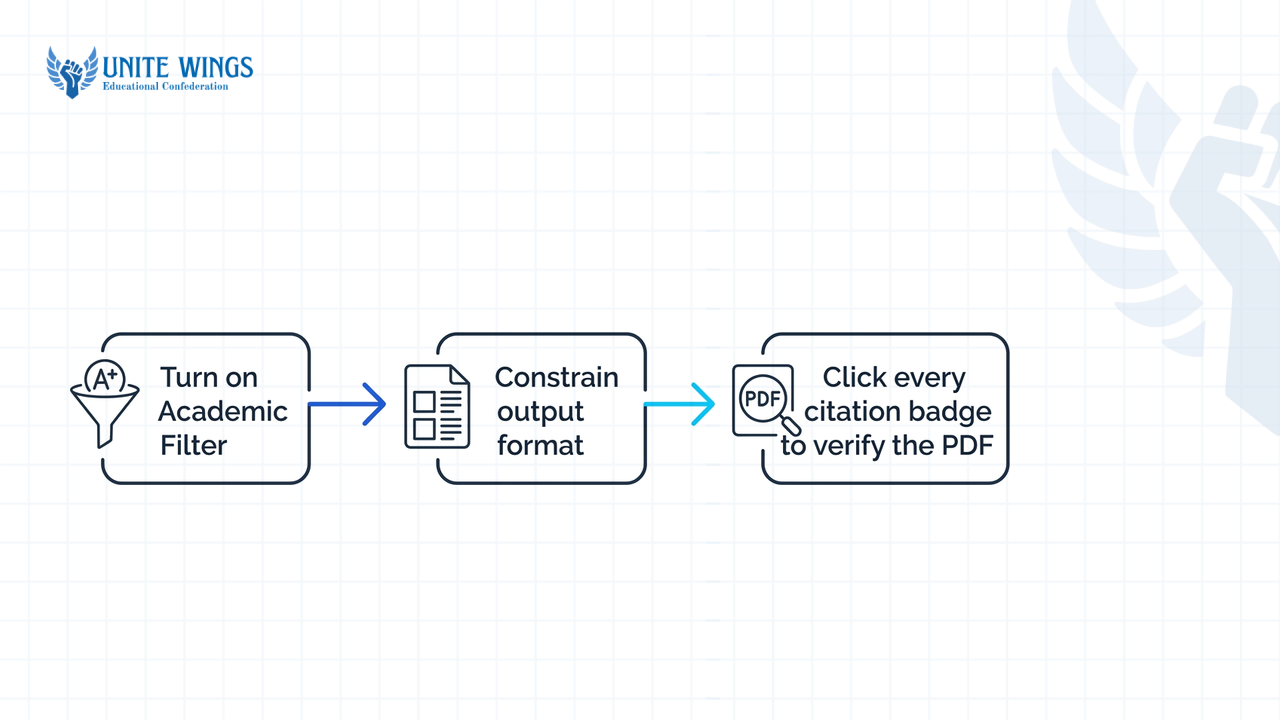
When using Perplexity for students/freshers working on a minor project report or seminar paper, follow this three-step setup to avoid bad links:
- Turn on the Academic Filter: Before typing your prompt in Perplexity, click the Focus or Filter icon inside the search bar and select "Academic" so it queries scholarly journal databases and preprint servers instead of SEO blogs.
- Constrain the output format: Use the prompt: "List 5 peer-reviewed papers published between 2023 and 2026 on [topic]. For each paper, state the exact title, authors, publication venue, and the specific methodology stated in the abstract. Do not extrapolate beyond the visible text."
- Click every citation badge: Official documentation from both companies confirms that neither tool eliminates hallucinations completely, as noted by Noxi. Even with Perplexity's Academic Filter on, the model can misread abstract metadata or merge findings from two separate papers. Always click the numbered
[1]or[2]link to confirm the PDF opens before adding it to your bibliography.
If you need a structured workflow for literature reviews and semester projects without fabricated footnotes, our Research with AI: Perplexity and NotebookLM walks through pairing live citation discovery with source-grounded reading.
Is Perplexity or ChatGPT better for debugging DSA and lab code?
ChatGPT is noticeably stronger for computer science and engineering students who need raw code generation, Data Structures and Algorithms (DSA) problem solving, and step-by-step debugging, according to 2026 analyses by Coursera and Medium. While ChatGPT acts like an interactive coding tutor that maintains state across long conversations, Perplexity is built to retrieve up-to-date developer documentation, Stack Overflow threads, and recent framework patches.
Here is how that difference plays out during campus placement prep or a college lab exam:
- Use ChatGPT when your logic fails hidden test cases: Suppose your Dynamic Programming solution in C++ throws a
Time Limit Exceeded (TLE)orSegmentation Faulton LeetCode or CodeChef. Paste your code into ChatGPT and ask: "Trace my code step-by-step on the input[4, -1, 2, 1]and show me the exact iteration where the index goes out of bounds." ChatGPT holds your full code context in memory and explains the recursion tree without losing track of your variable names over ten follow-up messages. - Use Perplexity when a library updates and breaks your build: Suppose you are building a full-stack hackathon project using a 2026 release of Next.js, FastAPI, or LangChain, and ChatGPT keeps giving you deprecated syntax from an older version. Paste the exact terminal error into Perplexity. Because it searches live tech blogs, GitHub issues, and official documentation on every query, it pulls the patched syntax released last week.
What most students get wrong is assuming Perplexity Pro cannot write good code. If you pay for Perplexity Pro, you get multi-model access that lets you switch the underlying model from Perplexity's default engine to Anthropic's Claude or OpenAI's models inside Account Settings, as confirmed by Enrich Labs. Toggling Perplexity Pro to an Anthropic or OpenAI reasoning model upgrades its coding output, though ChatGPT's native canvas and dedicated code interpreter environment remain easier to work in for long debugging sessions.
How do the free daily limits compare between Perplexity and ChatGPT in 2026?
Perplexity's free tier gives you unlimited basic web searches alongside a strict cap of 3 Pro Searches per day and 1 Deep Research query per month, according to FreeAcademy. ChatGPT's free tier gives you unlimited standard text chats using OpenAI's base models (such as GPT-6 Luna), while placing tight daily caps on file uploads, image generation, and Deep Research, as reported by CatDoes.
Because exact free-tier quotas shift whenever OpenAI or Perplexity rolls out new model updates, check the live plan comparison inside each tool's "Upgrade" menu if a limit triggers mid-session.
For a student paying ₹0/month, the smartest approach is to stop treating one tool as a replacement for the other. Keep both pinned in your browser and split your daily workload so you never hit a paywall during exam week:
- Save your 3 daily Perplexity Pro Searches for multi-hop questions: Do not waste your Pro Search toggle on simple definitions like "What is normalization in DBMS?" Leave the Pro toggle off for basic web lookups (which are practically unlimited). Turn Pro Search on only when you need the AI to search multiple sources, compare numbers, and synthesize a structured brief—for example, comparing the recent financial ratios of two Indian FMCG companies for an MBA case study.
- Use ChatGPT Free for concept breakdowns and mock viva practice: Since standard text chats on ChatGPT's free tier are unlimited, use it for back-and-forth studying. Paste a syllabus topic and say: "Ask me 5 viva questions one by one on Operating System deadlocks, wait for my answer, and correct my mistakes."
- Never burn ChatGPT's free file upload quota on short notes: ChatGPT Free locks you out of document uploads quickly after a few files. If you only have three pages of text from a PDF or a short code file, copy and paste the raw text directly into the chat box instead of attaching the file.
Which AI handles uploaded 100-page textbook PDFs better?
ChatGPT Plus handles massive textbook PDFs much better, supporting single file uploads up to 512 MB and context lengths up to 2 million tokens, according to FileUploadGPT. Perplexity Pro restricts standard file uploads to 40 MB per file with a maximum of 10 files per prompt (RankPlaybook), though its structured "Projects" tool accepts files up to 100 MB and its "Spaces" workspace can hold up to 100 standing sources (Enrich Labs).
If you are trying to study from a scanned 250-page Indian engineering reference book (like a digital copy of Morris Mano for Digital Logic or Sadiku for Circuit Theory), file size and multimodal reading matter more than web search.
According to a document processing review by DataStudios, ChatGPT's paid tiers ingest dense multimodal PDFs—reading body text alongside circuit diagrams, tables, and embedded charts—within a single continuous context window. You can upload a 90 MB textbook PDF and ask: "Compare the block diagram on page 42 with the state table on page 45 and explain how the clock pulse triggers the transition."
If you upload that same 90 MB textbook into a standard Perplexity Pro chat prompt, the upload fails immediately because of the 40 MB ceiling. To make Perplexity work with large semester syllabi, you have to use a workaround:
- Option A (Use Perplexity Projects): Move out of the standard search bar into Perplexity's "Projects" feature, which bumps the individual file limit to 100 MB.
- Option B (Split by chapter for Perplexity Spaces): Use a free PDF splitter to slice your 120 MB textbook into five 24 MB unit-wise PDFs. Upload those unit PDFs into a Perplexity "Space" (which aggregates up to 100 standing sources) so you can query across your syllabus alongside live web sources.
If you want to learn how to set up custom GPTs, Projects, and Study Mode so large syllabi turn into interactive practice tests, check out our ChatGPT Masterclass.
If an Indian student can only pay for one Pro subscription, which one is worth ₹2,000/month?
If your budget is capped at ₹2,000/month, Perplexity Pro gives you more flexibility because one subscription lets you switch between frontier models from OpenAI, Anthropic, and Google, and verified university students can cut the price to $10/month (roughly ₹850–₹900) through Perplexity Education Pro, according to Whizi and FreeAcademy. However, if you do not have an international card or an iPhone and only have ₹400 to spend via UPI, OpenAI's budget tier ChatGPT Go at ₹399/month is the most practical upgrade in India (OpsLyft).
Here is the exact 2026 pricing, tax, and payment breakdown for Indian students across all paid tiers:
| Subscription Tier | Official India Price (2026) | Model Access | Payment & UPI Reality in India | Best Student Fit |
|---|---|---|---|---|
| Perplexity Education Pro | $10/month (~₹940–₹970, fluctuates with USD-INR rate) | Multi-model switching (OpenAI, Anthropic, Google, Perplexity engines) | Web checkout billed in USD; requires international credit/debit card and SheerID verification. | Any college student with a valid ID card/enrollment proof and a card with international transactions enabled. |
| ChatGPT Go | ₹399/month (Fixed INR) | Expanded access to base OpenAI models (does not unlock full Plus reasoning models) | Native UPI supported directly on web and mobile checkouts (Google Pay, PhonePe, Paytm). | Budget-conscious students who hit free message caps during exams and want easy UPI billing. |
| ChatGPT Plus | ₹1,999/month (Includes ~₹305 / 18% GST) | Exclusive to OpenAI's full proprietary ecosystem (such as GPT-6.1 Sol) | Native UPI supported on web checkout and Google Play / Apple App Store. | CS/IT students doing heavy coding, DSA prep, and 100+ page multimodal textbook analysis. |
| Perplexity Pro (Standard) | $20/month on Web (~₹1,885–₹1,940) or ₹1,999/month on Indian iOS App Store | Multi-model switching across OpenAI, Anthropic, and Google models | Web requires USD card. To pay in INR or via UPI, you must subscribe through mobile app stores. | Final-year researchers, MBA students, and freshers who want three AI ecosystems for the price of one. |
Pricing and payment gateways change periodically; verify the final GST breakdown on the checkout screen before approving a recurring mandate.
Two Indian billing traps most comparison blogs miss
First, understand the UPI and currency barrier. ChatGPT Plus and ChatGPT Go charge a fixed INR price on the web (₹1,999 and ₹399, inclusive of 18% GST) and support UPI apps like Google Pay, PhonePe, and Paytm natively on desktop web checkout, as confirmed by Kraviona and Equity Research India. Perplexity's direct web checkout bills in US Dollars ($20/month or $10/month for students), which requires an international credit or debit card and fluctuates between ₹1,885 and ₹1,940 before bank forex markup fees, according to Whizi. If you want to pay for Perplexity Pro via UPI or local rupee billing without a forex card, you have to buy it through the Apple iOS App Store or Google Play Store, where local taxes are bundled at a flat ₹1,999/month (SubsCheap).
Second, watch out for SheerID verification rules and shared account scams. Many students assume a college .ac.in or .edu.in email address automatically gives the $10/month Perplexity Education Pro discount. As AIPricing.guru points out, holding a college email is not enough on its own: you must pass formal institutional validation through SheerID inside Account Settings, which often asks you to upload an active university ID card, fee receipt, or semester registration document with the current 2026 academic dates clearly visible.
Avoid third-party reseller marketplaces (like SubsKart or GroupAI Tools) that advertise heavily discounted shared Perplexity Pro accounts via UPI. Because Perplexity Pro limits file uploads and workspace quotas across the account, sharing a single login with five strangers means your uploaded resume or project synopsis is visible in the shared history, and you will constantly hit file-upload lockouts when other users exhaust the prompt caps.
How to set up your AI study stack this week
Do not buy a subscription before testing whether the free tiers cover your current semester workload. Take these three steps over the next seven days:
- Today (10 minutes): Create free accounts on both Perplexity and ChatGPT. In Perplexity, switch the search filter to "Academic" and run one search for your current minor project or assignment topic to see how inline citations work.
- During your next lab session: Take one piece of buggy C++, Java, or Python code from your college lab manual. Run it through ChatGPT Free to trace the variable states, and run the compiler error message through Perplexity Free to pull recent Stack Overflow threads.
- Before paying ₹1,999 next month: If you hit free limits and have a valid college ID card plus a debit/credit card with international usage turned on, apply for the $10/month Perplexity Education Pro plan via SheerID first. If you only have UPI and need higher chat limits for daily study, start with ChatGPT Go at ₹399/month.
Master AI research before your next project submission
Having the right tool is half the job; knowing how to verify sources, cross-check PDFs, and write without fabricated citations is what saves your grades. Join the Research with AI: Perplexity and NotebookLM masterclass to build a complete, reusable workflow that takes you from a blank topic to a fully cited project report or placement company brief in under an hour.
Frequently asked questions
Which AI tool is better for writing college research papers without fake citations?
Perplexity is better for research papers because it searches the live web on every query and links every statement to a numbered source, achieving an 85% valid citation support rate in 2026 audits. Use its Academic Filter to restrict sources to scholarly journals, and click each link to verify the abstract before citing.
Is Perplexity Pro or ChatGPT Plus better for debugging C++ and Python lab assignments?
ChatGPT Plus is better for debugging C++ and Python lab assignments because it acts like an interactive coding tutor, holding long code files in context and tracing logic errors step by step. Perplexity is better used as a lookup tool for recent framework documentation, library syntax updates, and live Stack Overflow fixes.
Can ChatGPT or Perplexity read an entire 200-page engineering textbook PDF without crashing?
ChatGPT Plus handles 200-page engineering textbook PDFs easily, supporting single files up to 512 MB and 2 million tokens while reading diagrams, tables, and charts natively. Perplexity Pro caps standard chat uploads at 40 MB per file, requiring you to split large textbooks or use its Projects feature (capped at 100 MB).
How does ChatGPT Go at ₹399/month compare to ChatGPT Plus in India?
ChatGPT Go is an entry-level ₹399/month plan in India designed for students who hit the message limits of the free tier but do not want to spend ₹1,999/month. It expands your daily message allowances and accepts UPI, but it does not give the full heavy-reasoning models included in ChatGPT Plus.
Does Perplexity accept UPI or Indian debit cards for its web subscription?
Perplexity's direct website bills in US dollars ($20/month standard or $10/month for verified students) and requires an international credit or debit card rather than UPI. To pay for Perplexity Pro using UPI in rupees, you must subscribe through the mobile app stores, where billing is set at ₹1,999/month.
How does Perplexity's Education Pro discount work for Indian universities?
Verified university students get Perplexity Education Pro for $10/month (50% off the standard $20 rate) by applying through the Upgrade settings screen. Having a college email address is not enough on its own; you must pass SheerID verification by submitting proof of active university enrollment, such as a dated college ID card.
Newsletter
Stay updated with our latest news and insights.