
Why You Hit the Claude Message Limit Fast and 7 Free Fixes
Stop re-sending a 40-page PDF with every reply. Seven simple chat habits that stretch your free daily Claude quota 4x further during exam week.
You hit the Claude message limit fast because Claude does not count messages; it counts the total compute tokens processed on every single turn, as documented by The Science Talk. When you upload a syllabus PDF or keep a coding thread going for twenty replies, Claude re-reads the entire conversation history and every attached file from scratch each time you hit send, locking you out in as few as 8 to 15 messages, according to Claude AI Class. If you are looking for how to bypass claude message limit for free, the solution is changing how you manage context, attachments, and session timers so you get up to 40 messages per window instead of 8.
In short
- Start a new chat every 15 to 20 messages and paste a 200-word summary from your old thread so you stop paying the token tax of re-reading past history.
- Never drop a raw 40-page syllabus or textbook PDF into your main study chat; extract the text into Markdown or summarize it in a throwaway chat first.
- Check your exact reset timer at
claude.ai/settings/usageinstead of waiting for midnight IST, because free quotas run on a rolling 24-hour clock anchored to your first prompt. - Batch 3 to 5 related coding or placement prep questions into one mega-prompt using XML tags so Claude answers everything in a single turn.
Why does Claude lock me out after just 8 messages when a PDF is attached?
Claude locks you out after 8 to 15 messages with a PDF because the model has no permanent short-term memory between turns and must re-read the entire PDF plus every previous prompt and reply on every new message, according to Claude AI Class. Under normal text-only conditions, AIToolsRecap notes that free users get 15 to 40 messages per session on Claude Sonnet (which has a 1-million-token context window), but heavy attachments burn through that dynamic token budget in minutes.
Anthropic does not give you a fixed number of messages per day. Instead, your free account gets a dynamic token and compute allowance that fluctuates based on server demand, model complexity, and message length. Both the prompt you type and the long response Claude generates draw from this exact same session budget.
When you attach a gate exam PDF or a 50-page university unit book, you trigger cumulative context re-reading. Look at the hidden token math comparing a single long thread against starting fresh:
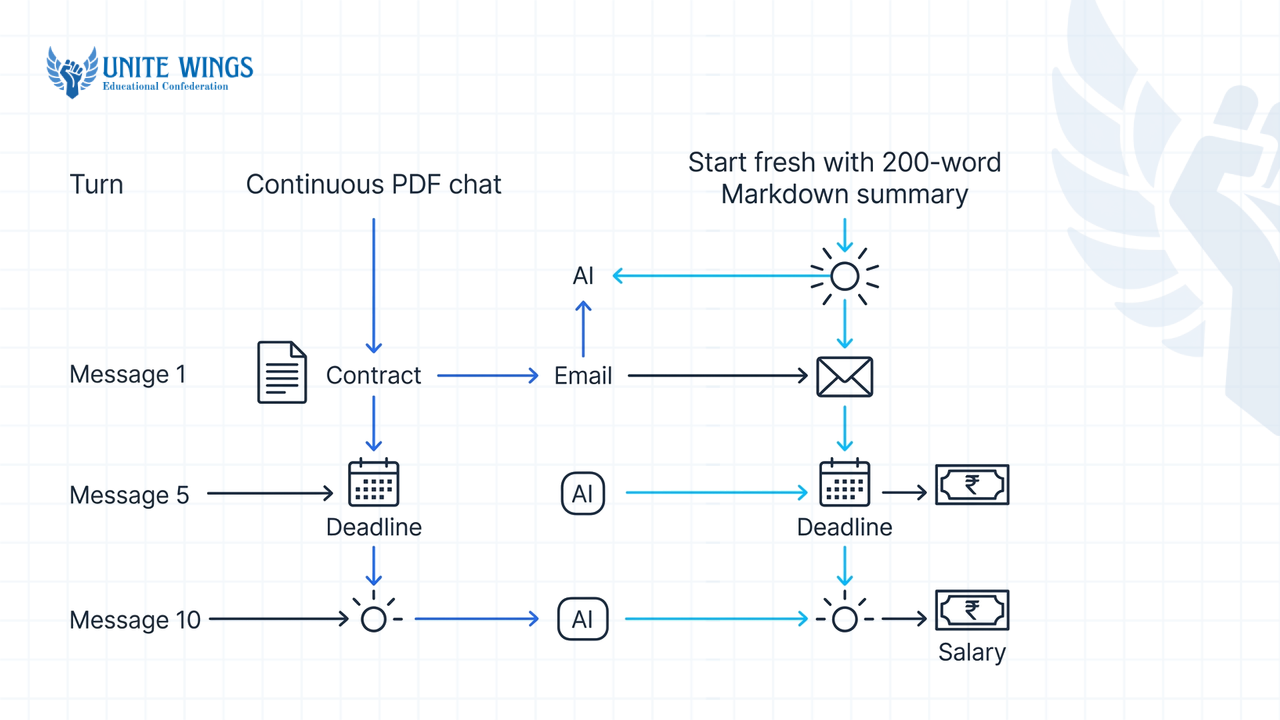
| Turn number | What happens in one continuous PDF chat | What happens when you extract text and start fresh |
|---|---|---|
| Message 1 | You upload a 20-page PDF + ask Question 1. Claude reads 1x PDF + Q1. | You paste a 200-word Markdown summary + ask Question 1. Claude reads 200 words + Q1. |
| Message 5 | You ask Question 5. Claude re-reads the 20-page PDF + Q1 through Q4 + Replies 1 through 4 + Q5. | You ask Question 5. Claude reads the 200-word summary + Q1 through Q4 + Replies 1 through 4 + Q5. |
| Message 10 | You ask Question 10. Claude has now processed the weight of that 20-page PDF ten separate times. Quota exhausted. | You ask Question 10. Total tokens processed remain under a fraction of a single PDF upload. You still have 20+ messages left. |
By message 10 in an unoptimized chat, you have forced Claude to read a 20-page document ten times just to answer a one-line follow-up question. That is why a single long thread burns 5x more tokens than starting fresh with clean notes.
Most students also miss the 5-minute server cache timeout. According to AI Superhub, Claude's prompt cache expires after roughly 5 minutes of inactivity. If you upload a heavy document, ask two questions, take a 10-minute chai break, and come back to ask a third question, the server cache is cold. Claude has to re-compute the entire thread from scratch, spiking your token consumption right when you resume studying.
What time of day do Claude free message limits reset in IST?
Claude free message limits do not reset at midnight IST or any fixed calendar hour; instead, Fast.io confirms that the free tier runs on a rolling 24-hour countdown timer anchored to the exact timestamp of your very first message in that cycle. Paid plans like Pro and Max ($100/mo) operate on a rolling 5-hour session window from the first prompt, alongside cumulative weekly caps, as reported by AI Business Weekly.
If you sit down in your hostel room and send your first prompt at 9:15 PM IST on Tuesday, your free cycle starts at 9:15 PM. If you burn through your quota by 10:30 PM IST, waiting up until 12:00 AM midnight will do nothing. Your quota will reset at 9:15 PM IST on Wednesday.
Here is how the plans compare in 2026 so you know exactly what clock you are running against, based on data from Christopher Alarcon and AI Business Weekly:
| Plan Tier | Session Reset Window | Approx. Messages per Window | Key Structural Rules |
|---|---|---|---|
| Free | Rolling 24 hours from first prompt | 15 to 40 messages (drops to 10–15 during peak traffic) | Runs on Claude Sonnet (1M context); includes web search, Artifacts, and max 5 Projects. |
| Pro | Rolling 5 hours from first prompt + weekly cap | 45 to 160 messages (at least 5x Free capacity) | Priority access during peak hours; access to Opus models. |
| Max ($100/mo, formerly Max 5x) | Rolling 5 hours from first prompt + weekly cap | High-volume tier above Pro | Renamed from Max 5x on October 30, 2026; no peak-hour throttling. |
| Ultra ($200/mo, formerly Max 20x) | Weekly rolling cap only | Highest individual capacity | Renamed from Max 20x on October 30, 2026; verified Ultra accounts have no 5-hour session limit. |
Free users in India face a timing trap during evening study hours. According to Fast.io, free accounts experience traffic-based throttling during global peak business hours, which can slash your allowance from 40 messages down to 10 or 15 prompts. When it is evening study hours (IST), prime time for Indian college students doing assignments or LeetCode prep, it is morning on the US East and West Coasts. Global server load peaks, and Anthropic throttles free accounts first.
Fix 1: Anchor your clock early and check the live meter. Send a single short prompt early in the morning when you wake up (even just "Hi") to start your rolling clock early, and do your heavy work before evening US traffic hits. Stop guessing when your lockout ends: open claude.ai, click your profile name in the bottom left, select Settings, and click Usage (or visit claude.ai/settings/usage directly) to see the visual progress bars for your current session and exact reset time, as outlined by Christopher Alarcon.
Also watch out if you use multiple tools. The Science Talk notes that the web interface, desktop app, and terminal queries in Claude Code all pull from the exact same account-level usage pool. Running a terminal query in Claude Code will eat the messages you were saving for your browser study session.
How does starting a new chat save my free message quota on Claude?
Starting a new chat resets your accumulated conversation history to zero tokens, which stops Claude from re-processing old questions and answers and preserves your session quota for new work, according to Saltech Systems. Every 15 to 20 messages, or the moment you switch from one subject or coding bug to another, you should close the current thread and open a fresh one, as recommended by Tenorshare's 2026 guide on bypassing Claude message limits.
Most students keep a single "Placement Prep" or "Final Year Project" thread open for days because they are afraid of losing context if they open a new chat. That habit guarantees you hit the wall in under 15 turns. You can keep the memory without paying the token tax by using two built-in workarounds.
Fix 2: Use the 200-word meta-prompt handoff every 15 messages. Before you abandon a long thread (or when you reach message 15), ask Claude to compress the thread for you. Copy and paste this exact prompt from Tenorshare's 2026 workflow guide:
"Summarize our discussion in 200 words, including key decisions and next steps, formatted as a system prompt for my next chat."
Copy Claude's 200-word output, click New Chat, paste that summary at the top of your first message, and ask your next question. You just drastically reduced your token overhead while keeping every decision intact.
Fix 3: Move recurring study files into Claude Projects for cached reading. According to DataStudios' 2026 report on file upload limits, free accounts can create up to 5 Claude Projects. Instead of uploading your resume, project documentation, or semester syllabus into every new chat, upload them once into a Project knowledge base. Official Claude Documentation confirms that Project knowledge bases cache referenced files, letting you query those documents across multiple fresh chats without paying the full upload token cost on every message, provided you work continuously so the 5-minute inactivity cache does not expire. If you want to set up Projects and Artifacts properly for semester exams and coding sprints, the Claude Masterclass walks through the exact workspace setup step by step.
How do I compress long syllabus PDFs or code files before uploading to Claude?
You can compress long syllabus PDFs and code files by stripping out boilerplate comments, splitting documents so you only upload the exact pages you need, or converting heavy PDFs into clean Markdown text via a throwaway chat before starting your main workflow, according to AI Superhub. Because standard web chats allow up to 20 files at 500 MB each while Claude Projects and code execution environments enforce a strict 30 MB per-file limit, pre-trimming files prevents both upload errors and instant token lockouts, based on 2026 data from Fast.io and DataStudios.
Before you attach anything, check how Claude's file rules actually work in 2026 according to Fast.io's file attachment guide:
- Under 101 pages: Claude reads both text and visual elements (charts, diagrams, images), which increases token consumption.
- 101 to 1,000 pages: Claude automatically switches to text-only extraction and ignores all charts, diagrams, and graphics. You still get hit with a massive raw-text token flood that drains your free quota in a few messages.
- Over 1,000 pages: Rejected immediately with an "Uploaded file is too large" error, even if the file size is only 5 MB.
Never upload a 300-page reference textbook when you only need to study Unit 3. Here are three ways to shrink your input weight before Claude sees it:
Fix 4: The throwaway chat extraction method for PDFs. If you have a dense 30-page research paper or syllabus PDF, do not upload it into the chat where you plan to write your assignment or practice viva questions. As recommended by AI Superhub, open a temporary chat, upload the PDF, and prompt: "Extract all core formulas, definitions, and syllabus topics from pages 4 to 12 into lean Markdown bullet points. Omit introductory fluff." Copy the Markdown output, delete or ignore that throwaway chat, open a fresh chat, and paste the Markdown text. You only pay the heavy PDF reading tax once instead of on every follow-up turn.
Fix 5: Strip comments, console logs, and node_modules from code. When debugging a full-stack project for campus placements, students often drag 10 complete .js or .py files into the chat. According to AI Superhub, stripping out excessive comments, whitespace, and irrelevant functions before pasting your code cuts unnecessary parsing overhead. Instead of uploading a 600-line file, paste only the 40-line function that is throwing the error plus the exact terminal stack trace.
How can I combine multiple questions into one mega-prompt to save messages?
You can combine multiple questions into one mega-prompt by grouping your tasks inside clear XML tags, such as <question_1> and <question_2>, and instructing Claude to answer all of them in a single response, a practice recommended by the official Claude Help Center. Instead of sending five separate back-and-forth messages that force Claude to re-read the entire context five times, a structured mega-prompt spends your context read once.
What most students get wrong when using Claude for students/freshers prep is treating the chat box like WhatsApp. They type:
- "Explain normalization in DBMS."
- "Now give me an example of 3NF."
- "What is BCNF and how is it different?"
- "Ask me 3 TCS NQT interview questions on this."
- "Keep the answers short."
That is 5 separate turns. By turn 5, Claude has re-read its own explanation of normalization four times.
Fix 6: Batch sequential tasks using XML tags. Whenever you are studying a topic, debugging code, or tailoring your resume for an off-campus drive on Naukri or Unstop, pause for 60 seconds and write down every output you need from that text. Then use this exact XML template in a single prompt:
I am preparing for a technical interview on Database Management Systems. Read the context below and complete all three tasks in a single response, keeping total output under 400 words.

<context>
[Paste your clean notes or syllabus snippet here]
</context>

<task_1>
Explain the difference between 3NF and BCNF using one concrete SQL table example.
</task_2>

<task_2>
List the 3 most common viva trap questions interviewers ask freshers about normalization, with 2-sentence answers for each.
</task_2>

<task_3>
Write one 2-line resume bullet point showing I optimized a college project database to 3NF.
</task_3>
Fix 7: Cap Claude's output length inside your prompt. Remember that both your input prompt and Claude's output response consume tokens from the same session budget. If you ask an open-ended question, Claude Sonnet will happily generate an 800-word essay when you only needed a 5-line code fix or a 3-bullet summary. Always end your prompt with an explicit output constraint such as "Reply in under 150 words", "Output only the corrected code block with no explanation", or "Give me a 5-row markdown table only." Shorter outputs keep your conversation history lean, which directly lowers the re-reading cost on your next message.
Your 48-hour action plan to stop hitting the lockout wall
Do not wait until the night before your semester exam or coding round to test these habits. Make three changes to your setup this week:
- Today (Takes 2 minutes): Open
claude.ai/settings/usageand bookmark it in your browser bar. Check your current session bar before you upload any file so you never lose a prompt mid-thought. - Tonight (Takes 10 minutes): Create 2 Claude Projects on your free account to handle your primary coding project or placement prep and your toughest semester subject. Convert your syllabus or reference notes into clean Markdown or
<30 MBchunks and upload them to the Project knowledge base so they are cached. - Tomorrow morning: Trigger your rolling 24-hour free window early in the morning with a single test prompt, and use the XML mega-prompt template above for your afternoon study session so you finish before evening US peak traffic throttles free accounts.
Build a study and coding workflow that never gets locked out
If you want to set up Claude properly for college assignments, coding projects, and placement prep, join the Claude Masterclass. You will walk away with a ready-to-use Claude Projects setup, custom Artifacts templates for coding and study notes, and a prompt library that gets 4x more output out of a free account.
Frequently asked questions
Why does Claude say I reached my limit after only a few messages?
Claude locks you out after a few messages because usage is metered by total compute and tokens processed rather than a fixed message count, according to The Science Talk. Attaching a large PDF or continuing a long chat forces Claude to re-read the entire history on every turn, exhausting your quota in 8 to 15 messages.
How many messages do you actually get on Claude's free tier?
Under standard text-only conditions, free users get approximately 15 to 40 messages per rolling window on Claude Sonnet, according to AIToolsRecap. However, Fast.io notes that heavy server traffic during peak business hours or large file attachments can drop your actual allowance to 8 to 15 prompts.
What is the difference between Claude's context window and usage limit?
The context window is the maximum amount of text and files Claude can hold and read inside a single conversation, reaching up to 1 million tokens on modern Sonnet models according to DataStudios. Your usage limit is the total compute and token budget allowed across your account during a rolling 24-hour or 5-hour session window.
Can I check my remaining Claude messages using a command or meter?
Yes, you can check your live usage meter by opening claude.ai, clicking your profile name in the bottom left, selecting Settings, and clicking Usage, as confirmed by Christopher Alarcon. This page shows visual progress bars for your current session and weekly allowances along with your exact reset timestamp.
Does using Claude Code or the desktop app give me extra free messages?
No, using the desktop app or Claude Code in your terminal does not give you extra messages. According to The Science Talk, the web interface, desktop app, and terminal tools all draw from the exact same account-level usage pool and share identical rate limits.
Can I carry conversation memory across different Claude chats for free?
Yes, AIToolsRecap confirms that free accounts include cross-chat memory and allow up to 5 Claude Projects. You can also carry detailed context into a fresh thread for free by asking Claude at the end of a session to generate a 200-word system prompt summary of your key decisions and pasting it into a new chat.
Newsletter
Stay updated with our latest news and insights.