
How to Use Perplexity AI for Students: 7 Study Workflows
Seven practical ways to use Focus modes, Spaces, and PDF uploads to turn a 60-page syllabus unit into cited study notes in 20 minutes.
Learning how to use Perplexity AI for students comes down to changing two defaults: switching your Focus mode from "All" to "Academic" or "Math" before searching, and uploading your semester syllabus PDFs into a permanent Space (now also labeled Projects) instead of a temporary chat thread. Unlike ChatGPT, which generates text from memory, Perplexity queries the live web and your uploaded class notes on every prompt, attaching numbered citation badges ([1], [2]) to every sentence so you can verify formulas and dates before writing them on an exam sheet. By early 2026, Perplexity's monthly query volume crossed 100 million queries, driven largely by student adoption, according to KidsAiTools (2026).
In short
- Never upload syllabus PDFs into a normal chat thread: Files attached to standard threads are automatically deleted after 7 days; upload them into a Space (Project) where they stay indexed all semester.
- Change your Focus mode by subject: Pick Academic Focus (searches PubMed, arXiv, Semantic Scholar) for literature reviews, Math / Wolfram|Alpha Focus for engineering numericals, and Finance Focus for B.Com or MBA company analysis.
- Check Indian pricing before paying: The Airtel 12-month free Perplexity Pro offer closed to new registrations on January 16, 2026; verified college students can get Education Pro for $10/month via SheerID instead of the standard $20/month (~₹1,660).
- Export threads natively: Click the three-dot menu next to the share button on any thread to download clean PDF, Markdown, or DOCX revision notes with citations intact.
How is Perplexity AI different from Google Search and ChatGPT for college work?
Google Search gives you a list of web links to read yourself, and standard ChatGPT writes answers from static training memory that can invent fake paper titles. Perplexity AI works as a real-time conversational answer engine that searches live internet indices on every turn and attaches numbered inline citations to every factual claim, as documented by GetInfoToYou.com and AI Agents Kit (2025).
When you are preparing a final-year literature survey or checking a VTU syllabus concept at 11 PM, using the wrong tool costs you hours. If you ask standard ChatGPT for five IEEE or Springer papers on "load balancing in cloud computing," it frequently fabricates plausible-sounding author names and broken DOIs. If you type the same query into Google, you have to click through ten SEO blog posts and ads before finding a clean definition.
| Feature | Google Search | ChatGPT (Standard) | Perplexity AI |
|---|---|---|---|
| Core mechanism | Web index directory returning ranked links | Generative chatbot built for creative synthesis and writing | Real-time answer engine retrieving live web and academic sources |
| Citations | None (you click and read each link) | Only when web browsing is triggered; often omits inline line-by-line links | Inline numbered badges ([1], [2]) on every claim |
| Academic filtering | Requires separate Google Scholar tab | No native toggle to restrict strictly to peer-reviewed DOIs | Dedicated Academic Focus (Semantic Scholar, PubMed, arXiv) |
| Best college use case | Finding official university circulars (VTU, Mumbai University portals) | Drafting emails, rewriting your resume bullets, brainstorming code architecture | Breaking down syllabus units, literature reviews, fact-checking textbook claims |
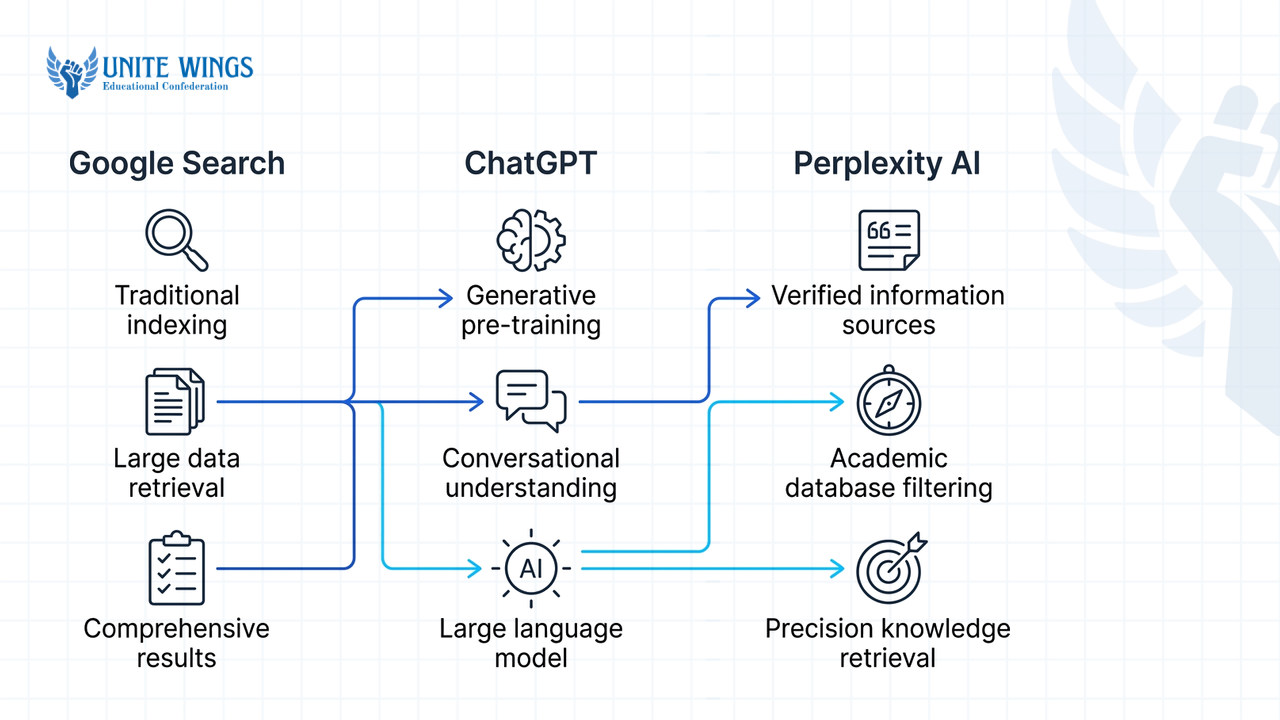
This comparison follows the architecture breakdown in QuickSaaSGuide.tech. Use a simple rule for your semester work: if you need to verify a fact, formula, or citation, start in Perplexity; if you need to rewrite or format text you already have, move it to ChatGPT or Claude.
Which Focus mode should I pick for engineering vs commerce subjects?
For engineering, computer science, and sciences, pick Academic Focus to pull from arXiv and Semantic Scholar, or Math / Wolfram|Alpha Focus to run symbolic algebra and calculus. For commerce, economics, and MBA coursework, combine Finance Focus and Academic Focus to parse corporate filings, market data, and economic journals, as detailed by TechCompanyNews.com and GetFuturix.com.
Most students leave Perplexity on the default "All" web mode. That lets low-quality tutorial blogs and forum posts pollute your exam answers. Before you hit enter, click the Focus button inside the search bar and switch the engine based on your branch:
- Academic Focus (All branches for projects and seminars): Routes your query strictly to peer-reviewed repositories including Semantic Scholar, PubMed, arXiv, and registered DOIs, according to Vertech Academy (2026). What most students get wrong here is trusting the AI summary blindly. While Academic Focus filters exclusively for real peer-reviewed papers, AI synthesis can still oversimplify a paper's methodology or misattribute a number. Always click the
[1]badge, open the primary PDF, and verify the abstract before putting that citation in your B.Tech project report. - Wolfram|Alpha / Math Focus (Engineering, Physics, Stats): Routes technical, algebraic, and scientific queries to a computational and symbolic math engine rather than guessing numbers with language tokens, as explained by AppliedAI.tools. Use this for Laplace transforms, thermodynamics cycles, and probability distributions.
- Finance Focus + Web Focus (B.Com, BBA, Economics, MBA): Narrows queries to financial metrics, corporate disclosures, SEC filings, and market data, according to Glbgpt (2025) and Reddit's Perplexity student community. When analysing an Indian listed company for a commerce assignment, pair Finance Focus with a custom prompt constraint: "Focus strictly on Indian market data, SEBI disclosures, and FY 2024–25 annual reports."
How do I upload syllabus PDFs and class notes into a Perplexity Space?
Open the Spaces (or Projects) tab in the left sidebar, click Create New Space, name it after your subject, and upload your syllabus PDF and lecture slides under Add Sources. Free tier accounts can upload up to 3 files per day and 5 files per Space, whereas Pro accounts support 50 documents per Space at 25MB to 40MB per file, according to Fast.io (2026) and Otio.ai.
Note on interface naming: Perplexity has transitioned the feature historically called "Spaces" into persistent workspaces labeled "Projects" in newer interface rollouts, as tracked by TheOxfordAISchool.com. Whether your sidebar says Spaces or Projects, the underlying storage rule is the most important trap to avoid in Perplexity.
What most students get wrong: Students attach their 80-page textbook PDF or prof's PPT directly into the main home-screen search bar using the paperclip icon. According to Fast.io (2026), files attached to standard ad-hoc chat threads are ephemeral and get automatically wiped after 7 days. Files uploaded inside a Space/Project stay permanently indexed across the entire semester.
Follow these steps to set up a subject workspace for an Indian university course:
- Log into
perplexity.ai(the free tier works immediately with a Google login and no credit card) and click Spaces / Projects on the left sidebar. - Click Create New Space and name it by your exact subject code, for example:
VTU BCS502 - Computer Networks. - Click Add Sources and upload your university syllabus PDF and your professor's module PPTs. Keep individual files under the 25MB–40MB cap (Fast.io sets Pro Space document limits at 25MB per file, while Otio.ai reports consumer file caps up to 40MB; compress scanned handwritten PDFs if they exceed 25MB).
- In the Custom Instructions box (documented by GitHub.io's Perplexity guide), paste this standing rule: "You are an Indian engineering exam tutor. Answer all questions strictly using the uploaded syllabus and lecture notes first. Structure every 10-mark answer with a definition, a labelled ASCII block diagram or step list, formulas with variable definitions, and one real-world application."
- Prune your files before finals. Uploading conflicting notes, such as two different professors' PPTs that use different notation for the same algorithm, causes context window pollution and degrades answer accuracy. Keep only your primary reference PDF and the official syllabus in the Space. If you have a massive local archive of 10+ full textbooks, pair Perplexity with Google's NotebookLM; we teach the exact handoff between the two tools in our Research with AI: Perplexity and NotebookLM live session.
7 daily study workflows using Indian university syllabus examples
Once your Space and Focus modes are set, stop typing two-word searches like "explain TCP." Use these seven structured workflows to cut your exam prep and assignment time in half.
Workflow 1: Deconstruct a VTU or Mumbai University syllabus unit into an exam checklist
University syllabus PDFs dump 15 topics into a single paragraph without telling you how they connect. Upload your syllabus into your Space and run this prompt:
Prompt: "Read Module 3 from the uploaded VTU Operating Systems syllabus PDF (Deadlocks: System model, Deadlock characterization, Methods for handling deadlocks, Deadlock prevention, Deadlock avoidance, Banker's algorithm). Break this module into a 5-day study checklist. Flag which sub-topics require numerical practice vs theory definitions, and cite standard textbook sections from Silberschatz."
Perplexity outputs a day-by-day breakdown, separates the Banker's algorithm numericals from the four Coffman conditions theory, and links directly to university lecture notes hosting the exact syllabus breakdown.
Workflow 2: Verify textbook claims and outdated curriculum statements
Indian university textbooks often contain code syntax or regulatory rules from 2012. When your B.Com taxation or CS textbook states a rule that looks dated, switch to Web or Finance Focus and run a verification prompt:
Prompt: "My Mumbai University TYBCom syllabus notes state [insert textbook claim]. Verify whether this rule has been amended by SEBI or the Ministry of Corporate Affairs as of 2026, and cite the official circular date."
Workflow 3: Run a 3-minute literature review for your final-year IEEE project
Instead of opening 30 tabs on Google Scholar, turn on Academic Focus (or trigger Deep Research, which autonomously executes multi-step web queries across 20 to 40 sources in 2 to 4 minutes, according to Fello AI, 2026) and run this prompt:
Prompt: "Find 5 peer-reviewed papers published between 2023 and 2026 on plant leaf disease detection using lightweight CNNs on edge devices. Present them in a Markdown table with columns: Paper Title & Year, Dataset Used (e.g., PlantVillage), Model Architecture, Reported Accuracy %, and Limitations mentioned by the authors."
Workflow 4: Generate 2-mark vs 10-mark university exam answers
University valuation schemes reward structure. Inside your subject Space (where your custom instructions are already active), prompt Perplexity to format the exact same concept for both sections of your question paper:
Prompt: "Using the uploaded class notes on Normalization (1NF, 2NF, 3NF, BCNF), write: (A) a 4-line 2-mark definition for BCNF, and (B) a full 10-mark answer showing a step-by-step table decomposition from unnormalized form to BCNF using a college library database example."
Workflow 5: Commerce and MBA case study data extraction
When preparing a B.Com, BBA, or MBA assignment on an Indian company or sector, select Finance Focus and prompt:
Prompt: "Compare the debt-to-equity ratio, operating margin, and R&D spend of Tata Motors and Mahindra & Mahindra over the last 3 fiscal years. Put the numbers in a table and cite the exact investor presentation or annual report source for every figure."
Workflow 6: Placement company technical research before campus drives
When your placement cell announces a company visiting campus in 48 hours, use Perplexity to map their actual engineering or business stack instead of reading their generic "About Us" page:
Prompt: "Search recent engineering blogs, GitHub repositories, and job descriptions from Juspay (or TCS Digital / Infosys Specialist Programmer). List the primary programming languages, backend databases, and system design topics asked in their 2025–2026 fresher technical interviews."
Workflow 7: Bridge prerequisite gaps across semesters
If you are in 6th-semester Machine Learning and forgot 3rd-semester Linear Algebra, ask Perplexity to teach only the slice you need right now:
Prompt: "I need to understand Principal Component Analysis (PCA) for my Mumbai University AI exam tonight, but I forgot how eigenvalues and eigenvectors work. Explain only the exact matrix steps needed to solve a 2x2 covariance matrix numerical by hand, without general linear algebra history."
Can Perplexity solve numericals and code questions with step-by-step sources?
Yes. When you switch to Math Focus (or Wolfram|Alpha Focus) and explicitly instruct Perplexity to run Python code or symbolic verification, it breaks algebra, calculus, and engineering numericals into sequential steps rather than guessing the final digit, according to AppliedAI.tools and GetFuturix.com.
Standard language models fail at engineering numericals (like calculating the safe sequence in Banker's Algorithm, finding transfer functions in Control Systems, or solving Simpson's 1/3rd rule) because they predict the next word instead of computing numbers. To stop arithmetic hallucinations, add a verification line to every numerical prompt:
- Select Math Focus or toggle on Pro Search.
- Type the exact problem from your previous year question paper (PYQ).
- Add this exact line at the end: "Solve step-by-step showing every intermediate formula substitution so I can write it on a university theory sheet, and execute Python code in the background to verify the final numerical answer."
For computer science and coding labs (Data Structures in C, OOPs in Java, or Python labs covered in SNU.edu.in's CS tool breakdown), Perplexity's advantage over a standalone code editor is that it links the documentation and StackOverflow/GitHub issue right next to the fix. If your compiler throws a segmentation fault or a version deprecation error, paste the exact error trace and ask: "Why does this fail in Python 3.12, and show the corrected function with time and space complexity in Big-O notation."
How do I export Perplexity threads into clean revision notes before exams?
Click the three-dot menu next to the Share button at the top-right of any completed Perplexity thread and select Export as PDF, Markdown (MD), or DOCX, as documented by Texas A&M University's Perplexity Export Guide. For bulk exports or direct Notion database syncing, use browser extensions like SaveAI, Pactify, or AISaver.
Many outdated tutorials claim you have to use messy browser print-to-PDF screens or request a JSON dump just to save a study guide. Here is how exporting actually works in 2026:
- Single-thread revision notes (Native): Finish your Q&A inside a single thread (for example, all 5 modules of one subject). Click the three-dot menu in the top-right corner next to the share icon and choose DOCX (to edit in MS Word/Google Docs), Markdown (to drag and drop into Obsidian or Notion), or PDF (to read on your phone on the bus to the exam centre), per TAMU.edu.
- Keeping live citation links in Notion/Word: If you want clean formatting with clickable source badges preserved for a research paper, third-party Chrome extensions such as SaveAI, Pactify, and AISaver convert active threads directly into Notion pages or Word files, according to SaveAI (2026) and XWXExporter.
- Full account backup: Perplexity does not feature a native one-click "Export All" button for conversation history in settings. If you want an archive of every search session you have ever run, visit
perplexity.ai/account/detailsand use the official Data Export option, which emails you a zip archive containing your session history in JSON/CSV format, according to RobCressy.com.
Airtel Pro offer update & student pricing in India (2026)
If you saw reels telling you to claim a free 1-year Perplexity Pro subscription through the Airtel Thanks app, note that Airtel's promotional offer officially closed to new registrations on January 16, 2026, according to GroupAITools.com. Standard Perplexity Pro costs $20/month (roughly ₹1,660/month) or $200/year, per FreeAcademy.ai. However, verified college students and educators can get Education Pro at a 50% discount ($10/month) through SheerID verification, according to EnrichLabs.ai. For 80% of undergraduate coursework, the free tier including basic model access, live web citations, Academic/Math focus modes, and a daily quota of Pro Search runs is enough.
Your 48-hour action plan for this semester
Do not wait until the night before internals to test these workflows. Take 20 minutes this week to set up your semester research system:
- Today (10 minutes): Create a free account at
perplexity.ai, click Spaces / Projects, and create one workspace for your toughest subject this semester. Upload your official university syllabus PDF and paste the 10-mark exam tutor custom instruction from above. - Tomorrow (10 minutes): Take one numerical and one theory topic from last year's question paper. Run the numerical using Math Focus with Python verification, run the theory question inside your Space, and export the thread to DOCX or PDF via the top-right three-dot menu.
- This weekend: If you are working on a final-year dissertation, mini-project, or literature review, pair Perplexity's live web citations with a closed-corpus notebook tool so your sources never get mixed up.
Master the complete academic & career research workflow
If you want to go beyond basic prompts and build a repeatable system for literature reviews, syllabus mastery, and placement research, join our Research with AI: Perplexity and NotebookLM masterclass. You will walk away with a live, configured Perplexity Space and NotebookLM workspace built around your own syllabus, plus a citation-verified research template you can use for every semester project and company interview prep.
Frequently asked questions
Is Perplexity Pro free for students in India in 2026?
Perplexity Pro is not completely free for new users in India, as the Airtel 12-month promotional offer closed on January 16, 2026, according to GroupAITools.com. However, verified college students can claim the Education Pro plan for $10 per month (down from the standard $20/month) via SheerID verification, while the basic free tier remains free without a credit card.
Can Perplexity replace Google Scholar for academic literature reviews?
Perplexity's Academic Focus searches peer-reviewed databases including Semantic Scholar, PubMed, arXiv, and registered DOIs. However, because AI summaries can occasionally oversimplify methodology, you should still click the inline citation badges to read the original PDF before citing a paper in your thesis.
How many PDFs can I upload to Perplexity on the free plan vs Pro?
On the free tier, you can upload up to 3 files per day and store up to 5 files inside a single Space, according to DataStudios (2025). Upgrading to an individual Pro plan expands each Space to hold up to 50 documents, with individual file sizes capped between 25MB and 40MB depending on the upload interface.
Why did my uploaded class notes disappear from my Perplexity chat after a week?
Files attached directly to standard, one-off chat threads are treated as temporary context and are automatically deleted after 7 days, according to Fast.io (2026). To keep your syllabus PDFs, textbook chapters, and lecture slides permanently indexed across the entire semester, always upload them inside the Spaces (Projects) tab in the left sidebar.
Should I use Perplexity AI or NotebookLM for studying university textbooks?
Use Perplexity when you need live internet search, external academic papers from arXiv or PubMed, current financial figures, or Python-verified math steps. Use NotebookLM when you have a massive local collection of scanned PDFs and want the AI to answer strictly from your uploaded documents with zero outside web interference.
How do I stop Perplexity from inventing fake citations in my project report?
Switch the search filter from "All" to Academic Focus so the engine only retrieves results from peer-reviewed repositories like Semantic Scholar and PubMed, and add "Only cite claims backed by the retrieved sources; if a metric is not in the source text, state that explicitly" to your prompt. Always verify the DOI link on the [1] badge before submitting.
Newsletter
Stay updated with our latest news and insights.