
How to Use Perplexity for Literature Reviews and Citations
A 5-step Academic Focus workflow to find peer-reviewed IEEE and Scopus papers, build a literature matrix, and generate real citations without fake DOIs.
To use Perplexity for your final-year literature review and research paper, switch the search bar from "All" to "Academic" mode, combine it with domain limiters like site:ieeexplore.ieee.org, and upload your downloaded PDFs into a persistent "Space" to generate a 5-column comparison matrix. Instead of spending three weeks reading 40 abstracts for your BTech or MBA synopsis, this workflow pulls peer-reviewed citations, isolates unaddressed research gaps from 2024–2026 papers, and formats your references in IEEE or APA 7th style in under an hour. You still have to verify every DOI manually before submitting to your project guide, because AI summaries can misrepresent statistical claims even when linking to real papers.
In short
- Turn on Academic Focus and prefix queries with
site:ieeexplore.ieee.org,site:arxiv.org, orsite:ncbi.nlm.nih.gov/pubmedto block casual web blogs. - Upload 10 to 15 paper PDFs (up to 100 MB each) into a Perplexity Space to generate a 5-column literature matrix (Author/Year, Journal/DOI, Methodology, Quantitative Findings, Research Gap).
- Use Deep Research mode to run over 20 autonomous search iterations across 2 to 3 minutes, mapping conflicting results from 2024–2026 to frame your capstone problem statement.
- Cross-check every inline citation badge (
[1],[2]) usingCtrl+Fon the original PDF; a 2026 study in The Lancet found 1 in 277 academic papers now contains a fabricated AI reference. - Go to account settings and turn off AI data retention so Perplexity does not train its underlying models on your unpublished thesis data or uploaded PDFs.
How do I force Perplexity to search only IEEE, PubMed, ArXiv, or Google Scholar?
Perplexity does not have a single-database drop-down selector for IEEE Xplore or Google Scholar, so you must turn on Academic Focus mode and type search operators like site:ieeexplore.ieee.org or site:arxiv.org directly into your prompt (vertechacademy.com, glbgpt.com). While Academic Focus restricts the retrieval engine to peer-reviewed publications and preprints, combining it with URL modifiers forces the search to pull only from the exact repository your college project evaluation committee accepts.
Follow these numbered steps to lock your search to approved academic directories before collecting sources for your synopsis:
- Click the Focus button at the bottom-left of the Perplexity prompt box and switch it from All to Academic. According to First AI Movers' 2026 guide and vertechacademy.com, this setting restricts inline citation badges (
[1],[2]) to scholarly journals and preprints while blocking lifestyle blogs. - Add the exact
site:operator for your target repository at the beginning of your query. For CS/IT and electronics BTech projects, usesite:ieeexplore.ieee.orgorsite:arxiv.org. For biotech, pharma, or healthcare MBA topics, usesite:ncbi.nlm.nih.gov/pubmed. - Add date and file modifiers (
after:,before:,filetype:pdf) as documented in the University of Florida's 2025 advanced search guide to filter out older papers and keep your references current. - If you are building an automated literature fetcher for a computer science project using Perplexity's Agent API, pass
"arxiv.org","pubmed.ncbi.nlm.nih.gov", and"scholar.google.com"inside thesearch_domain_filterparameter to hard-restrict retrieval at the code level, per Perplexity's 2026 API documentation.
Copy and run this exact search string for an engineering literature search:
site:ieeexplore.ieee.org after:2023 "federated learning" AND "healthcare IoT"List 10 peer-reviewed papers with their exact title, publication year, DOI, and a two-sentence summary of their experimental setup.
For an MBA finance or marketing review where you need working papers or open-access PDFs, run this instead:
site:scholar.google.com after:2023 filetype:pdf "UPI adoption" AND "rural consumer behavior" India
What most students get wrong: Assuming that turning on Academic Focus guarantees 100% peer-reviewed journal articles. As AIWeekly's 2026 review of Focus Mode limitations points out, secondary summaries, institutional blogs, and unreviewed preprints occasionally slip through the filter. If your faculty guide demands strictly Scopus-indexed or IEEE transaction papers, look at the URL inside the citation card before copying the paper into your synopsis. If the badge points to a university news blog or a preprint server when you need a published journal, drop that source and re-run the prompt with site:ieeexplore.ieee.org explicitly stated.
| Research Goal | Perplexity Mode to Select | Search Modifiers to Add | Best Use Case for Indian Students |
|---|---|---|---|
| Finding 10–20 specific papers fast | Academic Focus + Pro Search | site:ieeexplore.ieee.org after:2023 | Building your initial reference list for Phase-1 project synopsis approval. |
| Mapping an unfamiliar thesis topic | Deep Research Mode | None (uses autonomous 20+ step queries) | Understanding a broad debate (e.g., EV battery thermal management) in 3 minutes. |
| Extracting metrics from downloaded PDFs | Perplexity Spaces (File Upload) | Upload PDFs into Space | Turning 15 downloaded Springer/IEEE PDFs into a 5-column comparison matrix. |
| Final systematic review & PRISMA screening | Do not use Perplexity alone | Export search strings to Covidence, Rayyan, or Elicit | Final MTech/PhD thesis extraction requiring 100% reproducible search strings. |
What prompt turns 15 research papers into a literature review comparison table?
To convert 15 research papers into a literature review table, create a dedicated Perplexity Space, upload your downloaded PDFs (up to 100 MB per file), and prompt the workspace to extract a 5-column markdown matrix covering Author and Year, Journal and DOI, Sample Size and Methodology, Key Quantitative Finding, and Identified Research Gap (datastudios.org, vertechacademy.com). Using a persistent Space stops Perplexity from losing context across days of work and forces the model to read your uploaded files rather than guessing from short web abstracts.
Before you upload anything, protect your unpublished project work. Go to your Perplexity account settings and toggle off AI data retention. According to a 2026 NIH health technology case study, turning this setting off stops Perplexity from using your queries and uploaded PDFs to train its underlying models.
Here is the step-by-step workflow to build your synopsis table:
- Download the full-text PDFs of 10 to 15 core papers you found during your initial search. Do not rely on Perplexity reading behind paywalls; if a paper is locked on IEEE Xplore or Springer, download it through your college library Wi-Fi or institutional login first.
- Click Spaces in the left sidebar of Perplexity and create a new workspace named after your capstone project. According to the University of Florida's 2025 research guide and datastudios.org, Spaces store multiple PDFs up to 100 MB per file across sessions and let you set custom system instructions.
- In the Space's Custom Instructions box, paste this role setting: "Act as an academic research librarian. Answer strictly using the uploaded PDF documents. Do not extrapolate numbers or assume findings not explicitly printed in the text. If a metric or sample size is missing from a PDF, write 'Not reported in text'."
- Upload your 10 to 15 PDFs into the Space. If you have a Perplexity Pro subscription—which costs $20 per month or $200 per year (godofprompt.ai, google.com), with discounts available if you verify a student
.eduemail address (vertechacademy.com)—switch your model selector to an advanced reasoning model from Anthropic (Claude) or OpenAI, as recommended by Seabuck Digital's 2025 feature review, to handle dense tables and equations cleanly. - Run the following 3-step prompt sequence inside your Space to generate a synopsis-ready matrix:
Prompt 1 (Generate the 5-Column Literature Review Matrix):
Review all uploaded PDF files. Build a 5-column markdown literature comparison table for these papers with the exact column headers: 1) Author(s) & Year, 2) Journal & DOI, 3) Sample Size & Methodology (include exact dataset names, hardware, or survey instruments), 4) Key Quantitative Finding (include exact accuracy %, p-values, F1-scores, or error rates), 5) Identified Research Gap or Limitation stated by the authors. Do not combine papers; give each uploaded PDF its own row.
Prompt 2 (Synthesize Methodological Conflicts):
Based strictly on column 3 and column 4 of the table above, group these papers into 2 or 3 competing methodological approaches. Write two paragraphs explaining where the authors disagree or where one method outperforms another, citing the inline source numbers.
Prompt 3 (Check for Missing Data):
List any row in the table where you could not find an exact quantitative metric or DOI inside the uploaded PDF, so I can inspect those files manually.
If you want to connect this Perplexity matrix directly to NotebookLM so you can audio-brief your project teammates and cross-verify quotes across 50+ pages at once, we walk through the complete two-tool pipeline in our Research with AI: Perplexity and NotebookLM workshop.
What most students get wrong: Copy-pasting the AI-generated markdown table straight into their final college report without checking the numbers in Column 4. When a PDF has a complex multi-column layout or spans six different benchmark datasets, language models frequently grab the baseline accuracy instead of the proposed model's accuracy, or blend numbers from two adjacent rows. Always open each PDF and check the exact accuracy percentage, sample size ($N$), or $p$-value before printing your synopsis.
How can I find a genuine research gap for my final-year BTech or MBA project?
To find a defensible research gap for your BTech or MBA thesis, switch Perplexity from standard Pro Search to Deep Research mode and prompt it to analyze 2024–2026 publications for conflicting results, dataset bottlenecks, or unaddressed regional constraints (hksoka.com). Unlike a standard search that summarizes the top five results, Deep Research uses reasoning models (such as Claude Opus iterations) to run over 20 autonomous, multi-step search iterations across 2 to 3 minutes, mapping out where current methods fail (hksoka.com).
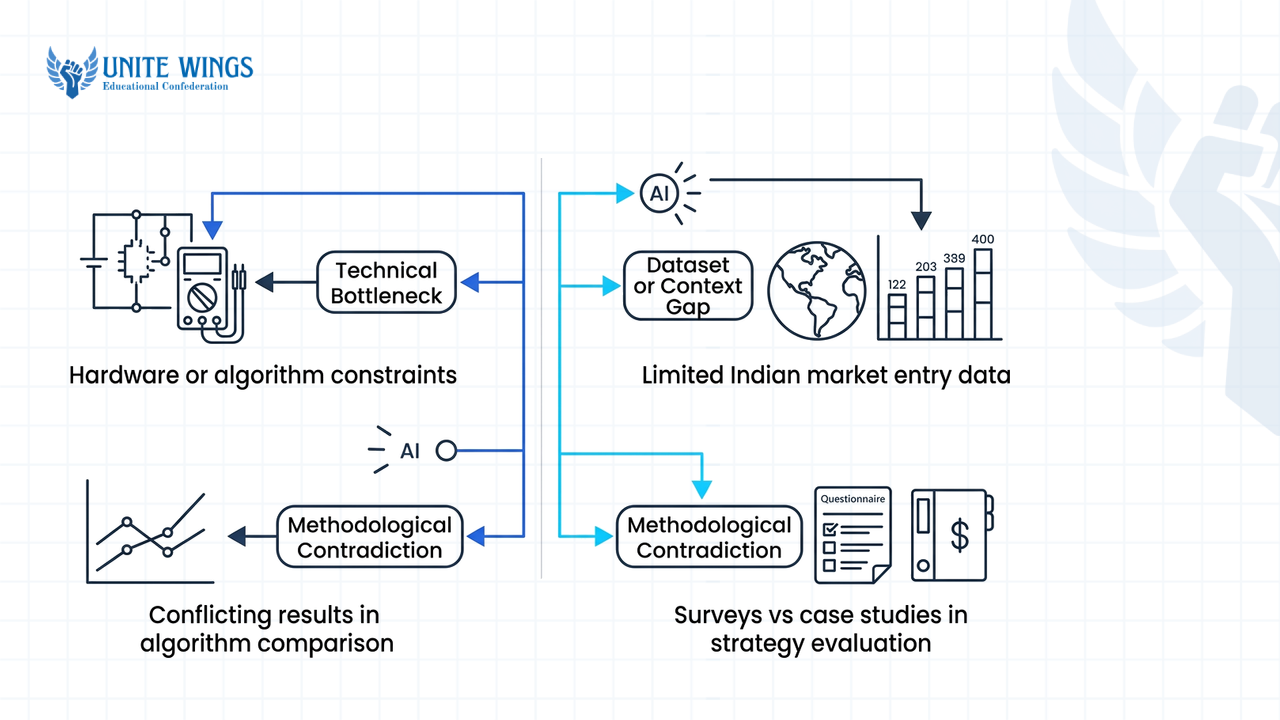
When you stand in front of your department's project review panel, saying "nobody has done this before" will get your topic rejected in two minutes. Faculty panels look for one of three concrete gaps: a technical bottleneck (high latency, poor accuracy on edge devices), a dataset or context gap (a financial model tested on US equities but untested on Indian mid-cap NSE stocks), or a methodological contradiction (Paper A claims transformer models beat CNNs on a task, while Paper B claims the opposite on smaller datasets).
Use these exact Deep Research prompts to find a problem statement you can actually finish within one or two semesters:
- For BTech CS/IT, AI, and Electronics students:
Run a Deep Research analysis on peer-reviewed papers published between 2024 and 2026 on [insert specific topic, e.g., lightweight vision transformers for agricultural plant disease detection]. Identify 3 unresolved technical bottlenecks mentioned in the 'Limitations' or 'Future Work' sections of these papers. Frame each bottleneck as a feasible final-year BTech project problem statement that can be trained and tested on a single consumer GPU or Google Colab using open-source datasets. - For MBA (Finance, Marketing, HR, Operations) and Economics students:
Analyze academic studies published between 2024 and 2026 on [insert topic, e.g., buy-now-pay-later default risk among Gen Z consumers]. Identify 3 empirical contradictions or unaddressed operational variables when applying these models to Indian tier-2 and tier-3 city markets. Formulate 3 specific research questions and list the statistical tests (e.g., SEM, logistic regression, ANOVA) required to test them for an MBA dissertation.
Deep Research outputs a structured report that you can export as markdown or PDF (hksoka.com). Free accounts get a limited number of Deep Research runs per day (exact query caps shift based on server load), whereas Pro users get unlimited runs.
One important boundary: if you are doing an MTech thesis, a medical literature review, or a paper targeting a high-impact journal that requires a PRISMA flow diagram, do not use Perplexity as your final screening engine. A 2026 study in the Journal of the Medical Library Association concluded that while Perplexity is useful for discovering real article citations during exploratory scoping, it should complement rather than replace dedicated databases like PubMed (nfxbus.com). Furthermore, a 2026 ResearchGate evaluation of systematic review tools notes that because Perplexity is a real-time web-searching answer engine rather than a direct Semantic Scholar embedding tool like Elicit or Consensus, you should shift to traditional platforms like Covidence, Rayyan, or Elicit for final data extraction and reproducible Boolean search string design.
How do I verify that every DOI and citation from Perplexity actually exists?
Verify every Perplexity citation by clicking the numbered inline badge ([1], [2]), opening the original publisher URL or DOI, and pressing Ctrl+F on the primary paper to confirm the exact statistic or claim appears in the text (vertechacademy.com). Never trust a working link alone, because AI search tools frequently attach a real, clickable DOI to a paraphrased claim that the original authors never actually made.
Skipping citation verification in 2026 carries severe penalties. According to a 2026 study published in The Lancet, 1 in every 277 academic papers now cites at least one fabricated reference, jumping from 1 in 2,828 three years earlier due to unverified AI use (place-4-papers.com). In response, arXiv instituted a policy in June 2026 imposing a one-year submission ban on any author whose manuscript contains incontrovertible evidence of hallucinated references or unverified AI-generated text (place-4-papers.com). If you plan to submit your final-year BTech project to an IEEE conference or upload a preprint to arXiv to boost your MS or placement resume, a single fake citation can get your paper desk-rejected and your name blacklisted.
How accurate is Perplexity when pulling citations? The numbers depend entirely on how you configure the tool:
- General Web Search (High Error Rate): A March 2025 study by the Tow Center at Columbia Journalism School recorded Perplexity's standard search citation error rate at 37%—which was still the lowest error rate among all evaluated AI search engines (hksoka.com).
- Academic Search Mode (High Link Validity, Minor Metadata Errors): A 2026 evaluation by Singapore Management University Libraries found that 93 out of 100 academic search tool references resolved to valid, existing matches, while the remaining 7 flagged records were metadata mismatches (such as a wrong volume number or publication year) rather than complete hallucinations (place-4-papers.com). Similarly, late 2025 internal audit data reported by datastudios.org showed 97% of academic summaries mapped to valid DOIs.
The gap between a 93% valid link rate and a 37% general citation error rate points to the trap most students fall into: reference existence versus claim faithfulness. A paper can be 100% real, and its DOI link can open cleanly on Springer, while the sentence Perplexity wrote in your chat completely misstates the paper's findings or blends two conflicting authors' arguments into a false consensus.
Run this 4-step verification checklist on every source before adding it to your literature review:
- Install a side-window previewer: If you are verifying 25 citations in one thread, use a browser extension like NoTab (highlighted in NoTab's 2026 researcher guide) to preview inline citation links
[1],[2]in a floating side window without cluttering your browser with 30 open tabs. - Check the primary vs. secondary source: When you click the badge, verify that the URL lands on the primary journal publisher (IEEE, Elsevier, Springer, PubMed, arXiv) and not a secondary blog summarizing the study. If Perplexity cited a secondary article, find the primary DOI mentioned inside that article and read the original abstract.
- Run the
Ctrl+Fnumerical check: Copy the specific number, dataset name, or technical conclusion from Perplexity's summary, open the original paper, and search for the exact term usingCtrl+F. Confirm the authors found that number in their own experiments rather than merely citing an older paper in their introduction. - Fix the 7% metadata drift: Check the publication year, issue number, and author spelling directly on the journal page, as Singapore Management University's 2026 audit proved metadata mismatches still happen on valid papers (place-4-papers.com).
Can Perplexity format my bibliography in APA 7th or IEEE style automatically?
Perplexity defaults to APA 7th Edition formatting and can convert your reference list into IEEE, MLA, or Chicago styles on command, hitting 95% adherence in late 2025 audits, though it lacks automated two-way syncing with reference managers like Zotero (datastudios.org). Because chat prompts occasionally introduce minor punctuation or capitalization mistakes in journal titles, use Perplexity for fast first-draft formatting during synopsis prep, then import the verified DOIs into Zotero or Mendeley for your final thesis submission.
To generate a formatted reference list at the end of a research thread or inside your Space, run this exact prompt:
Compile all referenced sources cited in this thread into a cleanly formatted bibliography using strict [IEEE / APA 7th Edition] style guidelines. Include the full DOI URL for every entry. Output only the formatted reference list without any introductory or concluding narrative text.
If your college department or university ethical guidelines require you to disclose and cite the AI tools you used during your literature discovery phase, follow the updated 2026 APA 7th Edition rules documented by aiacknowledgement.org and studyaidhub.com:
- To cite Perplexity as a general research tool in APA 7th: Use "Perplexity AI" as the author, the current year, the italicized title Perplexity, the bracketed descriptor
[AI search engine], and the main URL (aiacknowledgement.org, studyaidhub.com).- Copy-paste format: Perplexity AI. (2026). Perplexity [AI search engine]. https://www.perplexity.ai
- To cite a specific, shareable Perplexity chat session in APA 7th: Include the exact date of the query, the conversation title in italics, the bracketed descriptor
[Generative AI chat], the publisher "Perplexity", and the unique shareable session URL generated by clicking the "Share" button on your thread (aiacknowledgement.org, studyaidhub.com).- Copy-paste format: Perplexity AI. (2026, April 1). Federated learning healthcare IoT literature gaps [Generative AI chat]. Perplexity. https://www.perplexity.ai/search/[your-unique-share-link]
For your final 60-page project report where IEEE reference numbering ([1], [2]) changes every time you add a paragraph in Microsoft Word or Overleaf, do not maintain your bibliography manually in chat. As ZeroSkillAI's 2026 research stack guide notes, Perplexity cannot sync bidirectionally with Word plugins. Copy the verified DOIs from your Perplexity Space table, paste them into Zotero's "Add Item by Identifier" magic wand tool, and let Zotero manage your live citations.
Your next steps for this week
Do not wait until the night before your Phase-1 project review to test this workflow. Break your literature review into three short blocks this week:
- Today (20 minutes): Open Perplexity, go to Settings to turn off AI data retention, and run 3 searches in Academic Focus mode using
site:ieeexplore.ieee.org after:2023orsite:ncbi.nlm.nih.gov/pubmed after:2023for your capstone topic. Download 10 to 15 full-text PDFs using your college Wi-Fi. - This weekend (40 minutes): Create a dedicated Perplexity Space, paste the academic librarian instruction, upload your 15 PDFs, and run the 3-step prompt sequence from this guide to generate your 5-column Literature Review Matrix.
- Before meeting your project guide (30 minutes): Run one Deep Research query on 2024–2026 bottlenecks to frame 3 potential problem statements, and do the
Ctrl+Fcheck on every quantitative metric in your matrix so you cannot be caught off guard during questioning.
Build your complete AI research workflow
If you want to cut your literature review time from three weeks to a single afternoon without risking fake citations, join our Research with AI: Perplexity and NotebookLM masterclass. You will walk away with a live, tested two-tool workflow that connects Perplexity's Academic discovery with NotebookLM's source-grounded synthesis, plus a ready-to-submit literature matrix template for your college synopsis.
Frequently asked questions
Does Perplexity hallucinate academic citations or fake paper titles?
Perplexity rarely invents fake paper titles in Academic Focus mode, where a 2026 Singapore Management University Libraries test found 93% of references matched real publications and 7% had minor metadata errors (place-4-papers.com). However, standard web searches show a 37% citation error rate (hksoka.com), and real links can still misstate a paper's actual findings.
Is Perplexity free for academic literature reviews and student research?
Yes, Perplexity's free tier gives you unrestricted access to Academic Focus mode and a limited daily allowance of Pro Searches and Deep Research runs that reset every 24 hours. Students who need unlimited Deep Research, multi-model selection, and bulk 100 MB PDF uploads can upgrade to Perplexity Pro ($20/month) or claim a discounted student plan using a verified .edu email address (vertechacademy.com, godofprompt.ai).
What is the difference between Perplexity Academic Focus and Deep Research modes?
Academic Focus is a retrieval filter that restricts standard or Pro searches to scholarly journals, databases, and preprints while blocking casual web blogs (vertechacademy.com). Deep Research is an autonomous reasoning mode that spends 2 to 3 minutes executing over 20 iterative searches to map complex scholarly debates and write structured, exportable literature reports (hksoka.com).
How do I upload multiple PDFs to Perplexity for a comprehensive synthesis?
Click Spaces in the left sidebar, create a dedicated project folder, and upload your research PDFs (up to 100 MB per file) directly into the workspace knowledge base (datastudios.org, vertechacademy.com). Storing files inside a persistent Space lets you query the entire group of 10 to 15 papers simultaneously across multiple days without re-uploading documents or losing context.
How do I cite Perplexity itself in an academic research paper using APA 7th style?
For general tool usage in APA 7th Edition, cite: Perplexity AI. (2026). Perplexity [AI search engine]. https://www.perplexity.ai (aiacknowledgement.org). If you are citing a specific, shareable conversation thread, include the exact date, the italicized chat prompt title, the bracketed description [Generative AI chat], "Perplexity", and the unique shareable session URL (studyaidhub.com).
Can Perplexity replace PubMed, Covidence, or Elicit for a systematic review?
No, Perplexity should only be used for initial exploratory scoping and discovering candidate papers, as confirmed by a 2026 Journal of the Medical Library Association study (nfxbus.com). Because Perplexity searches the live web rather than running reproducible Boolean queries across fixed academic embeddings, use PubMed, Covidence, Rayyan, or Elicit for final systematic review screening and PRISMA reporting.
Newsletter
Stay updated with our latest news and insights.