
How to Tailor Your Fresher Resume in 10 Minutes Using Gemini
Pull your resume straight from Google Docs into Gemini Canvas, spot missing JD keywords in seconds, and rewrite your project bullets without sounding AI-written.
To tailor your fresher resume to a job description using Gemini in 10 minutes, pull your Google Doc into gemini.google.com using the @ command, run a negative-constraint skill gap prompt against the target job description, and paste the revised project bullets back into your template so your single-page layout stays intact. In 2026, Global Capability Centres (GCCs) and Indian IT recruiters use Applicant Tracking Systems (ATS) like Workday, Greenhouse, and Lever that auto-reject generic resumes before a human ever opens them. A 10-minute edit aligns your semester projects with the exact vocabulary in the job posting without fabricating corporate metrics you cannot defend in a technical round.
In short
- Turn on "Keep Activity" in your Google settings so the
@Google Drivecommand can pull your master resume directly into Gemini web chat. - Force Gemini to use bracketed placeholders like
[add: metric]or[confirm: tool]so it never invents fake numbers or team leadership claims. - Add a banned-words constraint to your prompt to block robotic verbs like "spearheaded", "synergized", and "orchestrated".
- Edit individual project lines inside Gemini Canvas or Google Docs inline "Refine", then paste without formatting to preserve your single-page margins.
- Gemini's Drive extension is read-only; you must manually duplicate your base Google Doc or click "Share & export" to save role-specific versions.
Why your generic fresher resume fails in 2026 (and the 10-minute timing breakdown)
A single generic resume fails because ATS software filters candidates by exact hard-skill matches and frequency before a placement coordinator or HR screener sees your file. According to Hyring's 2026 data, standard IT and services fresher roles in India pay ₹3.5 LPA to ₹4.5 LPA, while specialized AI/ML and product company roles command ₹5 LPA to ₹15 LPA (and ₹25 LPA to ₹40 LPA at top-tier firms). Remember that LPA figures are Cost to Company (CTC); your actual monthly in-hand salary will be 70% to 85% of (CTC ÷ 12) after PF and variable deductions. When you apply for a ₹8 LPA Data Analyst role at a GCC on job portals using the same B.Tech or B.Com resume you used for a ₹3.5 LPA standard IT services application, the scanner rejects you for missing tool-specific phrasing.
Here is how to divide your 10 minutes so you can tailor applications between college lectures:
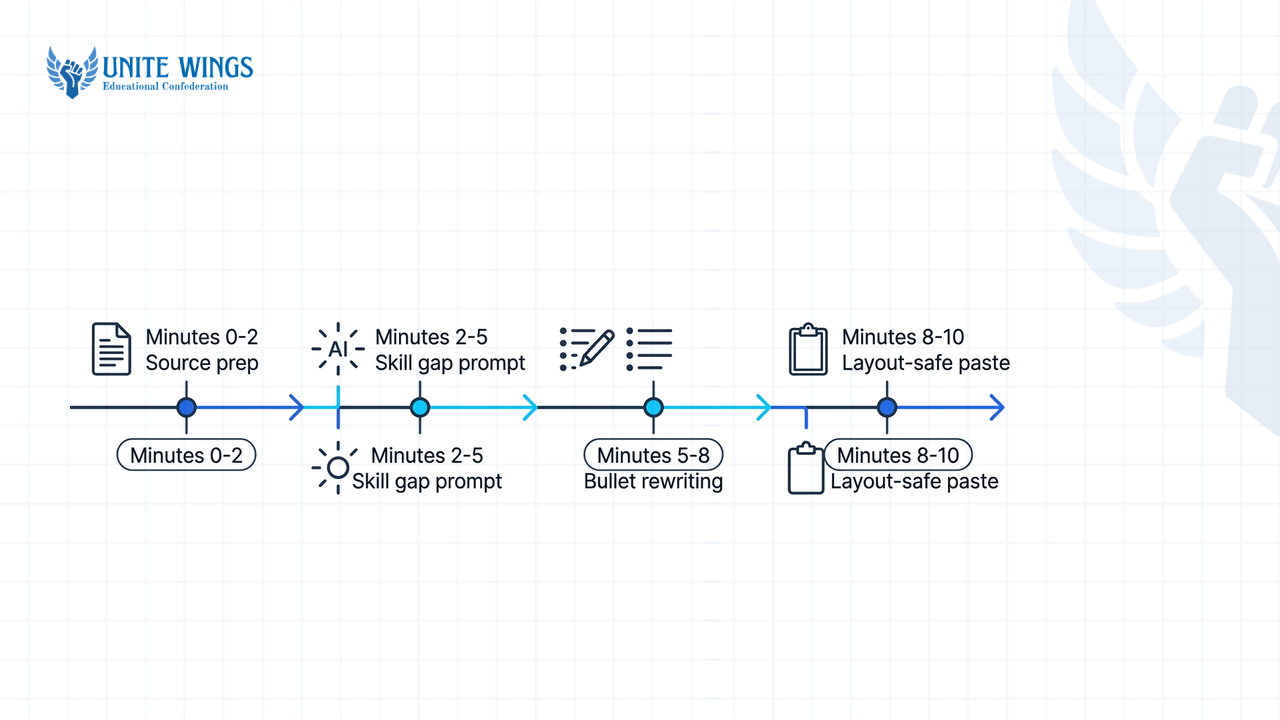
| Minutes | Step | Where you work | Exact output |
|---|---|---|---|
| 0 to 2 | Source prep & context feeding | Google Docs & gemini.google.com | Master resume and target JD loaded into one chat session |
| 2 to 5 | Skill gap & constraint prompt | Gemini web chat | Categorized table of exact matches, partial fits, and missing keywords |
| 5 to 8 | Bullet rewriting & tone check | Gemini Canvas or Docs inline "Refine" | 3 to 4 updated project or internship bullets with zero AI buzzwords |
| 8 to 10 | Layout-safe paste & PDF export | Google Drive | New Doc named Resume_Role_Company exported as a clean PDF |
How do I pull my existing resume from Google Docs directly into Gemini?
Open gemini.google.com, make sure your Google Workspace extension is enabled, type @ in the prompt box, select Google Drive, and type the exact filename of your master resume. As confirmed by Google Workspace Updates, this extension lets Gemini cross-reference your Docs and Drive files directly inside the chat window without downloading and re-uploading PDFs. If you use a free personal Gmail account where deep Workspace integration isn't active, copy-paste your raw resume text directly into a fresh chat session.
Follow these exact steps to set up your source files in under two minutes:
- Go to
gemini.google.comand click on Activity in the left menu. Turn on "Keep Activity". Google Support notes this setting is mandatory for Connected Apps (Drive and Docs) to operate inside the web version of Gemini. - Click Extensions (or Connected Apps) in the settings menu and toggle the switch for Google Workspace to ON.
- Open a new chat, type
@Google Drive, and type the name of your master resume file (for example,Master_Resume_2026). Click the file from the dropdown list. - Paste the target job description (JD) from LinkedIn, Internshala, or your campus placement portal directly underneath the tagged file.
What most students get wrong here is assuming free accounts and college Workspace accounts behave the same way. If your college .edu or .ac.in email has admin restrictions blocking extensions, or if your free tier hits a daily limit, do not waste time troubleshooting settings. Open your Google Doc, copy the text, and paste it straight into the Gemini prompt box; the free plan's token context easily holds a full fresher resume and a long JD in one go. If you want to set up deeper workflows across your Drive, Gmail, and Docs, the Gemini Masterclass walks through Workspace extensions and Gems step by step.
What prompt finds the exact skill gap between my fresher resume and a job description?
The most reliable prompt instructs Gemini to act as an ATS keyword scanner that categorizes hard skills, tools, and certifications from the job posting into exact matches, partial fits, and missing items against your resume. Guides from PromptLayer and The Interview Guys show that separating gaps into categories stops the AI from blindly stuffing unverified keywords into your work history. You see what phrasing you can legitimately adopt from your coursework and what skills you truly lack.
Copy and paste this exact prompt into Gemini after tagging or pasting your resume and the job description:
Act as an ATS resume editor and keyword scanner for Indian campus and off-campus hiring. Compare my fresher resume [attached via @Drive or pasted below] to this target job description: [paste JD]. Step 1: Extract all hard skills, software tools, programming languages, and domain terms from the JD, sorted by frequency. Step 2: Create a 3-column table showing (A) Exact Matches found on my resume, (B) Partial Fits where I did the work in a college project or internship using different wording, and (C) Missing Hard Skills not present in my text. Do not rewrite my resume yet.
Look closely at Column B (Partial Fits). If a B.Tech CS job description asks for "RESTful API integration" and your final-year project bullet says "connected backend to frontend using Node.js", Gemini flags that as a partial fit. If a B.Com financial analyst JD at a GCC asks for "variance analysis and data reconciliation" and your internship note says "checked monthly expense sheets in Excel", you have the experience but lack the ATS keyword. You will fix Column B in the next step, and ignore Column C unless you have actually used that tool in a lab or project and forgot to list it.
How do I stop Gemini from adding fake metrics or buzzwords like 'spearheaded'?
You stop hallucinations and robotic jargon by adding explicit negative constraints to your prompt and forcing Gemini to insert bracketed placeholders like [add: metric] or [confirm: tool] whenever a number is missing. Research from HR Lens and Rezoom confirms that unconstrained AI prompts default to inflated verbs like "spearheaded" and invent fake percentages to fill experience gaps. As Techpresso notes, freshers are the most vulnerable to this trap because you do not have corporate revenue numbers, so the AI invents mock team leadership scopes that get exposed in the first five minutes of an interview.
When you ask Gemini to rewrite your bullets based on your Column B partial fits, paste this guardrail block at the bottom of your prompt:
CRITICAL RULES FOR REWRITING: 1. Keep every employer, college name, project title, date, and existing number unchanged. 2. Do NOT invent metrics, percentages, revenue numbers, latency reductions, or team sizes. If a bullet needs a number to sound strong, insert the exact placeholder [add: metric] so I can fill it manually. 3. If a JD keyword seems to fit my project but isn't explicitly proven in my notes, insert [confirm: term]. 4. Start every bullet with a plain past-tense verb (Built, Analyzed, Tested, Automated, Queries, Reconciled).
Pair those rules with this banned-words list in your prompt to avoid generic corporate jargon:
- Banned verbs: Spearheaded, synergized.
- Banned adjectives: Passionate.
If you plan to apply to multiple roles, save these rules as a custom "Gem" inside Gemini. As documented by Rezoom, creating a Gem lets you set standing instructions and attach your master resume as permanent knowledge, so you can call these exact guardrails in future chats using the / command without re-pasting them.
How do I use Gemini Canvas to rewrite project bullet points without changing my layout?
You use Gemini Canvas (or the inline "Refine" menu inside Google Docs) to edit individual project lines side-by-side, and then copy the plain text back into your master Google Doc using Ctrl+Shift+V (Paste without formatting). According to Jetstream and WERSM, Google's official resume workflow recommends feeding raw, unedited personal notes into Gemini, asking for 4 concise ATS-friendly bullets, and refining them interactively before copying over. If you ask Gemini to regenerate your entire resume from top to bottom and paste the output directly, you will break your margins, font sizes, and single-page structure.
Here is the live before-and-after of how this works in Gemini Canvas for both a B.Tech fresher and a B.Com fresher:
| Candidate profile & target role | Before (Generic master resume bullet) | What a bad, unconstrained AI prompt outputs (Gets rejected) | After (Edited in Gemini Canvas with negative constraints) |
|---|---|---|---|
| B.Tech CS Final Year applying for Junior Backend Engineer (₹6.5 LPA) | "Made an e-commerce website using Python and SQL for my 7th-semester project. Worked with 3 friends." | "Spearheaded a dynamic 4-person engineering team to architect a cutting-edge Python/SQL e-commerce platform, boosting database query efficiency by 45%." | "Built a relational SQL database and Python backend for a semester e-commerce project across a 4-member team, writing [add: number of endpoints] REST API endpoints for user authentication and cart checkout." |
| B.Com Honours Fresher applying for Finance Associate at a GCC (₹4.5 LPA) | "Did a 2-month summer internship at a CA firm. Checked client bills in Excel and helped with GST filing." | "Orchestrated end-to-end GST compliance and financial synergy for 50+ high-net-worth clients, reducing audit discrepancies by 30%." | "Reconciled monthly vendor invoices against bank statements in MS Excel ([confirm: used VLOOKUP/Pivot Tables]) during a 2-month CA firm internship, preparing data sheets for quarterly GST return filings across [add: number of clients] client accounts." |
Notice how the "After" column incorporates exact JD vocabulary ("REST API endpoints", "Reconciled", "GST return filings") without lying. You then replace [add: number of endpoints] with 12 and [add: number of clients] with 18 based on what you actually did.
To move those lines into your resume without breaking your template:
- Highlight the draft bullet inside the Gemini Canvas workspace on
gemini.google.comto shorten or adjust the phrasing until it fits the character length of your existing resume line. - Alternatively, if you have a paid Google Workspace account (Business Standard or above), highlight the weak bullet directly inside Google Docs, click the Gemini "Help me write" pen icon, and select Refine → Rephrase or Shorten. Google Workspace's April 2026 update also added "Match writing style" and "Match doc format" to keep your visual structure intact.
- For free accounts copying from the web app: copy the finalized single bullet from Gemini Canvas, click into your Google Doc, and paste it into your template to preserve your exact font and spacing.
How can I save role-specific resume versions in Google Drive using Gemini?
You must manually duplicate your base Google Doc and rename it for each company, or click "Share & export → Export to Docs" at the bottom of a Gemini response to create a new file in Drive. A common misconception among students is that you can tell Gemini in chat, "Save this tailored resume into my Placement_2026 folder on Google Drive." As Fast.io confirms, native Gemini web chat and Workspace extensions are strictly read-only regarding file creation; Gemini can read your Drive files, but it cannot autonomously organize folders or overwrite existing Google Docs from chat output.
A practical workflow shared by job seekers on Reddit takes less than two minutes per application:
- Create one dedicated folder in your Google Drive named
2026_Tailored_Resumes. - Right-click your
Master_ResumeGoogle Doc and click Make a copy. Do not edit your master file directly, or you will lose original project bullets you need for other domains. - Rename the duplicate using the format
FirstName_LastName_Role_Company(for example,Rohan_Sharma_DataAnalyst_Deloitte). Recruiters downloading 200 PDFs from Naukri or campus portals hate seeing files namedResume_Final_v3(1).pdf. - Paste your 3 to 4 tailored bullets from Gemini into this duplicate Doc using
Ctrl+Shift+V. - If you also want Gemini to tune your 2-line top summary, ask it to pull live company context from Google Search—a technique noted on Medium that aligns your summary with the company's current products.
- In Google Docs, click File → Download → PDF Document (.pdf) and upload that PDF to the job portal.
Your 3-step action plan for this week
Stop sending the same generic PDF to multiple companies and wondering why your application status stays stuck. Take these three steps before your next campus or off-campus deadline:
- Today (20 minutes): Open your current resume in Google Docs and clean up the base formatting into a single-column, single-page layout with zero tables or text boxes. Enable "Keep Activity" in
gemini.google.comso your@Google Drivetag works. - Tomorrow (15 minutes): Create a custom Gem in Gemini (or save a Google Keep note on your phone) containing the ATS skill gap prompt, the
[add: metric]placeholder rule, and the banned-words list from this guide. - This week (10 minutes per job): Pick specific roles on LinkedIn, Internshala, or your campus placement portal. Run the 10-minute workflow for each role, save the 5 separate PDFs in your Drive folder, and submit them.
Fix your base resume before you scale with AI
Tailoring keywords with Gemini only works if your underlying resume structure passes the 10-second recruiter scan. Join the Resume Masterclass to rebuild your master fresher resume from scratch, write proof-backed project bullets, and set up an AI editing system where you stay in charge.
Frequently asked questions
Does Gemini's free tier allow file uploads for resume tailoring?
Yes, the free consumer tier of Gemini allows you to attach files and holds enough token context in a fresh chat session to process both a standard fresher resume and a full job description. If you hit daily file limits on the free plan, copy-paste the raw text of both documents directly into the prompt box.
Can Gemini automatically customize my resume for 10 different jobs at once?
No, Gemini cannot batch-generate and save 10 formatted resume files into your Google Drive automatically because its Drive extension is read-only. Furthermore, feeding 10 job descriptions into a single prompt causes context bleed, where keywords from one company leak into another. Tailor one job description per chat session using a saved Gem.
Does Gemini ruin my resume formatting when I copy text over?
Gemini will overwrite your font sizes and spacing if you ask it to rewrite your full document and use a standard copy-paste. To protect your single-page layout, only rewrite individual bullet points in Gemini Canvas and paste them back into your master Google Doc using Ctrl+Shift+V (Paste without formatting).
How do I ensure ATS scanners don't reject my Gemini-tailored resume?
ATS platforms like Workday, Greenhouse, and Lever reject resumes when keywords are missing or hidden inside complex multi-column tables and graphics. Use Gemini's skill-gap table to match exact tool names from the job description (like writing both "Amazon Web Services (AWS)" and "Python"), and always export your clean Google Doc as a standard PDF.
Can I use the @ command in Gemini if my resume is a Word file or PDF on my laptop?
The @Google Drive command only pulls files stored inside your Google Drive, and it works best with native Google Docs. If your resume is a .docx or PDF on your desktop, upload it to Google Drive and open it as a Google Doc first, or upload the file directly using the + attachment icon in the Gemini prompt bar.
What is the average fresher salary in India in 2026 for IT and AI roles?
According to Hyring's 2026 compensation data, standard IT and services fresher roles in India offer ₹3.5 LPA to ₹4.5 LPA, while EasyPlace puts the broader white-collar median between ₹2.5 LPA and ₹8 LPA. Specialized fresher roles in AI, machine learning, and product companies pay ₹5 LPA to ₹15 LPA, reaching ₹25 LPA to ₹40 LPA at top-tier tech firms.
Newsletter
Stay updated with our latest news and insights.