
Is a Canva Resume ATS Friendly for Freshers? We Tested 5 Layouts
Raw text output from running five popular Canva templates through an ATS parser, why skill bars and floating text boxes break, and the 6-step fix.
Yes, a Canva resume is ATS-friendly for freshers, but only if you build it in a single-column layout without floating sidebars, icons, or skill bars, and export it as an unflattened PDF Standard file. If you used one of canva.com's default two-column student templates, enterprise parsers like Workday and SAP SuccessFactors will scramble your B.Tech graduation dates into your project descriptions and drop your parser match score by 15 to 25 points, according to naukri.com.
In short
- Export your file as PDF Standard (96 dpi) and leave Flatten PDF unchecked; turning Flatten PDF on converts your text into an unreadable static image that automated tracking systems cannot parse.
- Delete all telephone/email icons and visual skill bars; parsers read icons as garbage symbols (
&,#) and ignore graphics completely. - Strip two-column layouts into a single top-to-bottom column using standard 10–11pt fonts (Arial, Calibri, or Georgia) and basic headings (
Education,Skills,Projects,Work Experience). - Run the 10-second Notepad test (
Ctrl+AthenCtrl+Vfrom your exported PDF) before uploading to Naukri or campus portals.
Can Workday, Greenhouse, and Naukri read a PDF exported from Canva?
Workday, Greenhouse, and Naukri can read a PDF exported from Canva as long as the text layer remains selectable and lives in a linear, single-column sequence. According to naukri.com, approximately 87% of large Indian enterprises and IT firms, including TCS, Infosys, Wipro, and HDFC, screen profiles through an Applicant Tracking System before a human ever opens the file.
Whether your canva.com PDF survives that screen depends on two variables: which Canva layout you chose, and which ATS engine the company uses. Modern systems used by tech startups and product companies, such as Greenhouse and Lever, extract text from clean PDFs reliably, and ismyresumegood.com notes they can even read simple two-column PDFs with only occasional right-column misalignment. Legacy enterprise platforms like Oracle Taleo, older versions of iCIMS, SAP SuccessFactors, and Naukri RMS are far stricter. According to smartresumeanalyzer.com, Taleo and older iCIMS setups routinely drop contact details or experience lines placed inside sidebars, headers, footers, or floating text boxes.
We tested 5 common Canva fresher resume structures across enterprise parsers to see what actually makes it through to the recruiter's screen:
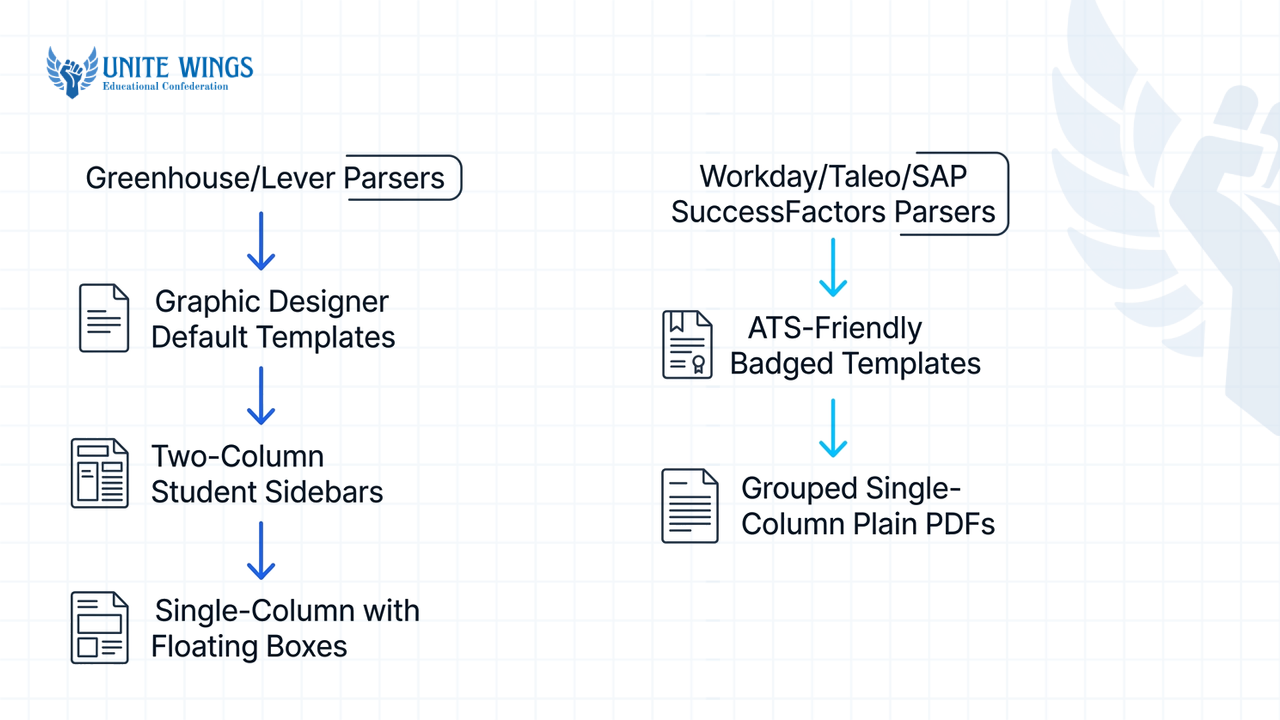
| Canva layout type | Visual features included | Greenhouse / Lever result | Workday / Taleo / SAP SuccessFactors result | Fix required for freshers |
|---|---|---|---|---|
| 1. Graphic Designer Default | 2 columns, photo, skill progress bars, contact icons, Flattened PDF | Complete failure (0% text extracted) | Complete failure (blank profile generated) | Uncheck Flatten PDF, delete graphics, merge into 1 column |
| 2. Two-Column Student Sidebar | Left sidebar for Skills/Education, right column for Projects | Partial pass (right-column dates occasionally shift) | Scrambled text; 15–25 point score drop (naukri.com) | Move sidebar sections into main vertical flow |
| 3. Single-Column with Floating Boxes | 1 vertical column, but dates and roles sit in separate unaligned text boxes | Dates detach from project titles | Education and internship dates swap places | Put role, company, and date inside the exact same text box |
| 4. "ATS-Friendly" Badged Canva Template | 1 column, decorative font, contact icons (@, phone symbol), colored header | Reads body text; corrupts phone/email icons | Drops header contact info; misreads decorative font | Replace icons with Email: and Phone: text; switch to Calibri/Arial |
| 5. Grouped Single-Column Plain PDF | 1 column, standard headings, grouped text blocks, PDF Standard (unflattened) | 100% clean parse | 100% clean parse | Ready to upload |
What most students get wrong is trusting the "ATS-Friendly" tag in Canva's template search bar. Template creators add that tag for search visibility, not because they tested the file against Workday or Naukri RMS. Even Canva's accessibility PDF settings, which generate a reading order tag, are frequently ignored or misread by standard corporate ATS engines, according to cvdesignr.com.
Why do Canva two-column templates scramble your education and project dates?
Canva two-column templates scramble your education and project dates because Canva positions every piece of text as an independent floating box on an X-Y coordinate grid rather than inside a continuous top-to-bottom document flow. When an ATS extracts your text stream, it reads either strictly left-to-right across the entire page width or guesses box order by coordinates, stitching unrelated columns together (pmresume.io, resumeize.com).
Here is what happens under the hood. In Microsoft Word or Google Docs, text flows like water in a pipe: line 1 leads to line 2. In Canva, you are placing sticky notes on a canvas. If your "Education" block is in a narrow left column at vertical position Y=200px and your "Final Year Project" is in the wider right column at Y=198px, the parser reads the project title first, jumps left to grab your college name, and then jumps back right to read your Python tech stack.
Look at the actual plain-text output extracted from a standard two-column Canva fresher resume versus a properly grouped single-column Canva layout.
Garbled parser output from a two-column Canva template with icons and skill bars:
ROHAN SHARMA & +91-9876543210 # rohan.sharma@email.com
EDUCATION SKILLS B.Tech in Computer Science E-COMMERCE MICROSERVICES APP
2022 - 2026 | Jan 2026 - Mar 2026
Java Python SQL React Built a REST API using Spring Boot and PostgreSQL handling 500+ requests per second.
CGPA: 8.6/10 | NIT Trichy
Notice three fatal breaks in that output:
- The phone and email icons parsed as stray
&and#symbols (atsverification.com), which prevents the ATS from autofilling your contact fields. - The parser read across the column gap, merging
EDUCATION,SKILLS, and the first project title (E-COMMERCE MICROSERVICES APP) into a single nonsensical line, then glued the B.Tech graduation dates (2022 - 2026) directly next to the project dates (Jan 2026 - Mar 2026). - The visual progress bars under
Java Python SQL Reactdisappeared entirely because automated systems cannot interpret shapes, progress circles, or star ratings as numerical proficiency (cvdesignr.com, resumefast.io).
Clean parser output from a fixed single-column Canva template:
ROHAN SHARMA
Phone: +91-9876543210 | Email: rohan.sharma@email.com | LinkedIn: linkedin.com/in/rohansharma

EDUCATION
B.Tech in Computer Science, NIT Trichy | 2022 - 2026 | CGPA: 8.6/10

SKILLS
Languages: Java, Python, SQL | Frameworks: Spring Boot, React.js | Tools: Git, Docker, PostgreSQL

PROJECTS
E-Commerce Microservices App | Jan 2026 - Mar 2026
- Built a REST API using Spring Boot and PostgreSQL handling 500+ requests per second during load testing.
To turn the garbled layout into the clean layout without leaving Canva, follow these 5 steps:
- Delete the vertical divider line and every background rectangle used to color the sidebar.
- Delete all icons next to your phone, email, GitHub, and LinkedIn links; type plain text labels (
Phone:,Email:) in a single text box spanning the top width of the page. - Delete all skill progress bars, circles, and rating stars; replace them with plain comma-separated text grouped by category (
Languages:,Frameworks:). - Merge detached text boxes: instead of having your project title in one box on the left and
Jan 2026 - Mar 2026in a separate floating box on the right, put the title, pipe separator (|), and date inside the exact same text box so the parser cannot split them. - Rename creative headings like
What I BringorMy Coding Pathto strict standard headings:Education,Skills,Projects, andWork Experience(naukri.com, cvscan.in). Use 13–16pt for your name and 10–11pt for body text in Calibri, Arial, or Georgia (cvscan.in).
Should you download a Canva resume as PDF Standard or PDF Print for ATS?
Always download your Canva resume as PDF Standard with the Flatten PDF checkbox turned off. Choosing PDF Print adds print production data like bleed areas and crop marks, while checking Flatten PDF rasterizes your entire resume into a static image that strips out every selectable letter and causes immediate ATS rejection (rezoom.io, atsresumeai.com, applycove.com).
When you check "Flatten PDF", Canva takes a screenshot of your page and wraps it inside a .pdf container. To your eyes, it looks crisp. To Workday or Naukri RMS, it is a blank photograph with zero words.
Follow this exact export and verification checklist every time you update your resume:
- Click Share in the top-right corner of Canva, then click Download.
- Under File type, select PDF Standard (96 dpi, built for digital documents). Never choose PDF Print (300 dpi), PNG, or JPG.
- Look directly below the file type dropdown and ensure Flatten PDF is UNCHECKED.
- Download the file to your desktop and open it in Chrome, Edge, or Adobe Reader.
- Run the Copy-Paste Verification Test: press
Ctrl+A(orCmd+Aon Mac) to highlight everything on the page, pressCtrl+C, open plain Notepad (or TextEdit), and pressCtrl+V.
Read the Notepad file from top to bottom. If nothing pastes into Notepad, you accidentally flattened the PDF or used an image font. If your B.Tech CGPA appears inside your summer internship paragraph, you still have floating text boxes positioned at conflicting vertical coordinates in Canva. Go back into Canva, combine those sections into one text box, re-export, and run the Notepad test again until the plain text reads in the exact order a human reads it.
How do you use Canva Magic Write to rewrite weak fresher bullet points?
You use Canva Magic Write to rewrite weak fresher bullet points by feeding it your raw project tools, action, and actual numbers inside a strict constraint prompt so it does not invent fake corporate metrics. Magic Write, powered by OpenAI, lets you draft, rewrite, shorten, or expand text directly inside the Canva editor, while the Job and Resume AI app in Canva's Apps panel lets you paste a target job description alongside your text to generate tailored sections (cvmark.io).
However, career tool audits from enhancv.com note that Magic Write acts as a writing accelerator rather than a strategic career coach. If a fresher highlights a weak line like "Made a library management website using PHP and MySQL" and clicks a generic prompt like "Make this sound professional", Magic Write will hallucinate senior-level claims, such as "Spearheaded enterprise database architecture, boosting company revenue by 40%". In a campus placement interview, a panelist will spot that fake metric in five seconds and reject you for dishonesty.
Instead, follow this 3-step workflow inside Canva:
- Click the text box containing your weak project or internship bullet point.
- Click the Magic Write icon (the sparkle pencil on the floating toolbar) and select Custom prompt.
- Paste this exact framing prompt along with your real numbers:
Rewrite this fresher college project bullet point as one single-sentence resume bullet. Start with a strong past-tense action verb (like Built, Deployed, Automated, or Queried). Emphasize the exact technical stack (Java, SQL, React, Python) and keep only the numbers I provide below. Do not invent percentages or business revenue. Keep it under 22 words for an Indian IT/software role. Raw text: [paste your rough note here]
Here is how that prompt transforms real fresher entries compared to default AI output:
- Your rough note: "Did a data analysis project on Zomato dataset in Python and made dashboards in Power BI for 50,000 rows."
- Bad Magic Write output (unconstrained): "Strategically revolutionized culinary data insights by architecting high-impact Power BI visualizations, driving a 35% increase in operational decision-making efficiency."
- Clean Magic Write output (using the strict prompt): "Cleaned a 50,000-row Zomato dataset using Python (Pandas) and built an interactive Power BI dashboard tracking delivery time bottlenecks across 12 cities."
If you want to learn how to control Canva's full suite of AI tools without creating formatting messes, the Canva AI Masterclass walks through Magic Write and layout setup step by step. And if your main bottleneck is figuring out which college projects, hackathons, or internships belong on your one-page sheet in the first place, the Resume Masterclass covers how to structure fresher bullets so a recruiter grasps your stack in ten seconds.
When should you ditch Canva and use a Word or LaTeX resume template instead?
You should ditch Canva and switch to a Microsoft Word (.docx) or LaTeX (Overleaf) template when applying to legacy mass-hiring portals like Oracle Taleo, when an application form specifically asks for a .docx file, or when you have 3+ academic projects that no longer fit on a single Canva page (cliqhr.com, cvscan.in, myperfectresumes.in).
Canva has a permanent technical limitation: it does not provide a native .docx export for standard canvas designs, restricting Word downloads to Canva Docs only. While modern ATS platforms parse clean PDFs smoothly, cliqhr.com confirms that traditional enterprise ATS platforms, including Taleo and older instances of Workday or iCIMS, exhibit higher reliability when processing native .docx files. Furthermore, freshers must restrict their resumes to a single page (trymintly.com, candycv.com, naukri.com), and Canva's padded margins and large spacing force you to shrink fonts below 10pt once you add a third project or internship.
In the 2026 Indian hiring market, generalist fresher packages cluster around ₹2.5 to ₹4.5 LPA (hirepal.ai), while standard IT and services roles range between ₹3.5 and ₹4.5 LPA, and specialized AI/ML, cloud, and product engineering roles command ₹8 to ₹25+ LPA (hyring.com). Because both mass recruiters and high-paying product teams filter thousands of campus and off-campus applicants mechanically before human review, matching your file tool to the target portal saves you from silent auto-rejection.
Use these decision rules to pick the right resume builder for your specific situation:
- If you are a CS, IT, or circuit-branch engineering fresher applying for ₹8–25+ LPA SDE, AI/ML, or data roles: Ditch Canva and use a single-column LaTeX template on Overleaf (such as Jake's Resume) or a clean Microsoft Word
.docx. You need dense, 1-page horizontal bullet space for GitHub links, tech stacks, LeetCode/Codeforces profiles, and 3 detailed project blocks. - If you are applying to mass IT recruitment drives (TCS, Infosys, Wipro), banking portals (HDFC), or updating Naukri.com: Use a single-column Microsoft Word (
.docx) template or a verified single-column PDF. Legacy enterprise parsers and naukri.com's automated profile extractor read native linear Word tables and paragraphs with zero coordinate errors (applycove.com, cliqhr.com). - If you are applying for UI/UX, graphic design, social media, marketing, or emailing a startup founder directly on LinkedIn: Keep your Canva resume, or maintain two versions (trymintly.com, applycove.com). Attach the styled Canva PDF when sending cold emails, DMs, or bringing printed copies to walk-in interviews, and upload the plain single-column version whenever an application link routes you through a Workday, Taleo, or Naukri portal.
What to do with your resume this week
Do not wait until a 24-hour campus placement deadline opens on Superset or an off-campus link drops on LinkedIn to test whether your file parses cleanly. Fix your layout in three steps over the next 48 hours:
- Today (10 minutes): Open your current Canva resume PDF, press
Ctrl+A, and paste the text into Notepad. If your dates, college name, or project bullets appear out of sequence, or if your phone number starts with&or#, stop uploading that file to job portals immediately. - Tomorrow (30 minutes): Duplicate your Canva design, delete the second column, remove every icon and skill bar, merge every title and date into a single text box, and re-export as PDF Standard with Flatten PDF unchecked. If the Notepad test still fails, copy that plain text into a single-column Microsoft Word document saved in 10.5pt Calibri.
- Before your next application: Upload your cleaned file to your Naukri profile and click "Auto-fill from Resume" on one practice Workday job portal. When Workday populates your Education and Project fields into the right boxes without you having to retype a single date, your resume is 100% ATS-safe.
Rebuild your fresher resume in one session
If you fixed your formatting in Canva or Word and realized your project and internship bullet points still look thin next to 500 other applicants, join the Resume Masterclass. You will walk away with an ATS-verified, single-page resume template and a repeatable AI workflow to rewrite college projects, hackathons, and coursework into crisp, metric-backed bullets that pass both automated parsers and 10-second recruiter scans.
Frequently asked questions
Do Indian job portals like Naukri reject Canva-designed resumes automatically?
No, Naukri does not automatically reject a resume just because it was made in Canva. However, naukri.com's automated parser extracts text to build your searchable candidate profile, and floating text boxes, sidebars, or non-text skill bars break that extraction (applycove.com, cliqhr.com), hiding your keywords from recruiter searches.
Are Canva templates labeled "ATS-friendly" reliable in real-world applications?
No, the "ATS-friendly" label in Canva's search directory is applied by independent template designers and is not audited against enterprise software like Workday or Taleo. Many labeled templates still include two columns, contact icons, and detached date boxes. You must verify any template yourself using the Notepad copy-paste test.
Why do phone and email icons on a Canva resume hurt my ATS score?
Automated parsers cannot translate vector graphics or icon fonts into words. According to testing by atsverification.com, telephone, envelope, and location icons parse as stray special characters like & or #, which corrupts the contact string and stops the ATS from capturing your email address or mobile number.
Does Canva Magic Write invent fake metrics or numbers for freshers?
Yes, if you give Magic Write a vague prompt like "improve this project description," it frequently generates placeholder corporate percentages and revenue figures (enhancv.com). Always instruct Magic Write in your prompt to use only the exact numbers you provide, such as dataset size, API latency, or team size, and forbid invented business metrics.
Can I export my Canva resume directly to a Microsoft Word (.docx) file?
No, Canva does not allow native .docx exports for standard graphic templates; Word exports are only available inside Canva Docs. If an application portal requires a .docx upload, either convert your unflattened Canva PDF using Microsoft Word's "Open PDF" feature and fix the spacing, or build your resume directly in Word.
What font and size should freshers use inside Canva for ATS safety?
Use standard system fonts like Calibri, Arial, or Georgia instead of Canva's custom display fonts (cvscan.in). Set your body text between 10pt and 11pt, section headings between 12pt and 13pt, and your name at the top between 13pt and 16pt so the entire layout fits cleanly on one single page.
Newsletter
Stay updated with our latest news and insights.