
How to Turn Your Google Gemini Skills Into Resume Proof as a Fresher
Recruiters ignore 'Prompt Engineering' on fresher resumes. Build one of these 4 Google Workspace + Gemini mini-projects instead, with exact resume bullet lines.
Knowing how to put Google Gemini skills on a resume for freshers comes down to one rule: never list Gemini as a standalone skill, and instead attach it to a Google Workspace workflow with a hard metric. While over 90% of Indian employees use generative AI tools, 82% of Indian employers still face talent shortages in practical AI application skills, according to the India Skills Report 2026 by Wheebox, Taggd, CII, and AICTE. You get shortlisted when you replace a generic skills bullet with a weekend project built in Google Sheets, Docs, or Apps Script that proves you can cut manual work.
In short
- Delete "AI Tools: ChatGPT, Gemini" from your skills section; 21% of hiring managers penalize or ignore resumes that list abstract AI tool names without verifiable outcomes.
- Pair Gemini with Google Workspace (Sheets, Docs, Gmail) using a free Google AI Studio API key and Google Apps Script if you do not have a paid Workspace license.
- Use the 4-part bullet formula: Task + Named Tool + Action Taken + Hard Metric (e.g., cutting data synthesis turnaround time by 40%).
- Prepare a live workflow demo for interviews, because NASSCOM's 2026 hiring survey shows 71% of AI managers use a practical take-home or live building round instead of relying on certificates.
Do Indian recruiters actually care if a fresher knows Google Gemini in 2026?
Indian recruiters care about applied Gemini workflows because 73% of employers in India plan to hire freshers under a skills-first framework rather than pure degree-based criteria, according to the TeamLease EdTech Career Outlook Report HY1 2026 (Shoolini University). Knowing how to chat with a bot gets you zero points, but automating a spreadsheet or document pipeline carries a 20% to 25% starting salary premium (Deloitte India).
The India Skills Report 2026 places national graduate employability at 56.35%, largely because college students prepare for legacy aptitude tests while companies have moved on (India Today). Nearly 40% of the roles Indian employers plan to hire for are brand new jobs driven by AI, data, and cloud, and project-based hiring for freshers grew by 38% year-on-year. Across India, AI-linked job postings passed 290,000 in 2025 and are projected to reach nearly 3.8 lakh roles in 2026, with Generative AI requirements growing roughly 60% year-on-year, according to the QuadCSE AI/ML Salary Guide and Foundit Report.
The gap between using AI and applying it at work is where you can beat candidates from Tier-1 colleges. Verizon's 2026 Community Pulse Survey notes that 90% of employers view strong AI skills as important, yet only 30% of employees feel prepared to apply them on the job (Verizon). Meanwhile, 90% of Indian technology employers are expanding technical headcount to scale AI services (SME Futures). And you do not need a metro pincode to compete: Scaler's India AI Workforce Report 2026 found that nearly one in five AI learners in India come from Tier-2 cities including Lucknow, Patna, Jaipur, Indore, and Coimbatore.
What this means for your bank account depends on where you land and what you can build:
| Employer Type / Location | Starting Fresher Salary Band | What They Test for Gemini / AI Roles | Source |
|---|---|---|---|
| Product companies, GCCs, funded startups | ₹6–12 LPA (up to ₹10–18 LPA in Bengaluru/Hyderabad) | Live API / Apps Script workflows, data cleaning, human-in-the-loop verification | ShiftToTech / Instahyre Salary Guide 2026 |
| Traditional IT services firms | ₹4–8 LPA | Basic prompt structure, Python/JavaScript code debugging, documentation | ShiftToTech / Instahyre Salary Guide 2026 |
| Tier-2 city firms (e.g., Jaipur, Indore) | ₹3–4 LPA | Client proposal generation, Google Sheets automation, marketing synthesis | ShiftToTech / Instahyre Salary Guide 2026 |
Salary bands shift every quarter by city and role, so check recent fresher offers on Instahyre and Naukri before your HR salary negotiation round.
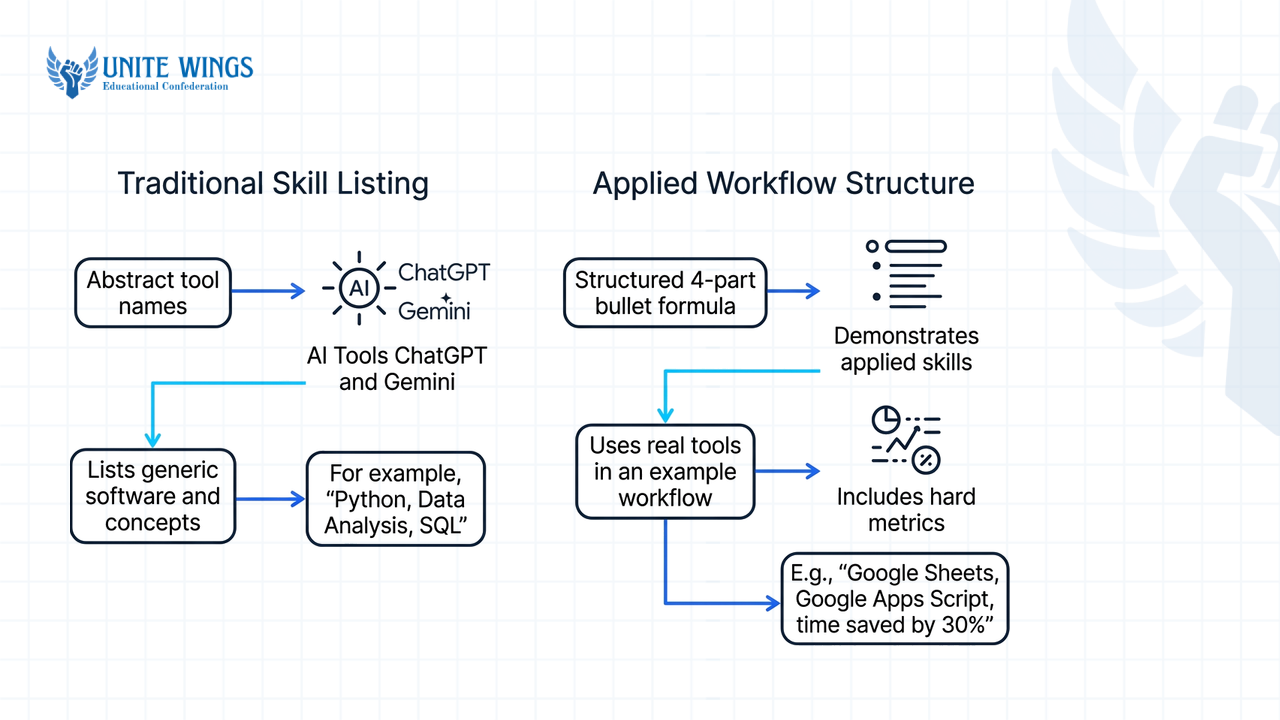
Why does writing 'AI Tools: ChatGPT, Gemini' on a resume backfire in interviews?
Writing "AI Tools: ChatGPT, Gemini" in your skills section backfires because 86% of Indian organizations now use AI or Agentic AI inside their own recruitment screening (Deloitte India), and their tools flag unverified buzzwords. Furthermore, 21% of hiring managers explicitly penalize or ignore resumes that list abstract AI tool names without proof of human validation and business outcomes (Fast Company).
There are two ways freshers shoot themselves in the foot with Gemini on a CV. First, they use Gemini to write the entire resume from scratch and paste the output directly. Fast Company's 2026 report shows that 76% of hiring managers say fully AI-generated resumes obscure real candidate achievements and lack human context. Bharti HR Insights (2026) confirms that automated ATS screeners in India reject resumes containing identical AI-generated phrases like "results-driven professional." If you want to use Gemini to polish your draft, follow the 4-step workflow published by Google and Jetstream: feed the app your raw, messy college project history, apply a structured writer prompt, manually edit out generic adjectives, and format the final numbers yourself.
Second, students list "Gemini" under skills and get destroyed in the technical cross-examination. When a panelist at a Bengaluru startup or a Deloitte campus drive sees "Gemini" on your resume, they do not ask what a large language model is. They ask: "How did you stop Gemini from hallucinating row data when you summarized that sheet?" If your only experience is typing one-line questions into the free web chat, you will freeze.
What most students get wrong is assuming HR only looks for keywords. According to Resume Genius and BuiltIn (2026), 26% of hiring managers want candidates to describe AI's tangible impact or practical tasks during an interview, and 19% look for concrete work examples right on the resume. Group your skills under a dedicated "AI & Technical Stack" heading, and never name a tool unless a project bullet two inches above it shows the exact output and a GitHub or Loom link.
What are 4 mini-projects I can build using Gemini, Google Sheets, and Docs in one weekend?
You can build four role-specific portfolio projects in 48 hours by pairing Google Docs, Sheets, and Gmail with Gemini: a marketing competitor synthesizer, a custom =GEMINI() spreadsheet classifier for data roles, an invoice-to-Sheets parser for operations, and an automated applicant scorer for HR. These projects prove practical execution, which matters because 82% of Indian employers struggle to find candidates who can apply AI to real workflows, according to the 2026 ManpowerGroup Talent Shortage Survey.
Before you start, here is the technical catch that top blogs skip: free consumer @gmail.com accounts do not get the native Gemini side-panel buttons ("Help me write" in Docs, "Help me organize" and "Fill with Gemini" in Sheets) unless you pay for a Google Workspace business/pro plan or your college provides an enterprise workspace license (MindStudio, BytePills).
The free workaround for students is better for your resume anyway:
- Go to Google AI Studio and generate a free Gemini API key.
- Open any Google Sheet, click Extensions > Apps Script, click the gear icon (Project Settings), and store your API key.
- Open
script.newwhile signed into a single Google Account and click the sparkle icon in the right-side panel; Google integrated Gemini directly into the Apps Script side panel so you can generate, refactor, and debug JavaScript code using natural language diff views.
Pick the project below that matches the job title you are targeting on Naukri or Internshala:
1. Marketing & Content: Multi-source competitor brief and client proposal generator
If you are applying for Marketing Analyst, Brand Executive, or Founder's Office roles, build a document synthesis hub.
- Collect 50 public competitor product descriptions, pricing pages, or lecture notes into a Google Drive folder alongside a sample
@Budget_Estimate.xlsxand@Process.pdf. - If you have Workspace access, use Gemini in Google Docs to pull Drive context (
@filename) and synthesize a structured 2-page client proposal, then route it to a Google Sheet for approval tracking (Scuti Asia / Google Workspace workflow). - If you are on a free account, write a 25-line Apps Script in Google Docs that loops through a folder of text files, sends the text to the Gemini API with a system prompt requiring a 3-column competitor comparison table, and appends the verified output into a master Google Doc.
- Add a second tab in Google Slides where Gemini generates the presentation outline and speaker notes from that master Doc.
2. Data & Business Analysis: Custom =GEMINI() batch sentiment and survey tracker
If you want Data Analyst, Business Analyst, or Product Analyst roles, build a data-cleaning function inside Google Sheets.
- Download a messy dataset of 500 customer reviews or college event survey responses with missing categories and mixed Hindi-English (Hinglish) text.
- On a paid Workspace account, highlight the table and use "Help me organize" and "Fill with Gemini" in Google Sheets to classify variables (Google Workspace Updates).
- On a free student account, go to Extensions > Apps Script and use the Gemini side panel to write a custom JavaScript function called
=GEMINI(cell,instruction). - In cell C2, type
=GEMINI(A2, "Classify sentiment as Positive, Negative, or Neutral and extract the primary product defect in 3 words")and drag it down 500 rows to perform batch categorization and translation directly inside spreadsheet cells.
3. Operations & Finance: Unread Gmail invoice parser to Google Sheets
If you are targeting Operations Executive, Supply Chain, or General Management Trainee roles, automate data entry from email attachments (adapted from the 2026 DataCamp workflow).
- Send your own Gmail account 20 sample PDF invoices or vendor receipts with varying layouts and label them
Unread-Invoices. - Open Google Sheets, launch Extensions > Apps Script, and prompt the Gemini side panel to write a script that searches Gmail for unread threads with that label.
- Pass the extracted attachment text to the Gemini API with a prompt that forces a strict JSON response:
{"vendor_name": "", "invoice_date": "", "total_amount_inr": 0, "gst_number": ""}. - Parse the JSON in Apps Script and append each invoice as a clean row in Google Sheets, then mark the email as read.
4. HR & Talent Acquisition: Automated candidate screener with DPDP compliance
If you are targeting HR Operations, Talent Acquisition, or Technical Recruiter roles, or want a Python/Workspace hybrid project, build an applicant scoring pipeline.
- Option A (No-Code Workspace): Connect a Google Form (job application) to Google Sheets. Use Apps Script and the Gemini API (or an n8n integration) to compare each applicant's text against a fixed rubric, score them from 0 to 10 in a new column, and trigger Gmail to send personalized status emails.
- Option B (Python + Streamlit): Follow the open-source developer workflow documented on Medium using Python, Streamlit, and the
google.generativeaipackage to build a local ATS matcher prototype that evaluates resume match scores against target job descriptions. - The compliance step that gets you hired: Under India's Digital Personal Data Protection (DPDP) Act 2023, feeding real candidates' phone numbers, emails, and Aadhaar/PAN details into public APIs without consent is a legal risk. Add a regex pre-processing function in your script that masks email addresses and 10-digit Indian mobile numbers before the text hits the Gemini API. Mentioning DPDP Act 2023 data masking in an HR or tech interview separates you from 99% of freshers.
If you want guided practice setting up these workspace connections, the Gemini Masterclass walks through connecting Gemini with Gmail, Docs, and Drive step by step.
How do I write resume bullet points that show AI productivity with real numbers?
Write your AI resume bullets using the four-part Robert Half and Fast Company formula: Task + Named Tool + Action Taken + Hard Metric. Instead of claiming you "know prompt engineering," state the exact volume of data you processed, how you connected Google Gemini to your workspace, and the hours or percentage of manual work you eliminated.
Recruiters screening non-technical and technical roles alike scan for quantified output (JobSwiper). Even if you took a 2-to-3-hour foundational course like CompTIA's AI basics to learn Gemini and Copilot interactions, do not waste three lines listing the certificate. Use that space for project bullets.
Copy and adapt these four role-specific templates based on the weekend project you built:
| Target Role | Weak Bullet (Gets Rejected by ATS/HR) | Strong Bullet (Task + Tool + Action + Metric) |
|---|---|---|
| Marketing / Content | Used Google Gemini to write marketing briefs and client proposals in Google Docs. | Processed 50+ monthly market research briefs using Google Gemini and Google Docs to synthesize competitor pricing data, cutting synthesis turnaround time by 40%. |
| Data / Business Analyst | Skilled in Google Sheets and Gemini AI for data cleaning and sentiment analysis. | Engineered a custom =GEMINI() function in Google Sheets via Apps Script to classify 500+ bilingual customer feedback rows, streamlining categorization and manual tagging. |
| Operations / Finance | Automated data extraction from emails into Google Sheets using Gemini API. | Automated weekly client invoice extraction using Gemini API and Google Sheets via Apps Script, reducing manual collation time by 65% (from 4 hours to 1.5 hours). |
| HR / Recruitment | Built an ATS resume screener using Python, Streamlit, and Google Gemini. | Built a DPDP-compliant applicant screening pipeline combining Google Forms, Sheets, and Gemini API (with regex PII masking) to automatically score applicants from 0–10. |
If the rest of your CV still looks like a generic college template, the Resume Masterclass shows you how to rebuild every section so a recruiter understands your value in ten seconds.
How do I demonstrate my Gemini workflow live during a fresher interview?
Demonstrate your Gemini workflow live in an interview by walking the panel through a four-stage pipeline: Prompt Design $\rightarrow$ Raw AI Generation $\rightarrow$ Critical Human Verification & Editing $\rightarrow$ Final Business Deliverable. According to NASSCOM's 2026 hiring survey, 71% of AI managers rely on a practical take-home or live building round rather than academic scores or certificates.
When an interviewer on Google Meet or Zoom says, "Show me how you built that Google Sheets automation," do not just show the finished spreadsheet. Follow the Future Career School (2026) live demonstration framework:
- Show the structured prompt pattern (60 seconds): Open your Apps Script editor or prompt log. Show that you did not use a lazy one-liner; point to your system instructions, your few-shot examples, and the JSON schema constraint you forced Gemini to follow.
- Trigger a live run and show raw output (60 seconds): Run the script on 3 fresh rows of messy data while sharing your screen. If an error pops up in the Apps Script console, use the Gemini side panel's one-click AI fix and diff view to debug the JavaScript live in front of the interviewer.
- Explain your human-in-the-loop verification gate (90 seconds): This is what gets you hired. Point to a column in your Google Sheet where your script flags low-confidence outputs or where you manually cross-check 10% of the rows against source PDFs to catch model hallucinations. While over 90% of the Indian workforce has touched GenAI, over 80% of regular corporate Indian firms are still in pilot phases of HR and operations AI deployment (Human Asset HR, Economic Times); managers are terrified of a fresher pushing unverified AI garbage to a client.
- Rehearse the cross-examination out loud: Before your interview, open the mobile Gemini app, turn on Gemini Live (or use Google's AI Career Coach resources and Google for Students), and tell it: "Act as a skeptical senior data analyst at an Indian GCC. Grill me for 5 minutes on how my Google Sheets Gemini API script handles rate limits, bad inputs, and hallucinations."
What most students get wrong in live rounds
Never claim your Gemini script is "100% accurate." When an interviewer asks what breaks your workflow, tell them the exact failure mode—for example, "Scanned PDFs with smudged GST tables cause Gemini to misread 8s as 3s, so I added a Google Sheets conditional formatting rule that highlights any row where the line items do not sum to the invoice total for manual check." Owning the limitation proves you actually built the project.
Your 7-day execution plan to get interview-ready
Hiring processes across Indian campuses and off-campus drives are already filtering for candidates who can prove what they build (Times of India). Do not wait until placement season starts to replace the buzzwords on your CV:
- Today (30 minutes): Open your resume, delete "ChatGPT, Gemini, Prompt Engineering" from your skills list, and generate a free API key in Google AI Studio.
- This weekend (6 hours): Build one of the four Google Workspace + Gemini mini-projects above that matches your target role, and record a 2-minute Loom video showing the prompt, the Apps Script code, the human verification step, and the final Sheet or Doc.
- Next Monday (45 minutes): Rewrite two project bullets on your resume using the Task + Tool + Action + Hard Metric formula and hyperlink your Loom video and GitHub repo right next to the project title.
Build your proof in one guided sprint
If you have zero work experience and want a mentor-led structure to pick, build, and publish a role-specific project that recruiters can click and verify, join the AI Portfolio Sprint. You will walk away with a completed, deployed AI workflow project, a live demo link, and the exact resume bullets to defend it in technical rounds.
Frequently asked questions
Is it safe to use Google Gemini to write my entire fresher resume from scratch?
No, pasting a fully AI-generated resume will hurt your shortlist rate because 76% of hiring managers say AI-written resumes hide real achievements and lack human context. Automated ATS filters in India also reject overused AI phrases like "results-driven professional." Use Gemini only to tighten raw bullet points that you drafted yourself, then manually edit the numbers.
Do I need a paid Google Workspace account to use Gemini with Google Sheets and Docs?
You need a paid Google Workspace business/pro plan or a supported college enterprise account to see the native "Help me write" and "Fill with Gemini" toolbar buttons inside Docs and Sheets. However, any student with a free Gmail account can connect Gemini to Sheets and Docs for free by pasting a Google AI Studio API key into Extensions > Apps Script.
What is the average fresher salary for AI-enabled roles in India?
Freshers in applied AI and AI developer roles earn ₹6–12 LPA at product companies, GCCs, and funded startups (reaching ₹10–18 LPA in Bengaluru and Hyderabad), compared to ₹4–8 LPA at traditional IT services firms and ₹3–4 LPA in Tier-2 cities like Jaipur. Across competitive sectors, Deloitte India reports that AI and data skills carry a 20% to 25% early-career salary premium.
Do ATS resume screeners in India automatically penalize resumes that mention AI tools?
ATS screeners do not penalize the word "Gemini" itself, but 21% of hiring managers ignore or penalize resumes that dump AI tool names into a skills section without verifiable proof. Furthermore, 86% of Indian employers use AI in recruitment that flags generic, unverified keyword stuffing. Always pair the tool name with a quantified project outcome.
How do I answer interview questions about prompt engineering without sounding like a script?
Skip textbook definitions and show a four-step pipeline from your own project: the system prompt and JSON constraints you wrote, the raw output Gemini generated, the human-in-the-loop verification check you used to catch hallucinations, and the final Google Sheet or Doc deliverable. Practice defending your edge cases out loud using Gemini Live on your phone before the interview.
Newsletter
Stay updated with our latest news and insights.