
9 Best Free Custom GPTs for College Students in 2026 (Tested)
Nine free tools inside the ChatGPT Store that find real IEEE citations, draw architecture diagrams, debug Python notebooks and draft seminar slides.
The best custom GPTs for college students on the free ChatGPT plan are Consensus, SciSpace, Scholar GPT, SciWeave, Diagrams: Show Me, Whimsical Diagrams, Eraser, Python GPT, and Data Analyst GPT. You do not need a paid subscription to use any of these 9 tools; sign in at chatgpt.com/gpts and open the Explore GPTs tab to run them inside your standard message caps. While over 3 million custom GPTs were created in the first two months after OpenAI launched the store in 2024 (Coursera, 2025), these 9 connect to live academic databases, visual diagram engines, or built-in Python execution rather than just wrapping a basic prompt.
In short
- Free ChatGPT accounts can browse and use public Custom GPTs in the GPT Store, though standard daily message caps apply (OpenAI Help Center, 2026).
- For final-year literature reviews, use Consensus or Scholar GPT; both query databases of roughly 200 million verified academic papers instead of guessing citations (DataNorth, 2026; AI Agents Kit, 2025).
- For project architecture and synopsis reports, use Diagrams: Show Me or Whimsical Diagrams to turn plain-text notes into sequence diagrams and flowcharts (FeaturedGPTs, 2026).
- Since August 16, 2026, personal accounts (Free, Go, Plus, and Pro) can no longer create new Custom GPTs; you need a college Edu workspace or must use Custom Instructions instead (Webiano Digital, 2026).
- OpenAI has scheduled the legacy Custom GPT architecture for retirement by December 11, 2026, migrating workflows to modular plugins and skills (Justin McKelvey / DataNorth, 2026).
Can free ChatGPT users access Custom GPTs in the GPT Store in 2026?
Yes, free ChatGPT users can access and chat with public Custom GPTs in the GPT Store at zero cost after signing in (OpenAI Help Center, 2026). Go to chatgpt.com/gpts, click the "Explore GPTs" tab on the left sidebar, search for the tool by name, and start a chat under your regular free-tier message limits (Codioo, 2026).
Most students stay inside the default ChatGPT window and type one-line prompts for everything from IEEE literature surveys to SQL lab assignments. That default window has no direct API link to PubMed or Mermaid.js diagram renderers unless you route your prompt through a specialized GPT.
Here is how the 9 tested free GPTs compare across the three tasks that eat up the most college hours:
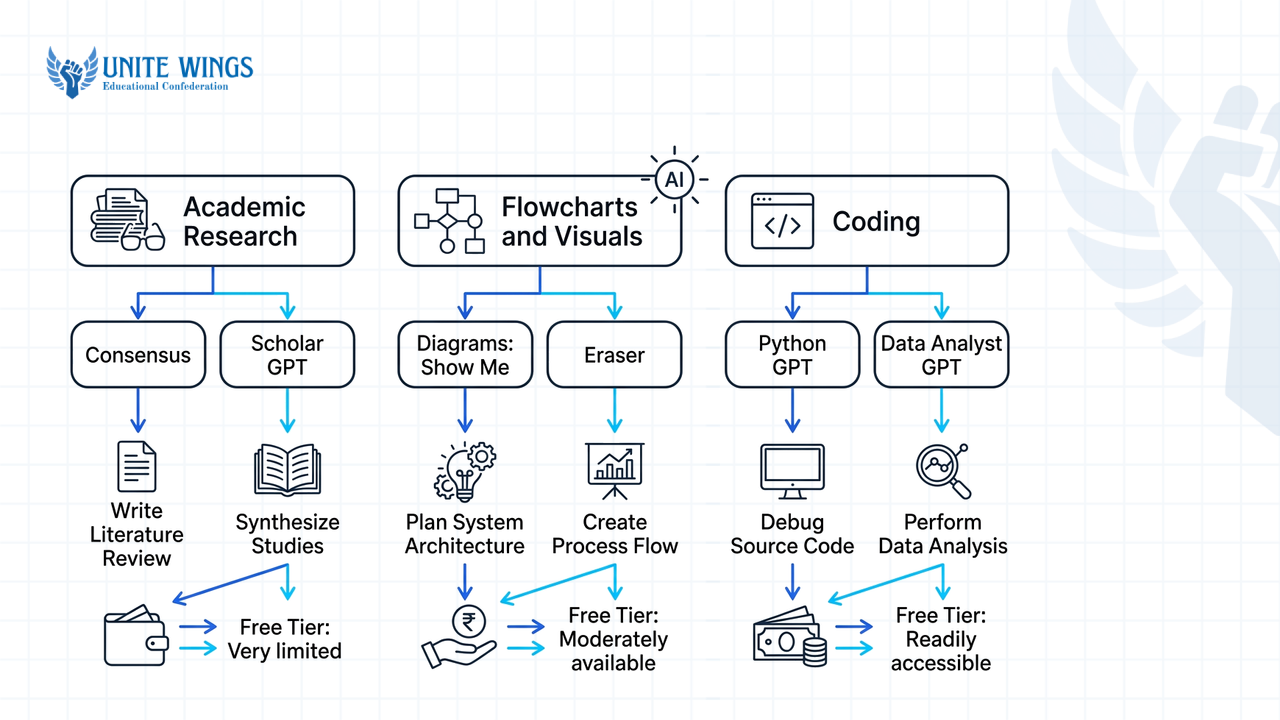
| Custom GPT Name | Category | Core database or engine | Best college task | Free tier access |
|---|---|---|---|---|
| Consensus | Academic Research | ~200M academic papers (DataNorth, 2026) | Checking scientific agreement with verified citations | Yes |
| Scholar GPT | Academic Research | 200M+ papers on arXiv, PubMed, Google Scholar (AI Agents Kit, 2025) | Pulling DOI-backed sources for B.Tech or M.Tech theses | Yes |
| SciSpace | Academic Research | Peer-reviewed literature parser (SciSpace, 2024) | Summarizing dense research PDFs and complex terminology | Yes |
| SciWeave | Academic Research | Peer-reviewed scientific literature (SciWeave, 2026) | Answering specific technical questions with direct citations | Yes |
| Diagrams: Show Me | Flowcharts & Visuals | Text-to-diagram generator (FeaturedGPTs, 2026) | Generating sequence diagrams, mind maps, and timelines | Yes |
| Whimsical Diagrams | Flowcharts & Visuals | Whimsical visual engine (FeaturedGPTs, 2026) | Converting rough lecture or project notes into flowcharts | Yes |
| Eraser (DiagramGPT) | Flowcharts & Visuals | Diagram-as-code architecture tool (DataNorth, 2026) | Drawing system architecture diagrams for capstone reviews | Yes |
| Python GPT | Coding & Debugging | Code generation & syntax debugger (ClickUp, 2025) | Fixing syntax errors and optimizing algorithm logic | Yes |
| Data Analyst GPT | Coding & Debugging | Built-in Advanced Data Analysis / Code Interpreter (AI Agents Kit, 2025) | Running Python scripts and plotting CSV datasets without local setup | Yes |
Why does knowing your way around these specific AI tools matter beyond semester exams? A May 2026 Business Standard report found that 60% of TCS's FY26 fresher hires possessed verified AI skills (Business Standard / Unite Wings, 2026). Furthermore, single-source 2026 data from AI Workflow India indicates that Indian graduates with documented AI competencies secure 30% to 40% higher salary packages and 5x more recruiter callbacks (AI Workflow India, 2026). Even public infrastructure is shifting here: in January 2026, Google announced an ₹85 crore grant for 75 million Indian students to support AI education infrastructure and digital upskilling (Unite Wings, 2026). Learning to pair the right specialized GPT with your coursework builds the exact workflow fluency placement panels test for.
Which Custom GPT finds real research papers without making up fake citations?
Consensus, Scholar GPT, SciSpace, and SciWeave are the four best Custom GPTs for finding real research papers without hallucinated citations. Consensus and Scholar GPT query indexes of roughly 200 million academic papers across arXiv, PubMed, and Google Scholar, while SciSpace and SciWeave extract answers directly from peer-reviewed literature (DataNorth, 2026; AI Agents Kit, 2025; SciWeave, 2026).
What most students get wrong when writing a minor project synopsis or IEEE paper is asking the default ChatGPT window: "Give me 10 recent research papers on load balancing in cloud computing with citations." Standard language models predict words based on probability, so they regularly stitch together a real author's name, a plausible journal title, and a dead link or fake year. If your project guide checks two of those references on Google Scholar, your synopsis gets rejected on the spot.
Instead, pick one of these four research GPTs based on the exact stage of your assignment:
1. Consensus (Best for testing a hypothesis)
Consensus connects your prompt to a database of approximately 200 million academic papers to check scientific agreement on a specific question (DataNorth, 2026; SciWeave / Vertex AI, 2024).
- Real student task: You need to justify why you chose Random Forest over SVM for a hospital readmission prediction project.
- Exact prompt to run:
"Do tree-based ensemble models outperform support vector machines on imbalanced electronic health record datasets? Provide 5 peer-reviewed papers from 2021 to 2026 with exact titles and links." - What the tested output looks like: Consensus returns a structured synthesis bar showing the consensus split across studies, followed by 5 numbered cards containing the real paper title, publication year, citation count, a one-sentence quote from the abstract, and a direct hyperlink to the Consensus paper page.
2. Scholar GPT (Best for pulling arXiv and PubMed DOIs)
According to a 2025 AI Agents Kit report, Scholar GPT queries an academic database indexing over 200 million research papers from arXiv, PubMed, and Google Scholar.
- Real student task: Collecting 8 literature review entries for a final-year B.Tech thesis on lithium-ion battery thermal management.
- Exact prompt to run:
"Search arXiv and Google Scholar for peer-reviewed papers on phase change materials in EV battery thermal management published after 2022. List the title, authors, year, and explicit DOI for each." - What the tested output looks like: A clean markdown list where every entry includes a clickable
doi.orglink and a 3-bullet breakdown of the methodology and quantitative findings.
3. SciSpace (Best for decoding dense PDFs)
SciSpace specializes in helping students parse dense academic terminology, conduct literature reviews, and summarize research PDFs without generating fake citations (SciWeave, 2026; SciSpace, 2024).
- Real student task: Your professor handed you a 18-page IEEE Transactions paper full of partial differential equations that you have to present in tomorrow's seminar.
- Exact prompt to run: Upload the PDF into SciSpace GPT and type:
"Explain the proposed mathematical formulation in Section 3 for a third-year undergraduate student, and list the 3 baseline limitations the authors mention in Section 4." - What the tested output looks like: Plain-English definitions of every variable in the equation, tied directly to page and paragraph numbers from your uploaded PDF.
4. SciWeave (Best for quick citation-backed technical answers)
SciWeave provides citation-based answers pulled directly from peer-reviewed scientific literature (SciWeave, 2026).
- Real student task: Writing the introduction section of a biotechnology or pharmacology lab report where every factual claim needs an inline reference.
- Exact prompt to run:
"What are the primary mechanisms of CRISPR-Cas9 off-target cleavage in mammalian cells? Answer in 150 words with inline citations to peer-reviewed studies." - What the tested output looks like: A concise paragraph where every sentence ends with an author-year tag linked to the underlying journal article.
Always click the source link before pasting a reference into your report. While Consensus and SciWeave pull from verified scholarly repositories, prompt-handling nuances can occasionally introduce formatting errors if you do not verify the source URL yourself. If you want to combine these GPTs with dedicated citation tools for your thesis, our Research with AI: Perplexity and NotebookLM session walks through building a complete zero-hallucination literature workflow.
What is the best Custom GPT for turning project notes into flowcharts and diagrams?
"Diagrams: Show Me" and Whimsical Diagrams are the best Custom GPTs for converting rough text notes into flowcharts, sequence diagrams, mind maps, and timelines (FeaturedGPTs, 2026). For software engineering or cloud architecture diagrams, Eraser (formerly DiagramGPT) works as a diagram-as-code tool that renders clean technical layouts from text prompts (DataNorth, 2026).
During internal project evaluations (Project Phase 1 and Phase 2), review panels rarely read 40 pages of copied theory; they flip straight to your system architecture diagram, ER diagram, and user flow. Drawing boxes manually in MS Word takes two hours and looks crooked. These three GPTs turn your rough bullet points into clean visuals in under a minute.
5. Diagrams: Show Me (Best for sequence diagrams and Mermaid.js code)
"Diagrams: Show Me" creates sequence diagrams, mind maps, timelines, graphs, and flowcharts directly from text inputs (FeaturedGPTs, 2026; Vertex AI / Medium source, 2024).
- Real student task: Creating a login-to-checkout sequence diagram for a college canteen ordering web app.
- Exact prompt to run:
"Create a sequence diagram showing a student logging in via college email OTP, selecting menu items, paying via UPI gateway, and the kitchen dashboard receiving the order token. Output both the rendered image and the editable Mermaid.js code." - What the tested output looks like: An inline visual sequence diagram image inside the chat, an "Edit diagram" link that opens the chart in an external browser editor, and a copyable Mermaid.js code block you can paste into Notion or GitHub README files.
6. Whimsical Diagrams (Best for mind maps and process flowcharts)
Whimsical Diagrams transforms messy text notes into structured flowcharts, mind maps, and sequence diagrams (FeaturedGPTs, 2026).
- Real student task: Turning 3 pages of scattered unit-4 operating systems notes on deadlock handling into a single revision mind map before mid-sem exams.
- Exact prompt to run: Paste your raw lecture notes and add:
"Convert these notes on deadlock prevention, avoidance (Banker's Algorithm), detection, and recovery into a hierarchical mind map." - What the tested output looks like: A color-coded flowchart image generated by Whimsical, accompanied by a direct link to open the board in Whimsical where you can drag nodes around and export a high-resolution PNG for your presentation slides.
7. Eraser / DiagramGPT (Best for system architecture diagrams)
According to a 2026 DataNorth overview, Eraser functions as a diagram-as-code architecture tool succeeding older visual generators.
- Real student task: Designing a cloud deployment architecture diagram for a final-year IoT smart irrigation project.
- Exact prompt to run:
"Generate a system architecture diagram-as-code for an ESP32 sensor node sending soil moisture data via MQTT to an AWS IoT Core broker, storing time-series data in DynamoDB, and serving a React dashboard." - What the tested output looks like: A clean engineering block diagram with labeled directional arrows and service groupings, plus the underlying declarative syntax so you can add or rename components in seconds.
Which Custom GPT helps non-CS students write and debug Python or SQL code?
Python GPT and Data Analyst GPT are the top Custom GPTs for helping non-CS students write, execute, and debug Python or SQL code (ClickUp, 2025; AI Agents Kit, 2025). Both use ChatGPT's built-in Advanced Data Analysis environment (Code Interpreter) to run scripts, fix syntax errors, and generate charts without installing Python locally (DataNorth, 2026).
If you are from Mechanical, Civil, Biotech, or B.Com and preparing for mass-recruiter drives (like TCS NQT or Infosys SP/DSE) or analyst roles, setting up Anaconda, virtual environments, and SQL servers on a slow laptop often stalls your prep on day one. These two GPTs let you write, test, and debug inside the browser.
8. Python GPT (Best for syntax debugging and algorithm optimization)
Python GPT assists students with code generation, syntax debugging, and algorithm optimization (ClickUp, 2025).
- Real student task: You wrote a Python script for a numerical methods lab (or a coding round practice problem), and it keeps throwing an
IndexError: list index out of rangeor timing out on hidden test cases. - Exact prompt to run: Paste your broken code or a screenshot of your terminal error log and write:
"I am a Mechanical Engineering student learning Python. Find the bug causing the IndexError in this script, explain why it happens on edge-case inputs in plain English, and rewrite the function to run in O(n) time." - What the tested output looks like: A side-by-side comparison showing the exact line where your loop counter exceeded the list length, a dry-run table with sample array values
[4, 1, 9], and the corrected, commented Python function.
9. Data Analyst GPT (Best for CSV cleaning, SQL queries, and instant charts)
Data Analyst GPT is a top-performing assistant in the GPT Store for data visualization, script execution, and debugging via Code Interpreter (AI Agents Kit, 2025). Because ChatGPT's built-in Advanced Data Analysis executes Python scripts in a sandboxed cloud environment, you do not need a local setup (DataNorth, 2026).
- Real student task: You downloaded a messy 15,000-row CSV dataset from Kaggle for an MBA or economics minor project, and you need to clean missing values, write 4 SQL aggregation queries, and plot a correlation heatmap.
- Exact prompt to run: Upload the
.csvfile and prompt:"1. Run a Python script to check missing values per column and impute numeric nulls with the median. 2. Write the equivalent PostgreSQL query to find the top 3 product categories by monthly revenue. 3. Generate a downloadable seaborn correlation heatmap PNG." - What the tested output looks like: Data Analyst GPT opens an interactive execution window, runs
pandasandseaborncode live on your file, outputs the tested SQL query block, and displays a downloadable chart image alongside the cleaned CSV file.
For placement aptitude and coding test practice, Indian freshers also frequently use a store tool called Prompt GPT, which features a camera-based MCQ solver and a smart versioning coding debugger (Unite Wings, 2026). Use it to step through why an aptitude logic puzzle or code snippet failed after you attempt a mock test, rather than blindly copying answers without learning the logic.
How do I build my own private Custom GPT for my semester subject in 10 minutes?
Since August 16, 2026, you cannot build a new Custom GPT on a personal ChatGPT account (Free, Go, Plus, or Pro); creation now requires an eligible Business, Enterprise, or Edu workspace with administrator permission (Webiano Digital, 2026; OpenAI Help Center, 2026). If your college provides an Edu workspace, you can build one in 10 minutes via the Configure tab.
Almost every other blog ranking on Google right now gets this wrong. They still tell you to buy a personal ChatGPT Plus subscription and click "Create a GPT." If you pay for a personal Plus account today expecting to build custom bots, you will not find a working creation flow because OpenAI restricted new Custom GPT builds to organizational workspaces in August 2026 after launching enterprise Workspace Agents in April 2026 (Webiano Digital, 2026; Crypto Briefing, 2026).
Furthermore, OpenAI has scheduled the legacy Custom GPT architecture for retirement by December 11, 2026, shifting these workflows into modular Plugins and Skills (Justin McKelvey / DataNorth, 2026).
Depending on whether you have a college .edu workspace or a personal free account, follow the matching path below to set up your semester study assistant today:
Path A: If you have a college Edu or Business workspace (The 10-minute GPT Builder)
- Open the Builder: Log in with your institutional account at
chatgpt.com/gptsand click Create in the top-right corner, then switch directly to the Configure tab (AI-Toolbox, 2026). - Paste your System Instructions (capped at 8,000 characters): The Instructions field in the GPT Builder is strictly capped at 8,000 characters (AIAgentsKit, 2026). Paste a structured prompt like this:
"You are a strict semester exam tutor for VTU/Anna University/MU B.Tech Semester 5 Database Management Systems. Answer every question using ONLY the uploaded syllabus and lecture PDFs. Structure every 10-mark answer with: 1) Formal definition, 2) Schema or architecture diagram in Mermaid syntax, 3) SQL or relational algebra example, and 4) Three key bullet points for quick grading." - Upload your semester files: Under Knowledge, upload up to 20 individual reference files such as syllabus PDFs, previous years' question papers, and handwritten note scans (AIAgentsKit, 2026). Each file is capped at 512 MB, and text documents have a 2,000,000-token ceiling per file (AIAgentsKit, 2026; AI Agents Kit, 2025).
- Toggle capabilities and test: Check the boxes for Web Search and Code Interpreter & Data Analysis. Test two past exam questions in the Preview pane on the right, then click Save and choose either private link sharing or workspace directory publishing.
Path B: If you are on a personal Free or Plus account (Two working workarounds)
- Workaround 1 (Free Tier — Custom Instructions): Open Settings and select Custom Instructions, which supports up to 5,000 characters on standard ChatGPT accounts (AI Business Weekly, 2026). Paste your syllabus structure and 10-mark answer format there, then attach your unit PDF directly into the chat window when studying.
- Workaround 2 (Shared Projects): If you have access to ChatGPT Projects on a supported workspace, use a Project folder instead of a Custom GPT. Shared ChatGPT Projects hold up to 40 files on Business workspaces and allow sharing with up to 100 classmates, making them far more resilient ahead of the December 2026 Custom GPT architecture transition (Justin McKelvey, 2026).
To learn how to set up Projects, write system prompts that never drift, and use study mode properly, join our hands-on ChatGPT Masterclass.
How to put these 9 GPTs to work this week
Do not bookmark all 9 tools and go back to typing vague one-liners in the default chat window. Pick three tasks from your current semester schedule and execute them over the next seven days:
- Today (15 minutes): Open
chatgpt.com/gptson your free account, search for Consensus, Diagrams: Show Me, and Data Analyst GPT, and pin all three to your left sidebar so they sit right below your main chat button. - This Wednesday (30 minutes): Take one upcoming lab record, minor project synopsis, or seminar topic. Run your research question through Scholar GPT or Consensus to collect 5 verified DOI papers, then paste your system workflow notes into Diagrams: Show Me to generate your architecture diagram.
- This weekend (45 minutes): Set up your 5,000-character Custom Instructions (or a workspace Project folder with your syllabus PDFs) so your account automatically formats answers to match your university's exam marking scheme.
Go beyond one-line prompts in the ChatGPT Masterclass
If you want to set up a complete study and placement prep workflow without wasting hours on trial and error, join the ChatGPT Masterclass. You will walk away with configured ChatGPT Projects for your semester subjects, tested prompt templates for deep research and study mode, and verifiable AI workflow proof you can talk about in campus interviews.
Frequently asked questions
Do I need a ChatGPT Plus subscription to use Custom GPTs?
No, you do not need a ChatGPT Plus subscription to use public Custom GPTs. Free ChatGPT users can browse the GPT Store via the "Explore GPTs" tab and chat with public tools like Consensus, SciSpace, and Python GPT under standard daily free-tier message caps (OpenAI Help Center, 2026; Codioo, 2026).
Why can't I find the Create button for Custom GPTs on my personal account?
OpenAI removed the ability for personal accounts (Free, Go, Plus, and Pro) to create or publish new Custom GPTs starting August 16, 2026 (Webiano Digital, 2026). Building new Custom GPTs now requires a Business, Enterprise, or Edu workspace with administrator permissions enabled (OpenAI Help Center, 2026).
Are Custom GPTs being retired or phased out by OpenAI?
Yes, OpenAI has scheduled the legacy Custom GPT architecture for retirement by December 11, 2026 (Justin McKelvey / DataNorth, 2026). The platform is migrating standalone custom bots toward modular plugins, skills, and shared ChatGPT Projects, so store your core prompts and PDFs in local folders or Projects too.
How many syllabus PDFs can I upload to a Custom GPT or ChatGPT Project?
A Custom GPT knowledge base supports up to 20 uploaded reference files, with each file capped at 512 MB and 2,000,000 tokens per text document (AIAgentsKit, 2026; AI Agents Kit, 2025). By comparison, Shared ChatGPT Projects on Business workspaces hold up to 40 files and can be shared with 100 people (Justin McKelvey, 2026).
Can Consensus or Scholar GPT still make mistakes in citations?
While Consensus and Scholar GPT query verified indexes of roughly 200 million papers across arXiv, PubMed, and Google Scholar, prompt nuances can occasionally cause formatting mismatches (DataNorth, 2026; AI Agents Kit, 2025). Always ask for the explicit DOI link and click it to verify the abstract before submitting your thesis.
Which Custom GPT is best for preparing for Indian college placements in 2026?
Use Python GPT and Data Analyst GPT to practice coding logic, SQL queries, and data cleaning inside ChatGPT's built-in execution environment (ClickUp, 2025; DataNorth, 2026). Many Indian freshers also use Prompt GPT to debug versioned code and step through aptitude MCQ logic during placement preparation (Unite Wings, 2026).
Newsletter
Stay updated with our latest news and insights.