
Notion vs Custom Website Portfolio for Freshers: What Works?
A side-by-side comparison of Notion pages and custom websites across build time, mobile layout, and what Indian startup founders vs HR teams prefer to click.
Choosing between a Notion vs website portfolio for freshers comes down to the exact role you are applying for on Naukri, LinkedIn, or your campus placement portal. If you are targeting product management, content writing, marketing, or backend engineering, a clean Notion page works well and costs $0 on Notion's free plan. If you are applying for UI/UX design, product design, or frontend development, a custom website wins because hiring managers judge your visual execution and CSS control within 10 seconds of clicking your link.
In short
- Pick Notion if: You are applying for Product Management, Marketing, Content Writing, or Backend roles where text-heavy case studies and problem statements matter more than custom visuals.
- Pick a Custom Website if: You want a UI/UX, Product Design, or Frontend role; design leaders noted in Scale.jobs' 2025 insights reject Notion because it lacks micro-interactions and custom typography.
- The 10-second rule: Hiring teams spend roughly 10 seconds on a portfolio homepage during initial screening (Emily Backes, 2026), so fast loading and skimmable headings beat complex animations that fail to load.
- Cost check: Notion's
notion.sitelink is free, adding a custom domain natively costs $8 to $10/month, and traditional builders like Wix or Squarespace charge $19 to $25+ per month. - The 2026 shortcut: You no longer need 20 hours on Webflow; AI builders like Bolt.new, Lovable, or Seera generate custom portfolio sites in 1 to 90 minutes from a PDF resume or text prompt.
Do recruiters actually read Notion portfolios during screening?
Recruiters do read Notion portfolios, and according to 2024 discussions on Reddit and Medium, software engineers and product managers have used Notion portfolios wrapped via Super.so to land interviews at Google, Amazon, and Meta. However, hiring teams spend only about 10 seconds reviewing a portfolio homepage during the initial screen before deciding to read further, according to Emily Backes' 2026 analysis on recruiter habits. Whether a Notion link passes that 10-second test depends on who is clicking it and what role you want.
In Indian campus placements and off-campus drives, your portfolio goes through two different gates. First is the HR screener or placement cell coordinator scanning a high volume of applications; they care that the link opens fast without a login wall and shows your project stack immediately. Second is the hiring manager or technical interviewer who clicks through during your technical round to verify what you actually built.
Curious.page's 2026 guide on Notion vs personal websites notes that Notion's block-based editor is built for heavy content organization, which makes it effective for writing-heavy case studies, product management specs, and content logs. A 2022 Prototypr.io evaluation also found that engineering and PM evaluators appreciate Notion because the text-heavy format keeps attention on project context and problem statements rather than visual fluff. When a PM hiring manager opens a fresher's Notion teardown of a Swiggy checkout flow, the familiar document layout lets them scan the user research, metrics, and wireframes in seconds.
The reaction flips completely if you send a raw Notion link for a visual role. Scale.jobs' 2025 U.S. job market portfolio insights, citing design leader Ben Sauer, point out that design leaders are skeptical of Notion portfolios because the default medium hampers focused visual storytelling. If you are a final-year student applying for a UI/UX internship, a recruiter may see a standard Notion document as a lack of effort in visual execution.
| Feature or Criteria | Free Notion Portfolio (notion.site) | Wrapped Notion (Super.so / Potion.so) | Traditional Builder (Wix / Squarespace / Webflow) | AI Website Builder (Bolt.new / Seera / ChilledSites) |
|---|---|---|---|---|
| Setup & Build Time | A few hours of manual typing and block arranging | A few hours of Notion setup and wrapper styling | 23 minutes for basic wizard (Emergent, 2026) to 4–20 hours for custom styling (MySeera, 2026) | 60 seconds (Seera/ChilledSites) to 30–90 minutes for full custom code (The AI Server, 2026) |
| Monthly Cost | $0 for public pages; $8–$10/mo for native custom domain (Notion, 2026) | Free tiers have branding/limits; paid tiers add monthly hosting fees (Wrkzon, 2026) | $19 to $25+ per month for professional hosting tiers (Emergent, 2026) | Free tiers available for generation and preview; custom domain hosting varies by platform |
| Design & CSS Control | Low: restricted fonts, no custom hex codes in standard text blocks (Prototypr.io, 2022) | Medium: custom themes, CSS tweaks, and faster caching layers (Reddit, 2024) | High: full template control, custom typography, and complex CSS animations | High: generates editable React, Next.js, and Tailwind CSS components (The AI Server, 2026) |
| Mobile Responsiveness | Poor by default: multi-column layouts stack into long single columns (Thomas Frank, 2022/2026) | Good: wrapper handles responsive breakpoints better than raw Notion | Good: built-in mobile viewport editors, though manual tweaking takes hours | Good: requires prompt iteration and testing during the 30–90 minute build window |
| Best Role Fit for Freshers | Product Management, Content Writing, Marketing, Backend Dev, Data Analysis | PMs and Engineers wanting a clean custom URL and faster load speeds | Senior Visual Designers or Freelancers with budget for ongoing subscriptions | UI/UX Designers, Frontend Developers, and Full-Stack Freshers needing custom proof fast |
When does a custom website beat a Notion portfolio for freshers?
A custom website beats a Notion portfolio whenever your target job requires you to prove visual polish, frontend code execution, or brand customization. Curious.page's 2026 analysis shows that custom websites outperform Notion when applicants need bespoke typography, complex CSS animations, custom brand aesthetics, or granular SEO controls that Notion blocks restrict. If your day-to-day job involves deciding how a screen looks or responds to a user's cursor, your portfolio container is your first work sample.
An older 2022 evaluation by Prototypr.io highlights two specific reasons freshers in Product Design or UI/UX are advised against raw Notion portfolios:
- Notion has strict native layout limits, including only three default font styles and an inability to type custom color hex codes directly into standard text blocks.
- The Aesthetic-Usability Effect causes human reviewers to subconsciously perceive cleaner, custom-designed websites as more usable and professional than uniform template pages, associating visual polish with higher competence.
Here is the decision rule to use before you build:
- If you are a CS/IT fresher targeting Frontend, Full-Stack, or UI/UX roles: Build a custom website. When a startup CTO checks your GitHub and portfolio link, a custom site built with React or clean HTML/CSS proves you can ship a responsive interface.
- If you are a non-CS student or fresher targeting Product Management, Growth Marketing, Copywriting, or Business Analyst roles: Use Notion. Your hiring manager wants to read your SQL query logic, GTM strategy, or PRD structure, and Notion's toggle lists and embedded PDFs let you organize detailed case studies without fighting CSS bugs.
- If you are a freelancer looking for gig clients: Use an AI builder made for service workflows. A 2026 review by InMinutes and Base44 notes that AI website builders like InMinutes and Base44 bundle booking calendars, data-storing inquiry forms, and auto-blogging directly into portfolio layouts.
If you do not have strong projects to put on either platform yet, join the AI Portfolio Sprint to pick a real problem, build a working proof-of-work project with AI, and publish it for recruiters to verify.
How do I stop my Notion portfolio from looking messy on mobile?
You stop a Notion portfolio from breaking on mobile by stripping out multi-column desktop grids, switching databases from tables to list or gallery views, and hiding metadata clutter in the page menu. According to a 2022 and 2026 breakdown by Thomas Frank and Reddit users, Notion's mobile view automatically compresses side-by-side desktop columns into a single vertical stack, which scrambles your reading order and creates endless scrolling. Because many Indian startup founders and hiring managers open LinkedIn DMs and resume links on their phones between meetings, a broken mobile view kills your conversion rate.
Most students make the mistake of designing their Notion page on a 15-inch laptop with three columns: a profile photo on the left, a bio in the middle, and contact links on the right. On a mobile screen, Notion stacks these left-to-right, pushing your actual project links down and requiring excessive scrolling.
Follow this mobile optimization checklist based on 2025 and 2026 workflows from Rosanna Txt and Thomas Frank:
- Stick to a single vertical column: Build your homepage top-to-bottom in one column so the visual hierarchy stays identical on desktop and mobile screens.
- Swap tables and boards for Gallery or List views: Rosanna Txt's 2025 guide shows that changing database layouts from wide tables or Kanban boards to
ListorGalleryviews makes touch navigation and reading much cleaner on smartphones. If you use a Gallery view on mobile, turn cover image previews off if your images have small text that gets cropped. - Pack deep details into Toggle Lists: Instead of letting a case study run excessively long vertically, place your project sections inside toggle lists so a mobile reader can scan headings and expand only what they want to read.
- Turn off top-of-page clutter: Open the three-dot menu (
...) at the top right of your Notion page, clickCustomize page, and hideBacklinks,Page discussions,Table of contents, and inline comments (Rosanna Txt, 2025). This removes the grey metadata bars that eat up the top half of a phone screen before your bio even starts.
Can I connect a custom domain to a free Notion portfolio?
Yes, you can connect a custom .com or .in domain to a free Notion portfolio either by paying Notion $8 to $10 a month for their official add-on, using a third-party wrapper like Super.so, or setting up a free Cloudflare Worker reverse proxy. According to Notion's 2026 Custom Domain Documentation, Notion's free plan lets you publish unlimited public pages on a standard notion.site URL for $0, while workspace owners can buy the native Custom Domain Add-on for $10/month (or $8/month billed annually).
If you want to pay for the official native route, the setup is straightforward:
- Open your Notion workspace
Settingsand go toSites. - Click
New domain, selectCustom domain, and type your subdomain (such aswww.yourname.com). - Copy the CNAME record pointing to
external.notion.siteand the verification TXT record, then paste both into your domain registrar's DNS settings (like GoDaddy, Namecheap, or Squarespace).
If you want a custom domain plus better design control and faster page loads, 2024 and 2026 data from Reddit and Wrkzon point to third-party wrapper tools like Super.so, Potion.so, and Simple.ink. These tools sit on top of your Notion page, add caching layers to fix Notion's slow default load speeds, and let you apply custom fonts and CSS, though their free tiers include mandatory platform branding and feature limits.
If you want to connect your custom domain for $0 in monthly hosting fees, Wrkzon's 2026 guide outlines a free workaround using Cloudflare Workers as a reverse proxy:
- Publish your Notion page to the web and copy the public
notion.siteURL. - Create a free account on Cloudflare.com, add your custom domain, and change your domain registrar's nameservers to the ones Cloudflare gives you.
- Create a Cloudflare Worker script using an open-source reverse-proxy JavaScript template, and deploy a Worker route matching
yourdomain.com/*pointing to your public Notion URL.
What most students get wrong about the free Cloudflare script
Tutorials on YouTube make the free Cloudflare Worker proxy look like a permanent hack, but they rarely mention the maintenance trap. Because this reverse-proxy method is unofficial, your custom domain will suddenly throw an error screen whenever Notion updates its internal API endpoints or content security policies. If your site breaks on the morning a recruiter from your dream startup clicks your resume link, you get rejected without knowing why. If you cannot check your DNS and Worker scripts every couple of weeks, stick to the free notion.site link or deploy a free static site via an AI builder.
How fast can I build a custom portfolio website using AI instead of coding?
You can generate a live initial draft of a custom portfolio website using AI in 60 seconds, and finish a fully edited, mobile-tested site with custom React code in 30 to 90 minutes. According to 2026 data from Webhunt.ai, MySeera, and Emergent, traditional no-code builders like Webflow, Wix, or Squarespace take about 23 minutes just to step through the initial wizard setup and 4 to 20 hours of manual layout styling to finish. Modern AI website builders cut out both the manual coding and the drag-and-drop alignment grind.
Depending on your technical comfort, you have three distinct AI workflows in 2026:
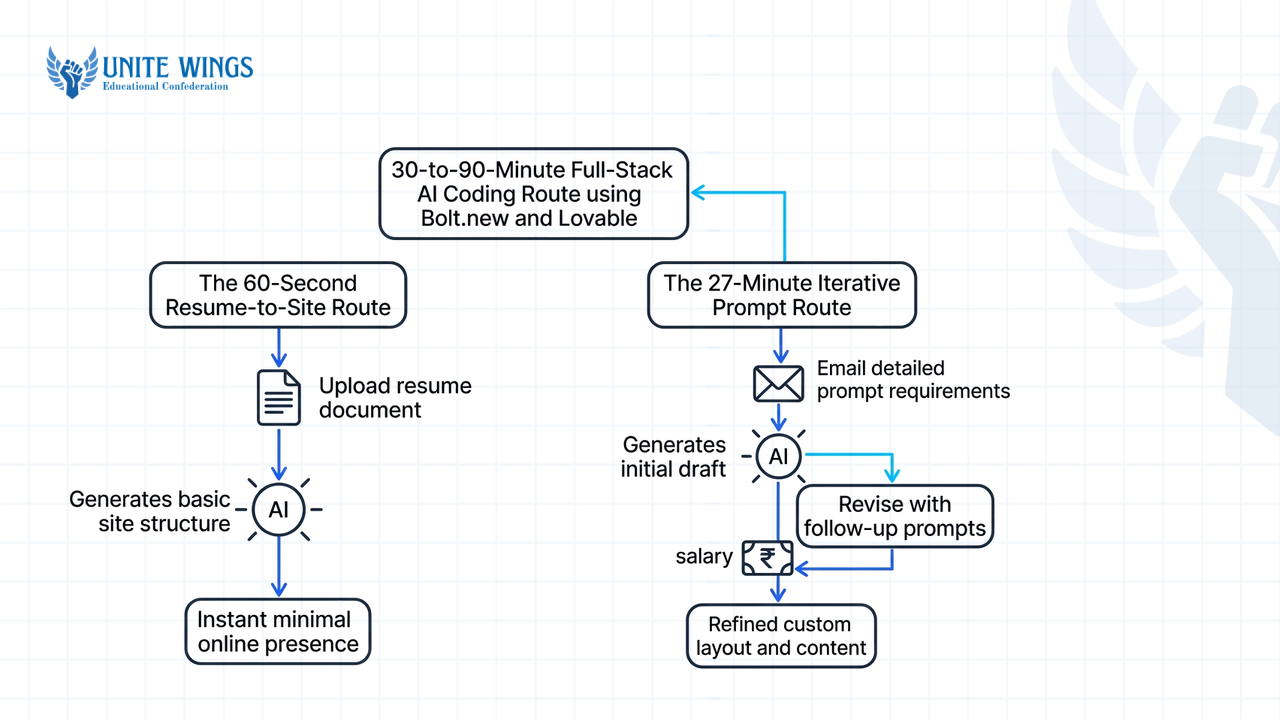
- The 60-Second Resume-to-Site Route (Zero Code): If you have a finished resume or LinkedIn profile and need a link tonight, MySeera's 2026 review shows that specialized generators like Seera ingest your PDF resume or LinkedIn export and output a structured, multi-section portfolio in under 60 seconds. Similarly, ChilledSites' 2026 overview notes that entering a plain-English prompt of your background generates a live multi-page portfolio with galleries, a bio, and a contact form in roughly one minute.
- The 27-Minute Iterative Prompt Route (No Code): In 2026 generation tests by Emergent, AI-first builders constructed custom multi-page architectures and stateful inquiry forms from text briefs in about 27 minutes of back-and-forth prompting. You tell the tool what sections to rearrange, swap placeholder photos for your project screenshots, and publish.
- The 30-to-90-Minute Full-Stack AI Coding Route (For Tech & Design Freshers): According to The AI Server's 2026 analysis, browser-based full-stack AI tools like Bolt.new (which uses WebContainers) and Lovable let you generate, preview, and deploy interactive React and Tailwind CSS portfolio prototypes in 30 to 90 minutes. If you want to customize a specific section, you can also use Vercel's v0 to generate production-ready React and Next.js UI components from a text prompt and drop them into your repository.
Copy and paste this exact prompt into Bolt.new, Lovable, or v0 to generate a clean fresher portfolio that passes the 10-second recruiter scan:
"Build a responsive single-page portfolio website in React and Tailwind CSS for an Indian final-year B.Tech fresher applying for [Frontend Developer / Data Analyst] roles. Above the fold, include my name, a one-line value proposition, buttons for my GitHub, LinkedIn, and PDF resume download, and a jump link to my projects. Below that, create a 3-card project grid where each card shows the project title, a 2-sentence problem/impact summary with metrics, tech stack tags, a 'Live Demo' link, and a 'GitHub Repo' link. Use a high-contrast dark theme with clean typography, zero entrance animations that delay text rendering, and ensure the project grid collapses into a clean single column on mobile viewports."
If you want guided practice turning a prompt like this into a live, bug-free site on your own URL, our Build a Website with AI workshop walks you through generating, fixing, and publishing a custom site without a coding background.
Your next steps this week
Do not let portfolio perfectionism delay your job applications by another semester. Pick your path and ship a working link in the next seven days:
- Today (30 minutes): Check the job descriptions of 5 roles you want on LinkedIn or Naukri. If they ask for PM, marketing, content, or backend skills, open a free Notion account; if they ask for UI/UX, frontend, or web development, open Seera or Bolt.new.
- By Wednesday (90 minutes): Write three project summaries using the Problem-Action-Result format. If you are on Notion, apply the single-column layout and hide page backlinks and discussions for mobile; if you are using an AI builder, run the prompt above and replace all placeholder text with your real project metrics and GitHub links.
- By Friday (15 minutes): Open your published URL in an Incognito browser tab on your mobile phone. Hand the phone to a hostel roommate or friend for 10 seconds, take it back, and ask them what role you are applying for and what your best project is. If they cannot answer both, simplify your top heading and pin your best project first before adding the link to your resume header.
Ship your custom portfolio site in one session
If you want a custom website that stands out from standard Notion docs without spending weeks learning React or fighting Webflow, join the Build a Website with AI masterclass. You will describe what you want in plain English, generate a working website, learn how to fix layout bugs, and publish it to a live link you can put on your resume the same day.
Frequently asked questions
Do recruiters judge freshers negatively for using a Notion portfolio?
It depends on the role you are targeting. Engineering and product management evaluators often like Notion because its text-heavy layout highlights project context and problem statements (Prototypr.io, 2022). However, design leaders frequently reject Notion portfolios for UI/UX roles because the platform restricts custom typography, micro-interactions, and visual storytelling (Scale.jobs, 2025).
Can I connect a professional .com domain name to a free Notion page?
Yes, you have three options to connect a custom domain to Notion. You can pay Notion $10/month ($8/month billed annually) for their official Custom Domain Add-on, use a third-party wrapper like Super.so or Potion.so, or configure a free Cloudflare Worker reverse-proxy script pointing yourdomain.com/* to your public Notion URL (Wrkzon, 2026).
Why does my Notion portfolio layout look completely distorted on mobile phones?
Notion automatically compresses multi-column desktop layouts into a single long vertical column on mobile screens, which scrambles your visual flow (Thomas Frank, 2022/2026). Fix this by building a single-column layout, converting table databases into List or Gallery views, using toggle lists, and hiding backlinks and discussions in the Customize page menu.
How fast can I build a professional portfolio using AI without knowing how to code?
You can generate a raw multi-section portfolio draft in 60 seconds using resume-to-site AI tools like Seera or prompt builders like ChilledSites (MySeera, 2026). However, editing your project copy, swapping in real screenshots, and testing mobile responsiveness on full-stack AI tools like Bolt.new typically takes 30 to 90 minutes (The AI Server, 2026).
Which option is better for UI/UX design students: Notion or a custom website?
A custom website is much better for UI/UX and product design students. Because of the Aesthetic-Usability Effect, design reviewers subconsciously connect visual polish with professional competence, and raw Notion pages lack the custom hex color controls, bespoke typography, and CSS micro-interactions needed to prove your interface design skills (Prototypr.io, 2022; Curious.page, 2026).
How much does it cost to maintain a personal portfolio website for a student?
Publishing a standard notion.site link costs $0 on Notion's free plan. Adding a custom domain natively on Notion costs $8 to $10 per month, whereas traditional website builders like Wix and Squarespace charge $19 to $25+ per month for professional hosting tiers (Emergent, 2026). AI builders offer free generation tiers with optional paid domain hosting.
Newsletter
Stay updated with our latest news and insights.