
How to Build and Publish a Student Portfolio Website With AI
Go from a plain PDF resume to a live, mobile-responsive portfolio website in one afternoon using copy-paste AI prompts and free one-click hosting.
You can build and deploy a clean, watermark-free portfolio website quickly by feeding your resume text and three project summaries into Claude or Lovable.dev, downloading the generated HTML or React code, and hosting it for free on GitHub Pages or Vercel's Hobby plan. If you do not want to touch code folders at all, upload your PDF resume directly to SitesPlaced or Portfolio AI to get a live link in under 60 seconds. With roughly 73% of employers planning to hire freshers in the first half of 2026 according to the NNHire hiring trends report, and AI-linked resume screening in India projected to grow by 32% year-on-year per a 2026 CareerGuideline market report, a live portfolio URL on your resume gives human recruiters verified proof of work when you apply for off-campus roles.
In short
- Pick an open-code AI generator like Claude or Lovable.dev if you want a 100% watermark-free site that you own forever, or pick SitesPlaced if you want a live link from a PDF resume in 60 seconds with zero setup.
- Host your exported HTML or React files on GitHub Pages (
username.github.io) or Vercel's Hobby tier (yourname.vercel.app) to get free, ad-free hosting (Vercel provides up to 100 GB of monthly data transfer, while GitHub Pages guidelines suggest keeping repositories under 1 GB). - Never use your college
.eduor.ac.inemail to register your hosting or domain accounts, or you will lose access to your live portfolio link a few months after your 8th-semester graduation. - Delete AI-generated contact forms unless you hook them up to an email routing API like Resend or Formspree; use a direct
mailto:link and your LinkedIn URL instead so recruiters' messages do not vanish.
Which AI tool is best for generating a clean portfolio website for free?
If you want total code ownership and zero platform badges, use Claude, Lovable.dev, or Manus to generate clean HTML/Tailwind or React code and host it yourself. If you want an instant website generated directly from your resume PDF without opening a code editor or GitHub, use SitesPlaced, Seera, or Portfolio AI.
Before you pick a tool, understand the difference between closed-canvas builders and open-code generators. Closed builders host the site for you from a PDF upload, which saves time today, but you cannot download the underlying source files to move them elsewhere later. Open-code generators give you actual HTML, CSS, and JavaScript files that you push to your own GitHub account. For CS/IT students sitting for campus placements or applying off-campus, open-code hosted on GitHub doubles as proof that you know how to manage a repository.
| Tool Name | Input Method | Code Export | Watermarks / Ads on Free Tier | Default Free URL Format | Best For |
|---|---|---|---|---|---|
| Claude / Replit Agent | Text prompt + pasted resume | Yes (HTML/Tailwind/React) | None (when hosted on Vercel/GitHub) | Custom via host (yourname.vercel.app) | Students who want a custom, zero-badge site quickly |
| Lovable.dev / Manus | Natural language prompt | Yes (Full frontend code via GitHub) | None on exported code; free daily credits | Built-in preview or connected GitHub host | Students building interactive web app portfolios |
| SitesPlaced | PDF resume upload | No (Closed platform) | Ad-free according to SitesPlaced | yourname.sitesplaced.com | Non-CS freshers who want a clean site with zero technical steps |
| Portfolio AI | PDF resume upload | No (Closed platform) | Single-source tool powered by Gemini | Platform subdomain | Instant setup with built-in email routing via Resend API |
| Seera | PDF or DOCX upload | No (Closed platform) | Subdomain enforced on free tier | myseera.com subdomain | Getting a live link in under 60 seconds before a deadline |
| Framekit | Text prompt / details | No (Closed visual builder) | Small platform badge on free tier | Framekit subdomain | Multi-page sites (Home, Projects, About, Contact) |
| Butternut AI | Resume upload or pasted text | No (Closed platform) | Free SSL and auto SEO meta tags | Platform subdomain | Quick responsive sites with built-in search engine tags |
A single-source 2025 Canva survey cited by Manus found that 72% of hiring managers prefer candidates who show their work through a personal website or interactive portfolio. Similarly, a 2026 TaskVeda guide notes that over 72% of hiring managers look up candidates online before scheduling interviews. Non-IT white-collar hiring in India grew by 8% at the close of FY26, led by BPO/ITES (+18%), Hospitality (+21%), and Oil & Gas (+15%) according to Naukri JobSpeak data reported by NNHire, so even operations, finance, and marketing freshers benefit from a clean portfolio link.
Here is the decision rule for choosing your setup:
- If you are a CS, IT, or data student targeting tech startups or product companies: Pick Claude or Lovable.dev to generate code, then deploy it on GitHub Pages or Vercel. Technical recruiters frequently inspect applicant GitHub profiles, as noted by Anna University Plus.
- If you are a core engineering, commerce, or management student applying tonight: Upload your PDF resume to SitesPlaced, Seera, or Portfolio AI. You do not need a credit card for SitesPlaced or Framekit.
- If you have a visual or case-study heavy background: Try Genspark.ai, which writes case-study summaries from your background description, or Visme AI, which ingests documents to sort raw data into visual layouts.
What exact prompt turns my resume into a personal portfolio site?
To avoid generic AI layouts, give your AI tool a prompt that specifies your target role, a conversational tone, your exact project metrics, and a single-file HTML/Tailwind CSS output structure. One-liner prompts like "make a portfolio from my resume" produce stiff websites with fake skill percentage bars that recruiters immediately recognise and close.
Before pasting your resume into an AI generator, fix the bullet points first; our Resume Masterclass shows you how to turn vague college tasks into sharp, metric-driven lines in ten minutes. Also, as the Superdesign Dev Guide points out, specifying your exact role positioning and target audience prevents template fatigue. A 2026 Medium guide recommends instructing the AI to rewrite stiff corporate resume bullets into human-friendly, conversational summaries such as "I enjoy building practical projects and learning by doing."
Follow these 4 steps to generate your code:
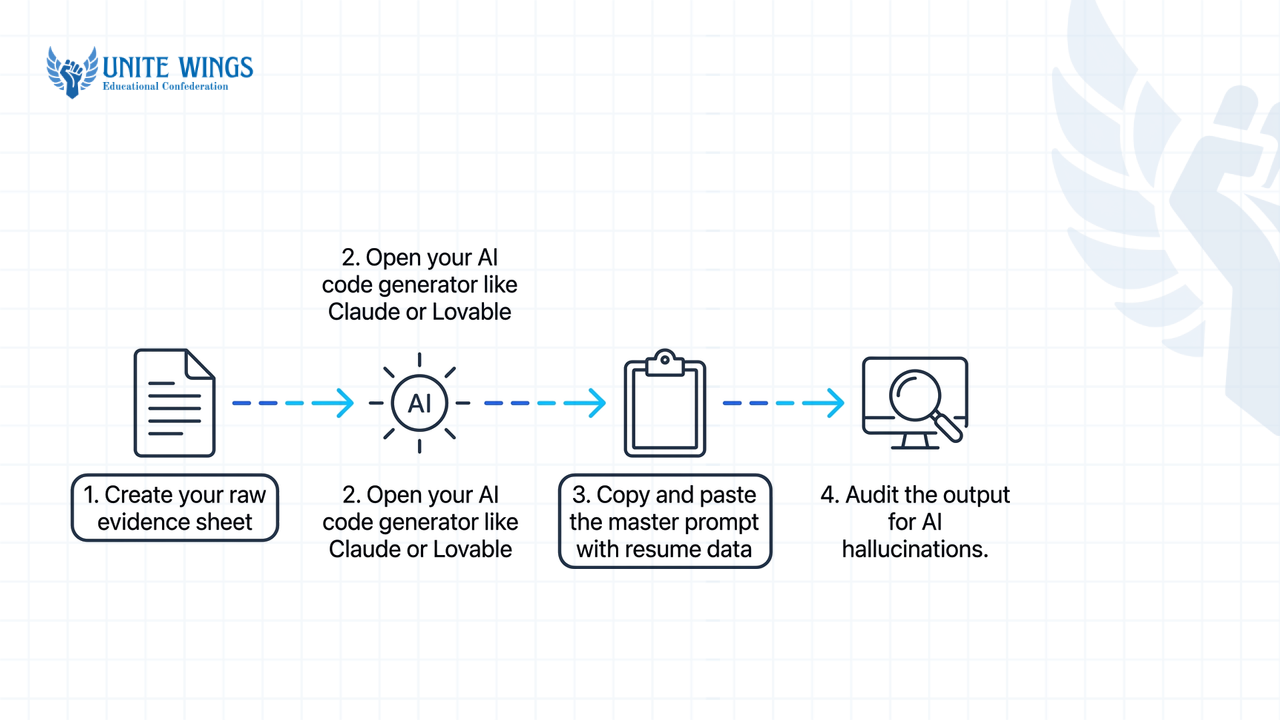
- Create your raw evidence sheet: Open a blank note and paste your full resume text, plus three project briefs. Each project brief must have a title, the exact tech stack or tools used, a two-sentence problem-and-solution summary, a GitHub repo link, and a live demo URL.
- Open your AI code generator: Go to Claude (turn on Artifacts), ChatGPT, or Lovable.dev.
- Copy and paste the master prompt below: Replace the bracketed sections with your actual details from Step 1.
Copy-Paste Master Prompt:
"Act as a senior frontend developer. Build a responsive, single-page personal portfolio website using plain HTML5 and Tailwind CSS (loaded via CDN in a single index.html file so I can deploy it directly to GitHub Pages without a build step).
Target positioning: I am a final-year [B.Tech CS / BBA / B.Com] student in India applying for [Full-Stack Developer / Data Analyst / Product Marketing] fresher roles at tech startups and mid-sized companies.
Tone and Copy Rules:
- Rewrite my stiff resume bullet points into conversational, first-person language (e.g., use lines like 'I enjoy building practical projects and learning by doing' instead of ' Spearheaded synergistic solutions').
- Do NOT invent any metrics, fake client testimonials, company logos, or skill percentage bars (like 'Python 90%'). Only use the facts provided below.
- Include four clean sections: Hero (with my name, a 2-sentence bio, and a button to view my resume PDF), Featured Projects (3 cards in a responsive grid), Skills (grouped into clean text tags by category: Languages, Frameworks, Tools), and Contact.
- For the Contact section, do NOT generate a dummy
<form>tag. Instead, create three clickable buttons: 'Email Me' (usingmailto:myemail@gmail.com), 'LinkedIn' (linking to my profile), and 'GitHub'. - For the 3 project cards, use local image paths named
assets/project1.png,assets/project2.png, andassets/project3.pngwith a16:9aspect ratio container, and include two links per card: 'Live Demo' and 'Source Code'.
Here is my resume and project data: [PASTE YOUR RESUME TEXT AND 3 PROJECT BRIEFS HERE]"
- Audit the output for AI hallucinations: Read every line of the generated preview. What most students get wrong here is publishing the first draft without checking the HTML. AI tools routinely insert placeholder "Lorem ipsum" text, dead
#href links, or fabricated internship metrics (like "Increased server efficiency by 45%" when you never gave a number). If an interviewer asks you about a hallucinated metric on your own website during a technical round, you will get rejected on the spot. Use a follow-up prompt to fix mistakes: "Remove the testimonials section completely, change the background theme to slate-900 with white text, and make sure the GitHub button on Project 2 points to my actual URL."
If you want someone to walk you through generating, debugging, and publishing your site live on screen without needing a coding background, join our Build a Website with AI session.
How do I add project screenshots and links to an AI-generated website?
You add screenshots to an AI-generated site either by dragging and dropping image files directly into visual AI builders like Framer AI and Lovable.dev, or by saving 16:9 PNG screenshots inside a local public/ or assets/ folder in your code repository and replacing the placeholder src URLs in your HTML file.
When AI generators build a layout, they usually insert random stock photos from Unsplash. Recruiters want to see your actual dashboard, terminal output, Figma frame, or web app interface. According to the Genspark AI guide and the Hamraah Foundation Student Prompt Toolkit, replacing those stock links with real project screenshots takes three specific steps depending on your tool.
Method A: If you generated an index.html file (Claude, ChatGPT, or GitHub Pages setup)
- Open your live project on your laptop, set your browser zoom to 100%, and take a clean rectangular screenshot (16:9 aspect ratio works best for grid cards).
- Create a folder on your desktop named
portfolio. Put yourindex.htmlfile and yourresume.pdfinside it. Insideportfolio, create a subfolder namedassets. - Save your three screenshots inside the
assetsfolder asproject1.png,project2.png, andproject3.png(use all lowercase letters and no spaces in file names, or Linux web servers will throw a 404 broken image error). - Open
index.htmlin Notepad or VS Code, pressCtrl + Fto find<img, and make sure the source attribute matches your folder path:src="assets/project1.png". Add descriptivealttext likealt="Dashboard view of inventory management app".
Method B: If you are using an interactive AI builder (Lovable.dev or Framer AI)
- Upload your screenshot image files directly into the chat prompt box or the project's asset panel.
- Type this exact conversational instruction: "Add a project card for my inventory app with this screenshot and a link to GitHub at [your-url], plus a Live Demo button pointing to [your-demo-url]."
What most students get wrong with contact forms: Almost every AI generator puts a sleek "Send me a message" form at the bottom of your portfolio with Name, Email, and Message boxes. On a static HTML website hosted on GitHub Pages or Vercel, that form is completely fake—there is no backend server to send you the email, and browser CORS policies will block naive JavaScript scripts. If a startup founder fills out that broken form to offer you an interview, the message disappears into thin air.
You have three ways to fix this:
- The zero-code fix: Delete the form and use a
mailto:yourname@gmail.combutton plus your LinkedIn link, as instructed in our Master Prompt above. - The static form endpoint fix: Create a free account on Formspree, copy your unique endpoint URL, and paste it into your HTML form tag:
action="https://formspree.io/f/your-id" method="POST". - The automated builder fix: Use Portfolio AI, which extracts your resume via Gemini and automatically routes job inquiries from your site to your inbox using the Resend API.
Where can I host my AI-built HTML portfolio for free without watermarks?
Host your AI-generated HTML or React portfolio on GitHub Pages, Vercel (Hobby plan), or Netlify (Free tier) to get a fast, SSL-secured live website with zero platform ads or watermarks. Avoid free tiers on traditional builders like Wix or WordPress.com, which inject brand advertisements that hurt your credibility during placement reviews.
As documented by Framekit and SitesPlaced, general website builders force banner ads and platform watermarks onto free student sites. In contrast, developer platforms keep their free .vercel.app and .github.io subdomains completely unbranded forever, as confirmed by Aditya Gangwani's portfolio guide and a 2026 Dev.to tutorial.
| Hosting Platform | Cost & Plan Name | Bandwidth / Storage Limits | Best Framework Fit | Custom Domain Cost |
|---|---|---|---|---|
| GitHub Pages | Free forever | 1 GB soft repo limit per Anna University Plus | Static HTML, CSS, JS | Free connection (you only pay the domain registrar fee) |
| Vercel | Free (Hobby Tier — personal, non-commercial use only) | 100 GB monthly data transfer per Getpack | React, Next.js, Vite, or plain HTML | Free connection (pay registrar only) |
| Netlify | Free-forever tier | Monthly credit allocation with auto Git deploys per DevChallenges | Static HTML and Jamstack sites | Free connection (pay registrar only) |
| Google Sites | Free | Tied to Google Drive storage | Basic drag-and-drop (no advanced AI layouts) | $0 connection fee (only mainstream visual builder with free .com mapping per TaskVeda) |
Mistake to avoid: Never use your college email ID
Do not sign up for GitHub, Vercel, Netlify, or resume-to-site tools using your institutional .ac.in or .edu.in email address. Colleges deactivate student email accounts months after graduation. When your college email dies, you lose login verification and student hosting perks, breaking the portfolio link printed on every resume you sent out for off-campus drives. Always register with a personal Gmail address.
Option 1: Deploy on GitHub Pages (Best for single HTML files)
- Sign into GitHub with your personal email and click the + icon in the top right to select New repository.
- Name the repository exactly
yourusername.github.io(replaceyourusernamewith your actual GitHub handle), set it to Public, and click Create repository. - Click uploading an existing file, drag your
index.html,resume.pdf, andassets/folder into the browser box, and click Commit changes. - Go to the repository's Settings tab, click Pages in the left sidebar, set the Branch dropdown to
main(and/rootfolder), and click Save. Your ad-free site will be live athttps://yourusername.github.ioshortly.
Option 2: Deploy on Vercel (Best for Lovable/React exports or custom subdomains)
- Push your project files to any GitHub repository (for example, name it
my-portfolio). - Go to Vercel.com, sign up for the free Hobby plan using your GitHub account, and click Add New... then Project.
- Click Import next to your
my-portfoliorepository and click Deploy. Vercel's automated CI/CD pipeline builds your site automatically and gives you a clean URL likeyourname.vercel.app.
Regarding custom .com or .in domains: while subdomains like .vercel.app and .github.io are free indefinitely, buying a custom domain requires an annual registrar fee. Furthermore, while Vercel, GitHub Pages, and Google Sites let you connect a custom domain you own at zero extra platform cost, most closed AI website builders charge $19 to over $200 per year just for custom domain mapping, according to Framekit's analysis. For Indian freshers, yourname.vercel.app or yourname.github.io is completely respected by hiring managers—save your money.
How do I update my AI portfolio later when I finish a new project?
How you update your portfolio depends on how you built it: you can re-upload an edited PDF resume on platforms like Seera, type a plain-English instruction in conversational editors like Framer AI, push a single Git commit to trigger an automatic rebuild on Vercel, or connect a Notion database for zero-code updates.
You do not need to regenerate your entire website from scratch when you finish your 7th-semester capstone project or complete a summer internship. Pick the update workflow that matches your tool:
- The Git auto-deploy method (GitHub Pages / Vercel / Netlify): Open your GitHub repository in your web browser, click on
index.html, and click the pencil icon (Edit this file). Copy the HTML block of an existing<div class="project-card">...</div>, paste it right above the first card, and ask Claude or another AI code generator to generate the inner text for your new project. Upload your new screenshot to theassets/folder and click Commit changes. As confirmed by Anna University Plus, both GitHub Pages and Vercel detect the commit and automatically redeploy your live site in under 60 seconds. - The conversational AI edit method (Framer AI / Lovable.dev): According to Framer AI documentation, you can open your saved project canvas and type a conversational prompt to your AI agent: "Add a new project card at the top of the projects grid for my Customer Churn Prediction model built with Python and Scikit-Learn, and link it to this GitHub URL." Click publish to push the update live.
- The PDF re-upload method (Seera / SitesPlaced): If you used a resume-driven converter like Seera, add the new internship or project to your Word/Google Doc resume, export it as a PDF, and upload the new file to your dashboard (or edit the text fields directly in the web dashboard) to overwrite the old version while keeping the exact same link.
- The dynamic Notion / Google Sheets automation (Advanced): If you want your site to update automatically without opening a builder or GitHub ever again, a 2025 Resumly.ai guide outlines how to connect a Notion database or Google Sheet to a static site generator using Zapier triggers and Netlify build hooks. Every time you add a new row to your Notion project tracker and change its status column to "Done", Zapier fires a webhook that tells Netlify to rebuild and publish your website with the new project included.
What to do next
Do not spend three weeks tweaking fonts and animations while off-campus job postings close. Follow this schedule to get your proof of work live and in front of recruiters:
- Today (Next 20 minutes): Gather your resume text and 3 project links. Run the Master Prompt in Claude or upload your PDF to SitesPlaced, and publish your live URL on GitHub Pages or Vercel using your personal Gmail account.
- Tomorrow: Test your live portfolio URL on your phone using mobile data to make sure images load fast and every GitHub, demo, and
mailto:button works. Put the live link right next to your phone number at the top of your resume PDF, and add it to the Featured section of your LinkedIn profile and your Naukri profile summary. - This weekend: If one of your three project slots looks weak or is just a basic college tutorial clone, build one real, working micro-project and swap it in using the Git commit workflow above.
Build and publish your site live with us
If you want to skip the trial-and-error and build a custom, watermark-free website in one sitting, join the Build a Website with AI masterclass. You will learn how to describe what you want in plain English, fix layout bugs and broken images without a coding background, and walk away with a live, deployed website on your own URL that you can paste onto your resume the same day.
Frequently asked questions
Which AI tool builds a student portfolio completely for free without watermarks?
Claude and Lovable.dev generate clean HTML/CSS or React code for free, which you can host with zero watermarks or ads on GitHub Pages or Vercel's Hobby plan. If you prefer a no-code PDF-to-website converter, SitesPlaced lets students publish an ad-free portfolio directly from a resume at yourname.sitesplaced.com without a credit card.
Do recruiters in India actually check student portfolio links on resumes?
Yes. A 2026 TaskVeda guide reports that over 72% of hiring managers research candidates online before scheduling interviews, and a 2025 Canva survey cited by Manus found that 72% prefer candidates with an interactive portfolio. With AI screening in India growing 32% year-on-year (CareerGuideline), live links verify your skills fast.
Is coding knowledge required to edit an AI-generated portfolio?
No coding knowledge is required. On closed platforms like Seera or SitesPlaced, you update your site by uploading a revised resume PDF or typing into dashboard boxes. Even if you host an HTML file on GitHub Pages, you can paste your code back into Claude or ChatGPT and tell it in plain English to add your new project.
Is GitHub Pages completely free for personal student portfolios?
Yes, GitHub Pages is 100% free forever for hosting static HTML, CSS, and JavaScript files from public repositories, and it never places ads or watermarks on your pages. According to Anna University Plus, the only main restriction to keep in mind is a soft limit of 1 GB per repository.
How do I connect a custom domain name to a free AI portfolio site?
If you buy a custom .com or .in domain from a registrar, you can connect it for free in the project settings of Vercel, Netlify, GitHub Pages, or Google Sites by pointing your DNS A and CNAME records to the host. Avoid connecting custom domains on closed AI website builders, which charge $19 to $200+ yearly for domain mapping (Framekit).
Why should I avoid free tiers on Wix or WordPress.com for my placement portfolio?
Free tiers on general website builders like Wix and WordPress.com place third-party brand advertisements and sticky platform banners across your pages, as noted by Framekit. During campus placements or off-campus startup evaluations, a clean .vercel.app or .github.io link looks far more credible than an ad-supported page.
Newsletter
Stay updated with our latest news and insights.