
How to Use ChatGPT to Make a Study Schedule for Semester Exams
Five copy-paste prompts that turn any university syllabus PDF and exam datesheet into a realistic day-by-day revision timetable in under 3 minutes.
To figure out how to use ChatGPT to make a study schedule for exams that you will actually follow, stop typing one-line requests like "make me a study timetable." Instead, upload your exact university syllabus PDF, tell the AI your weekday versus weekend study hours, rate your confidence per unit, and command it to break chapters into 45-minute subtopic blocks. Doing this turns a long syllabus into a day-by-day execution table in just a few minutes.
In short
- Crop your university syllabus PDF to just the current semester's subjects before uploading so ChatGPT does not blur or drop the later modules.
- Give five exact inputs in your prompt: exam date, weekday/weekend hours, unit weightages, your Red/Amber/Green confidence rating, and a rule to keep the final 20% of days for past papers.
- Ask ChatGPT to list its assumptions at the bottom of the timetable so you can spot hallucinated dates or 8-hour study days immediately.
- When you miss a day because of lab internals or vivas, use a rescue prompt in the same chat to triage remaining topics into must-learn, should-learn, and skip-if-needed rather than starting over.
- Export ChatGPT Q&A tables as TSV files into Anki or Deckbase for spaced repetition, because ChatGPT cannot track per-card memory intervals on its own.
Can I upload my college syllabus PDF to ChatGPT to make a timetable?
Yes, you can upload your college syllabus PDF or lecture slides directly into ChatGPT using the attachment icon to extract subtopics and build a timetable. According to OpenAI's official documentation and a 2026 Medium analysis, feeding the raw document prevents the model from guessing your course structure or hallucinating generic review days.
Most multi-semester university syllabus PDFs contain all semester details, grading rules, and reference book lists in a single, massive file. A 2026 Medium analysis notes that uploading massive multi-semester PDFs causes context degradation, where ChatGPT reads Unit 1 and Unit 2 accurately but blurs or omits subtopics from Unit 4 and Unit 5.
Fix this before you open ChatGPT by following three preparation steps:
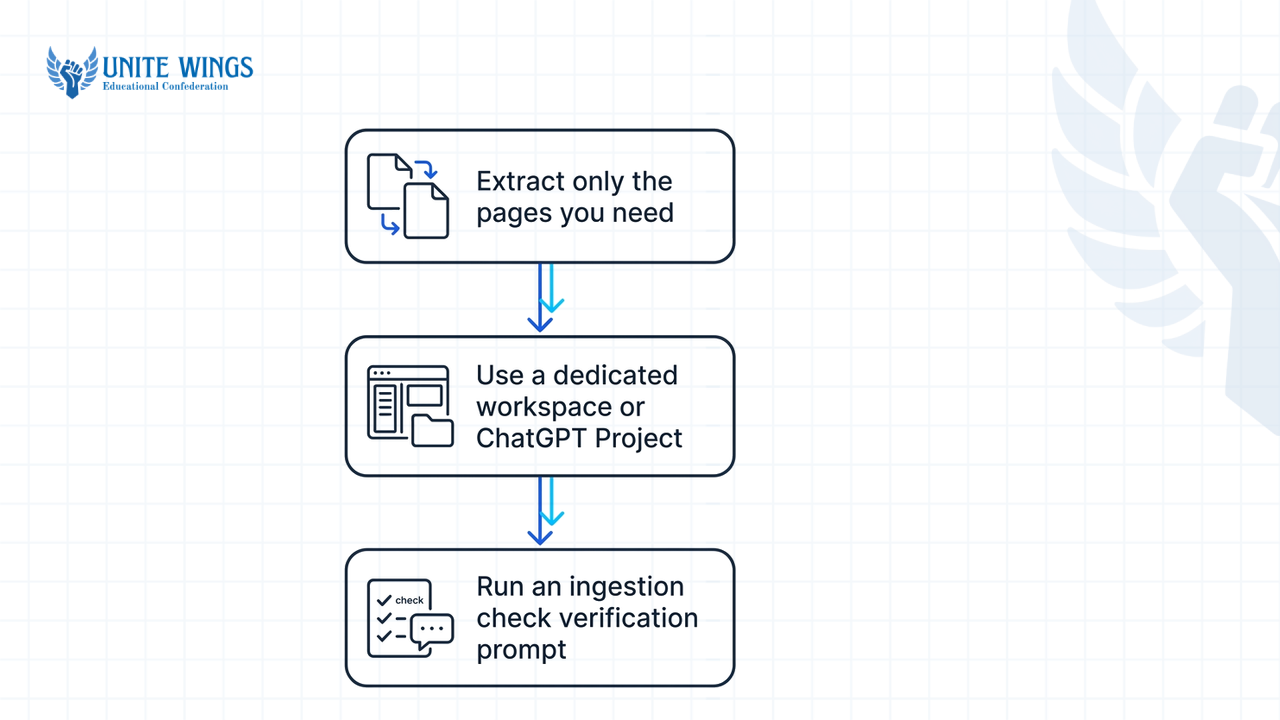
- Extract only the pages you need: Open your university syllabus PDF in Chrome or Microsoft Edge, click Print, select "Save as PDF," and type the exact page range for your current semester's subject (for example, pages 24 to 26 for Semester 5 Database Management Systems).
- Use a dedicated workspace: If you have a paid plan, create a ChatGPT Project for that exam and upload the cropped PDF there so the context stays pinned across multiple chats. If you are on the free tier, start one fresh chat per subject and do not mix subjects in the same thread.
- Run an ingestion check first: Upload the cropped PDF and run this verification prompt before asking for any dates or hours:
Read this syllabus PDF. Extract all module numbers, exact subtopics, and lecture hours or credit weightages into a bulleted list. Do not generate a study schedule yet. Flag any text that was unreadable.
Why run this step first? Scanned university circulars often have skewed tables. Checking the extracted list against your PDF takes 30 seconds and stops ChatGPT from skipping an entire module in your final timetable, a flaw highlighted in Michigan State University's guide on syllabus review with ChatGPT.
What is the best ChatGPT prompt for a 15-day exam study plan?
The best ChatGPT prompt for a 15-day exam study plan specifies five exact constraints: your exam date, separate weekday and weekend study hours, unit weightages, your confidence level per module, and a rule reserving the final 20% of days for past papers. Guides from SidetrackedDay and DocsBot AI confirm that leaving out any of these five parameters forces ChatGPT to output a generic template.
What most students get wrong is telling ChatGPT "I have 15 days, schedule 5 chapters," which produces a lazy output like "Day 1 to 3: Study Unit 1." When you sit down at your desk at 8 PM after college, "Study Unit 1" is too vague to start, so you procrastinate. The fix is forcing ChatGPT to break broad modules into 45-minute subtopic chunks with an active recall test at the end of each block, building a daily routine for students/freshers that requires zero guesswork at your desk.
Copy and paste this 15-day master prompt right after your syllabus ingestion check:
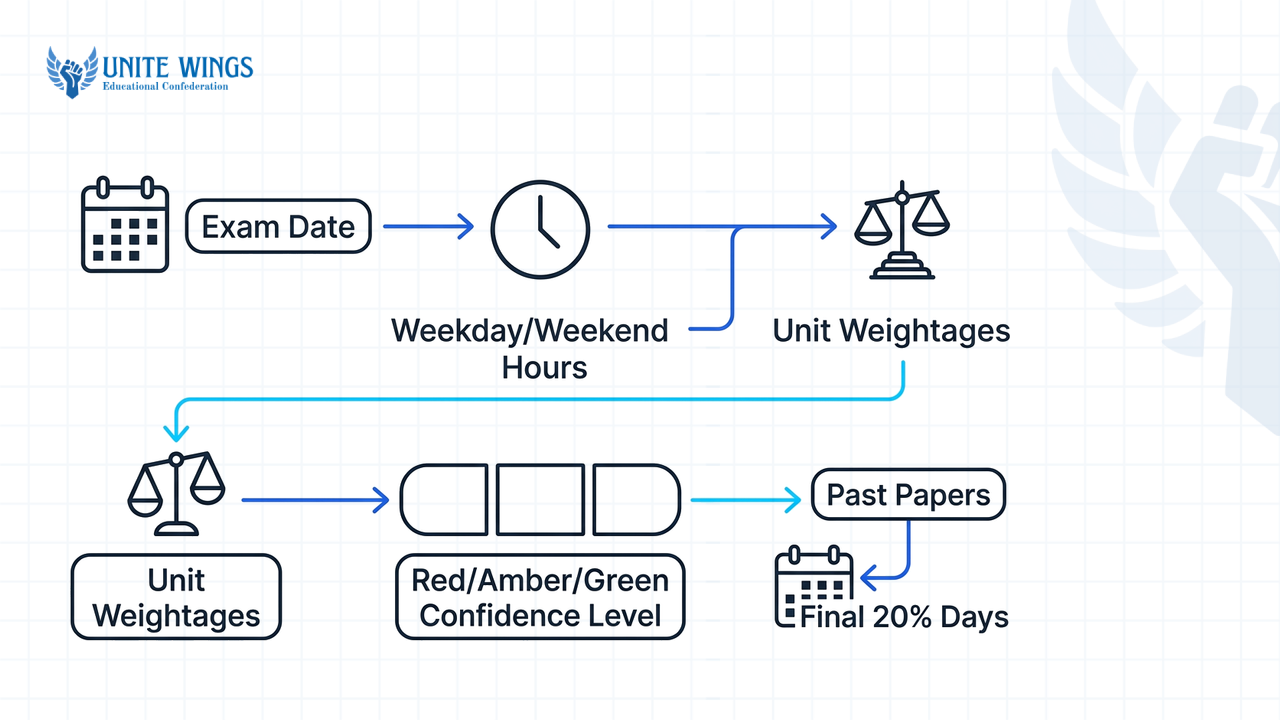
Act as an exam coach. My exam in [Course Name] is on [Exam Date, e.g., May 20, 2026]. I have 15 days left. I can study [X] hours on weekdays after college/classes and [Y] hours on weekends. Do not exceed these daily hour limits.
Use the syllabus subtopics you just extracted. Here is my confidence rating per unit (Red = haven't touched, Amber = attended lectures/have notes, Green = revised once) and their exam marks weightage:
- Unit 1: [Red/Amber/Green] - [Marks/Weightage]
- Unit 2: [Red/Amber/Green] - [Marks/Weightage]
- Unit 3: [Red/Amber/Green] - [Marks/Weightage]
- Unit 4: [Red/Amber/Green] - [Marks/Weightage]
- Unit 5: [Red/Amber/Green] - [Marks/Weightage]
Build a day-by-day study schedule in a Markdown table with columns: Day/Date, Subtopics to Cover (broken into 45-minute blocks), Study Method (active recall, problem-solving, or blank-page summary—no passive rereading), and Time Allocated.
Rules:
1. Schedule Red and high-weightage units in the first 8 days.
2. Reserve Days 12, 13, and 14 (the final 20%) strictly for solving previous years' university question papers and fixing weak spots.
3. Keep Day 15 (the day before the exam) to a maximum of 2 hours of light formula/definition review.
4. Below the table, list all assumptions you made about my pace and syllabus coverage so I can audit them.
Worked example 1: B.Tech CSE (Operating Systems, 15 days out)
Suppose you are a 3rd-year engineering student with your Operating Systems semester exam in 15 days. You have lab externals on weekdays, leaving 3 hours on weekdays and 7 hours on weekends. You rate Unit 1 (OS Structures - 10 marks) as Green, Unit 2 (Process Synchronization & Deadlocks - 25 marks) as Red, Unit 3 (Memory Management - 25 marks) as Red, Unit 4 (File Systems - 20 marks) as Amber, and Unit 5 (Disk Scheduling - 20 marks) as Green.
When you run the master prompt, here is a slice of the exact table and assumption list ChatGPT generates:
| Day / Date | Subtopics to Cover (45-min blocks) | Study Method | Time Allocated |
|---|---|---|---|
| Day 1 (Mon) | Unit 2: Critical Section Problem, Peterson's Solution (45m); Semaphores & Mutex locks (45m); Classical Problems of Synchronization (45m); 10 GATE/University numericals on Semaphores (45m) | Concept derivation + numerical problem-solving | 3 hours |
| Day 2 (Tue) | Unit 2: Deadlock Characterization & Resource Allocation Graph (45m); Banker's Algorithm trace + 3 past paper problems (90m); Deadlock Detection & Recovery blank-page recall (45m) | Step-by-step algorithm tracing + blank-page test | 3 hours |
| Day 6 (Sat) | Unit 3: Paging hardware & TLB numericals (90m); Page Replacement Algorithms: FIFO, Optimal, LRU trace problems (90m); Thrashing & Working-Set Model notes + quiz (90m); Unit 2 + 3 combined error review (90m) | Past paper numerical drills + self-quizzing | 6 hours (1 hr buffer) |
| Day 13 (Sat) | Full 3-hour timed solve of 2024 University End-Sem Question Paper (180m); Line-by-line grading against textbook solutions and rewriting missed derivations (180m) | Timed mock exam + error log | 6 hours |
At the bottom, the assumption audit instruction catches a classic engineering syllabus trap: ChatGPT states, "Assumption: I allocated 45 minutes to Banker's Algorithm assuming you only need theoretical steps." Because you know your university paper always asks a 10-mark numerical on Banker's Algorithm, you immediately reply: "Change Day 2 to give 90 minutes to Banker's Algorithm numericals and move Deadlock Recovery to Day 3." Prompting ChatGPT to list its assumptions, a technique recommended by SidetrackedDay, lets you fix unrealistic pacing before Day 1 starts.
Worked example 2: B.Com Sem 4 (Corporate Accounting, 15 days out)
Now take a B.Com student preparing for Corporate Accounting. Theory units take less time than ledger preparation and balance sheet tallying. Your inputs: 4 hours on weekdays, 6 hours on weekends. Unit 1 (Issue & Forfeiture of Shares - 20 marks, Amber), Unit 2 (Final Accounts of Companies per Schedule III - 30 marks, Red), Unit 3 (Amalgamation & Internal Reconstruction - 25 marks, Red), Unit 4 (Holding Company Consolidation - 15 marks, Red), Unit 5 (Cash Flow Statements - 10 marks, Green).
For accounting or commerce subjects, add one line to the master prompt: "For every practical accounting unit, allocate 25% of the block to format/rules and 75% to solving full-length journal and balance sheet problems by hand."
ChatGPT outputs a schedule that puts Unit 2 (Final Accounts) on Days 1 to 3, breaking it down into: "Block 1 (45m): Memorize Schedule III vertical Balance Sheet & Statement of P&L proforma using blank-sheet recall. Block 2 & 3 (90m): Solve 2 full illustrations including adjustments for managerial remuneration, proposed dividend, and tax provision." If you want to practice building these multi-step workflows live, our ChatGPT Masterclass walks through setting up Projects, custom instructions, and Study mode for coursework.
How do I ask ChatGPT to prioritize high-weightage units first?
To force ChatGPT to prioritize high-weightage units first, paste your university question paper blueprint or unit mark allocations alongside your syllabus and command the AI to allocate a specific percentage of study hours to high-yield topics. Workflows tested by StudentAI.app and DueToday show that without explicit mark weightages, ChatGPT divides study time equally across all chapters.
In Indian university exams, treating all five modules equally is a trap. Often, two modules carry 50% of the paper or contain guaranteed compulsory questions, while a massive theoretical module only appears as an optional 5-mark short note.
If your syllabus PDF only lists "Lecture Hours" (like 10L, 12L) and not exam marks, upload the PDF of one or two previous year question papers (PYQs) into the same chat and run this high-yield prioritization prompt:
I have uploaded my syllabus and two past university question papers. Do the following before scheduling:
1. Calculate the exact mark weightage of each syllabus unit based on how often it appears in the past papers.
2. Combine that weightage with my confidence score (1 = no idea, 5 = exam ready) to calculate a Priority Score for each subtopic.
3. Sort all subtopics into three buckets:
- Tier 1 (Must-Learn): High exam marks + low confidence. Allocate 60% of my total 15-day hours here, placed in the first 7 days.
- Tier 2 (Should-Learn): Medium marks or high marks where my confidence is already 4/5. Allocate 30% of my hours here.
- Tier 3 (Skip-If-Needed): Low mark weightage + lengthy theory. Allocate 10% of hours at the end of the schedule using quick summary notes.
Once the timetable is ready, do not just read your textbook passively during those Tier 1 blocks. According to OpenAI's official documentation, you can turn on ChatGPT's global Study mode across web, iOS, and Android by selecting "Study" from the prompt suggestions. Instead of handing you direct summaries that you forget the next morning, Study mode uses Socratic questioning and file-referenced quizzes based on your uploaded syllabus to test whether you can actually solve the Tier 1 subtopics on your own. Always cross-verify formulas, sections of the Companies Act, or code syntax against your prescribed textbook, as DueToday and SidetrackedDay both note that AI models can still hallucinate edge-case rules if your prompt drifts away from the source PDF.
How do I update my AI study schedule if I miss a day?
Update your AI study schedule after missing a day by pasting your unfinished topics and remaining days back into the same chat thread, then instructing ChatGPT to redistribute the backlog without increasing your daily maximum hours. Analyses from PlanBotAI and Any.do confirm that ChatGPT cannot track background progress or auto-adjust missed sessions on its own.
Between surprise record submissions, practical vivas, and placement assessments, almost nobody follows a 15-day plan with 100% accuracy. What most students get wrong when they miss Day 4 is abandoning the schedule completely or asking ChatGPT to simply divide Day 4's work across Days 5, 6, and 7. Doing that turns a realistic 3-hour weekday into a 4.5-hour grind, causing you to fail Day 5 too.
Instead, keep your daily hour cap fixed and force ChatGPT to compress low-priority topics using this rescue prompt from SidetrackedDay and Any.do:
Update my study plan. Today is [Current Day/Date]. I missed yesterday's scheduled session because of college labs. Here are the subtopics I failed to complete: [Paste missed subtopics].
I have [X] days left until the exam. My daily hour limits remain strictly [Y] hours on weekdays and [Z] hours on weekends—do not increase my daily hours to make up for lost time. Rebalance the remaining days using these rules:
1. Keep all Tier 1 (Must-Learn) subtopics intact.
2. Compress Tier 2 topics by switching their study method from full textbook reading to solving top 5 past paper questions.
3. Drop Tier 3 (Skip-If-Needed) subtopics to 15-minute definition reviews or cut them completely if hours do not fit.
4. Keep the final 2 days for past papers and light review untouched.
Output the revised table from today through Exam Day.
What if your chat thread gets so long by Day 10 that ChatGPT starts forgetting your syllabus subtopics or ignoring your weekday hour limits? A 2026 Medium analysis warns that long multi-turn chats suffer from context drift. If ChatGPT starts giving sloppy edits, ask it to output a single Markdown summary of your completed topics, remaining topics, and constraints, copy that block, open a brand-new chat, re-upload your cropped syllabus PDF, and run the rescue prompt there.
Also, watch out for reminder limitations: while OpenAI's Scheduled Tasks documentation notes that paid accounts can set automated recurring prompts, free ChatGPT accounts cannot trigger native background reminders, and only supported higher-tier workspaces can push tasks directly into apps like Any.do via Model Context Protocol (MCP) as noted by Any.do. If you are on a free account, copy your updated table into Google Calendar or Notion and set a phone alarm for 9:30 PM every night to log what you finished.
Can ChatGPT create spaced repetition flashcards from my timetable?
ChatGPT can generate flashcards and question-answer tables directly from your study timetable and lecture notes, but it cannot run a true spaced repetition algorithm by itself. Technical breakdowns from ActiveRecalling.com and Deckbase show that because ChatGPT lacks a per-card database to track your memory decay intervals, you must export its outputs into dedicated apps like Anki or Deckbase.
Some blogs claim you can just tell ChatGPT "quiz me using spaced repetition every day," which fails by Day 4 because the chat does not calculate SM-2 or FSRS (Free Spaced Repetition Scheduler) forgetting curves per card. Here is how ChatGPT compares to dedicated flashcard tools:
| Feature | ChatGPT (Standalone) | Anki (Free Desktop / Android) | Deckbase |
|---|---|---|---|
| Generates Q&A cards from syllabus PDFs | Yes, in seconds from uploaded text | No native generation without paid API add-ons | Yes, supports AI card generation workflows |
| Tracks per-card review dates & intervals | No per-card database or memory tracking | Yes, uses SM-2 and optional FSRS scheduling | Yes, uses FSRS scheduling algorithm |
| Enforces atomic "one concept per card" | Only if explicitly commanded in your prompt | Depends on how you format the import file | Built into its card creation guidelines |
| Best role in your 15-day exam workflow | Drafting cards at the end of each 45-min block | Daily 20-minute morning recall drills | Fast PDF-to-deck conversion with FSRS |
To avoid bloated flashcards where the back of the card is a 10-line paragraph you can never memorize, Deckbase recommends enforcing a strict "one-concept-per-card" (minimum information principle) rule in your prompt. At the end of each day's study block, paste your notes or upload the chapter slides and run this Anki/Deckbase export prompt:
Based on the subtopics I studied today ([Paste subtopics or attach lecture slides]), generate 20 flashcards for active recall.
Follow these strict rules:
1. One concept per card (minimum information principle). No multi-part questions. Maximum 15 words on the back (Answer) side.
2. Focus on exam-tested definitions, formula conditions, accounting adjustments, or differences between two similar concepts.
3. Output the cards inside a raw code block formatted as Tab-Separated Values (TSV) with Question in Column 1 and Answer in Column 2, with no header row, so I can save it as a .txt file and import it directly into Anki or Deckbase.
Copy that code block into Notepad, save it as unit2_cards.txt, open Anki on your laptop or AnkiDroid on your phone, click Import, and you have a deck ready in 60 seconds. Review that deck during your morning commute to college so your evening study hours stay 100% free for new syllabus subtopics.
Your 30-minute action plan for tonight
Do not spend the next three days color-coding a timetable while your exam countdown drops to 12 days. Execute this setup tonight in 30 minutes:
- Next 10 minutes: Download your university syllabus PDF, use "Print to PDF" to slice out only the 2 to 4 pages covering your hardest upcoming subject, and locate two previous years' university question papers.
- Minutes 10 to 20: Upload the cropped syllabus PDF into a fresh ChatGPT chat, run the ingestion check prompt to verify every subtopic, and then paste the 15-Day Master Prompt with your honest Red/Amber/Green ratings and weekday hour caps.
- Minutes 20 to 30: Read the assumptions ChatGPT lists below the table, fix any subtopic that needs more numerical practice, and start Day 1's first 45-minute block before going to sleep.
Go beyond one-line prompts with the ChatGPT Masterclass
If you want to learn how to set up persistent ChatGPT Projects for your entire semester, build custom GPTs trained on your department's past papers, and use Study mode and Deep Research without hitting context limits, join the ChatGPT Masterclass. You will walk away with a working AI study and research workspace configured on your own laptop.
Frequently asked questions
Can I upload my college syllabus PDF to ChatGPT for free?
Yes, free ChatGPT accounts allow PDF uploads, though you are subject to daily file upload and message limits on flagship models. To avoid burning through your free daily quota on a single subject, crop your university syllabus PDF to just the relevant 2 to 3 pages before uploading.
Why does ChatGPT keep giving me a generic, useless study plan?
ChatGPT outputs generic timetables when you only give it a subject name and an exam date, forcing it to guess what is in your course. Upload your exact syllabus PDF, specify separate weekday and weekend hour limits, and command it to break chapters into 45-minute subtopic blocks.
How many hours a day should I tell ChatGPT to schedule for semester exams?
Set a realistic maximum for daily study hours, keeping weekday limits lower to account for college classes or labs, and allocating more time on weekends. Always instruct ChatGPT to leave a 1-hour buffer on weekends and limit the day immediately before the exam to 2 hours of light revision.
How do I stop ChatGPT from inventing fake syllabus chapters or exam dates?
Upload your official syllabus PDF instead of asking ChatGPT to search the web for your university curriculum, and run a two-step prompt. First, ask it to list the exact modules from your PDF, and second, ask it to list its assumptions at the bottom of the generated timetable.
Can ChatGPT send me automatic daily study reminders?
Paid ChatGPT plans include a Scheduled Tasks feature that can run automated prompts or reminders at set times, and supported higher-tier workspaces can sync tasks to apps like Any.do. Free accounts cannot trigger automated background reminders, so export your table to Google Calendar or set a daily phone alarm.
What should I do when my ChatGPT study schedule chat gets too long and starts forgetting rules?
Long chat histories cause context degradation, where ChatGPT forgets your initial syllabus PDF or weekday hour caps midway through your 15-day plan. Ask ChatGPT to summarize your completed topics and remaining subtopics into a single text block, then paste that summary alongside your syllabus PDF into a fresh chat.
Newsletter
Stay updated with our latest news and insights.