
How to Earn Money Using Canva AI as a Student in India (4 Services)
Why Etsy printables fail for most Indian students, and 4 micro-services you can actually sell to local businesses and LinkedIn creators for ₹3,000–₹10,000.
If you want to learn how to earn money using Canva AI as a student in India, skip passive template shops and sell active design packages to Indian business owners instead. According to 2026 pricing guides from CollabMarket and INSD Ahmedabad, monthly social media design retainers for 20 to 30 posts pay between ₹5,000 and ₹30,000 in India. By combining ChatGPT or Claude with Canva's Bulk Create tool, you can produce a full 30-post client package in 10 to 60 minutes from your hostel room.
In short
- Sell active services (social media retainers, menus, carousels) rather than passive Etsy printables, which fail for beginners without marketplace SEO and niche validation.
- Charge ₹300 to ₹1,500 per individual social media carousel, ₹1,000 to ₹8,000 for local cafe menus, or ₹5,000 to ₹30,000 for monthly 30-post retainers.
- Use Canva's ₹69 1-day prepaid Pro pass or ₹199/month Pro Lite tier if you cannot afford the ₹500/month full Pro plan needed for Bulk Create and template link sharing.
- Collect client advances cleanly using Indian micro-payment link tools like UroPay, SMEPay, or Paperchai instead of raw personal UPI QR codes.
Why do passive Canva template shops rarely make money for beginners in India?
Passive Canva template shops on platforms like Etsy rarely make money for beginners because new sellers upload generic designs into saturated categories without validating search demand or learning marketplace SEO. Case studies from Reddit and Medium in 2026 confirm that unpromoted digital planners and basic social templates earn zero to minimal revenue when you have no audience or ad budget.
You have seen the YouTube videos promising easy dollars from selling printable habit trackers while you sleep. When you actually open an Etsy or Gumroad shop from your college hostel, you compete against hundreds of thousands of existing templates. SkillToMillions and Medium's 2025–2026 template shop reports show that without distinct niche targeting and marketplace SEO, your shop will struggle to get noticed.
For an Indian college student who wants ₹5,000 to ₹15,000 in the bank this month, service freelancing beats digital product shops every time. Instead of waiting for an algorithm to notice your templates, you pitch four specific high-demand services to Indian clients who already spend money on marketing:
- Monthly Instagram and LinkedIn carousel packages: Indian business coaches, finance creators, and D2C startup founders need 20 to 30 educational carousels every month to stay visible.
- YouTube thumbnail and channel asset batches: Many active online creators buy thumbnails in batches or sets. According to LearnWithNKM's 2026 pricing breakdown, beginner batches start at ₹499 to ₹1,999 per set.
- Local cafe menus, flyers, and event brochures: Restaurants, gyms, and coaching centres near your college constantly update physical and WhatsApp PDF menus. Internshala HR resources put beginner rates for brochures, flyers, and menus between ₹1,000 and ₹8,000.
- Foundational logo and brand identity kits: Early-stage student startups and local shops pay ₹2,000 to ₹6,000 for multi-concept logo and colour palette packages, according to the 2026 CollabMarket Pricing Index.
How do you use Canva Bulk Create and AI to make 30 Instagram carousels in an hour?
To make 30 Instagram carousels in under an hour, generate a 30-row content table in ChatGPT or Claude, export it as a CSV file, and upload that file into Canva Pro's Bulk Create app to populate your slide layouts automatically. YouTube creator workflows show this exact pipeline cuts 5 hours of manual copy-pasting down to 10 to 60 minutes.
Before you start, check your account tier. Canva's Free plan gives you only 20 Standard or Premium AI uses per month and blocks external CSV uploads in Bulk Create, according to SwapBiswas's 2026 Canva India Pricing Report and the Canva Help Center. Full Canva Pro costs ₹500 per month or ₹4,000 per year on the web (and ₹3,999 per year on Apple's Indian App Store), while Pro Lite costs ₹199 per month.
Student budget rule: If you have zero budget today, check if your Jio prepaid recharge bundles Canva Pro or Lite access (reported by Digitavision in 2026). Otherwise, wait until a client pays your 50% advance, then buy Canva's ₹69 1-day prepaid Pro pass to run your batch jobs without an auto-renewing subscription.
Here is the step-by-step workflow to deliver a 30-post package in one sitting:
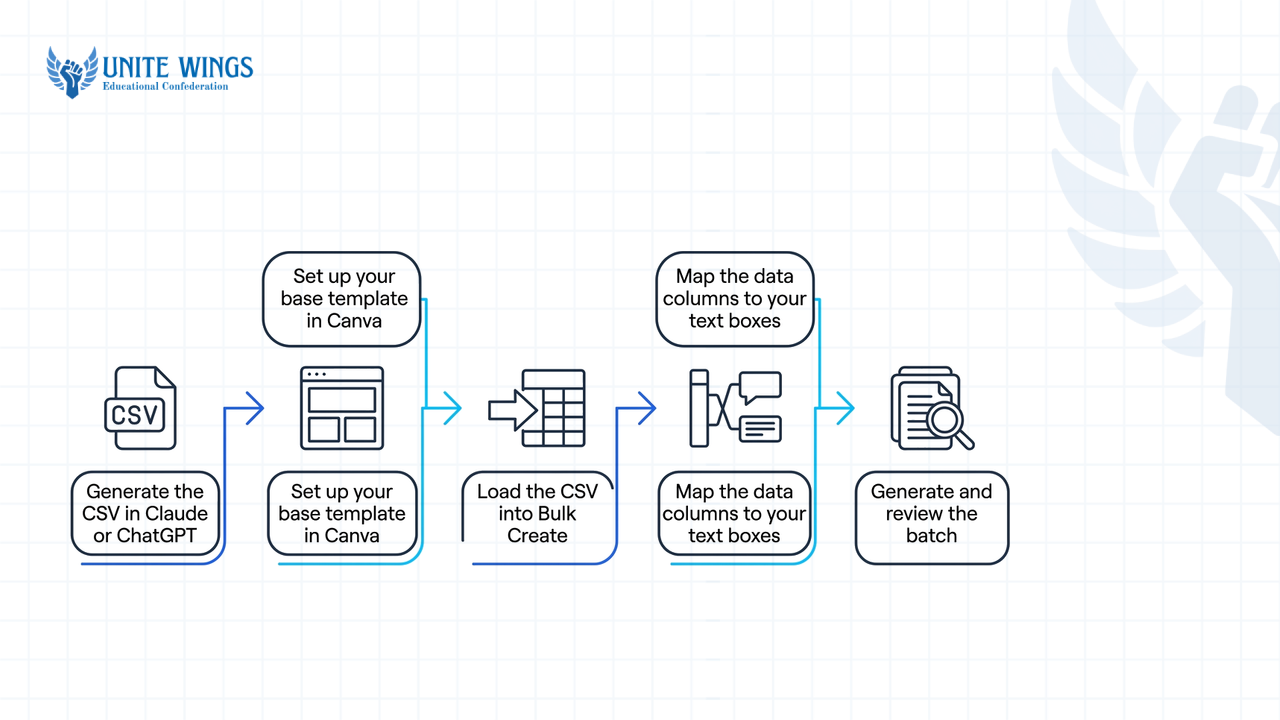
- Generate the CSV in Claude or ChatGPT: Open your AI chat tool and paste this exact prompt: "Act as a social media strategist for an Indian [insert client niche, e.g., personal finance coach for freshers]. Write 30 educational 4-slide Instagram carousels. Output the result strictly as a table with 4 columns: Hook, Slide_2_Point, Slide_3_Example, and CTA. Keep each cell under 25 words." Copy the table into Google Sheets or Excel and download it as a
.csvfile. - Set up your base template in Canva: Open Canva and create a custom 1080×1350px vertical document. Design a 4-page master carousel using your client's fonts and brand colours, leaving one clear text box on Page 1 for the
Hook, Page 2 forSlide_2_Point, Page 3 forSlide_3_Example, and Page 4 for theCTA.Alternatively, if you want AI to design the base layout too, open the Carousel Studio app inside the Canva Apps Marketplace to generate a multi-slide template from a text prompt. - Load the CSV into Bulk Create: On the left sidebar in Canva, click Apps, search for Bulk Create, and open it. Select Upload data and choose your
.csvfile. Orshot and Lilach Bullock's 2025–2026 technical guides note that Canva Bulk Create caps each batch at 300 rows and 150 columns, which easily fits a 30-post monthly retainer. - Map the data columns to your text boxes: Right-click the text box on Page 1 of your canvas, hover over Connect data, and select
Hook. Repeat this on Page 2 (Slide_2_Point), Page 3 (Slide_3_Example), and Page 4 (CTA). - Generate and review the batch: Click Continue in the left panel, ensure all 30 rows are ticked, and click Generate 30 designs. Canva opens a new tab containing all 30 carousels (120 pages total). Spend some time adjusting line breaks or font sizes on slides where text overflows.
What most students get wrong with Bulk Create images
Do not put Google Drive or cloud image URLs inside your CSV file expecting Canva to display the pictures. As documented by Lilach Bullock's 2025 Bulk Create rules, Canva reads image URLs as plain text strings. To swap images across 30 posts, either upload the photos directly into Canva's media library and drag them into frames, or embed image files directly into Excel cells before uploading the .xlsx file.
If you want hands-on practice combining Magic Design, Magic Write, and layout systems before pitching clients, our Canva AI Masterclass walks through building professional decks, posters, and social posts step by step.
How much should a student charge for LinkedIn carousels, YouTube thumbnails, or menus?
Indian student freelancers should charge between ₹300 and ₹1,500 per individual social media post or carousel, ₹499 to ₹1,999 for small thumbnail batches, and ₹5,000 to ₹30,000 per month for 20-to-30-post retainer packages, based on 2026 benchmarks from CollabMarket, INSD Ahmedabad, and LearnWithNKM.
Pricing varies depending on whether you quote a local shop owner or an established online creator. Some local agencies quote as low as ₹200 to ₹300 for a single static graphic, while freelancers who include AI-assisted copywriting and content structuring charge ₹500 to ₹1,500 per multi-slide carousel. Always sell packages rather than single graphics so you do not spend three hours negotiating a ₹300 payment.
Use this 2026 Indian student rate card to price your pitches:
| Service package | What you deliver | Typical rate (INR) | Source / 2026 benchmark |
|---|---|---|---|
| Single carousel or post | Individual social media post or carousel | ₹300 – ₹1,500 | CollabMarket & Internshala |
| Starter batch (Thumbnails / Posts) | Small design project or batch | ₹499 – ₹1,999 | LearnWithNKM |
| Cafe menu, flyer, or brochure | Brochure, flyer, or restaurant menu | ₹1,000 – ₹8,000 | Internshala HR Resources |
| Logo & basic brand kit | Foundational multi-concept logo/brand package | ₹2,000 – ₹6,000 | CollabMarket Pricing Index |
| Monthly social retainer | Social media management/retainer (20 to 30 posts) | ₹5,000 – ₹30,000 | Internshala, CollabMarket & LearnWithNKM |
How to use this table in a client call: When a LinkedIn creator asks for your rates, quote a ₹1,200 trial batch of 3 carousels first. Once they approve the trial, pitch a ₹8,000 monthly retainer for 25 carousels, pointing out that they save ₹2,000 compared to buying per post.
Where do you find your first 3 paying clients in India without Fiverr?
You find your first three paying clients without Fiverr by building 3 to 6 mock case studies, optimising your LinkedIn and Instagram profiles around a specific service, and sending personalised outreach messages to local cafes, startup founders, and Indian creators, as recommended by 2026 guides from INSD Ahmedabad, HappyFreelancer, and BigMiles.
Creating a gig on Fiverr or Upwork and waiting for orders puts you at the bottom of a global queue. Direct outreach and India-specific portals get you replies within 48 hours because you bring sample work directly to the buyer's inbox.
Follow this 3-channel client acquisition plan:
- Build a 3-project mock portfolio before messaging anyone: Pick three real businesses—for example, a popular cafe near your college, an Indian D2C skincare brand, and a LinkedIn tech creator. Redesign the cafe's cramped paper menu into a clean two-page Canva menu, build a 5-slide carousel from one of the creator's text-only LinkedIn posts, and make three product promo graphics for the D2C brand. Host these as PDFs on Google Drive or post them directly on your LinkedIn profile under the headline "Student Visual Creator | Helping Indian Coaches & Brands Scale Content with Canva".
- Send "free sample" cold DMs on LinkedIn and Instagram: Search LinkedIn for Indian founders, career coaches, or agency owners who post text updates 3 times a week but never use carousels. Turn one of their recent text posts into a 5-slide Canva carousel, export Slide 1 as a PNG, and send it with this exact message: "Hi [Name], loved your post on Tuesday about campus hiring. I turned your 4 points into a swipeable LinkedIn carousel so you can repost it or use the template on Instagram—attached Slide 1 here. Happy to send the full PDF for free if you'd like to use it. I build 25-post monthly carousel packs for ₹6,000 if you ever want to offload design."
- Walk into local cafes and apply on Internshala: Walk into 5 independent cafes, salons, or gyms in your city during non-peak hours (3 PM to 5 PM). Show the manager your mock menu on your phone and offer to redesign their physical and WhatsApp menu plus 5 Instagram festival posts for ₹1,500. In parallel, filter for remote graphic design internships and freelance gigs on Internshala, which Internshala's 2026 Resource Center confirms is one of the highest-volume platforms for Indian freshers seeking paid starter assignments.
If you want help writing cold outreach messages and pricing your first offer, the Freelance with AI masterclass shows you how to find one small client, deliver the work with AI, and secure your first testimonial.
How do you take UPI payments and deliver editable Canva links professionally?
To get paid and deliver work professionally in India, collect a 50% advance using a trackable UPI payment link tool like UroPay, SMEPay, or Paperchai, and hand over your finished work by embedding a Canva "Template Link" inside a branded one-page PDF instruction sheet.
Most college students make two amateur mistakes during handoff: they send a screenshot of their personal PhonePe QR code on WhatsApp, and they share a normal "Anyone with the link can edit" Canva URL. Both mistakes cost you money and repeat business.
Step 1: Collect UPI payments with automated receipts (no GST needed)
Under Indian tax law as cited by UroPay in 2026, individual service freelancers earning under ₹20 lakh annually do not need GST registration. However, raw personal UPI transfers give the client no invoice and leave you manually matching screenshots to bank statements. Standard corporate gateways require a current account and business KYC, so use developer-light Indian micro-merchant tools like UroPay, SMEPay, or Paperchai. These let you generate a payment link pre-filled with the exact project fee (for example, ₹2,500 for a 50% advance) that routes directly to your student savings account via UPI while logging the transaction automatically.
Step 2: Deliver isolated copies using Canva Template Links
If you send a client a standard collaboration link (Anyone with the link can edit), the client will type over your original master file, breaking the layout for future use. Instead, use Canva's Template Link feature, which forces Canva to generate a clean duplicate inside the client's own account.
2025–2026 Canva rule change for Template Links
Older tutorials claim free accounts can generate template links. According to EarnWithDesign and Canva's official help documentation, updates since mid-2025 require the creator to hold a paid account (Canva Pro, Teams, or Education) to generate a Template Link. Your client, however, only needs a free Canva account to open and edit the copy.
Follow this exact delivery checklist from Big Cat Creative and EarnWithDesign once your final 50% payment clears:
- Open your finished client design in Canva Pro.
- Click Share in the top-right corner, click See all, and select Template link.
- Click Create template link and click Copy.
- Create a simple one-page A4 document in Canva titled "Client Handoff & Editable Files – [Client Name]". Add a button or bold text that says "Click Here to Open Your Editable Templates in Canva" and hyperlink your copied Template Link to that button.
- Download that one-page document as a PDF Standard file (so links remain clickable) and email or WhatsApp the PDF to your client.
Your 7-day plan to earn your first ₹1,500 with Canva AI
Do not wait until you learn twenty different design tools. Execute these three actions over the next seven days:
- Days 1–2 (Build proof): Pick one local cafe and two Indian LinkedIn creators. Use ChatGPT and Canva to build one redesigned cafe menu and two 5-slide LinkedIn carousels. Save them as PDFs.
- Days 3–5 (Send 15 outreach messages): Send 5 personalised LinkedIn DMs per day to Indian coaches or founders attaching a free custom Slide 1 preview made from their recent text posts. Visit 3 local cafes with your sample menu on your phone.
- Days 6–7 (Close and batch-deliver): Collect a 50% advance via a UPI payment link, activate a ₹69 1-day Canva Pro pass if you are on the free plan, run the Bulk Create CSV workflow, and deliver the final files via a PDF instruction sheet.
Get your first paying client with AI
If you want a structured blueprint to land your first freelance project without guessing what to write in client DMs, join the Freelance with AI masterclass. You will walk away with a ready-to-pitch service offer, outreach templates that get replies from Indian founders, and a repeatable AI workflow to deliver work and earn your first client testimonial.
Frequently asked questions
Can students in India make money using Canva without a graphic design degree?
Yes, Indian clients hiring for social media carousels, YouTube thumbnails, and cafe menus judge you by your sample portfolio rather than your degree. If you show 3 to 6 clean mock redesigns on LinkedIn or Instagram, local businesses and creators will hire you for ₹499 to ₹1,999 starter batches.
Do I need Canva Pro to use Bulk Create and share template links with clients?
Yes, both uploading CSV files into Bulk Create and generating editable Template Links require a paid Canva plan (Pro, Teams, or Education) in 2026. If you cannot afford the ₹500 monthly subscription right now, buy Canva's ₹69 1-day prepaid Pro pass on the day you batch-produce and deliver client files.
Do my clients need to pay for Canva Pro to edit the templates I send them?
No, your clients only need a free Canva account to open, duplicate, and edit a Template Link you share with them. Just make sure you use free fonts and free graphic elements inside the template, otherwise Canva will ask your free-tier client to pay for watermarked Pro elements upon download.
Do I need GST registration to take UPI payments as a student freelancer in India?
No, Indian tax law does not require GST registration for individual service freelancers until your total annual turnover exceeds ₹20 lakh. You can legally collect client payments into your personal savings account using micro-payment link tools like UroPay, SMEPay, or Paperchai.
Why are my Canva templates not getting any sales on Etsy or Gumroad?
Beginner Canva shops on Etsy and Gumroad usually get zero sales because generic niches like daily planners and basic Instagram quotes are heavily saturated. Without keyword research, marketplace SEO, or an external audience driving traffic, new listings stay buried beneath thousands of established sellers.
How fast can I create 30 social media posts using ChatGPT and Canva Bulk Create?
Once your base 4-slide template is designed in Canva, generating a 30-row CSV table in ChatGPT or Claude and mapping it inside Canva Bulk Create takes between 10 and 60 minutes, including the time spent fixing text alignment on individual slides.
Newsletter
Stay updated with our latest news and insights.