
5 Best Canva AI Courses With Certificate for Students in India
Five free and under-₹999 Canva AI courses compared on 2026 Magic Studio coverage, portfolio projects you walk away with, and whether recruiters care about the certificate.
For Indian college students preparing for placements in 2026, the best free official option is Canva Design School's AI Essentials, which takes one hour and awards a native verification link after a 15-question test. If you need a live portfolio asset and a verifiable credential ID for your resume this weekend, pair that free badge with a live project session like the Unite Wings Canva AI Masterclass or Coursera's 3-hour Magic Studio module. Canva passed 265 million monthly active users in 2025 according to SkillScouter and Canva reports.
In short
- For an instant official badge: Take Canva Design School's AI Essentials 2026 (free, 1 hour, 6 lessons, 15-question test).
- For deep prompt engineering: Audit or subscribe to Coursera's AI-Powered Design with Canva Magic Studio (3 hours, covers Magic Write, Magic Design, and Magic Media).
- For a portfolio link + verifiable ID: Join a live build session like the Unite Wings Canva AI Masterclass, where you finish a 5-slide pitch deck or campaign asset during the call.
- What recruiters actually check: One 2024 MediaBrief and Canva-Sago survey found 84% of Indian hiring managers prefer candidates with digital portfolios over those with only static certificates.
- Salary reality: Entry-level Canva and graphic design roles in India pay ₹15,000 to ₹45,000 per month (₹2.5 to ₹6 LPA) according to 2026 data from Apeejay Education and RequireHire.
Top 5 Canva AI courses with certificates compared (2026)
Pick the best Canva AI course with certificate for students in India by checking three things: whether it teaches the 2026 Magic Studio interface, how many hours it takes before campus drives start, and whether you graduate with a finished project link. Pricing on platforms like Coursera and Udemy changes during monthly sales, so verify the current INR checkout fee on their official course pages before paying.
| Course & Provider | Cost (INR) | Time to Complete | 2026 Magic Studio Freshness | Certificate Type | Graduates with Portfolio Asset? | Best For |
|---|---|---|---|---|---|---|
| AI Essentials 2026 (Canva Design School) | Free | ~1 hour (6 lessons) | High (Native 2026 interface) | Official Canva digital certificate (pass 15-Q test) | No (Quiz-based only) | Every student wanting an official Canva badge on LinkedIn today |
| AI-Powered Design with Canva Magic Studio (Coursera) | Paid subscription / Financial aid available (check Coursera for INR rate) | ~3 hours | High (Dedicated Magic Studio prompts) | Coursera shareable verification URL | Guided exercises only | Students wanting structured prompt engineering for text and image tools |
| Canva AI Masterclass (Unite Wings) | Affordable student pricing (check /workshop page) | Live session (2–3 hours) | High (Live 2026 Magic Design & Magic Write builds) | Verifiable certificate with unique ID | Yes (5-slide pitch deck or social banner built live) | Freshers who procrastinate on recorded videos and need proof-of-work |
| Canva Master Course (Udemy / Bring Your Own Laptop) | Paid | 36+ hours | High | Udemy certificate of completion | Self-paced study | Students looking for extensive feature depth |
| Practical Certificate Course in Canva (W Tech / Raj Computers / Disha) | Paid | Practical labs (70% hands-on) | High | Institute completion certificate | Yes (20+ client-style practice projects) | Students wanting hands-on regional training and classroom accountability |
Here is the decision rule I give juniors during placement season:
- If you are a non-CS or MBA student applying for marketing, HR, or operations roles in the next 7 days: Do the free 1-hour Canva Design School test tonight, then attend a live workshop over the weekend so you have one live deck link for your resume.
- If you want to freelance on Internshala or cold-email Indian D2C brands: Combine Coursera's 3-hour Magic Studio course with 5 self-built mockup projects hosted on Fueler or Behance.
- If you are applying for core UI/UX or product design roles at tech companies: Do not lead with a Canva certificate. Recruiters for core design roles expect Figma and Adobe Creative Suite; treat Canva AI strictly as a secondary speed tool for social deliverables.
Does Canva Design School give a free official certificate in 2026?
Yes, Canva Design School issues free, official digital certificates in 2026 across modular tracks including AI Essentials, Graphic Design Essentials, Branding, and Visual Communication. According to Bring Your Own Laptop's 2026 review and Canva's FAQ, the AI Essentials 2026 course takes about one hour, covers 6 video lessons, and awards a shareable credential once you pass a 15-question test.
Canva Help Center FAQs confirm that these certificates do not expire, though Canva recommends reviewing the course material or re-testing every 12 months because Magic Studio tools update rapidly.
What most students get wrong is paying ₹500 to ₹2,000 to random Instagram ads or third-party websites claiming to sell an "Official Canva Certified Designer" badge. External training institutes, Udemy instructors, and bootcamps issue certificates of completion or participation under their own brand names. Only Canva Design School issues a native Canva-branded credential, and it costs ₹0.
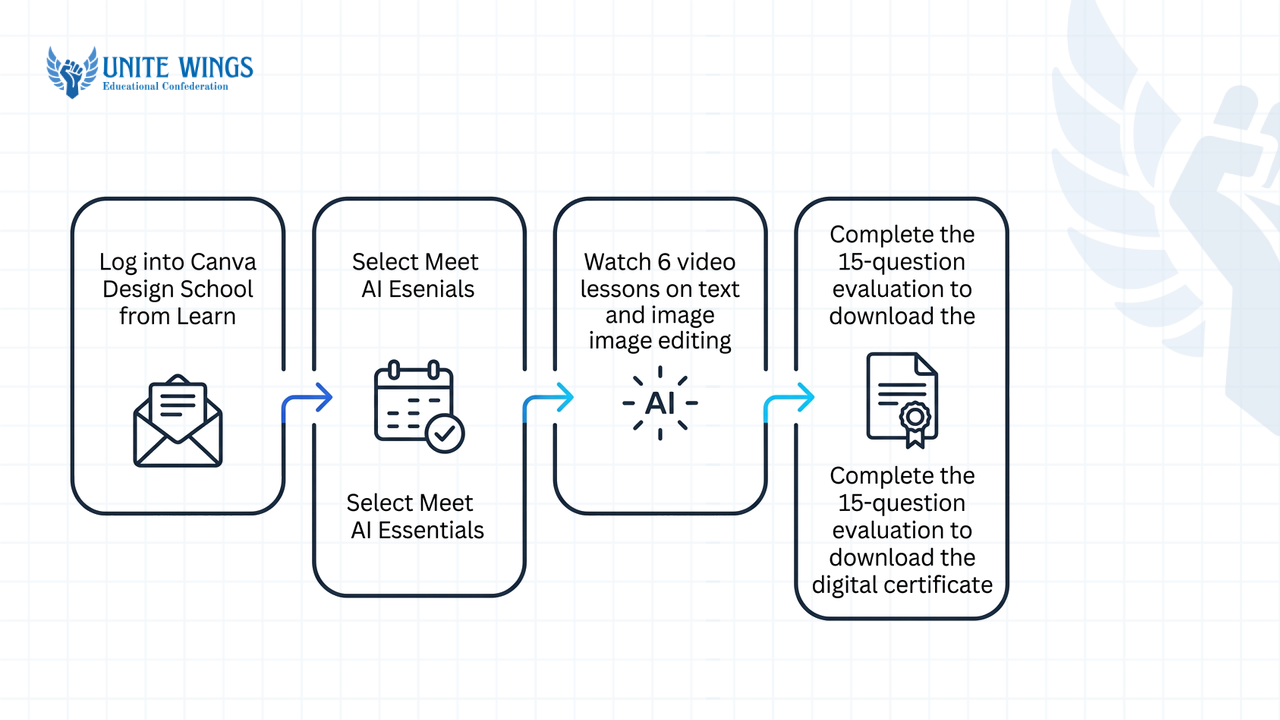
Follow these 4 steps to get your official badge in the next 60 minutes:
- Log into your free college or personal account at
canva.comand open Design School from the "Learn" dropdown menu. - Select Meet Canva's AI (listed as AI Essentials).
- Watch the 6 short modular video lessons covering text generation, image editing, and layout automation.
- Complete the 15-question multiple-choice evaluation at the end and download your digital certificate along with its shareable verification link.
Which Canva AI courses teach the new Magic Studio workflow instead of old 2023 menus?
Courses updated for 2026 teach Canva's integrated Magic Studio ecosystem rather than the old 2023 drag-and-drop sidebar menus. The top updated options are Coursera's AI-Powered Design with Canva Magic Studio (3 hours), Canva Design School's AI Essentials 2026 (1 hour), and live cohort sessions like the Unite Wings Canva AI Masterclass.
If you download a pirated course from Telegram or buy an outdated pre-recorded Udemy lecture from 2023, you will waste hours looking for buttons that no longer exist. Futurepedia and Canva's 2026 documentation confirm that Canva replaced its fragmented 2023 layout with six core Magic Studio workflows:
- Magic Write: Canva's built-in AI tool for writing and copy generation within its designs.
- Magic Design: An AI-powered layout and design generator driven by text prompts.
- Magic Media: Canva's AI tool for generating custom visual assets.
- Magic Grab: An AI selection tool used for editing and moving elements within images.
- Magic Switch (and Magic Resize): Allows you to resize and reformat your designs across various dimensions.
- Magic Expand: A generative AI tool designed to extend image boundaries.
The Canva Essentials Professional Certificate on Coursera isolates these exact workflows inside its dedicated 3-hour module, teaching you how to write multi-sentence prompts rather than clicking through static templates.
Do Indian recruiters value a Canva certificate or a live project link more?
Indian recruiters strongly prefer live project links over static course certificates. A 2024 survey reported by MediaBrief (from the Canva-Sago Global Report) found that 84% of Indian hiring managers prefer candidates who include digital portfolios, while a 2025 Fueler and LinkedIn data report notes that 78% of surveyed Indian recruiters prioritize practical skills over formal qualifications.
Why do both exist if portfolios matter more? They do two different jobs in the Indian hiring pipeline:
- The certificate beats the automated filter: When 800 freshers apply for a Social Media Coordinator or Founder's Office role on LinkedIn or Naukri, recruiters filter profiles by keyword skills and verified licenses. A certificate gets your profile opened.
- The live project link gets you the interview: Once a startup founder or agency lead opens your resume, a PDF certificate proves only that you watched videos. A live link proves you can deliver client work by 5 PM.
According to Oakland Post's coverage of Canva's 2025 business report, 92% of global business leaders now expect employees in non-design roles like sales, HR, project management, and marketing to possess visual communication skills. Furthermore, MediaBrief's 2024 report showed 52% of Indian job seekers already submit digital portfolios, the highest adoption rate globally, and 93% of Indian hiring managers accept applicants using generative AI tools to polish their application materials.
Your pay band depends directly on whether you show up with just a basic badge or AI-assisted proof of work:
| Role & Location Tier in India | Monthly / Annual Compensation (INR) | What Recruiters Expect to See | Source (2026) |
|---|---|---|---|
| Tier-2 City Entry-Level / Local Agency (0–1 yr) | ₹12,000 – ₹25,000/month (~₹1.8 – ₹3 LPA) | Basic template editing, festival posters, print-ready sizes | Apeejay Education |
| Metro Hub Entry-Level (Bengaluru, Mumbai, Delhi NCR, 0–1 yr) | ₹25,000 – ₹45,000/month (~₹3 – ₹6 LPA) | Magic Studio speed workflows, pitch decks, reel covers, digital portfolio | Apeejay Education / RequireHire |
| National Median Canva Designer (All experience levels) | ₹5.6 LPA median (Middle 50% earn ₹3.5 – ₹9.4 LPA) | Brand kit systems, multi-format campaign conversion via Magic Switch | Flexiple Salary Report |
| Freelance Canva / Graphic Designer (Beginner to Experienced) | ₹20,000 – ₹30,000/mo (Beginner) to ₹50,000 – ₹95,000+/mo (Experienced) | Live Fueler/Behance proof-of-work, fast turnaround for D2C and creators | XL Institute / Salary in a Month |
If you have zero internship experience and need to turn classroom designs into a recruiter-ready portfolio, the Unite Wings AI Portfolio Sprint walks you through building and publishing proof-of-work links from scratch.
Is a live hands-on Canva AI masterclass better than a 12-hour pre-recorded course?
A live hands-on Canva AI masterclass is better for college students who need a finished portfolio piece and verifiable certificate within a single weekend, while long pre-recorded courses (like Udemy's 36-hour Canva Master Course) suit learners who want an encyclopedia of every menu setting over several months.
Look at your browser bookmarks right now. Most engineering, BBA, and BCom students have three half-watched Udemy or Coursera courses sitting at 14% completion because semester exams, college fests, or placement tests got in the way.
Pre-recorded courses and live hands-on formats solve completely different problems:
- Completion vs. Procrastination: In a 36-hour pre-recorded course (Bring Your Own Laptop), nobody checks if you actually opened Canva. In a live masterclass (such as Unite Wings) or a lab-heavy regional institute program like Raj Computers Academy, W Tech, or Disha Computer Institute (which run 70% hands-on labs across 20+ client-style projects), you build on the spot.
- Task-Verified Credentials: During a Unite Wings live session, you do not just watch slides; you execute a live assignment, such as prompting Magic Design and Magic Write to generate a 5-slide startup pitch deck or an Instagram ad banner, to get your verifiable certificate with a unique ID.
- Fixing Real Friction: Non-designers get stuck on small, annoying problems: font pairings that look cheap, AI images with weird hands, or exporting a presentation as a clickable view-only link instead of a bulky 40MB PDF. A live mentor fixes your layout on screen in two minutes.
Rule of thumb: Pick a long pre-recorded Udemy course only if you are in your first or second year and commit to 45 minutes of practice every Tuesday and Thursday. If campus placements or internship applications are less than 30 days away, pick a 2-to-3-hour live masterclass.
How should you list Canva AI skills and certificates on your LinkedIn profile?
Add your Canva AI certificate manually in LinkedIn's Licenses & Certifications section with a direct verification URL and 5 targeted skill tags so automated recruiter filters rank your profile higher. According to iCertGlobal's 2026 LinkedIn optimization guide and Canva's LinkedIn profile guide, posting a certificate image in your feed gives you 24 hours of likes from batchmates, but only the structured profile section feeds LinkedIn Recruiter search algorithms.
Mistake to avoid on LinkedIn
Never upload a screenshot of your certificate as a regular photo post and stop there. Recruiters searching for "Canva" + "Social Media Marketing" filter by the structured Licenses & Certifications and Skills fields. If those fields are blank, you are invisible in recruiter searches.
Follow these 5 steps to set up your credential and portfolio link properly:
- Open your LinkedIn profile, click Add profile section, expand Recommended, and select Add licenses & certifications.
- Name: Enter the exact course title, such as
Canva AI EssentialsorAI-Powered Design with Canva Magic Studio. - Issuing organization: Type and select
Canva,Coursera, orUnite Wingsfrom the dropdown so the official company logo appears next to your credential. - Credential ID & URL: Enter your unique verification ID and paste the public verification link into the Credential URL box.
- Attach 5 Skill Tags: Click + Add skill at the bottom of the pop-up and tag:
Canva,AI Prompt Engineering,Visual Design,Graphic Design, andSocial Media Marketing.
Once the badge is live, scroll up to your LinkedIn Featured section, click the + icon, select Add a link, and paste a public view-only link to a 5-slide pitch deck or brand carousel you built in Canva (or your Fueler portfolio page).
Then add one proof-driven bullet under the Projects section of your resume. Instead of writing "Certified in Canva AI," copy and adapt this line:
Designed a 6-slide go-to-market pitch deck and 12 multi-format social media assets for a mock D2C skincare launch using Canva Magic Studio (Magic Design, Magic Switch, Magic Grab), reducing layout turnaround time from 4 hours to 35 minutes [Live Portfolio Link].
Your 7-day plan to get certified and portfolio-ready
Do not spend three weeks reading course reviews. You can finish both your official badge and a recruiter-ready portfolio piece before next Monday:
- Tonight (60 minutes): Create or log into your free account at Canva Design School, finish the 6 lessons in AI Essentials 2026, and pass the 15-question test to get your free native Canva link.
- This weekend (2 to 3 hours): Build one complete corporate asset, either a 5-slide market research presentation for a company you want to intern at or a 5-post Instagram and LinkedIn campaign, using Magic Write, Magic Grab, and Magic Switch.
- Monday morning (20 minutes): Publish your project as a view-only link on Fueler or your LinkedIn Featured section, and log your certificates under Licenses & Certifications with all 5 skill tags attached.
Build your portfolio piece live this weekend
If you want to skip self-paced trial and error, join the live Canva AI Masterclass. You will practice Magic Design and Magic Write step by step during the session, finish a presentation deck or social campaign asset you can link on your resume immediately, and graduate with a verifiable Unite Wings certificate ID for your LinkedIn profile.
Frequently asked questions
Can freshers get remote freelance gigs using only Canva AI tools?
Yes, Indian freshers earn ₹20,000 to ₹30,000 per month starting out as freelance Canva designers according to 2026 data from XL Institute and Salary in a Month. Target D2C founders, LinkedIn ghostwriters, and YouTube creators who need fast carousel decks, thumbnails, and pitch presentations rather than complex vector illustrations.
Do Canva Design School certificates expire?
No, official certificates earned on Canva Design School do not have an expiration date according to Canva Help Center FAQs. However, Canva recommends reviewing the course modules or re-testing every 12 months because new Magic Studio AI tools replace older workflows every year.
How do I verify a Canva certificate on LinkedIn?
Copy the unique public verification URL generated when you pass your Canva Design School test, Coursera module, or Unite Wings masterclass. Paste that link into the Credential URL field inside LinkedIn's Licenses & Certifications section so recruiters can click "Show credential" to verify its authenticity.
Is Canva AI certification helpful for MBA, BBA, and BCom students?
Yes, Canva's 2025 Global Business Report states that 92% of business leaders expect employees in non-design roles to have visual communication skills. For management and commerce freshers applying to marketing, HR, consulting, or founder's office roles, a Canva AI credential paired with a live pitch deck proves presentation readiness.
Which is better for Indian placements: Coursera's Canva course or Canva Design School?
Take Canva Design School's AI Essentials 2026 first because it is 100% free, takes one hour, and carries Canva's native logo. Add Coursera's 3-hour AI-Powered Design with Canva Magic Studio if you want deeper training on prompt engineering and have active Coursera financial aid or campus access.
Newsletter
Stay updated with our latest news and insights.