
How to Find HR and Hiring Manager Email IDs in India (Free Tools)
Six free email-finding Chrome extensions, monthly credit limits, and a 3-step Google X-ray formula to find verified work emails for Indian HRs and team leads.
To figure out how to find email addresses of HR and recruiters in India without paying for software, combine a free LinkedIn Chrome extension like DazLeads or ContactOut with a domain pattern check on Hunter.io. Because approximately 38% of corporate domains use the first.last@company.com format according to Emailchaser, you can also derive a hiring manager's exact work ID from a single public company email and verify it for free on Bouncer or BounceBan before sending. This keeps your hard bounce rate under the 2% threshold required to keep your Gmail account out of spam folders.
In short
- Pick DazLeads (10 to 30 free signup credits, no credit card) for Indian startups, or Hunter.io (25 to 50 free searches per month) to see company-wide domain patterns.
- Never guess and send to common Indian names at mass recruiters like TCS or Infosys, because name collisions force IT directories to add numbers like
rahul.sharma12@tcs.com. - Verify every guessed email on Bouncer (100 free credits) or BounceBan (free for catch-all domains) so your hard bounce rate stays below 2%.
- Keep your cold email under 150 words, include the Job ID in the subject line, and send exactly one follow-up after 5 to 7 working days.
Why should you avoid emailing generic careers@ or hr@ company addresses?
Generic inboxes like careers@company.com, info@, or hr@ act as unmonitored storage folders that receive thousands of untracked applications daily, meaning fresher resumes rarely get opened. When you email a named individual like a technical recruiter or an engineering manager directly, your message lands in a primary work inbox where one person is accountable for reading it.
In Indian tier-2 and tier-3 college off-campus drives, thousands of students copy-paste the same job portal message to the generic careers@ address posted on a company's website footer. Those shared mailboxes are rarely connected to an active Applicant Tracking System (ATS) queue, or they are checked once a month by a junior coordinator who filters only by immediate notice period. If you are a final-year student or a fresher with zero experience, your resume gets buried under experienced lateral applicants within an hour.
There is also a legal and technical distinction between the two inbox types. Under India's Digital Personal Data Protection (DPDP) Act, 2023, Emporia Studio notes that a generic business address like sales@ or careers@ does not count as personal data, whereas a named corporate address like priya@company.com does. Because nobody owns a generic inbox, nobody replies. Target two specific people for every role you want: the Talent Acquisition Specialist handling that vertical, and the Team Lead or Hiring Manager who actually owns the open headcount. Before you start pulling their contact details, make sure your LinkedIn profile looks credible when they look you up; the LinkedIn Masterclass covers how to set up a profile recruiters can find.
Which free Chrome extensions give the most accurate Indian company emails?
For Indian company lookups without a credit card, DazLeads offers 10 to 30 free credits specifically tuned for Indian corporate records, while Hunter.io provides 25 to 50 free monthly searches to uncover domain-wide naming patterns. If you are pulling emails straight from LinkedIn profiles, ContactOut, Apollo.io, and Lusha also offer restricted free tiers that reset monthly.
Google Chrome held 69.39% of the global browser market share as of August 2026 according to a single-source report from RecruitAISuite, making Chrome extensions the standard way to extract recruiter contacts directly from LinkedIn profiles. According to LinkedIn's Future of Recruiting report cited by Pin, recruiters who use AI tools and browser extensions save roughly 20% of their workweek (about one full day), and you can use the exact same extensions in reverse to find them. Free tier limits across these tools change often and some impose 24-hour credit expirations, so check each tool's pricing page before starting a large batch of applications.
| Tool / Chrome Extension | Free Tier Limit | Best Target in India | Key Limitation to Watch For |
|---|---|---|---|
| DazLeads | 10 to 30 free credits on signup (no card needed) | Indian startups and mid-size IT firms | Credits do not replenish freely once your initial signup batch is exhausted. |
| Hunter.io | 25 to 50 free searches per month | Established MNCs with public web footprints | Reveals the domain pattern well, but does not overlay directly onto personal LinkedIn profiles. |
| ContactOut | Free tier available via Chrome extension | Direct LinkedIn profile overlays (700M+ database) | Masks certain corporate metadata or phone numbers once your initial free lookups run out. |
| Apollo.io | Limited free monthly credits | Tech startups and SaaS hiring managers | Free credits expire or fluctuate based on whether you link a corporate domain vs a Gmail account. |
| Lusha | Small monthly free tier | Senior HR directors and VP-level leads | Burns through credits quickly if you click reveal on unverified phone numbers alongside emails. |
| Pin | Free trial / tier via Chrome extension | Broad recruiter lookups (850M+ profile index) | Built primarily for outbound recruiting sequences rather than single student lookups. |
Here is the decision rule for choosing your stack so you do not waste credits:
- If you are a final-year student targeting Indian tech startups (Series A to C) on LinkedIn: Install DazLeads and Apollo.io. Startup founders and talent leads change companies every 12 to 18 months, and LinkedIn profile overlays catch their newest domain faster than web scrapers.
- If you are targeting legacy IT firms, banks, or global MNCs (like Cisco, Nvidia, or McKinsey): Use Hunter.io first. You only need to spend 1 credit on Hunter to see the company's master email pattern, and then you can manually write the emails for ten different recruiters at that company without spending another credit.
- If a profile has no email on DazLeads or Apollo: Switch to ContactOut (which indexes over 700 million records) or use your backup credits on Skrapp and SalesQL.
What most students get wrong: Students install an extension, open a LinkedIn search results page, and click "Reveal Email" on 20 random HR profiles at once. You will burn your entire month's quota in three minutes, and half of those HR staff will be in payroll or campus relations rather than technical hiring. The fix: Only click reveal after you have opened the person's profile, checked their "Activity" tab to confirm they posted a job in the last 30 days, and verified that their title matches your target department (for example, "Talent Acquisition — Engineering" rather than "HR Operations").
How do I guess a company's email pattern without using paid tools?
You can guess a company's email format for free by finding one public address on their "Press" or "Contact Us" page and applying that exact structure to your target recruiter's name. According to Emailchaser, roughly 38% of businesses globally use first.last@company.com, 17% use first@company.com, 12% use flast@company.com, and 10% use firstlast@company.com.
When you run out of extension credits, use this five-step manual workflow to find any recruiter's email address in under three minutes:
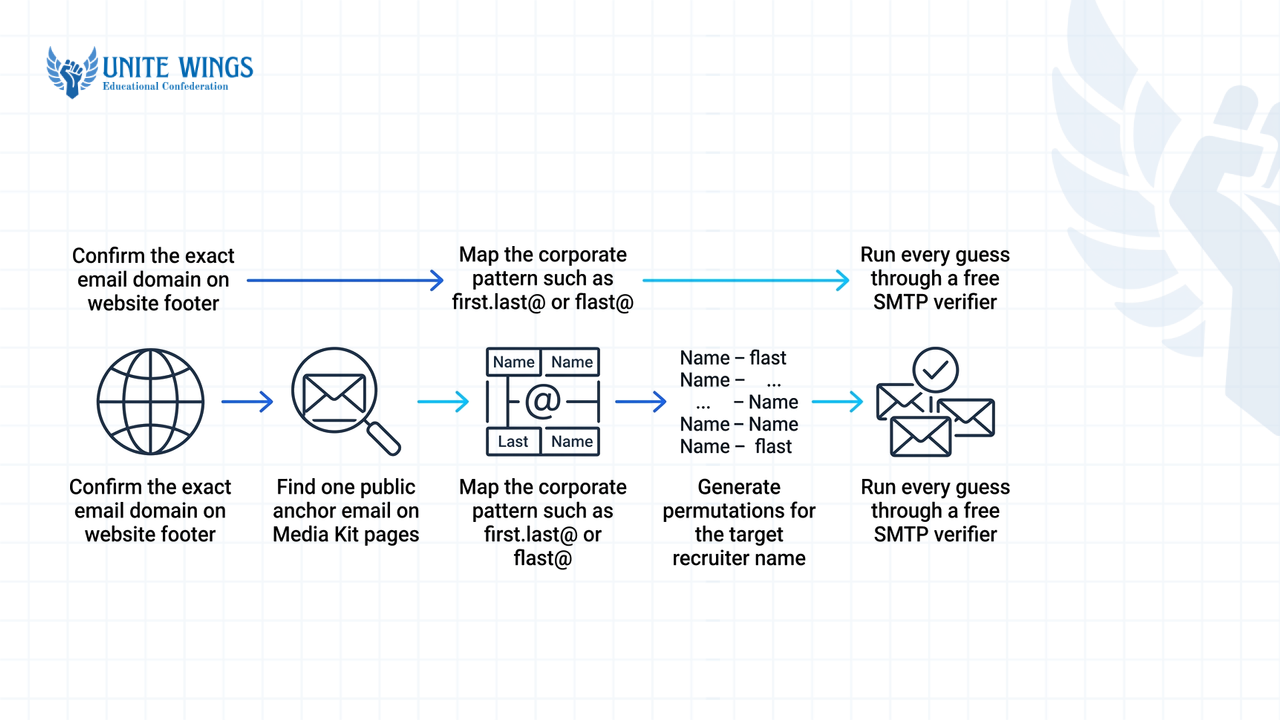
- Confirm the exact email domain: Go to the company's official website footer or privacy policy page to check the domain they use for mail. An Indian startup might host its website on
brandname.inorgetbrand.comwhile their corporate mail runs onbrand.io. - Find one public anchor email: Check the website's "Press", "Media Kit", or "Investor Relations" page, or read the bottom of a company press release on Google News. Companies almost always publish one named media contact (for example,
ananya.verma@company.com). - Map the corporate pattern: Match that public email against standard enterprise distributions. A single-source breakdown by Emailchaser notes that global tech companies like Google, Uber, and Stripe use
first@(17% of companies, mostly tech startups), Cisco and Nvidia useflast@(12%, common in older IT, legal, and finance firms), and McKinsey usesfirst_last@(roughly 6% of domains). - Generate permutations for your target: If you cannot find a public anchor email, plug your recruiter's first name, last name, and domain into a free browser tool like ConnectSafely or build a five-row permutation sheet in Google Sheets using the formulas below.
- Run every guess through a free verifier: Never send an email to all five permutations at once. Pass your list through an SMTP verifier first to isolate the single active mailbox.
If you want to build a zero-tool permutation sheet in Google Sheets, put the recruiter's first name in cell A2 (e.g., rohan), last name in B2 (kapoor), and domain in C2 (company.com). Then paste these formulas into columns D through H to cover 83% of all corporate formats:
- 38% (
first.last@):=LOWER(A2&"."&B2&"@"&C2)->rohan.kapoor@company.com - 17% (
first@):=LOWER(A2&"@"&C2)->rohan@company.com - 12% (
flast@):=LOWER(LEFT(A2,1)&B2&"@"&C2)->rkapoor@company.com - 10% (
firstlast@):=LOWER(A2&B2&"@"&C2)->rohankapoor@company.com - 6% (
first_last@):=LOWER(A2&"_"&B2&"@"&C2)->rohan_kapoor@company.com
Watch out for Indian name collisions at mass recruiters
Standard permutation formulas fail for common Indian names like Rahul Sharma, Priya Patel, or Amit Kumar at massive enterprises like TCS, Infosys, or Wipro. When an IT directory has 400 employees named Rahul Sharma, the system appends numbers or middle initials (such as rahul.sharma12@tcs.com). If you guess rahul.sharma@tcs.com, your fresher resume lands in the inbox of a Senior Vice President who joined in 2004, not the campus recruiter you saw on LinkedIn. For mass recruiters with over 10,000 employees, always use a Chrome extension tied to the exact LinkedIn URL rather than guessing from a formula.
How can I verify if an email address is active so my mail doesn't bounce?
Verify any guessed or scraped email address by pasting it into a free single-check verification tool like Bouncer (100 free credits), ZeroBounce (100 free monthly credits on business domains), or BounceBan before hitting send. According to HRMapper, keeping your hard bounce rate under 2% to 3% prevents Google Workspace and Microsoft 365 from throttling your account or routing your future job applications straight to spam.
When you send an email to a non-existent address (a hard bounce), the receiving mail server logs a failure against your sender reputation. If you guess five email variations for one hiring manager and BCC all five in a single Gmail message, four of them will bounce immediately. Do that three times in a week, and Gmail's outbound filters will silently flag your account, meaning even when you email a real recruiter who wants to interview you, your message will land in their Junk folder.
Use this verification workflow to keep your bounce rate near zero:
- Run standard checks on Bouncer or Saleshandy: As reported by Sidemail and Salesforge, Saleshandy's built-in verifier runs a multi-layer check across syntax, domain status, MX records, catch-all setup, and live SMTP responses on a limited free daily tier. Zen-Mode confirms that Bouncer gives you 100 free credits (and charges $8 for 1,000 pay-as-you-go credits if you ever scale up, while ZeroBounce starts at $39 for 2,000 credits).
- Isolate "Catch-All" domains with BounceBan: According to Hunter.io, catch-all (or accept-all) domains are configured to accept incoming mail for any address at that domain, so a basic SMTP ping returns a positive status even for a fake name. Standard verifiers label these as "Risky" or "Unknown". When that happens, paste the address into BounceBan, which Zen-Mode notes offers free single verification checks via a public queue and can verify catch-all domains and secure gateways like Mimecast and Proofpoint.
- Delete legacy Indian freemail addresses immediately: If you download an old placement cell alumni sheet or a scraped PDF of HR contacts from Telegram, delete every row ending in
@rediffmail.comor@bsnl.in. A single-source report from BounceZero found that Rediffmail has a dormancy rate approaching 40%, which will ruin your sender score in a single afternoon.
Is it legal and ethical to cold email a hiring manager on their work ID?
Yes, cold emailing a hiring manager on their corporate work ID is legal in India, as the country has no federal law banning unsolicited B2B or career outreach emails. However, under the Digital Personal Data Protection (DPDP) Act, 2023, Emporia Studio and Ken.so confirm that a named work address like priya@company.com counts as personal data, meaning you must handle it respectfully and stop mailing immediately if asked.
Many students confuse spam phone call rules with email laws. According to Emporia Studio, the Telecom Commercial Communications Customer Preference Regulations enforced by TRAI cover promotional calls and SMS under the Do Not Disturb (DND) registry, but they do not apply to commercial or career emails.
That said, India's data privacy framework has tightened. The DPDP Act was passed in 2023, and the Government of India officially notified the DPDP Rules on November 13–14, 2025, with core business compliance obligations taking full legal effect roughly 18 months later in May 2027. For companies that scrape and process personal data illegally without consent guardrails, PuzzleInbox and Revexa note that maximum penalties adjudicated by the Data Protection Board scale from ₹50 crore up to ₹250 crore (~$30M USD).
As an individual job seeker writing a tailored application to a hiring manager, you are not running an illegal commercial marketing blast, provided you follow four practical rules:
- Never scrape or buy bulk HR lists: Do not send automated 500-person mail merges to random HR spreadsheet lists downloaded from LinkedIn posts. Only collect the specific email address of a recruiter or team lead at a company where an relevant role exists.
- Keep the email under 150 words: According to Ucanly and Career Success Launchpad, cold emails under 150 words get higher engagement because hiring managers can read the entire message on a mobile screen without scrolling.
- Put the Role Name and Job ID in the subject line: Use a clear format like
Application: Backend Developer Intern — Job ID 4512 — [Your Name]. Include one link to a live project or GitHub repo, attach a one-page PDF resume, and ask for a single 10-to-15-minute chat. - Follow the 5-to-7 day single follow-up rule: Both Ucanly and Career Success Launchpad recommend waiting 5 to 7 working days before sending one polite two-line reminder. If the recruiter does not reply to that single follow-up, delete their email from your tracker and move on to another company.
Your action plan for this week
Stop applying solely through crowded job portals where your resume sits behind 2,000 other applicants. Set aside two hours this week to build a verified outbound pipeline:
- Today (30 minutes): Install DazLeads and Hunter.io on Chrome, and create a free account on Bouncer so your 100 verification credits are ready.
- Tomorrow (45 minutes): Shortlist 10 target companies where you have already seen an open role on LinkedIn or Naukri. Find the exact Hiring Manager or Talent Acquisition Lead for each role, extract or permute their email address, and run all 10 through Bouncer until every status reads "Deliverable".
- This weekend (45 minutes): Draft a custom, 120-word cold email for each of the 10 verified contacts referencing a specific project you built, schedule them to send on Monday morning at 9:30 AM IST, and set a calendar reminder to send one follow-up next Tuesday.
Build your complete off-campus outreach system
If you want the exact cold email templates, AI prompts, and tracking sheets our students use to get interview replies from Indian startups and MNCs, join the Job Search and Outreach Masterclass. You will walk away with a ready-to-use outreach tracker, verified email-finding workflows, and message templates tailored for freshers.
Frequently asked questions
Which free Chrome extension gives the most accurate email addresses for Indian companies?
DazLeads and Hunter.io are the most reliable starting points for Indian companies. DazLeads gives you 10 to 30 free credits on signup without a credit card and is built around Indian corporate records, while Hunter.io gives you 25 to 50 free monthly searches to see the company's email format.
How can I find a recruiter's email address on LinkedIn without paying for premium?
Install a free Chrome extension like ContactOut, Apollo.io, or DazLeads, which overlays directly onto public LinkedIn profiles to reveal work emails without needing a LinkedIn Premium subscription. If the extension shows no result, copy the recruiter's name and company domain, guess the first.last@company.com format, and check it on Bouncer.
Why do my cold emails keep bouncing when using older HR contact lists in India?
Free HR email PDFs shared on Telegram or college WhatsApp groups are usually three to five years old, and Indian tech recruiters switch jobs every 12 to 24 months. Additionally, legacy Indian domains like Rediffmail have a dormancy rate near 40%, causing massive hard bounces that ruin your Gmail reputation.
How do I guess a company's email pattern if I only know one employee's address?
Look at the structure of the known employee's address before the @ symbol and apply that exact rule to your target's name. Roughly 38% of companies use first.last@, 17% use first@, 12% use flast@, and 10% use firstlast@. Verify your generated address on BounceBan or Bouncer before mailing.
Is it better to email a hiring manager directly or apply through a job portal?
Do both in sequence: apply through the company's job portal first to generate an official Candidate or Job ID, and then immediately send a cold email under 150 words to the hiring manager referencing that ID. Direct emails bypass the generic careers@ backlog while the portal entry lets HR process your interview.
How many follow-ups can I send to a recruiter without appearing spammy?
Send exactly one follow-up email 5 to 7 working days after your first message. Reply in the same email thread so the recruiter has your original resume and portfolio link in view, keep the reminder under 50 words, and stop emailing that person if they do not reply.
Newsletter
Stay updated with our latest news and insights.