
5-Slide Self Introduction PPT for Freshers in Job Interviews
Copy-ready 5-slide layout and speaking script for assessment centre interviews, showing how to turn internships and college projects into proof of work.
A standard self introduction presentation ppt for freshers in job interview assessments uses five slides delivered in under three minutes: 1) Title and target role, 2) Academic profile and skill matrix, 3) A 1-page STAR project case study, 4) Certifications or role alignment, and 5) A closing slide with a question hook. Instead of pasting your resume onto slides, keep text under 30 words per slide and spend 30 to 45 seconds speaking on each page (Indeed). Preparing for a ₹3.4 LPA entry-level Ninja role or a ₹7 to ₹11.8 LPA Digital or Prime track (FacePrep) requires a 5-slide structure that proves your communication and problem-solving skills before the panel asks a single question.
In short
- Stick to 5 slides and a 3-minute spoken delivery (30 to 45 seconds per slide) so the panel has time for Q&A.
- Format your deck in 16:9 widescreen using Open Sans, Roboto, or Montserrat, with dark text on a white or light grey background.
- Dedicate Slide 3 to a single final-year capstone project or internship using the 4-column STAR layout (Situation, Task, Action, Result).
- Cut family background and generic hobbies like "listening to music"; replace them with job description skill mapping on Slide 4.
- Plant a specific tool or metric on Slide 5 to steer the interviewers toward questions you have already prepared to answer.
What should a fresher include in a 5-slide self introduction PPT?
A 5-slide fresher interview deck includes a title card, an education and skills snapshot, a single project case study, a role-alignment or certification slide, and a contact slide (InfoDiagram). This layout fits a 3-to-5-minute assessment window across tech, sales, management, and consulting interviews (SlideTeam, AIppt).
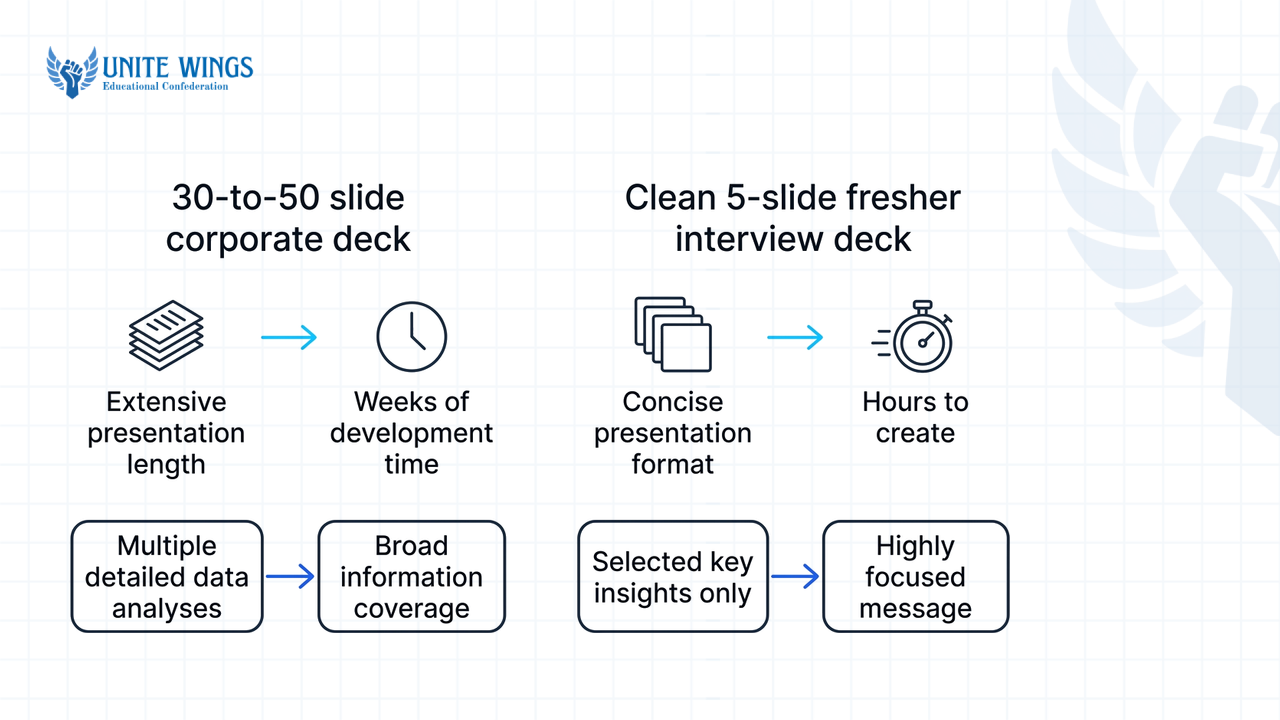
Most templates you find online are massive 30-to-50 slide corporate decks built for experienced professionals. If you download one of those for a campus placement or off-campus assessment centre, you will end up with blank timelines and awkward gaps. Build a clean 5-slide deck in Microsoft PowerPoint or Google Slides using a 16:9 widescreen aspect ratio.
| Slide number | Slide title | What goes on the slide (under 30 words) | Time to spend | Exact transition line to the next slide |
|---|---|---|---|---|
| Slide 1 | Title & Role | Full name, target role title (e.g., "Graduate Engineer Trainee - Data"), and a clean headshot if interviewing on Zoom or Teams. | 30–45 sec | "Here is a quick snapshot of my academic background and the core tools I work with." |
| Slide 2 | Profile & Skills | Degree, college tier, graduation year, CGPA (if strong), and hard skills shown with badge icons or progress bars. | 30–45 sec | "To show how I apply these tools outside the classroom, I want to walk through one project." |
| Slide 3 | Project Case Study | Four visual columns for Situation, Task, Action, and Result on your best final-year capstone project or internship. | 30–45 sec | "Alongside this project, I mapped my recent certifications and coursework to what your team is building." |
| Slide 4 | Role Alignment & Certs | Visual alignment matching your internship or project outcomes to the company's business needs. | 30–45 sec | "That brings me to how I can contribute from month one." |
| Slide 5 | Closing & Q&A | A summary of your value proposition, email, or a digital QR code and LinkedIn URL. | 30–45 sec | "I'd love to walk through how I applied these skills in my capstone project, or answer any questions you have." |
When you share your screen on Google Meet or Microsoft Teams, press F5 immediately to start the presentation in full-screen so the panel sees your full-screen slide rather than your speaker notes and browser tabs. If you want to build this layout quickly without messing up alignments, the Canva AI Masterclass covers how to generate clean, corporate-ready slide decks in minutes.
How is a self introduction presentation different from reading your resume?
An interview presentation is a visual pitch built around problem-solving and selective proof, while a resume is a static, chronological document meant for scanning (AIppt, JobTeaser). Your slides act as visual anchors with icons, architecture diagrams, and under 30 words per page, while your spoken voice carries the story (Indeed).
What most students get wrong: Freshers routinely copy-paste five bullet points from their resume onto Slide 2, turn their gaze to the screen, and read the text aloud word for word. The panel can read faster than you can speak. By the time you finish reading bullet two, the interviewer has already finished reading the slide, tuned out your voice, and started looking for gaps in your profile.
The fix: Separate what they see from what you say. Use high-contrast themes with dark grey or black typography in Open Sans, Roboto, or Montserrat on a clean white background, and replace text lists with visual progress bars or tool icons (InfoDiagram). Skip text animations and bouncing transitions; they lag on video calls and look amateurish.
Here is how to convert a resume line into a slide visual and a spoken line for Slide 2:
- What is on your resume: "Completed B.Tech in Computer Science from ABC Institute of Technology (2022–2026) with 8.4 CGPA. Proficient in Python, SQL, Power BI, and Git. Completed a 2-month summer internship at XYZ Pvt Ltd."
- What goes on Slide 2 (18 words total):
- Top block:
B.Tech CSE (2026) | 8.4 CGPA - Bottom block: Four tool icons (
Python,SQL,Power BI,Git) with a one-line tag under each:Data Cleaning,Querying,Dashboards,Version Control.
- Top block:
- What you say out loud (35 seconds): "I am graduating this year with a B.Tech in Computer Science and an 8.4 CGPA. Over the last four semesters, I focused my electives and lab work around data analytics. My primary stack is Python and SQL for data cleaning and querying, and Power BI for reporting. Rather than listing every subject I took, I want to show you how I used Python and SQL together on my next slide."
Notice how the spoken script connects the icons on the screen instead of reading them like a grocery list. This matters even more in 2026 because India's entry-level hiring market is split into sharp compensation bands. Standard IT services roles pay between ₹3.5 LPA and ₹4.5 LPA (Hyring), but recruiters run higher-paying tracks like Digital and Prime roles at ₹7 to ₹11.8 LPA for candidates who pass advanced technical and communication rounds (FacePrep). Furthermore, NASSCOM and Indeed's 2026 industry study shows that AI-skilled freshers command a 30 to 40 percent salary premium over peers without applied skills. World Economic Forum insights cited by Asia Pacific Institute also confirm that employers actively screen freshers for prompt engineering, digital tool use, and concise business communication. Putting an applied AI tool or workflow icon on Slide 2 separates you from the ₹3.5 LPA baseline crowd immediately.
Should you put hobbies and family background in an interview PPT?
Leave your family background, native place, and generic hobbies out of corporate and technical interview presentations (SlideModel). While some general HR guides still include personal slides, engineering and corporate panels treat family details as wasted time inside a tight 3-minute window.
There is a documented conflict in hiring advice here. Sociological research on corporate hiring (such as Lauren Rivera's work, cited by Huru.ai in 2025) notes that evaluators sometimes look at leisure pursuits to judge cultural fit, and older regional interviewers in India occasionally ask about your hometown. However, technical and core corporate interview guides explicitly advise against putting life stories on slides, directing freshers to stick to academic credentials and project metrics (BuildATS, 2026; SlideModel).
Use this decision rule to decide whether a personal detail belongs on Slide 4:
- Rule 1 (Cut family tree details): Never include a bullet about your parents' occupations or how many siblings you have. It does not prove you can write code, close a sale, or build a financial model.
- Rule 2 (Cut generic consumption hobbies): Never write "watching movies," "listening to music," or "reading books." If an interviewer asks, "What was the last non-fiction book you read and what did you disagree with in chapter three?", an unprepared answer destroys your credibility.
- Rule 3 (Keep only measurable, transferable proofs): Only include an extracurricular activity if it has a number attached and maps to discipline, teamwork, or role competence. For example, "Organised a 400-student college hackathon, managing a ₹1.2 lakh sponsorship budget" proves project management for a business analyst role. "Maintained a 300-day streak on LeetCode" proves consistency for a software role.
Instead of a "Hobbies" slide, make Slide 4 a Role Alignment & Certifications slide (Indeed). Highlighting certifications and continuous learning courses bridges the experience gap when you have no full-time work history (BuildATS, 2026). Create a simple two-column table on Slide 4: list three requirements copied straight from the company's job description on the left, and place your matching certification, hackathon win, or coursework proof on the right.
How do you present a 1-page project case study on slide 3?
Present your project on Slide 3 by dividing the slide into four columns for the STAR method (Situation, Task, Action, and Result) (InfoDiagram, AIppt), or four blocks covering problem context, approach, your specific contribution, and measurable impact (Sparkl, AcademicTutorials).
What most students get wrong: Freshers often paste a screenshot of their IDE code or a complex, unreadable database schema onto Slide 3, or they say "we built an e-commerce website" without explaining what they personally coded inside their 4-person college group.
The fix: Draw four clean vertical cards on Slide 3 with under 30 words total across the entire page. Use one sentence for Situation/Task, three short tool keywords for Action, and one bold number for the Result. Adjust what you say out loud based on your focus on an academic project or an internship, and the technical or HR background of your panel (YouTube Cloud Engineer Academy, 2026).
Here is the exact side-by-side comparison of how to build and speak to Slide 3:
| Element | Option A: Pitching a Final-Year College Project | Option B: Pitching a 2-Month Summer Internship |
|---|---|---|
| Slide 3 Visual: Situation & Task | Manual hostel mess tracking caused 22% food waste. | Client onboarding emails took 48 hours to process manually. |
| Slide 3 Visual: Action | Python • Flask • SQLite • QR Attendance Module | Excel Macros • Power Automate • CRM Data Cleaning |
| Slide 3 Visual: Result | Cut daily tracking time by 70% across 300 students. | Reduced response turnaround from 48 hours to 4 hours. |
| Spoken Script for a Technical Panel (70 sec) | "For my final-year capstone, our four-member team tackled hostel food waste. My specific responsibility was building the backend API in Flask and designing the SQLite schema. The main bottleneck was handling 300 concurrent QR scans during peak lunch hours without locking the database, which I solved by batching write requests. In our 3-week campus trial, it cut manual entry time by 70%." | "During my two-month internship at XYZ, the operations team was spending two days manually copying lead data from emails into their CRM. I was tasked with automating the intake pipeline. I cleaned 1,200 legacy rows in Excel and built a Power Automate flow triggered by subject-line keywords. That brought average lead response time down from 48 hours to 4 hours." |
| Spoken Script for an HR / Non-Tech Panel (60 sec) | "In my final year, I noticed our college hostel wasted nearly a quarter of its prepared food because headcount tracking was done on paper. In a team of four, I led the system design and coordinated testing with the mess staff. Within three weeks of launching our digital check-in tool, the kitchen staff saved 70% of their daily admin time and predicted meal counts accurately." | "During my summer internship, I noticed the sales team was losing leads because it took 48 hours to reply to inquiry emails. I took the initiative to automate how customer forms reached the sales reps. By removing the manual copy-pasting step, the team started replying to customers in 4 hours instead of two days." |
If you are a final-year student and your group project was mostly copied from GitHub, do not put it on Slide 3; the panel will catch you on the second follow-up question. Build a small, working personal project with real metrics first, as our AI Portfolio Sprint walks you through building and publishing a verifiable project from scratch.
How do you end a self introduction deck so the panel asks easy questions?
End your presentation on Slide 5 by displaying your core value proposition, contact links or a LinkedIn QR code, and deliberately mentioning a specific project bottleneck or tool mastery that invites predictable follow-up questions (24Slides, SlideModel, Indeed).
When a fresher ends a presentation by saying, "Thank you, any questions?", the panel's brains go blank for a second, and they default to random, high-pressure syllabus questions ("Explain polymorphism" or "Walk me through normalization forms"). You can control the first five minutes of the Q&A by leaving an intentional "bait hook" on Slide 5.
A bait hook works because interviewers are busy; if you hand them an interesting, half-opened topic right as you finish speaking, they will almost always pull on that thread first.
Follow these 3 steps to set the trap on Slide 5:
- Put three clean elements on the slide: Your 1-line role summary at the top (e.g.,
Entry-Level Data Analyst | Python, SQL & Automated Reporting), your email and GitHub/portfolio URL in the middle, and a scannable QR code to your LinkedIn profile in the corner. - Plant one specific "curiosity phrase" on the slide: Add a small callout box at the bottom that mentions a concrete problem you solved but did not fully explain on Slide 3. For example:
Ask me how I reduced my SQL query runtime from 14 seconds to 1.2 seconds. - Deliver a targeted closing line: Instead of saying "Thank you," use one of these exact verbal handoffs based on your role:
- For software/tech roles: "That wraps up my overview. Since we kept this brief, I did not get into how I handled database indexing on my capstone project, so I would love to walk through that architecture or answer any other questions you have."
- For analytics/business roles: "That is my background in three minutes. I have the live Power BI dashboard from Slide 3 open in my next tab if you would like to see how the filters work, or I am happy to take any questions."
- For sales/management roles: "That covers my coursework and internship results. I would be glad to share how I handled cold-call rejections during my summer stint, or jump into any questions from the panel."
Your checklist before the interview day
Do not wait until the night before your assessment centre to format slides. Run through this sequence so your technology and delivery hold up under pressure:
- Today: Open Google Slides or PowerPoint, set the page setup to Widescreen 16:9, and build the 5-slide skeleton using the table in Section 1. Count the words on every slide; if any slide crosses 30 words, delete the adjectives and replace the text with an icon or a metric.
- Tomorrow: Write out your spoken script for each slide and time yourself with your phone stopwatch. Edit your script until the entire 5-slide run takes under 3 minutes (BuildATS, 2026). Practise the four transition lines so you can click to the next slide while finishing your sentence.
- On interview day: Export a backup PDF copy of your deck in case PowerPoint freezes, close all WhatsApp Web and personal browser tabs, and open your live project or dashboard in a second window in case the panel bites on your Slide 5 hook.
Practise your pitch in a live mock round
Having a clean 5-slide deck gets you through the first three minutes; handling the 15 minutes of cross-questioning that follow is what gets you the offer letter. Join the Interview Masterclass to learn a repeatable structure for answering technical and HR follow-up questions, plus a live mock interview round where you can test your pitch before facing a real panel.
Frequently asked questions
How many slides should an interview self-introduction presentation have?
A standard fresher self-introduction presentation should have exactly 5 slides (SlideTeam, InfoDiagram). This covers your title card, academic and skill profile, a 1-page STAR project case study, role alignment or certifications, and a closing Q&A slide. Only expand to 10–15 slides if HR explicitly asks for a 15-to-20-minute technical deep-dive deck.
How long should a self-introduction presentation take in an interview?
Aim for a spoken delivery of under 3 minutes total, spending 30 to 45 seconds per slide, unless the recruiter specifies a longer slot (BuildATS, 2026; JobTeaser). Keeping your pitch tight prevents panel fatigue and leaves plenty of time for follow-up questions on your final-year project.
Should I use animations or custom templates in a professional interview deck?
Avoid heavy text animations, spinning transitions, and bright decorative templates (Indeed). Animations often lag over Zoom or Microsoft Teams screen shares and distract from your spoken points. Use a static 16:9 layout with dark text in Open Sans, Roboto, or Montserrat on a plain white or light grey background.
What if I do not have internship experience to put on Slide 3?
Use your final-year academic capstone project, a hackathon prototype, or an independent domain project on Slide 3 (BuildATS, 2026). Structure it using the four-column STAR method (Situation, Task, Action, and Result) and emphasize your individual technical contribution and a measurable outcome rather than what the whole college group did.
Can I use AI tools to generate my interview presentation?
Yes, you can use AI presentation tools to generate your 16:9 slide layouts and icons, and employers actively value digital tool proficiency (Asia Pacific Institute). However, rewrite all AI-generated slide text yourself so it stays under 30 words per slide and contains your real project metrics rather than generic corporate buzzwords.
What is a realistic fresher salary package in India when interviewing with a presentation?
Standard IT services and mass-recruitment roles in India pay between ₹3.5 LPA and ₹4.5 LPA (Hyring). IT recruiters run tiered tracks from entry-level Ninja roles at ₹3.4 LPA up to Digital and Prime roles at ₹7 to ₹11.8 LPA (FacePrep), where strong project presentations and AI skills command a 30 to 40 percent premium.
Newsletter
Stay updated with our latest news and insights.