
What to Post on LinkedIn as a College Student (15 Ideas)
Fifteen low-cringe post ideas pulled from regular coursework, lab projects and hackathon failures, plus 4 fill-in-the-blank templates you can publish in 15 minutes.
Deciding what to post on LinkedIn as a college student in India starts with dropping the fake CEO tone and treating your feed as a public lab notebook. You do not need an internship at Google or a national hackathon trophy to show up on a recruiter's feed. Your routine semester assignments, broken Python scripts, NPTEL lecture notes, and mid-sem prep sheets are already enough to build personal branding for students and freshers when you frame them as proof of work.
In short
- Stick to 1 to 2 posts per week on Tuesday, Wednesday, or Thursday between 11 AM and 5 PM so you stay visible without hurting your semester prep.
- Convert your existing lab assignments into 6-slide PDF carousels (1080x1350 pixels), which generate up to 11x more interactions than plain text or single photos.
- Put your GitHub, portfolio, or certificate links in the first comment instead of the post body to avoid 2026 algorithmic reach penalties.
- Replace generic "thrilled to announce" certificate dumps with 3 specific technical takeaways or a bug you fixed while earning that badge.
How do I start posting on LinkedIn as a student without sounding fake?
You avoid sounding fake on LinkedIn by writing in the first person about what you built, broke, or studied this week, rather than giving career advice you have not earned yet. A 2023 Forbes India and University of East Anglia study found that Gen Z job seekers who share authentic lessons, project failures, and specific weaknesses build higher trust with employers than those who post polished corporate fluff. When you write like a student documenting a learning process, classmates cannot mock you for pretending to be an expert, and hiring managers see exactly how you think.
Most students freeze at the blank post box because they think LinkedIn requires corporate jargon. What most students get wrong is uploading a participation certificate with a ChatGPT-generated paragraph full of words like "thrilled" and "humbled." Senior career mentors and discussions on Reddit warn that overly automated, robotic phrasing hurts your credibility with tech recruiters who read hundreds of identical posts every week.
Fix this by using the "Cringe vs Credible" rewrite rule: cut the emotion, name the tool, and show the receipt.
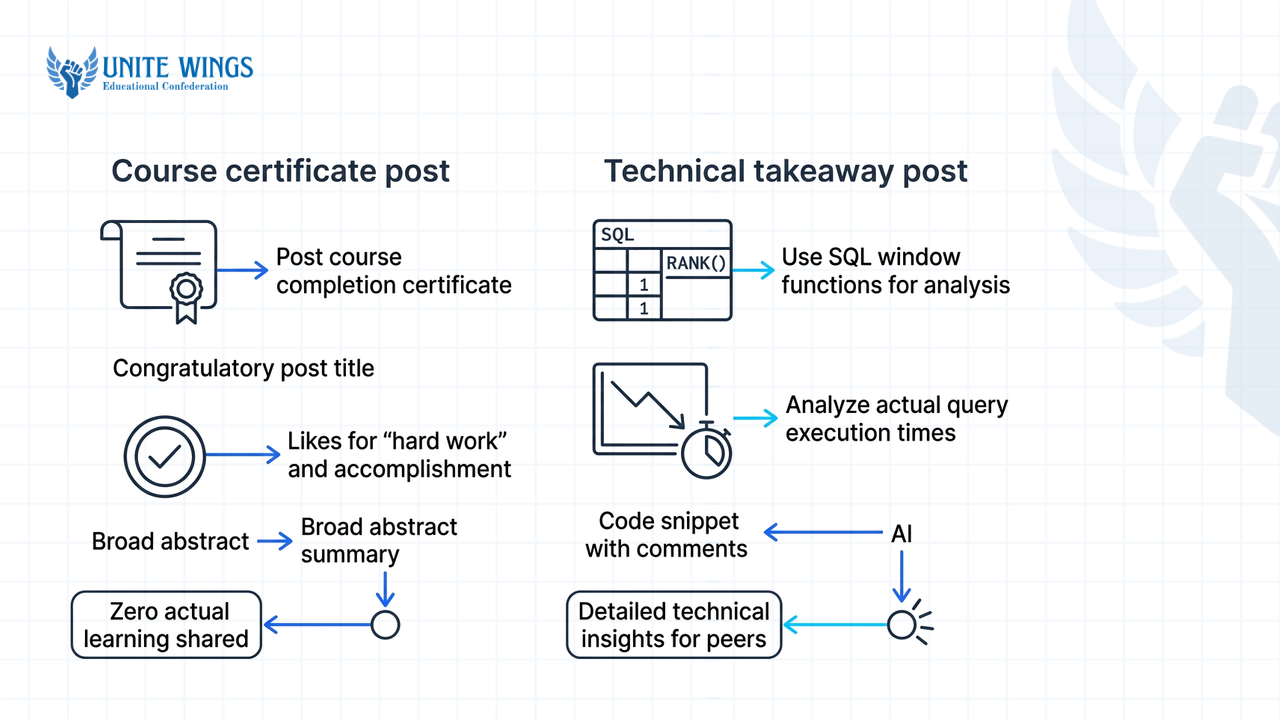
| Post trigger | Cringe version (what 90% of students post) | Credible version (what gets recruiter replies) |
|---|---|---|
| Course certificate | "Thrilled to announce that I have successfully completed the SQL for Data Science course on Coursera. Grateful for this learning opportunity." | "Finished a 16-hour SQL course on Coursera this weekend. The toughest part was writing window functions (ROW_NUMBER vs RANK) without slowing down queries on a 50,000-row dataset. Here are the 3 queries I rewrote to cut execution time." |
| Hackathon loss | "Honored to participate in Smart India Hackathon with my amazing team. We didn't win, but we made memories and learned teamwork." | "Our Smart India Hackathon prototype crashed 20 minutes before the final jury round because our Firebase free tier hit its read limit. We lost, but here is how we refactored our state management to cut database reads by 70%." |
| Coding milestone | "Delighted to share my 100-day streak on LeetCode. Consistency is the secret to success in software engineering." | "Solved 100 LeetCode problems in 14 weeks. I still struggle with Dynamic Programming on grids, so I built a 1-page decision tree in Notion to spot when to use memoization vs tabulation. Attaching the PDF below." |
| College fest role | "Proud to serve as the Sponsorship Head for our annual tech fest. Learned leadership and communication skills." | "Cold-emailed 85 local businesses in Pune for our college tech fest and got ignored by 70 of them. Changing our subject line from 'Sponsorship Request' to a 3-bullet audience breakdown got us 6 replies and Rs 1.2 lakh in funding." |
| Reading a book/paper | "Reading 'Designing Data-Intensive Applications'. Highly recommend this masterpiece to every aspiring software engineer." | "Read Chapter 3 of Designing Data-Intensive Applications for my DBMS elective. Finally understood why B-Trees beat LSM-Trees for read-heavy workloads. Drew this 1-page comparison diagram for my hostel study group." |
What should I post if I do not have any internship certificates yet?
If you do not have internship certificates yet, post verified proof of work from your daily academic schedule: mini-projects, lab assignments, open-source pull requests, hackathon builds, and student club operations. According to CollegeConnectUs (2026) and LinkedInRank (2026), recruiters treat documented academic projects and structured study notes as valid evidence of your capability when your work experience section is empty.
An Academic Mantra Services 2026 report notes that over 80% of Indian recruiters struggle to fill technical roles because of a practical skills gap, with only 42.6% of Indian graduates holding the functional skills needed to be hired immediately. Your goal on LinkedIn is to prove you belong in that 42.6% by showing how you apply classroom theory.
Here are 15 specific post ideas you can pull directly from an ordinary semester in an Indian college, grouped by where you find the material:
Academic and lab work
- The lab assignment teardown: Take a standard 3rd-semester Data Structures or CAD lab problem, show your initial brute-force solution, and explain how you optimized the time complexity or design constraints.
- Elective subject cheat sheet: Summarize a tough unit (like Operating System deadlocks or Financial Derivatives) into a 1-page handwritten or Excalidraw mind map before mid-sems.
- Research paper translation: Pick one IEEE or SSRN paper assigned by your professor, and write a 150-word post explaining the authors' methodology in plain English.
- Tool vs tool comparison from class: If your syllabus teaches MATLAB or Tally, spend two hours replicating the same assignment in Python or Power BI, and post a side-by-side comparison of which took fewer steps.
Projects and technical builds
- The broken build post-mortem: Share a screenshot of a terminal error or a failed circuit simulation, explain what caused the bug, and show the exact commit or wiring change that fixed it.
- Dataset cleaning diary: Download a messy Indian public dataset from data.gov.in (like state-wise EV registration or crop yields), document the 4 steps you took in Pandas or Excel to clean null values, and share one chart.
- UI/UX or workflow audit of a local app: Pick an app your college uses (the mess attendance portal, IRCTC, or a local bus tracker), point out one friction point, and post a 3-screen Figma redesign or database schema fix.
- Open-source documentation fix: You do not need to write complex algorithms for your first GitHub PR; find a library you use in class, fix a broken setup instruction in its README, and post about how you navigated the codebase.
Campus life and club operations
- The behind-the-scenes fest logistics post: Instead of posting a stage photo with a sash, share the Google Sheet tracker or automated email script you built to manage 400 hackathon registrations without double-booking rooms.
- Guest lecture synthesis: When your placement cell brings an industry speaker to the auditorium, take structured notes, tag the speaker and your college in a post within 24 hours, and list the 3 most actionable points they made.
- Peer workshop recap: If you taught 15 juniors how to use Git or Canva in a society meet, post the 5 questions they asked most often and how you answered them.
Learning in public and career prep
- NPTEL or Coursera weekly sprint: Every Sunday while taking an 8-week certification, post a 100-word summary of that week's module and one mini-experiment you ran using the concept, rather than waiting two months to post the final badge.
- Mock interview or GD reflection: After a campus placement mock round, write down one technical or HR question that stumped you, research the proper answer that evening, and share the before-and-after response.
- Placement test pattern breakdown: After sitting for an aptitude or coding round (without violating NDAs by sharing exact questions), share the topic weightage you noticed—such as how much time went into SQL joins versus sliding window arrays.
- Job description skill-gap audit: Take 10 entry-level job listings on Naukri Campus or LinkedIn for your target role (e.g., Business Analyst or Embedded Engineer), tally the tools mentioned most often, and post your 30-day plan to learn the top two.
To write these in under 20 minutes, copy and fill in one of these four templates:
Template 1: The Bug Post-Mortem
I spent [Number] hours this week trying to fix a [Name of error/bug] in my [Subject/Project name] build.
The goal was to [1-sentence project objective]. Everything worked until [describe the exact condition where it failed, e.g., we uploaded a CSV over 10MB].
What went wrong: I assumed [wrong technical assumption]. How I fixed it: Replaced [Old approach/function] with [New approach/function], which brought [metric, e.g., load time / memory usage] down from [X] to [Y].
If you are building with [Tool/Language], watch out for [1-line takeaway]. Link to the code is in the first comment.
Template 2: The Subject / Paper Breakdown
Most students in my [Semester/Branch] batch find [Specific topic, e.g., Normalization in DBMS / Black-Scholes Model] confusing because textbooks explain it with pure math.
While prepping for my internals this week, I broke it down using a real example: [Relatable scenario, e.g., how Swiggy tracks order status].
- [Step 1 in plain words]
- [Step 2 in plain words]
- [Step 3 in plain words]
Attached my 4-slide note sheet below. Fellow [Branch] students, what topic are you revising this week?
Template 3: The Course Module Log (No Certificate Needed)
Week [Number] of learning [Skill/Tool] via [NPTEL/Coursera/YouTube channel]: stopped watching tutorials and built a small prototype.
Instead of copying the instructor's dataset, I pulled [Name of real dataset or local problem] and tried to answer one question: [Question].
Three things that broke while doing this on my own:
- [Specific roadblock 1 and how you solved it]
- [Specific roadblock 2 and how you solved it]
- [Specific roadblock 3 and how you solved it]
Next week's target: [Next specific module or feature].
Template 4: The Campus Event Operations Breakdown
Last week, our team of [Number] students managed [Event Name] for [Number] participants at [College Name].
My specific responsibility was [Your exact task, e.g., handling judge scoring sheets / managing vendor payments]. Last year, this took [X hours / caused Y error] because we did it manually.
This year, we set up a [Tool used, e.g., Google Forms + Apps Script workflow / Python script] that automated [specific step]. It cut manual checking time by [X]% and prevented [specific mistake].
Here is the exact workflow we used so other college club leads can copy it.
Can I post about failed projects or exam prep on LinkedIn?
Yes, you should post about failed projects and exam prep on LinkedIn because debugging a broken build proves technical resilience, and structured revision notes prove you can synthesize complex documentation. According to Experiment Labs (2026), sharing failed projects demonstrates critical thinking to recruiters, provided your post follows a clear three-part arc: the initial problem, the exact failure point, and the systematic fix.
When a fresh graduate interviews at a product startup or an IT services firm like TCS or Infosys, the panel rarely asks if your college code worked on the first try. They ask what happened when it broke. A post that says "My Node.js API threw a CORS error during our minor project viva, here is how I configured the middleware to fix it" acts as a timestamped receipt that you write your own code rather than downloading a zip file from a senior.
The same rule applies to exam preparation. LinkedInRank (2026) notes that sharing structured exam prep notes, cheat sheets, or conceptual summaries establishes your authority as an active learner. Do not post a selfie at 2 AM with a mug of coffee complaining about university datesheets; that belongs on Instagram. Instead, post the 2-page comparison table you made to tell apart TCP and UDP headers, or the financial ratios formula sheet you built for your MBA mid-terms.
If you do not have a side project ready to document, the AI Portfolio Sprint walks you through picking a real problem, building a working project with AI assistance, and publishing it as verifiable proof of work.
How do I turn a college assignment into a LinkedIn carousel?
To turn a college assignment into a LinkedIn carousel, condense your lab report or research paper into a 6-slide vertical deck (1080x1350 pixels) following a Problem-Process-Takeaway structure, and upload it as a standard PDF document. Research from Metricool (2026) and Carousels Generator (2026) shows that LinkedIn document carousels generate up to 11x more interactions and hit average engagement rates above 6.6%, outperforming text-only and single-image posts because every swipe increases user dwell time on your post.
Most students let their semester assignments die inside a spiral-bound lab manual after the internal viva. By converting one assignment every fortnight into a swipeable PDF, you build a visual portfolio that recruiters can scan in 15 seconds on their phones. According to Animate Your Science (2024–2026) and Carouzel (2026), a 3-act narrative structure helps organize your slides.
Follow these 5 steps to convert an existing assignment today:
- Set the canvas dimensions: Open Canva or Adobe Express and create a custom design at 1080x1350 pixels (4:5 portrait ratio). Portrait slides fill more vertical screen space on mobile phones than 1080x1080 square slides.
- Map your assignment to 6 slides:
- Slide 1 (The Hook): Write the real-world problem statement, not your subject code. Change "DBMS Mini Project CS-304" to "How we designed a 5-table SQL schema to stop double-booking in our college library."
- Slides 2 to 4 (The Core Process): Put one step per slide. Use Slide 2 for your architecture diagram or dataset source, Slide 3 for the core logic or code snippet (use a dark background with 24pt+ font so code is readable without zooming), and Slide 4 for the output chart or UI screen.
- Slide 5 (The Roadblock): State one bug, bottleneck, or failed hypothesis you hit during the assignment and the exact fix you applied.
- Slide 6 (The Takeaway & CTA): Share the final metric (e.g., query speed, accuracy score, or professor's critique) and ask a specific question at the bottom: "How would you handle indexing on this table?"
- Export as a PDF Standard file: Do not export your slides as PNGs or JPEGs. Multi-image uploads display as a static collage grid on LinkedIn; only a PDF file renders as an interactive left-to-right swipeable carousel. If you want to design clean slides faster without messing up alignments, the Canva AI Masterclass covers practical layout workflows for social decks.
- Upload via the Document button: Click "Start a post" on LinkedIn, click the plus (
+) icon, and select "Add a document." Upload your PDF and type a clear, keyword-rich title in the "Document title" box (this title appears directly above your slide deck in the feed ). - Put external links in the first comment: Write a 4-line text caption summarizing the project, include 3 to 5 relevant hashtags at the bottom, and hit post. Once live, paste your GitHub repository or Google Colab link in the first comment. Speedwork Social's 2026 optimization guide confirms that placing external web links inside the main text of a post triggers algorithmic suppression because LinkedIn wants to keep users on the platform.
How often should a college student post on LinkedIn in 2026?
A college student should post on LinkedIn 1 to 2 times per week, publishing on Tuesday, Wednesday, or Thursday between 11 AM and 5 PM. While broad corporate benchmarks from Moic Digital (2026) and Brandeploy (2025) put the general growth sweet spot at 2 to 5 posts per week, student-focused guides like LinkedInRank (2026) confirm that 1 to 2 thoughtful posts a week are enough to build consistency without burning out during exams.
Posting more often does not guarantee more eyeballs if the quality drops. Richard van der Blom's 2026 Algorithm Insights report warns against low-quality daily filler, noting that 2 to 3 posts per week are plenty for individual creators. Furthermore, TryOrdinal (2026) reports that publishing more than two posts within 24 hours causes your own posts to compete against each other in the algorithm, reducing the reach of both. Always leave at least a 24-to-48-hour gap between your posts.
In weeks when you have internal exams or lab submissions and cannot write a post, stay visible through targeted comments. According to WordPress / ReallyInfluential (2026), leaving thoughtful comments on the posts of college alumni, hiring managers, and engineers at your target companies builds organic visibility and raises connection acceptance rates without writing a single original post. Spend 10 minutes on Tuesday and Thursday afternoons leaving two 3-sentence comments that add a technical observation or ask a specific question about the author's post.
As you post, remember how the 2026 LinkedIn algorithm categorizes your content. Speedwork Social's 2026 algorithm analysis shows that LinkedIn now prioritizes native keywords inside your post text and profile over heavy hashtag lists. Instead of stuffing 15 hashtags at the bottom of your caption, weave exact role and skill phrases (like "Data Analyst fresher," "Python Pandas," or "Embedded C") naturally into your sentences, and cap your hashtags at 3 to 5 specific tags.
Quick profile check before you hit publish
When your post lands on a recruiter's feed, they hover over your name before clicking. Based on University of Cincinnati (2026), GreatCareers.org (2025), College Fast Forward (2025), and ResumeMate (2025–2026) benchmarks, make sure four basics are in place so that click turns into a message:
- Headline: Replace "Student at XYZ College" with
[Field] Student | Aspiring [Target Role] | [Skill 1], [Skill 2](e.g.,ECE Undergrad | Aspiring Embedded Systems Engineer | C++, RTOS, STM32). - Custom URL: Edit your public profile URL to
linkedin.com/in/firstnamelastnamewith the trailing random numbers removed. - About section: Write 3 to 5 short paragraphs covering your degree, core technical skills, 2 key academic projects, and the exact internship or fresher roles you are targeting.
- Skills tab: Populate up to 100 relevant technical and functional skills from LinkedIn's dropdown menu so you show up when recruiters filter candidates by keyword.
Your 7-day action plan to publish your first post
Empirical studies on Indian management students (Zenodo and RS Publication, 2026) show a statistically significant positive link between active LinkedIn personal branding and securing internships and campus placements. With over 130 million LinkedIn users in India as of late 2026 (Edumanch, 2026) and over 4.5 million verified student profiles competing on Naukri Campus (The Wire, 2026), staying invisible until your 8th semester leaves you dependent purely on mass-recruiter lottery drives.
Do not try to plan a 6-month content calendar tonight. Take these three steps over the next seven days:
- Today (15 minutes): Open your lab folder or GitHub from this semester, pick one assignment or bug you already solved, and draft a 120-word post using Template 1 (The Bug Post-Mortem) or Template 2 (The Subject Breakdown) above.
- Before Thursday at 11 AM (30 minutes): Open Canva, drop that assignment's problem, process, and output into a 6-slide 1080x1350px template, export it as a PDF Standard file, and publish it on LinkedIn with any external code links placed in the first comment.
- Every Friday (10 minutes): Keep a single notes app file on your phone titled "LinkedIn Log." Whenever you fix a code error, finish an NPTEL module, or hear a sharp point in a guest lecture during the week, jot down two bullet points so you never stare at a blank screen on Tuesday morning.
Build a recruiter-ready LinkedIn presence in one weekend
If you want a step-by-step system to fix your headline, About section, keyword filters, and weekly content habits using AI without sounding like a bot, join the LinkedIn Masterclass. You will walk away with a fully optimized profile that shows up in recruiter searches and a repeatable 30-minute weekly workflow to turn your college coursework into interview calls.
Frequently asked questions
Can a 1st-year college student in India post on LinkedIn?
Yes, any student aged 16 or older is eligible to use LinkedIn under the platform's global terms of service (Getting Smart). Starting in your first year gives you a three-year head start to document foundational subjects like C programming, engineering drawing, or business communication before final-year placement pressure begins.
Should I put my GitHub or project link in the LinkedIn post or in the comments?
Put external links in the first comment rather than the main text of your post. Speedwork Social's 2026 algorithm data confirms that LinkedIn reduces the organic feed distribution of posts containing external URLs in the body caption. Mention "Link to the GitHub repo is in the first comment" at the end of your post text.
How many hashtags should I use on a LinkedIn post in 2026?
Use between 3 and 5 targeted hashtags at the bottom of your post. Speedwork Social's 2026 LinkedIn guide notes that the algorithm now relies primarily on natural keyword matching within your sentences for search discovery, and stuffing 10 to 15 hashtags can trigger spam filters and reduce your reach.
What is the best size for a LinkedIn carousel PDF in 2026?
The best dimension for a LinkedIn carousel is 1080x1350 pixels (a 4:5 portrait ratio) or 1080x1080 pixels (a 1:1 square ratio), exported as a standard PDF (Metricool, 2026). The 1080x1350 portrait format is better because it takes up more vertical screen space on mobile phones, where most users scroll.
Is it okay to use ChatGPT to write my LinkedIn posts as a student?
You can use AI to brainstorm outlines or check grammar, but do not copy-paste raw AI drafts. Senior mentors warn that generic AI phrasing sounds robotic and erodes trust with recruiters. Always inject your own specific project numbers, local college context, and the exact error messages you encountered.
What if my classmates make fun of me for posting on LinkedIn?
Classmates only mock posts that brag about minor certificates using fake corporate jargon. When you post helpful study sheets, honest bug post-mortems, or clean assignment breakdowns, your peers actually save and use your notes for their own exams, while alumni and recruiters see documented proof of your technical skills.
Newsletter
Stay updated with our latest news and insights.