
How Turnitin and Gradescope Catch Code Plagiarism in BTech Labs
Renaming variables and deleting comments will not fool Turnitin's Gradescope or Stanford MOSS. See how structural token matching catches copied GitHub and LeetCode solutions.
Standard Turnitin does not natively scan live GitHub repositories, LeetCode, or GeeksforGeeks for source code files, because its core engine is built for natural language prose. Programming assignments in Indian BTech and BCA labs are usually checked by Gradescope, which Turnitin acquired in October 2018, or by dedicated code scanners like Stanford's MOSS and Codequiry. Understanding which tool your college runs determines what actually gets flagged.
In short
- Gradescope's native Code Similarity tool only compares your submission against other students in the same assignment batch, not the open web.
- Renaming variables or swapping a
forloop for awhileloop fails because code scanners strip comments and match Abstract Syntax Tree (AST) tokens. - Turnitin's AI writing detector is trained on long-form essays and is documented as unreliable for pure source code, though identical ChatGPT outputs across classmates still trigger batch similarity.
- Dedicated checkers like Codequiry and Copyleaks do cross-reference public GitHub repositories, Stack Overflow, and coding forums.
- Both Gradescope and Turnitin only generate similarity reports; a human professor decides whether a match is misconduct.
What is the difference between regular Turnitin and Turnitin Gradescope for code?
Regular Turnitin scans .docx, .pdf, and .txt files as prose against academic repositories, whereas Gradescope runs structural token matching on raw source code within a single class batch. When students ask does Turnitin detect code plagiarism in GitHub and LeetCode, they often confuse these two separate workflows.
Standard Turnitin holds roughly 1.9 billion student papers as of mid-2025 and licensed access to 178 million journal articles from over 47,000 publications, according to a single-source EyeSift market analysis. That massive index works for your final-year project thesis or lab report PDF, not a .py or .cpp file. Gradescope, on the other hand, pulls code via web upload, GitHub, or Bitbucket, runs autograders, and checks logic overlap exclusively across the submissions uploaded for that specific assignment.
| Feature | Regular Turnitin | Gradescope Code Similarity | Third-Party Scanners (Codequiry / MOSS) |
|---|---|---|---|
| Primary input | Prose documents (.pdf, .docx) | Raw source code in 12 languages | Multi-file source code |
| Comparison scope | Global student paper and web database | Same assignment batch only | Public GitHub, forums, and batch files |
| Matching method | Exact and fuzzy text strings | Tokenization and structural blocks | Tokenization and Abstract Syntax Trees |
| AI text detection | Yes, for long-form prose only | No native AI detector | Varies by platform |
| Boilerplate filtering | Limited to bibliography/quotes | Instructor uploads starter templates | Configurable exclusion lists |
Gradescope natively supports 12 programming languages for its Code Similarity tool: C, C++, C#, F#, Go, Java, JavaScript, Matlab, MIPS, ML, Python, and R. If your BTech assignment uses Rust, Kotlin, or Dart, Gradescope cannot run its native code comparison, and your department must rely on manual review or external AST tools.
Turnitin does offer a specialized Code Similarity module for institutions that configure it through a Learning Management System (LMS) like Canvas or Blackboard. Even then, Phrasly's 2026 review notes that Gradescope itself acts as a grading workflow platform rather than an automated misconduct judge. A high percentage never auto-fails you; your lab instructor has to open the side-by-side comparison and read the code.
Does changing variable names and loop types bypass code similarity checks?
No, renaming variables, deleting comments, or swapping loop structures will not bypass Gradescope, Stanford's MOSS, or JPlag. Code similarity engines strip formatting and convert your file into normalized structural tokens and Abstract Syntax Trees (AST) before comparing anything, according to Medium's CS student guide.
Here is what most students get wrong: they assume the scanner reads code the way regular Turnitin reads an English essay. In an essay, swapping synonyms breaks an exact string match. In a code scanner, a preprocessing step called stripping deletes all whitespace, line breaks, and comments, then replaces every custom variable name with a generic placeholder.
Look at these two 15-line Python snippets for finding the maximum subarray sum.
Version A (Original):
# Standard Kadane approach
def max_subarray(nums):
    current_sum = nums[0]
    best_sum = nums[0]
    for idx in range(1, len(nums)):
        val = nums[idx]
        if current_sum + val > val:
            current_sum = current_sum + val
        else:
            current_sum = val
        if current_sum > best_sum:
            best_sum = current_sum
    return best_sum
Version B (Modified by a student):
def find_largest(arr):
    # Initialize trackers
    x = arr[0]
    y = arr[0]
    i = 1
    while i < len(arr):
        z = arr[i]
        if x + z > z:
            x = x + z
        else:
            x = z
        if x > y:
            y = x
        i += 1
    return y
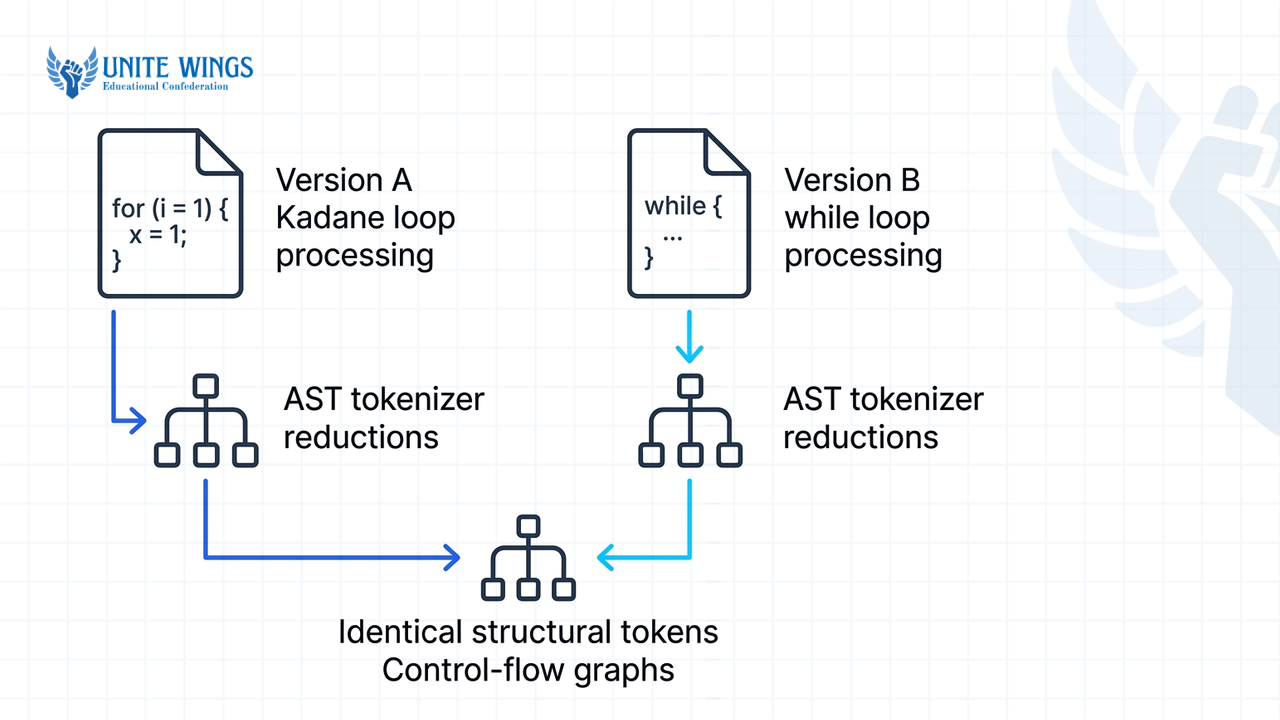
When Gradescope or MOSS processes both files, the tokenizer ignores max_subarray vs find_largest, ignores current_sum vs x, and drops the comments. Both files reduce to the exact same sequence of operations: function definition, two array-index initializations, a conditional loop iterating from index 1 to array length, an addition comparison inside an if-else branch, a second comparison updating the maximum variable, and a return statement.
Even changing the for loop to a while loop leaves the underlying AST control-flow graph nearly identical. Gradescope sorts its similarity report by the length of matching token blocks, so your professor sees both functions highlighted side by side in red and orange. If you want to avoid triggering a match when studying a friend's approach, close their file, understand the state transition on paper, and write your own control flow from scratch.
Can Turnitin match my code against public GitHub repositories and GeeksforGeeks?
Standard Turnitin does not perform real-time scans of public GitHub repositories, LeetCode, or GeeksforGeeks for source code files, unless that specific text was previously indexed by web crawlers or submitted to Turnitin by another student. However, specialized code checkers like Codequiry and Copyleaks explicitly cross-reference hundreds of millions of public GitHub repositories, Stack Overflow threads, and coding forums.
In Indian engineering colleges, professors frequently lift Data Structures and Algorithms lab questions straight from LeetCode or GeeksforGeeks, a pattern widely noted in student discussions on Reddit. When 60 students in the same CSE batch search the problem title, watch the top YouTube walkthrough, and implement the same optimal solution, Gradescope flags massive overlap across the class even though nobody shared files directly.
Here is how to keep your lab work safe using the clean room method:
- Read the tutorial, GeeksforGeeks explanation, or GitHub reference to understand the algorithm.
- Close every browser tab containing external code before opening your IDE.
- Sketch the data flow or dry-run an example input on paper so you rely on your own logic.
- Write the implementation in VS Code or your lab editor purely from memory, using your own helper structure.
If your department uses Codequiry or MOSS with a web-crawled reference bank, copying a 30-line helper function from a public GitHub repo will get matched directly to that repository URL. Writing from memory forces natural variation in your AST structure, which separates independent problem-solving from copy-pasting.
Can Turnitin or Gradescope detect ChatGPT or Copilot code?
No, neither Turnitin nor Gradescope reliably detects AI-generated source code on its own. Substack's technical breakdown of Turnitin confirms that Turnitin's AI writing detector, introduced in 2023, is trained on long-form academic prose and is documented as unreliable for non-prose formats like scripts and syntax-heavy code files. Gradescope has no native AI writing detector at all.
Many BTech students assume pasting Python from ChatGPT or Claude is risk-free because Turnitin's AI percentage skips .py files. That assumption fails for two reasons.
First, if ten students in your hostel ask ChatGPT for a "Python script for Dijkstra's algorithm using heapq" on the same night, the model often produces near-identical variable structures and control flow. When everyone uploads to Gradescope, its batch Code Similarity scanner flags all ten students against one another, regardless of whether an AI detector ran.
Second, when your course uses an LMS like Canvas or Blackboard, Turnitin often runs concurrently on your accompanying lab report PDF. Your .cpp file might escape an AI score, while the three-paragraph explanation you pasted from ChatGPT into your lab manual gets flagged by Turnitin's prose detector. Even then, Turnitin's documentation states that AI percentages are contextual indicators for educators rather than standalone proof.
If you use AI tools while studying for labs, treat them as a tutor that explains edge cases rather than a code generator. For structured study workflows that keep you in control of the output, the Claude Masterclass walks through using Projects and Artifacts for learning step by step.
How do professors separate standard library boilerplate from copied logic?
Professors upload the official starter code or template files directly into Gradescope's "Review Similarity" configuration, which tells the scanner to exclude standard imports, class skeletons, and boilerplate from similarity percentages. According to Gradescope's official documentation, instructors can add these template files before or after generating the report.
Without template exclusion, every student in a Java or C++ lab would show high overlap just for writing public static void main(String[] args) or #include <iostream> and reading standard input. Once the starter template is uploaded, Gradescope strips those shared lines and ranks student pairs strictly by the length of the remaining matching logic blocks.
False positives still happen in two common situations. First, an instructor forgets to upload the starter file, inflating everyone's baseline score. Second, short foundational algorithms like standard binary search or bubble sort have only one clean way to be written, so multiple students naturally produce identical AST tokens.
Protect yourself against false positives by keeping a local Git repository for every major lab or capstone project. Frequent, timestamped commits showing how you built a function incrementally, plus failed test runs, give your professor clear proof that you wrote the logic yourself if a short algorithm triggers a flag.
How should I cite open-source code or AI-assisted snippets in my BTech project?
Document external code using inline comments placed directly above the adapted block, paired with a dedicated attribution section in your project's README.md file. Turnitin's source code plagiarism guide recommends explicit comments naming the original source whenever you adapt external logic under an open-source license or institutional policy.
What most BTech students get wrong is dropping a vague // taken from GitHub comment, or leaving nothing at all because they assume code does not need citations like a research paper. Always check your lab syllabus first, because some introductory courses ban external snippets entirely while capstone projects allow open-source libraries with attribution.
Use this inline comment format in your .py or .cpp files when external snippets are permitted:
# Adapted from: [Repository or Author Name] ([URL])
# License: MIT | Modified to handle custom CSV parsing for lab input
def parse_lab_metrics(filepath):
    ...
For your project README.md, add a short block like this:
## Code Attribution and AI Assistance
- **Dijkstra priority queue helper (`graph_utils.py`)**: Adapted from [Author/Repo Name](URL) to support weighted directed edges.
- **AI Assistance**: Used ChatGPT (GPT-4) to debug memory leak warnings in `alloc_buffer()` and explain Python `asyncio` syntax; all core logic written by the author.
Clear documentation shows your evaluator where third-party utilities end and your own engineering begins. When you are ready to turn your college projects into public proof for recruiters, the AI Portfolio Sprint covers how to structure and publish a working project with clear documentation.
What to do before your next lab submission
Take these three steps on your next coding assignment to avoid accidental similarity flags:
- Before you start coding: Read your department's policy on open-source snippets and AI tools, and initialize a local Git repo in your assignment folder so your work has timestamped commit history.
- During your lab: If you look up a concept on GeeksforGeeks or GitHub, close the browser tab completely before typing your solution in your editor.
- Before uploading to Gradescope or your LMS: Verify that any permitted external helper functions have inline source comments, and write your accompanying lab report text in your own words rather than pasting from an LLM.
Build and ship your own project with AI
If you want to move past copy-pasting lab templates and build real software you understand, join Build a Website with AI. You will describe what you want, generate a working site, learn how to fix the code yourself, and publish it live with no prior coding background required.
Frequently asked questions
Does Gradescope check code against the internet?
No, Gradescope's native Code Similarity tool only compares your files against other submissions within the same assignment batch. It does not crawl public GitHub repositories, LeetCode, or Stack Overflow on its own unless your university separately routes submissions through an external checker like Codequiry or Turnitin's LMS pipeline.
What programming languages does Gradescope Code Similarity support?
Gradescope supports 12 languages natively: C, C++, C#, F#, Go, Java, JavaScript, Matlab, MIPS, ML, Python, and R. Assignments submitted in other languages like Rust, Swift, or PHP will not generate native Gradescope similarity reports and must be checked manually or with external tools.
Does a high similarity percentage on Gradescope mean automatic failure?
No, Gradescope does not issue automatic academic penalties or fail submissions based on a percentage threshold. It is an assessment workflow tool that sorts matching code blocks by length so your professor or teaching assistant can manually inspect the side-by-side comparison and decide if copying occurred.
Can Turnitin detect code stored in a private GitHub repository?
No, neither Turnitin nor Gradescope can read or index files stored inside your private GitHub repositories. Your code only enters their comparison pools if you submit it to an assignment, push it to a public repository that a third-party scanner crawls, or share it with a classmate who submits it.
Why did my original LeetCode-style lab code get flagged?
Short algorithmic problems often have one standard optimal solution, such as two-pointer array traversal or binary search, causing independent students to produce matching Abstract Syntax Trees. Professors also sometimes forget to upload starter templates, which leaves shared imports and input parsing inside the similarity calculation.
Does Turnitin check PDF lab reports with embedded code screenshots?
Turnitin scans the selectable text inside your .pdf or .docx lab report against its repository of 1.9 billion papers and web pages, along with running its prose AI detector. Raw text pasted into a Word doc can match existing reports, while unindexed code inside flat PNG screenshots is generally skipped by standard text matching.
Newsletter
Stay updated with our latest news and insights.