
How to Use Claude for Exam Preparation and Semester Notes?
A 4-step workflow to upload your university's past 5 years of question papers and messy lecture PDFs into Claude to generate 10-mark exam answers and revision sheets.
To figure out how to use Claude for exam preparation and notes, upload up to 20 PDF files of your previous year question papers (PYQs) and lecture slides into a single chat, then prompt Claude to rank topics by exam frequency and generate answers structured specifically for 5-mark and 10-mark university rubrics. Keep your uploaded PDFs under 100 pages per file so Claude reads both text and embedded diagrams, and wrap your professor's slide text in <slides> XML tags so the model does not pull outside definitions that lose marks during sheet evaluation. According to the Bharat Survey for EdTech cited by Skillstork in 2026, 35% of edtech-using students in India already use generative AI for learning, with 32% using it directly for exam preparation.
In short
- Keep scanned PDFs and slide decks at 100 pages or fewer per file; starting at page 101, Claude stops reading charts, diagrams, and scanned images, extracting only machine-readable text.
- Upload up to 20 past university question papers (up to 500 MB per file in standard chat) to map topic weightage before reading a single chapter.
- Use a free Claude Project (capped at 30 MB per file, up to 5 Projects per free account) to store your syllabus, notes, and question bank across the whole semester.
- Force 5-mark and 10-mark exam structures in your prompt (word limits, bullet counts, diagram descriptions) instead of asking for generic chapter summaries.
- Enclose your class notes in
<slides>tags and add a strict negative rule so Claude never invents textbook definitions your professor didn't teach.
How do I upload 5 years of university question papers into Claude to spot repeated topics?
You can upload up to 20 past university question papers at once into a standard Claude chat, provided each file is under 500 MB and 100 pages, and prompt Claude to cross-reference every question against your syllabus units to rank topics by how often they appear. According to the Anthropic Help Center in 2026, standard chats support up to 20 files at 500 MB each, while Claude Projects cap individual files at 30 MB with no fixed file count as long as the total text fits inside the 200,000-token context window (or up to 1M tokens on paid tiers).
| Feature or limit | Standard Claude Chat | Claude Projects (Free & Paid) | Best use case for semester exams |
|---|---|---|---|
| Max file size | 500 MB per file | 30 MB per file | Use Chat for heavy textbook PDFs; Projects for split unit notes |
| Max file count | 20 files per chat | Unlimited (bound by 200k–1M token context) | Use Chat for a quick 5-year PYQ dump; Projects for full-semester repositories |
| PDF visual & diagram reading | Pages 1 to 100 | Pages 1 to 100 | Keep all engineering/science PDFs with diagrams under 100 pages |
| Text-only PDF extraction | Pages 101 to 1,000 | Pages 101 to 1,000 | Only use for pure-text reference books with an existing digital text layer |
| Hard page ceiling | 1,000 pages (throws error above 1,000) | 1,000 pages | Split 1,200-page standard reference books by unit before uploading |
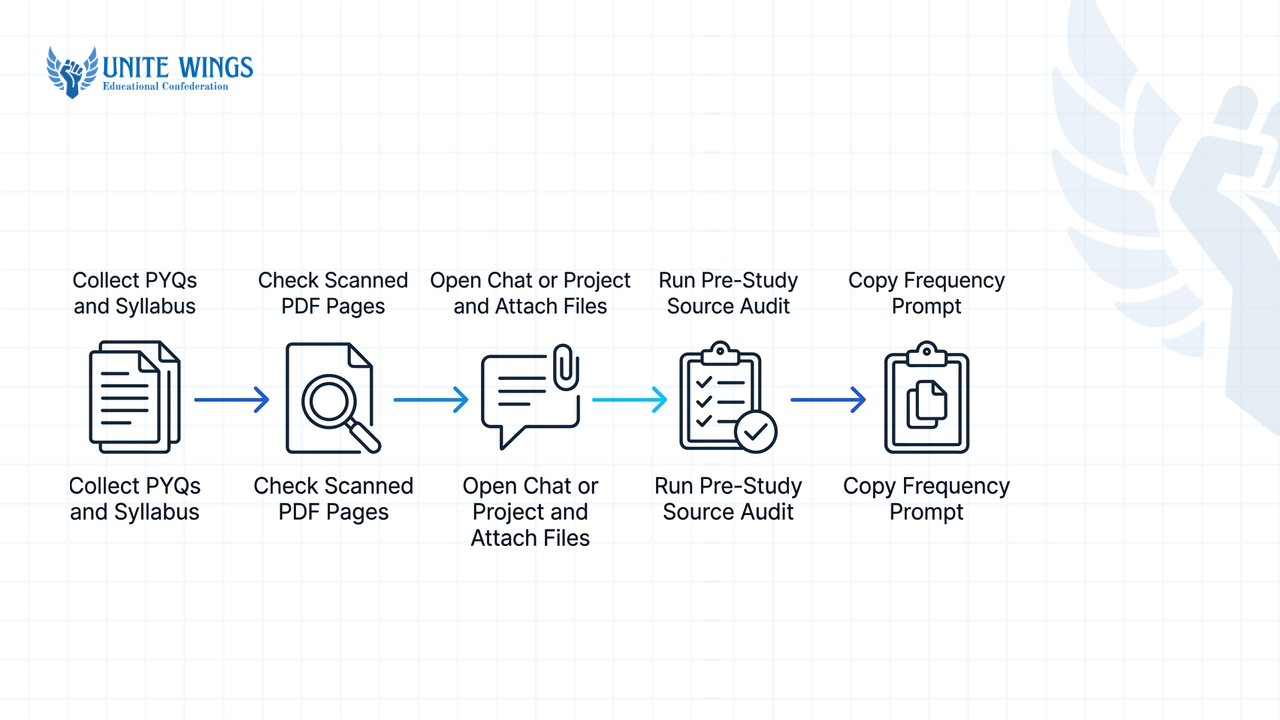
Follow these steps to run a 5-year PYQ frequency audit before you start making notes:
- Collect 5 years of past university papers plus your university syllabus copy.
- Check if your PYQ PDFs are scanned images or digital text; if they are scanned photos bundled into a PDF, make sure no single file exceeds 100 pages, or Claude will drop visual processing.
- Open a new chat (or create one of the 5 free Claude Projects available on free accounts) and attach your syllabus and all PYQ files. Supported upload formats reported by AI-Toolbox and Fastero include PDF, DOCX, CSV, TXT, HTML, ODT, RTF, EPUB, JSON, and XLSX (if you upload a mark-distribution sheet in XLSX, turn on code execution and file creation in your Claude settings first).
- Run a pre-study source audit, a workflow detailed by Nibomo in 2026, before asking for topic analysis: "Perform a source audit on these uploaded question papers and syllabus files. List any unreadable pages, missing semester years, or syllabus units that do not match the paper codes before we begin."
- Once Claude confirms all papers are readable, copy and paste this exact frequency prompt: "Cross-reference all uploaded question papers. Map out every question by topic, calculate how often each topic appears across the years, and list the top recurring themes weighted by exam frequency."
Why does this matter beyond passing the semester? Placement cells at tier-2 and tier-3 engineering colleges filter candidates by active backlogs and a strict 6.5 or 7.0 CGPA cutoff during initial shortlisting. Aiming for IT service companies like TCS, Infosys, Wipro, and Cognizant (which Anvilcareer's 2026 data puts at ₹3.5 to ₹7 LPA CTC, or ₹22,000 to ₹30,000 monthly in-hand after variable pay deductions) or targeting AI and data engineering roles (which Phinx.tech's 2026 report places at ₹10 to ₹30 LPA, and 20 to 40 LPA at IITs, NITs, and BITS Pilani), clearing semester papers with a clean CGPA keeps you eligible while freeing up evenings for coding and placement prep. If you want to set up reusable study workspaces for every subject this semester, the Claude Masterclass walks through Projects, Artifacts, and research workflows step by step.
How do I prompt Claude to write answers formatted for 5-mark and 10-mark university questions?
To get exam-ready answers from Claude for students and freshers, specify the exact mark weightage, word count, bullet count, and required sections (definitions, subheadings, diagrams, and conclusions) inside your prompt rather than asking Claude to summarize a topic. As documented by Notesmakr in 2026, explicit structural prompting with defined word counts and section headers stops the model from generating loose narrative paragraphs that lose marks under Indian university evaluation schemes.
Most students make the mistake of uploading a 40-page unit PDF and typing, "Summarize Unit 3 for my exam." Claude responds with three dense paragraphs of prose. When an university evaluator checks 60 answer booklets in three hours against a departmental marking scheme, they do not read walls of text; they scan for underlined keywords, a labeled block diagram, mathematical derivations, and distinct bullet points.
Copy and run this prompt template to generate notes formatted for Indian university answer booklets:
Using ONLY the attached Unit 3 notes, write exam-ready answers for the topic: [Insert Topic Name, e.g., Deadlock Avoidance and Banker's Algorithm].

Provide three versions based on my university marking scheme:

2. 5-Mark Answer: Keep under 150 words. Start with a 2-line definition, follow with 3 precise technical bullet points, and end with 1 example.
3. 10-Mark Answer: Structure with an Introduction, 4 detailed sub-headings, a diagram description, and a Conclusion.
Once you have generated the 5-mark and 10-mark notes, do not just read them passively. According to Notesmakr and cognitive research syntheses in 2026, active-recall study loops where Claude quizzes you one question at a time improve exam retention over passive reading. In the same chat thread, prompt Claude: "Act as a strict external viva and written examiner. Ask me one 5-mark question at a time from the high-frequency PYQ list we generated earlier. Wait for my typed response. Grade my answer out of 5 based on keyword accuracy against the uploaded notes, tell me which point I missed, and only then ask the next question."
Can Claude read handwritten class notes or scanned textbook pages?
Yes, Claude reads handwritten class notes and scanned textbook pages uploaded as images (JPEG, PNG, GIF, or WebP up to 8000x8000 pixels) or PDFs up to 100 pages, though Anthropic's 2026 Vision Documentation recommends a minimum resolution of 1000x1000 pixels to prevent OCR misinterpretations on messy handwriting or complex diagrams. You can photograph rough engineering or physics notebook pages with your phone and ask Claude to convert them into structured markdown notes, provided the page is flat, well-lit, and upright.
Here is what most students get wrong with scanned notes, and how to fix it before exam night:
Watch out for the 100-page visual cutoff
According to Taku.ai and the Anthropic Help Center in 2026, Claude performs full multimodal analysis (reading text, charts, circuit diagrams, and scanned handwriting) ONLY on PDFs of 100 pages or fewer. For PDFs between 101 and 1,000 pages, Claude automatically drops visual processing and switches to text-only extraction. If you upload a 120-page CamScanner PDF of a class topper's handwritten register that has no embedded digital text layer, pages 101 to 120 will return blank or corrupted data, and every diagram across the entire file will be ignored.
To digitize handwritten notebooks or scanned local-author textbooks without losing diagrams or equations, follow this 4-step workflow:
- Split long scanned PDFs before uploading: If your scanned photocopy packet or handwritten notebook PDF is 180 pages long, use any PDF splitter to break it into two files of 90 pages each (e.g.,
Unit_1_to_2.pdfandUnit_3_to_4.pdf). Keeping each file under 100 pages forces Claude to use its vision model on every single page. - Shoot individual board or notebook photos at 1000x1000 pixels or higher: As reported by Xnote.ai in 2026, heavy cursive, diagonal phone angles, and shadow lines across spiral notebooks cause OCR errors on mathematical subscripts and chemical formulas. Shoot straight down in daylight and rotate the image upright before attaching.
- Run a transcription and verification prompt: Instead of asking Claude to summarize a handwritten photo directly (which hides OCR reading errors inside the summary), make it transcribe first:
"Transcribe the handwritten notes in these attached images word-for-word into clean Markdown. Convert all hand-drawn flowcharts into text-based flow steps, format mathematical equations clearly, and put
[UNCLEAR: best guess]in brackets anywhere my handwriting or a symbol is smudged so I can verify it against my notebook." - Watch your session context weight: Even though standard chat permits 20 files up to 500 MB each, Taku.ai notes that upload usage limits combine file attachment weight, message history length, and model tier constraints. High-resolution images consume tokens fast; once Claude gives you the clean text transcription of your handwritten unit, copy that clean text into a new chat or save it into your Claude Project knowledge base, and delete the heavy image chat so you don't hit your daily message cap mid-revision.
How do I stop Claude from adding outside information not in my professor's slides?
You can stop Claude from introducing outside information by wrapping your pasted lecture text or slide references inside XML tags like <slides>...</slides> and adding an explicit negative constraint instructing Claude to reply "Not mentioned in the slides" whenever a fact is missing from your uploaded file. This technique comes directly from the Anthropic Prompt Engineering Guide in 2026, which shows that XML tags combined with strict boundary rules stop the model from falling back on its general training data.
Why is outside information dangerous in Indian university exams? According to the FICCI-EY-Parthenon AI Adoption Survey cited by Skillstork in 2026, 57% of leading Indian higher education institutions now have formal generative AI policies in place, and CENTA survey data shows over 70% of teachers across India use AI tools for lesson planning and academic material design. Professors know immediately when an answer uses a Wikipedia or standard US textbook notation instead of the specific derivation or nomenclature taught in class. If your professor taught the 4-layer TCP/IP model in class slides and Claude writes an answer using the 5-layer textbook variant, you lose marks on the internal assessment key.
Use this exact XML-grounded prompt whenever you study from your professor's PPTs or departmental PDF handouts:
You are an academic assistant grading and writing strictly against my professor's lecture material.

Read the uploaded lecture file (or the text inside the <slides> tags below):
<slides>
[Paste slide text here, or write: Refer exclusively to the attached file Unit_2_Slides.pdf]
</slides>

Task: Write a 10-mark exam answer explaining [Topic Name].

Strict Grounding Rules:
1. Use ONLY facts, formulas, variable symbols, and definitions explicitly stated inside <slides>.
2. Do NOT use external knowledge, standard textbook assumptions, or internet facts to fill in gaps.
3. Keep the exact terminology and acronym expansions used by my professor.
4. If a sub-topic, derivation step, or example required for a 10-mark answer is missing from <slides>, do not invent it. Instead, write strictly: "[MISSING FROM SLIDES: Ask professor or check recommended textbook for this section]".
When Claude outputs [MISSING FROM SLIDES], you immediately see the gap between your professor's lazy 15-slide PPT and what the 10-mark PYQ actually demands. You can then upload the specific chapter from your syllabus-recommended reference book in a separate prompt to fill just that missing derivation.
How do I turn a 60-page unit PDF into a 1-page mindmap using Claude?
To turn a 60-page unit PDF into a 1-page mindmap, upload the PDF into Claude (since 60 pages sits safely below the 100-page multimodal visual limit) and prompt Claude to extract the hierarchical chapter structure into either an interactive Mermaid diagram inside the Claude Artifacts panel or Markmap-flavored Markdown for free offline viewing. Both workflows are documented by SkillsDirectory and ContextBolt in 2026 as ways to build visual revision maps without paying for mind-mapping software.
Because a 60-page unit PDF is under the 100-page threshold, Claude reads every heading, sub-heading, table, and diagram caption in the file. And since Claude's context window processes roughly 150,000 words (around 350 textbook pages) in a single session, a 60-page unit takes only a fraction of a chat's memory.
You have two free methods to generate your 1-page revision sheet depending on whether you want to view it inside Claude or export it as an interactive webpage:
- Method A: Live visual map inside Claude Artifacts (fastest for screen revision):
First, click your profile icon in Claude, go to Settings > Capabilities, and toggle Artifacts on. Artifacts open a split-screen panel right beside your chat to render live code and diagrams. Upload your 60-page unit PDF and run this prompt:
"Read the attached 60-page unit PDF. Extract the complete hierarchical structure (Unit Title -> Major Topics -> Sub-concepts -> Key Formulas/Keywords). Generate a visual mindmap using Mermaid.js
mindmapsyntax inside an Artifact panel. Ensure visual clarity so the entire unit fits cleanly on a single screen." - Method B: Interactive expandable mindmap via Markmap (best for zooming and printing):
Sometimes a 60-page unit has too many branches for a static Mermaid chart. In that case, ask Claude for Markmap-flavored Markdown, as outlined by SkillsDirectory:
"Read the attached 60-page unit PDF and extract its complete hierarchy for last-minute exam revision. Output the entire structure as a single code block in Markmap-flavored Markdown: use
#for the unit root,##for main chapters,###for sub-topics, and indented-bullets for key definitions, formulas, and exam keywords. Keep every bullet under 8 words." Copy the Markdown code block Claude gives you, openmarkmap.js.org/replin your browser, paste the text on the left, and download the interactive HTML mindmap or SVG one-pager on the right for free.
Your 48-hour semester exam action plan
Do not wait until the night before your first exam to test file limits or prompt syntax. Set up your system in three steps:
- Tonight (30 minutes): Gather the last 5 years of question papers and your syllabus PDF for your toughest subject. Upload them into a single Claude chat, run the source audit and frequency table prompt from Section 1, and highlight the top 8 recurring topics that make up 70% of the paper's weightage.
- This weekend (2 hours): Create a free Claude Project for that subject. Split any scanned textbook or handwritten note PDFs so no single file exceeds 100 pages or 30 MB. Use the
<slides>XML prompt and the 5-mark/10-mark structural template to generate exam-ready notes for those top 8 topics. - Two days before the exam (45 minutes): Upload each 60-page unit PDF to generate a 1-page Markmap or Artifact mindmap, then spend 30 minutes running the active-recall viva prompt where Claude grades your typed answers one by one.
Build your complete Claude study and career workflow
If you want hands-on practice setting up persistent Projects, building interactive study Artifacts, and writing grounded research prompts that work for both semester exams and technical placement prep, join the Claude Masterclass. You will walk away with a working Claude Project setup, ready-to-use prompt templates, and live practice building Artifacts step by step.
Frequently asked questions
How many past question papers can I upload into Claude at one time?
You can upload up to 20 files at one time in a standard Claude chat, with each file capped at 500 MB and 1,000 pages. If you use a Claude Project instead, each file must be under 30 MB, though you can upload more than 20 files provided the combined text stays within the 200,000-token context window.
Why did Claude ignore the circuit diagrams and flowcharts in my textbook PDF?
Claude only analyzes visual elements like charts, diagrams, and images in PDFs that are 100 pages or fewer. If you upload a textbook PDF between 101 and 1,000 pages, Claude automatically switches to text-only extraction and ignores every visual graphic. Split your PDF into chapters under 100 pages to keep diagram recognition active.
Can Claude read a scanned PDF of handwritten notes if it is 150 pages long?
No, a 150-page scanned handwritten PDF will fail after page 100 because Claude disables visual OCR processing on PDFs over 100 pages. Since a raw camera scan has no underlying digital text layer, pages 101 to 150 will return blank. Split the scanned notebook into two 75-page PDFs before uploading.
How do I make Claude read an Excel sheet of our internal marks or syllabus schedule?
To upload and analyze .xlsx Excel files natively in Claude, open your Claude account settings and enable the "Code execution and file creation" capability before attaching the spreadsheet. Without code execution toggled on, Claude cannot parse native Excel workbooks, though it can still read .csv files directly in any standard chat.
Is the free version of Claude enough for semester exam preparation?
Yes, a free Claude account lets you create up to 5 Claude Projects and upload up to 20 files per chat, which covers a typical semester's core subjects. However, free accounts have daily message caps that reset based on attachment weight; if you hit limits during exam week, paste plain text instead of heavy PDFs or upgrade to the $20/month tier.
How do I make Claude quiz me for viva and written exams instead of giving away answers?
Prompt Claude to act as an examiner and enforce a turn-by-turn constraint: "Ask me one 5-mark question at a time from the uploaded syllabus, wait for my reply, grade my answer strictly against the attached notes, and do not reveal the solution until I respond." This forces active recall rather than passive reading.
Newsletter
Stay updated with our latest news and insights.