
6 Free AI Presentation Makers for Students Without Watermarks
We tested 12 AI slide generators to find the 6 tools that actually let students export PPTX or PDF files for free in 2026 without sneaky watermarks or paywalls.
If you have a viva, minor project review, or hackathon pitch tomorrow morning, you do not have time to generate a 10-slide deck only to find out the download button costs $15 or stamps a logo across your architecture diagram. In 2026, the best free AI presentation makers for students without watermark restrictions are Canva, Presentations.AI, Slidesgo, and SlidesAI, while Gamma and GenPPT serve specific use cases if you know how to work around their branding or slide caps. Skip Beautiful.ai and Plus AI altogether if you do not want to enter credit card details, as Runable confirms both rely on 7-to-14-day trials that auto-charge once the window closes.
In short
- Pick Canva (using only non-crown free elements) or Presentations.AI (Starter plan, up to 20 slides) for clean, unwatermarked PowerPoint (.pptx) exports tonight.
- Do not waste time looking for Tome; Runable confirms Tome officially shut down its presentation product on April 30, 2025.
- Gamma gives you 400 lifetime credits at signup (around 30 to 40 decks), but embeds a "Made with Gamma" badge on every free PDF, PNG, and PPTX export.
- Canva Education rejects
.edu.incollege emails because it is strictly for K-12 schools, so use your college ID on the GitHub Student Developer Pack instead. - Never use general slide makers for B.Tech system architecture or ER diagrams; generate those in Eraser DiagramGPT, Lucidchart AI, or Napkin.ai and paste the vector graphics into your slides.
Which AI presentation makers let you export to PPTX for free without a watermark?
Canva, Presentations.AI, and Slidesgo let you export editable PowerPoint (.pptx) decks for free without slapping a watermark across your slides, according to 2026 testing by PresentationScout and SlideForge. Gamma and GenPPT also allow free PPTX downloads, though Gamma adds a corner badge and GenPPT limits how many slides it styles for free.
| Tool | Free AI generation limit | Watermark on free export? | Native PPTX export rules | Best for which student? |
|---|---|---|---|---|
| Canva | 20 AI tool uses/month (refreshes monthly) | No (if you avoid crown-icon paid elements) | Yes, via Share > Download > PPTX | Non-CS and MBA students needing clean visuals fast |
| Presentations.AI | Up to 20 slides per deck on Starter plan | No, includes unbranded public links | Yes, exports to PPTX and PDF on Starter plan | Final-year groups needing quick corporate-style pitch decks |
| Slidesgo | 3 AI decks/month (refreshes monthly) | No watermark, requires keeping 1 credits slide at the end | Yes, direct PPTX download | First- and second-year students making seminar presentations |
| SlidesAI | 12 decks/year, max 2,500 characters input per prompt | No watermark | Native inside Google Slides (Download > PPTX) | Students whose college mandates Google Workspace submissions |
| Gamma | 400 lifetime credits (never refreshes, max 10 slides/prompt) | Yes, adds a "Made with Gamma" badge | Yes, but flattens some dynamic tables into static shapes | Hackathons where you present live from the browser or edit out the badge |
| GenPPT | 3 PDF-to-PPTX conversions/day (no login required) | No watermark on the 3 designed slides | Yes, gives full text outline + 3 designed slides in PPTX | Converting a published IEEE paper PDF into a quick seminar outline |
Here is how the 6 tools behave when you actually build a presentation for students or freshers under a deadline:
- Canva (Free Tier): You get a shared pool of up to 20 Standard or Premium AI tool uses per month, as tracked by Accelrio. To get a watermark-free PPTX, open Magic Design, generate your draft, and manually check every photo, icon, and graphic on the canvas. If an item has a tiny crown icon, delete it or swap it for a free element, then click Share > Download > Microsoft PowerPoint (.pptx). If you want to get faster at combining Magic Design and Magic Write without triggering paid element locks, the Canva AI Masterclass walks through the exact workflow.
- Presentations.AI (Starter Plan): According to PresentationScout, the free Starter plan gives you both PowerPoint and PDF exports plus unbranded public share links for decks up to 20 slides. If you are pitching at a college competition that caps decks at 10 or 15 slides, this tier covers your entire submission without adding platform logos.
- Slidesgo: You can generate up to 3 AI decks every month on the free tier and export them directly to PPTX. Instead of putting a watermark over your content, Slidesgo puts a single attribution slide at the end of the file, which your faculty panel will never see if you stop your slideshow on the "Thank You / Q&A" slide right before it.
- SlidesAI: Because this runs as an add-on directly inside Google Slides, there is no export paywall between the AI draft and your final file, as noted by AI Tools Tutorial. Runable notes the free tier caps you at 12 presentations per year and 2,500 characters of input text per run. That 2,500-character limit is roughly 350 to 400 words, so feed it your condensed bullet points rather than pasting a 20-page project report.
- Gamma: SlideGMM confirms Gamma's free plan exports to PDF, PNG, and PPTX, but stamps a "Made with Gamma" badge on the bottom corner of every slide and web share. What most students get wrong is assuming a Gamma PPTX download behaves like a normal PowerPoint file. On complex layouts, Gamma flattens dynamic grids into fixed visual objects to preserve the look, while keeping basic text boxes and native tables editable on simpler slides.
- GenPPT: Tracked by GenPPT, this browser utility requires no login and gives you 3 free PDF-to-PowerPoint conversions every day. It extracts the full presentation outline into your PPTX file and applies full graphic design to the first 3 slides, leaving you to copy-paste the slide layout onto the remaining outline slides inside PowerPoint.
Avoid Pitch if your professor demands a .pptx file uploaded to your college LMS. While Pitch has a great free collaborative editor, GenPPT notes that Pitch locks native .pptx exports behind its Plus tier at roughly $10 a month.
How many free AI decks can you generate on Gamma, Canva and Tome in 2026?
In 2026, Gamma gives you a one-time grant of 400 lifetime AI credits (averaging 30 to 40 decks total), Canva gives you 20 AI uses that reset every month, and Tome gives you zero because Runable confirms Tome officially shut down its presentation product on April 30, 2025.
Let us clear up the Tome confusion first, because older blog posts still rank on Google telling students to use it. Earlier reviews from PPT.ai and PowerfulAI Tools cited a free tier of 3 projects per month (up to 15 slides per project) or paid plans starting around $9.50 to $15.90 per month on yearly billing. None of that applies to your semester assignments today; the slide product is retired, so cross Tome off your list.
Between Gamma and Canva, your choice comes down to a one-time wallet versus a monthly allowance:
- Gamma's 400 lifetime credit math: When you sign up, Gamma gives you 400 credits that never refresh, according to Accelrio. BestStacked notes that Gamma's free tier also caps every initial AI generation prompt at a maximum of 10 slides. Generating a full deck eats credits based on slide count and how many times you ask the AI to rewrite or restyle a card, which averages out to 30 or 40 decks across your entire account life. Mistake to avoid: Do not use Gamma's AI chat button to fix a typo or change a heading color, because each AI regeneration burns credits you cannot get back; click the text box and edit it manually for free.
- Canva's 20 monthly AI uses: Canva's free plan caps AI generations at 20 uses per month across its Standard and Premium AI tools, and that counter resets to zero at the start of every billing cycle. If you have four subjects requiring monthly seminar presentations across a six-month semester, Canva's recurring 20-use pool will outlast Gamma's non-renewable 400 credits once you factor in trial-and-error prompts.
How do you unlock free pro presentation templates using a college .edu.in email?
You cannot get Canva for Education directly with a college .edu or .edu.in email because Canva officially restricts its free Education plan to K-12 primary and secondary school students and teachers. Instead, use your college email to register for the GitHub Student Developer Pack to claim verified higher-education software perks.
This is the single biggest trap Indian engineering and degree students fall into during placement season. Hundreds of Instagram reels claim that typing your name@college.edu.in or name@ac.in address into Canva immediately gives you Canva Pro for free. As documented by AI Student Discount, Canva Education requires K-12 teacher verification or a K-12 class invite code, and automatically rejects university students unless your specific university administration has paid for an enterprise Canva Campus license.
Regarding the GitHub Student Developer Pack workaround, current 2026 sources report mixed availability on bundled design tools: TechFuel and Email Estudante note that university students with a .edu or .edu.in email can register through the GitHub Student Developer Pack (which carries over $5,000 in software benefits) to access partner benefits like Canva Pro, while a 2026 review by VibeCoder Journal states the pack provides free GitHub Pro and GitHub Copilot Student with auto-model selection, though it does not currently bundle a dedicated AI presentation maker. Partner offers inside the GitHub pack rotate frequently, so check the live partner dashboard at education.github.com/pack after verifying your ID.
Follow these steps to verify your Indian college account without getting flagged:
- Go to the GitHub Education portal and link your
.edu.inor.ac.inemail address to your GitHub account. - If your tier-2 or tier-3 college does not issue
.edu.inemails, select the manual verification option and upload a clear photo of your physical college ID card showing a valid 2026 academic year date, or your current semester fee receipt. - Open the Pack dashboard to activate your software benefits, including GitHub Pro and GitHub Copilot Student with auto-model selection, and redeem partner benefits like Canva Pro.
Which free AI tool is best for generating technical diagrams and charts?
For B.Tech final-year projects, system design rounds, and research seminars, skip standard slide makers and use Eraser DiagramGPT, Lucidchart AI, Napkin.ai, or Piktochart AI to turn plain text into technical diagrams, then paste those visuals into your deck.
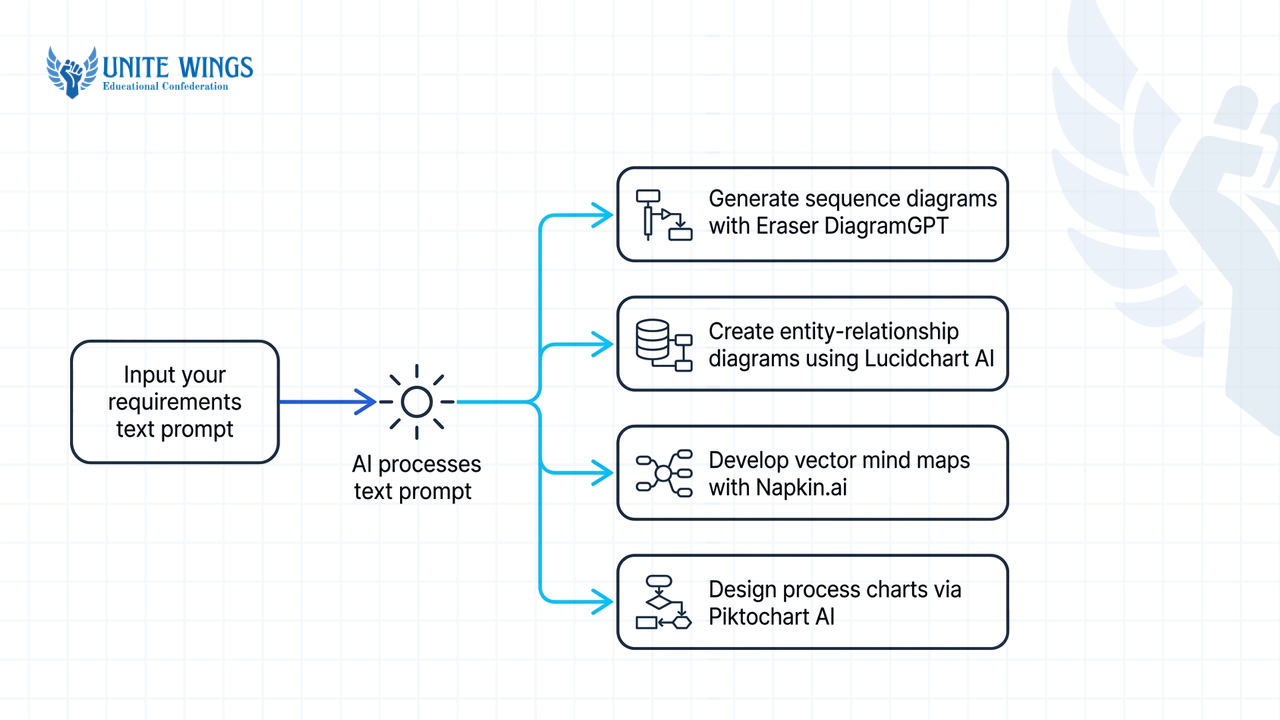
General slide generators fail horribly when you ask them for a 3-tier microservices architecture, a database Entity-Relationship Diagram (ERD), or a compiler flowchart. They usually give you three generic pastel circles with two words inside each. If you show that to an external examiner during your final project viva, they will immediately know you used a template generator without understanding the data flow.
Use these specialized diagramming tools instead, all of which have working free tiers in 2026:
- Eraser (DiagramGPT): According to Lucidchart's industry roundup and Eraser documentation, Eraser DiagramGPT has a free tier for up to 3 files that turns natural language prompts or Markdown code directly into software architecture and sequence diagrams. Type a prompt like "Create a sequence diagram for a Razorpay payment webhook verifying an order in a Node.js backend with MongoDB" and export the clean diagram into your slide deck.
- Lucidchart AI: Lucidchart offers a free tier that supports natural language text-to-diagram generation specifically built for technical charts, flowcharts, and ERDs.
- Napkin.ai: Highlighted by Digital Twin VRS, Napkin.ai takes paragraphs of plain study notes or project documentation and converts them into vector flowcharts, mind maps, and conceptual diagrams automatically. Because it exports vector graphics, you can stretch the diagram across a 16:9 projector slide without blurring the labels.
- Piktochart AI: If your presentation is for an MBA case study or commerce project rather than coding, Piktochart gives you 60 free AI credits every month on its forever-free plan to generate editable process and comparison diagrams.
- Whimsical AI, Taskade, Excalidraw, and Mermaid Chart: Taskade confirms that both Whimsical AI and Taskade offer free tiers for rapid system architecture sketches and technical mind maps, while Excalidraw and Mermaid Chart provide free open-source tiers for hand-drawn or code-first system designs.
What is the fastest workaround when an AI tool locks PPTX export behind a paywall?
When an AI presentation maker locks .pptx downloads behind a paid upgrade or stamps a badge on your file, the fastest workaround is exporting the deck as a free PDF and running it through a daily free converter like GenPPT, or presenting straight from the live browser share link.
Before you spend an hour rebuilding your slides by hand at 2 AM, check how your presentation will actually be graded. In most college hackathons, internal project reviews, and startup pitch events, nobody asks you to email them the raw .pptx file beforehand; you just plug your laptop into the projector HDMI cable or share your screen on Google Meet.
Use one of these four fixes depending on what your professor or panel requires:
- The Live Web-Link Bypass (0 minutes): Platforms like Presentations.AI (up to 20 slides on the Starter plan) and Pitch let you present directly from a browser tab in full-screen mode. Even on Gamma's free tier, where web links carry a small "Made with Gamma" badge, pressing
F11for full-screen view during an offline classroom presentation makes the corner badge barely noticeable on a standard classroom projector. - The Native PPTX Badge Deletion (2 minutes): If you exported a
.pptxfile from Gamma's free tier, open the file in Microsoft PowerPoint or upload it to Google Slides. Because Gamma exports the "Made with Gamma" badge as an object layer or slide master element on standard configurations, you can click the badge on each slide (or open View > Slide Master) and hit theDeletekey. If a specific slide exported with a flattened table that you need to edit, recreate just that one table using PowerPoint's native Insert > Table tool while keeping the rest of the AI-generated deck intact. - The PDF-to-PPTX Pipeline (5 minutes): If a tool blocks
.pptxexport completely (like Pitch's free plan) but allows PDF downloads or high-resolution image exports, download the PDF first. Upload that PDF to GenPPT using one of its 3 free daily no-login conversions to extract the text outline into a fresh.pptxfile, or import the PDF pages as slide backgrounds into Canva and add editable text boxes over the sections you need to change. - The Outline Copy-Paste Method (10 minutes): If both PDF and PPTX downloads are locked, highlight the generated text outline right inside the AI tool's browser editor, copy it into a blank Google Doc, and open Google Slides with the SlidesAI extension (using 1 of your 12 free yearly decks) or Microsoft PowerPoint Online's free Designer pane to lay out the text natively without an export wall.
Your action plan before your next presentation deadline
Do not wait until the night before your final viva or case study submission to find out your chosen AI tool wants a credit card. Set up your free stack right now so you can go from raw notes to a finished .pptx file in under 20 minutes:
- Tonight (10 minutes): Create a free account on Canva and Presentations.AI. Test one 5-slide prompt on Presentations.AI and download the
.pptxfile to confirm how it renders in your version of PowerPoint or LibreOffice Impress. - This week (15 minutes): Locate your
.edu.inemail credentials or scan your physical college ID card, then submit your verification on the GitHub Student Developer Pack portal so your student software perks are unlocked before mid-semesters start. - Before your next technical seminar: Bookmark Eraser DiagramGPT and Napkin.ai. Next time you need a system architecture slide, generate the diagram there first, export it as a clean PNG or SVG, and drop it into your slide deck.
If you already use Google Workspace for your college assignments and want to generate slide outlines, speaker notes, and research tables straight inside your Google Docs and Drive without juggling five third-party accounts, our Gemini Masterclass covers that exact workflow.
Turn your Google Drive notes into slide decks with Gemini
Stop hitting 10-slide prompt limits and export paywalls on third-party websites. In the Gemini Masterclass, you will learn how to connect Gemini directly to your Gmail, Google Docs, and Drive using Gems, Deep Research, and Canvas so you can research a technical topic, structure a slide-by-slide outline, and draft your presentation inside Google's native ecosystem.
Frequently asked questions
Which AI presentation tool is completely free without a watermark?
Canva and Presentations.AI are the best options for watermark-free exports in 2026. Canva's free plan exports clean .pptx and PDF files as long as you only use free templates and graphics (avoiding items marked with a crown icon), while Presentations.AI's free Starter plan allows unbranded exports for decks up to 20 slides.
Can I use my college .edu.in email to get Canva Pro for free?
No, you cannot get Canva for Education directly with a college .edu.in email because Canva officially restricts that program to K-12 primary and secondary schools. University students must either rely on their college buying an institutional Canva Campus license or apply for the GitHub Student Developer Pack to access verified student software perks.
How many presentations can I make with Gamma's free tier?
Gamma gives you a one-time grant of 400 AI credits when you sign up, which never refreshes monthly. Because credits are spent based on slide count (capped at 10 slides per initial prompt) and AI regenerations, 400 credits typically cover 30 to 40 presentations before you have to upgrade or edit manually.
What happened to the Tome AI presentation app?
Tome officially shut down its AI presentation product on April 30, 2025. Although many older blog posts still list Tome as having a 3-project-per-month free tier or paid plans starting around $9.50 to $15.90 a month, new users can no longer use it to generate slide decks in 2026.
Does Gamma's free plan put a watermark on PowerPoint downloads?
Yes, Gamma's free tier adds a "Made with Gamma" badge to all exported PDFs, PNGs, PowerPoint (.pptx) files, and shared web links. In addition, exporting complex Gamma layouts to PowerPoint often flattens dynamic grids into static shapes, though you can usually delete the corner badge inside PowerPoint after downloading.
Which tool is best for generating technical flowcharts and system architecture diagrams for college projects?
Eraser DiagramGPT, Lucidchart AI, and Napkin.ai are the best free tools for technical college diagrams. Eraser gives you 3 free files to turn text or Markdown into software architecture and sequence diagrams, Lucidchart AI handles ERDs and flowcharts on its free tier, and Napkin.ai converts study text into scalable vector diagrams.
Newsletter
Stay updated with our latest news and insights.